
Managing cash flow is critical for any online education or e-commerce business. By default, Shopify Payments usually processes payouts daily, but this setting can vary based on your region or previous configurations.
If you need faster access to your funds, this guide will show you how to change Shopify payouts to daily and highlight important factors to consider before switching.
Can You Change Shopify Payouts to Daily?
With Shopify Payments, merchants can choose one of three payout schedules: daily, weekly, or monthly. However, daily payouts are only available in certain regions and are processed on business days (Monday to Friday).
You should note:
Payouts aren’t sent on weekends or public holidays
Bank processing can take 1–3 business days
Some countries have payout restrictions (for example, Japan doesn’t support daily payouts)
How To Change Shopify Payouts to Daily (Desktop)
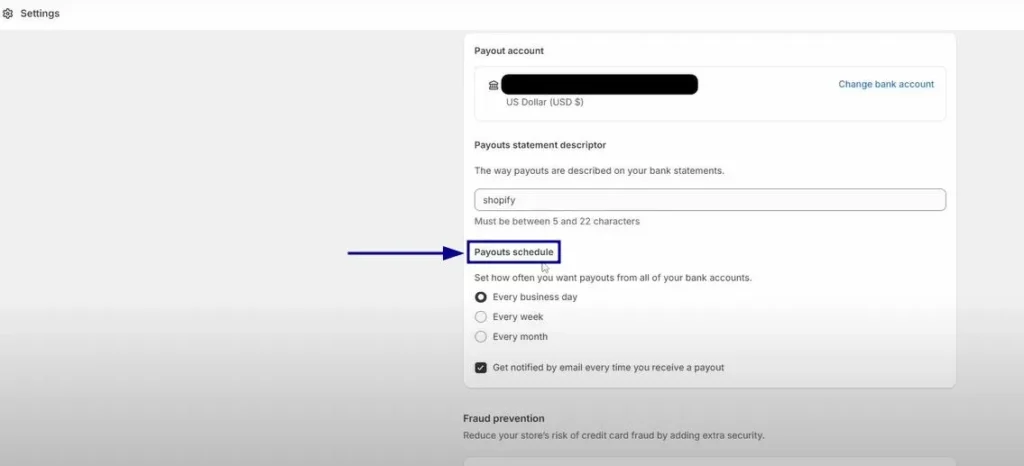
Follow these steps to change Shopify payouts to daily from your admin dashboard:
Log in to your Shopify admin
Go to Settings
Select Payments
In the Shopify Payments section, click Manage
Find Payouts schedule
Choose Daily
Click Save to apply changes
Your new payout schedule will take effect on the next applicable business day.
Change Shopify Payouts to Daily on Mobile
iOS & Android
Open the Shopify app
Tap Menu > Settings
Select Payments
Tap Manage under Shopify Payments
Choose Daily in the payout schedule
Tap Save or ✓
Important Things to Consider
Before you change Shopify payouts to daily, keep these points in mind:
Pending payouts may be delayed when switching schedules
U.S. merchants might receive multiple payouts per day due to multiple processors
Monthly payout dates are adjusted for shorter months automatically
Conclusion
Learning how to change Shopify payouts to daily allows you to receive funds more frequently and improve cash flow management. As long as your region supports daily payouts, the process is quick and can be updated anytime without extra fees.
FAQs
Can I change Shopify payouts to daily anytime?
Yes. You can change Shopify payouts to daily at any time from your Shopify admin, as long as your region supports daily payouts.
Are there any extra fees for daily payouts?
No. Shopify doesn’t charge additional fees when you change Shopify payouts to daily or switch between payout schedules.
Why can’t I select daily payouts?
Daily payouts aren’t available in all countries. For example, merchants in Japan can only choose weekly or monthly payouts, while some regions don’t allow custom payout schedules.
How long does it take to receive funds after switching to daily payouts?
Even after you change Shopify payouts to daily, banks usually need 1–3 business days to process the transfer before funds appear in your account.
Will pending payouts be affected when I change the payout schedule?
Yes. Any pending payouts may be delayed until the next payout date based on your new schedule.
Do daily payouts include weekends or holidays?
No. Shopify Payments only processes payouts on business days, excluding weekends and public holidays.
Can I track my payout history?
Yes. You can view all payout details, including dates and amounts, in Settings > Payments > View payouts within your Shopify admin.
Check out more premium Shopify Themes built and powered by ThimPress!
