
People rarely stop and think about why they trust one website and doubt another. They simply feel it while they move through the page.
Studies have shown that 75% of consumers gauge a business’s credibility by its website design. Visitors read signals from layout, spacing, visual hierarchy, and the copy placed across the interface. Every element communicates intent and reliability.
Many of these signals appear during what UX teams call micro-moments. People pause before clicking, scan the page for reassurance, and hover over form fields and buttons, expecting guidance.
Those tiny pauses carry weight. When handled well, they build confidence and keep the buying process moving.
First Impressions: Do Users Stay or Leave?
People decide how they feel about a website almost immediately. They land on a page, scan a few elements, and form a quick judgment about whether the business feels trustworthy.
Most visitors don’t read much during this stage. Ratings, short testimonials, recognizable payment methods, and clear product information often shape their early impression.
Social proof plays a strong role here: Around 90% of buyers are influenced by reviews and testimonials when deciding whether to trust a business. Seeing positive feedback from other customers reduces uncertainty. It shows that other people have been there before, and that you’re not some random operation they’ll regret engaging with.
That makes social proof one of the most practical tools for improving early UX moments:
- The key lies in placement. Put short testimonials or review highlights near the top of important pages so users notice them during their first scan.
- Product pages should display ratings close to the product title or price.
- Keep review snippets short and readable. A single sentence from a real customer often works better than a long block of text.
- You can also add reassurance near actions that require commitment.
- Place review counts near the “Buy” button.
- Add a small note about verified customers or satisfaction guarantees near checkout.
These cues reduce hesitation at the exact moment users pause to decide.
Let’s see this through the lens of a successful brand:
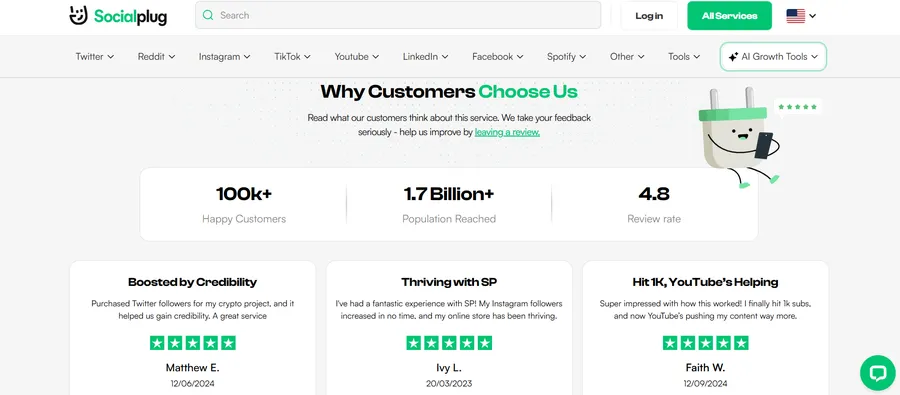
Socialplug is a platform that provides services designed to boost social media presence through followers, likes, views, and comments. Their site uses social proof across key touchpoints. Ratings, review counts, testimonials, and other reassurance elements are positioned strategically, which cuts skepticism early.
These small moments build trust quickly and help visitors feel comfortable completing a purchase.
Product Clarity: Do Users Understand It Quickly?
If a visitor lands on your page and can’t figure out what you’re offering within a few seconds, they’ll leave. They won’t read further to find out. They won’t scroll for clarification. They’ll just go.
And yet, only 2.2% of companies actually have an effective value proposition. That means the vast majority of websites are asking users to work harder than they should to understand a product.
Here’s how to establish clarity right from the get-go:
- Write your headline to answer three questions at once: What it is, who it’s for, and why it matters.
- Do it all in one or two lines.
- Avoid industry jargon in your above-the-fold copy. If a 10th-grader can’t understand it, rewrite it.
- Use a short subheadline to support your main headline rather than repeat it. Give users one more reason to keep reading.
- Break down complex offers into simple feature-benefit pairs so users can scan quickly without losing context.
- Test your page with someone unfamiliar with your product. If they can’t explain it back to you in 10 seconds, the messaging needs work.
Uproas, a provider of premium ad accounts for platforms like Meta, Google, and TikTok, gets this right from the first scroll.
Their page doesn’t make you hunt for what they do or who they serve. The offer is clear, the audience is defined, and the value is communicated without padding.
For a service that could easily get tangled in technical language, that directness is a deliberate UX choice. It removes the friction that typically causes confused visitors to bounce.

Trust Signals: Do Users Feel Confident?
Even when someone wants what you’re offering, doubt can stop the purchase. They wonder if the site is secure, if the company is legitimate, or if they’ll actually get what they paid for.
These concerns don’t always show up as conscious thoughts. They appear as hesitation, extra tabs opened to look for reviews, or an abandoned cart.
Trust signals are the UX elements that quietly answer those concerns before users even think to ask.
Here’s how to build confidence effectively:
- Display SSL certificates and secure checkout badges visibly, especially near payment fields.
- Include a clear, easy-to-find refund or return policy. Vague policies create friction, transparent ones remove it.
- Add recognizable payment method icons at checkout to signal familiarity and safety.
- Feature logos of known clients, media outlets, or partners if you have them. Third-party recognition carries more weight than self-promotion.
- Keep your contact information accessible. A visible email address or live chat option signals that a real business is behind the page.
- Avoid stock photos for team or testimonial sections where possible. Real images consistently outperform generic ones in building credibility.
- Make sure your page loads fast and renders correctly on mobile. A broken layout signals neglect, and neglect signals risk.
Friction Points: What Slows Users Down?
Every extra step, unnecessary field, or confusing layout is a small tax on the user’s patience. Most users won’t complain. They’ll just quietly drop off.
Friction rarely announces itself, so it’s easy to miss until you start looking at where exactly people stop engaging.
The goal isn’t a perfect website. You just need to design pages with as few unnecessary obstacles as possible.
Here’s how to identify and reduce friction:
- Audit your checkout or sign-up flow and remove every field that isn’t strictly necessary. Each additional field reduces completion rates.
- Make error messages specific and helpful. “Invalid input” tells users nothing, but “Please enter a valid email address” tells them exactly what to fix.
- Ensure your CTA buttons are easy to spot and use action-oriented labels. “Get Started” or “Create My Account” outperforms “Submit” consistently.
- Reduce the number of decisions a user has to make on a single page. Too many options create hesitation.
- Test your entire conversion flow on mobile, where small tap targets and misaligned elements cause disproportionate drop-offs.
- Use progress indicators on multi-step forms so users know how much is left. Uncertainty about length is itself a friction point.
- Avoid auto-playing media or aggressive pop-ups early in the session. Interruptions before users are engaged push them away.
Final Push: What Gets Users to Convert?
Some users arrive ready to buy. However, most don’t. They browse, compare, second-guess, and sometimes just need one last nudge to commit.
That nudge doesn’t have to be aggressive or manipulative. It just needs to be well-timed and relevant.
The difference between a visitor who converts and one who doesn’t is often a single well-placed element on the page.
Here are a few focused design choices:
- Use scarcity honestly. If stock is limited or a deal expires, say so clearly. Manufactured urgency that isn’t real damages trust when users catch on.
- Place your strongest testimonial or trust signal directly adjacent to your primary CTA, not buried further down the page.
- Offer a low-commitment entry point where possible. A free trial, a sample, or a no-obligation quote lowers the perceived risk of saying yes.
- Retarget users who’ve visited key pages but haven’t converted. A well-timed reminder ad often closes the gap.
- Make your CTA singular and focused. Pages with one clear action consistently outperform pages that ask users to do several things at once.
- Reduce post-click anxiety by immediately confirming what happens next. A clear confirmation message or next-step instruction reassures users that they made the right call.
Final Thoughts
Buying decisions rarely hinge on a single page element. They take shape through many small interactions across the user journey.
These moments deserve careful attention. They appear when visitors pause, evaluate their options, or look for confirmation before moving forward. When the interface answers those needs clearly and quickly, hesitation fades and the experience feels reliable.
The goal is straightforward: help users understand your offer, feel comfortable with your brand, and complete the process without friction. When those pieces work together, conversions become a natural outcome of a well-designed experience.

