
Getting a link to the order page is essential for helping customers track their purchases easily. When you get link to order a product on Shopify, you improve transparency, reduce support requests, and enhance the overall shopping experience.
In this knowledge base guide, we’ll show you two simple and effective ways to get link to order a product on Shopify, using Shopify’s built-in features and custom customer order pages. These methods are beginner-friendly and work well for most Shopify stores.
Shopify’s Order Page: An Overview
Shopify’s Order Page is a core feature that allows both store owners and customers to monitor order progress in real time.
For store owners, the order page displays:
Customer information
Purchased products
Payment status
Shipping and fulfillment details
This centralized view makes order management more efficient.
For customers, the order page provides:
Order confirmation status
Shipping and delivery updates
Payment and shipping address details
This transparency builds trust and minimizes unnecessary customer support inquiries.
Another advantage is flexibility. Shopify allows merchants to customize the order experience by adding branded elements, custom messages, or post-purchase actions such as feedback requests or product recommendations.
How to Get Link to Order a Product on Shopify: 2 Methods
Method 1: Using Shopify’s Built-in Order Status Page
This is the fastest way to get link to order a product on Shopify without creating additional pages.
Step 1: Access Shopify Admin Settings
From your Shopify admin dashboard, go to Settings → Checkout.
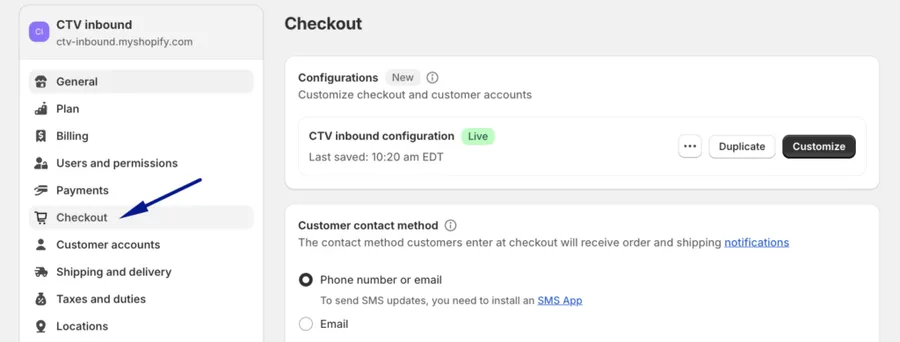
Step 2: Enable Order Status Page Link
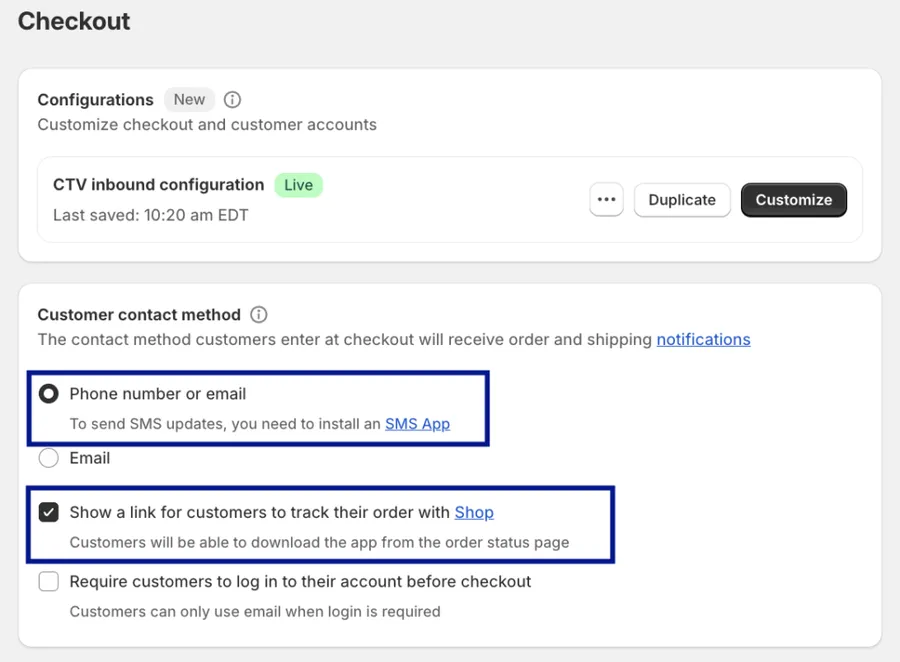
In the Customer contact method section:
Select Phone number or email
Enable “Show a link for customers to track their order with Shop”
This allows Shopify to automatically send the order status link to customers via email or SMS.
Step 3: Save Changes
Click Save to apply your settings.
Once completed, customers will receive a direct order status link after checkout.
Method 2: Creating Custom Customer Order Pages
If you want more control over design and content, creating a custom page is another effective way to get link to order a product on Shopify.
Step 1: Access Shopify Pages
From the Shopify admin:
Go to Online Store → Pages
Click Add page
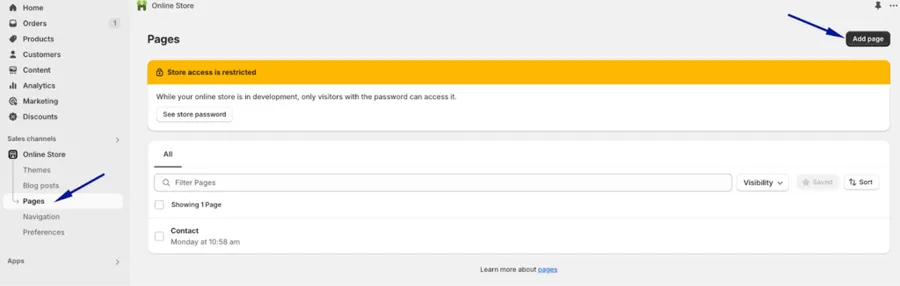
Step 2: Add Page Title and Content
Title: Track Your Orders
Content: Explain how customers can track their orders and include instructions or links to the order status page.
Example content:
Enter your order details to view real-time updates on your purchase, including shipping and delivery status.
Step 3: Configure SEO Settings
Scroll to Search engine listing preview and set:
SEO title related to order tracking
Clear meta description explaining the page’s purpose
Step 4: Set Page Visibility
Choose Visible if you want customers to access it publicly
Select Default theme template unless you use a custom one
Step 5: Save and Publish
Click Save, then add this page to your navigation menu or footer for easy access.
Best Practices for Order Page Links on Shopify
To make the most of your order page links, follow these best practices:
Use Descriptive Anchor Text
Avoid generic text like “Click here.” Instead, use:
“Track your order”
“View order details”
This improves usability and SEO clarity.
Ensure Easy Access
Place order page links in high-visibility areas such as:
Main navigation
Footer
Order confirmation emails
Provide Real-Time Updates
Customers expect accurate and timely information. Ensure your order page reflects real-time shipping and fulfillment updates.
Personalize the Experience
Add a thank-you message or next-step instructions to reassure customers after purchase.
Add Feedback and Social Sharing
Encourage customers to share purchases or leave feedback to increase engagement and trust.
Offer Coupons or Promotions
Including a discount on the order confirmation page can drive repeat purchases and increase customer lifetime value.
FAQs
1. What is the easiest way to get link to order a product on Shopify?
The easiest method is enabling Shopify’s built-in order status page, which automatically sends order tracking links to customers after checkout.
2. Can customers access their order page without logging in?
Yes. Shopify provides secure order status links via email or SMS that customers can access without creating an account.
3. Can I customize the order tracking page on Shopify?
Yes. You can customize order pages by creating custom Shopify pages or modifying checkout and order status settings to match your branding.
4. Where should I place the order page link?
For best results, include the link in order confirmation emails, your website navigation, and the footer.
Final Thoughts
Learning how to get link to order a product on Shopify is a simple but powerful way to improve customer experience. Whether you use Shopify’s built-in order status page or create a custom tracking page, both methods make order tracking clear and accessible.
By applying best practices and optimizing visibility, you’ll reduce support requests, build trust, and encourage repeat purchases.
Check out more premium Shopify Themes built and powered by ThimPress!
