
Add-on License
Thank you for choosing the ThimPress theme & plugin products. We ensure the best quality of service and assistance to our customers, which remains unchanged for all clients.
Based on the desire to license the digital assets for your projects appropriately, we created the ThimPress Add-on License page to help you do the right thing.
What Is An Add-On License On ThimPress?
For ThimPress add-ons, it will be a Single-use license, which means you are granted a license to use the item on a “non-exclusive, commercial, worldwide and revocable basis”, for a single installment per registration.
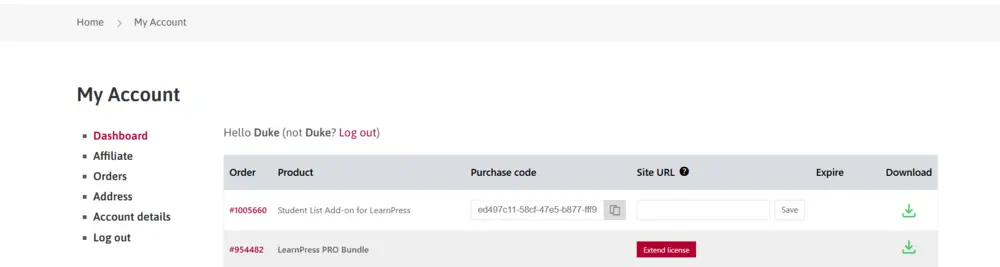
The license will start when you purchase the product and the order status becomes Completed. Then, the add-on will appear on the ThimPress My Account page.
Terms & Conditions
We would love to clarify the nuts & bolts of the ThimPress add-on license.
How Many Sites Can An Add-on License Apply To?
1 single add-on license can only be activated on 1 single domain name simultaneously. However, you can transfer the license from one domain name to another.
How Long Can You Use An Add-on?
For free add-ons, you can download, update, and get support for a lifetime.
The premium add-ons can be used for a lifetime. However, after the first 12 months, customers will have to extend their update/support license to receive the update ability & premium support.
Time For Updating Purchased Items
For premium items bought on ThimPress, all customers have 12 months to download the latest versions. After that, you will have to extend the update to receive the new patches, which include new features, bug fixes, and more.
Add-on Support Period
Like the initial update period when purchasing a premium add-on, all customers also have 12 months of free customer support on the premium forums. After that, you can:
- Extend the update/support license to get support from the current premium forums.
- Use our free support forums.
Update Methods
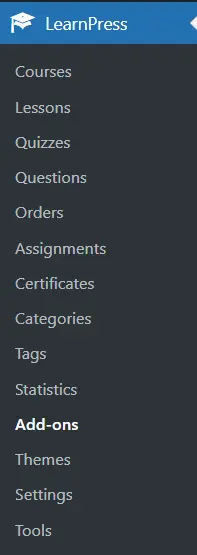
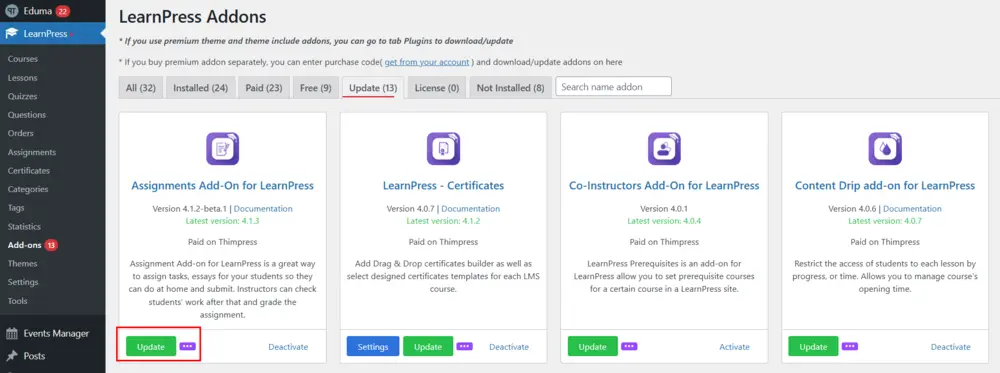
Customers can update our add-ons directly via your website’s admin panel. If you purchase the add-ons only, you will access WP admin -> LearnPress -> Add-ons.
On this page, you will click the Update button and wait for it.
Otherwise, you can access the My Account page, download the latest available version, and upload it to your website. Here is the tutorial video:
How To Check Your Update/Support Duration
To check the duration, you will access our My Account page. On each product, you will see a line of duration date above the button Extend License.

Other Documentation
You can also check out some useful documentation:
- Fix ThimPress Products License on Wrong Site
- How to Renew Customer Support License on ThimPress
- ThimPress Refund Rules
If you need any assistance, we would love to support you via our ThimPress Support Forum.