
Selling to other businesses works differently from selling to consumers. Orders are larger, prices are often agreed per customer, and buyers expect to pay on terms rather than by card. WooCommerce handles retail very well, but its default setup assumes every shopper is treated the same way. Every visitor sees the same price, anyone can check out, and there is no concept of a business account, a credit limit, or a negotiated quote. For a manufacturer, distributor, or brand that sells to other businesses, that is not enough.
The usual answer is to add plugins. A typical WooCommerce B2B setup starts with a wholesale pricing plugin, then a plugin to hide prices from guests, then one for quote requests, another for registration fields, another for a bulk order form, and so on. Each one solves a single problem, but together they add settings pages, compatibility questions, and more things to update and troubleshoot.
This article takes a different angle. Instead of comparing a long list of single-purpose plugins, it looks at what a WooCommerce wholesale store actually needs, and how a complete B2B plugin can cover most of that from one place. We use B2BKing as the main example, and also look at where AI fits into building and running a B2B store today.
What a WooCommerce Wholesale Store Actually Needs
Before choosing tools, it helps to list the problems a B2B store has to solve. Most WooCommerce B2B projects need some combination of the following:
- Price control: different prices for different customers, groups, or quantities.
- Access control: hiding prices, products, or the entire shop from guests and retail customers.
- Business accounts: registration forms with company fields, VAT numbers, and manual or automatic approval.
- Fast ordering: a way for buyers who know exactly what they want to order dozens of SKUs in one go.
- Negotiation: quote requests, custom offers, and a way to message the buyer.
- Order rules: minimum and maximum orders, quantity steps, and tax exemptions.
- Checkout control: different payment and shipping methods for B2B buyers, such as invoice or purchase order payments.
- Customer management: a clear view of who your business customers are and how they buy.
A retail store might need one or two of these. A wholesale store usually needs nearly all of them, and they need to work together. A price that is hidden on the shop page, for example, must also stay hidden in search results and in the order form.
B2BKing: A Complete WooCommerce B2B Plugin
B2BKing is a WooCommerce B2B and wholesale plugin that covers all of the needs above in a single package. It has been in development for close to seven years, is active on more than 15,000 B2B stores, and lists over 137 features. It works on new stores as well as on established ones.
One of its practical strengths is that it supports two modes. In B2B mode, the whole store is built for business buyers. In hybrid B2B/B2C mode, retail customers keep the normal WooCommerce experience, while approved business customers log in and see their own prices, products, and ordering tools. This makes it a good fit for brands that already sell to consumers and want to open a wholesale channel without building a second store.
Because all features live in one plugin, they are aware of each other. Product visibility rules apply to the order form, group prices apply to quotes and offers, and registration data flows into customer management. The sections below look at the main areas in more detail.
Wholesale Pricing, Discounts, and Hidden Prices
Pricing is the core of any WooCommerce wholesale setup, and B2BKing offers several ways to manage it. The simplest is per-group pricing directly on the product page: for each customer group you create, such as Resellers or Distributors, the plugin adds its own price fields. Prices can also be set per individual customer, or imported and exported in bulk via CSV.
For more advanced setups, B2BKing uses a dynamic rules system. Rules can apply to all B2B users, a specific group, or a single customer, and to the whole catalog, a category, or one product. Available rule types include:
- Percentage and fixed amount discounts
- Fixed prices and tiered (quantity-based) pricing
- Free shipping with conditions
- Minimum and maximum orders, and required quantity multiples
- Tax exemptions, zero-tax products, and added fees
- Hidden prices for specific users, groups, products, or categories
For example, a store can give resellers 5% off glass products when they order at least $500, while partners get a fixed price on the same items.
Guest access control handles what logged-out visitors see. Store owners can hide prices until login, hide the entire shop, or replace prices with a quote request button. Combined with product and category visibility by group, this allows each customer to see a catalog tailored to them.
B2B Registration, Quotes, and Checkout Control
Wholesale customers usually need to apply for an account rather than simply sign up. B2BKing extends WooCommerce registration with custom registration roles (for example Retailer, Distributor, or Contractor) and custom fields such as text, file uploads, dates, and dropdowns. Each role can be approved automatically or manually, and approved users can be placed into the right customer group straight away. For EU stores, a VAT field with VIES validation is built in.
Not every B2B sale has a fixed price. The request a quote feature lets buyers ask for pricing on a product or on their whole cart. Quotes run through the plugin’s built-in conversations system, where the store and the buyer can message each other. Once terms are agreed, the store can create an offer: a bundle of products with negotiated unit prices, visible only to that customer or group and ready to add to cart.
At checkout, payment and shipping methods can be enabled per user or group. B2BKing includes its own invoice and purchase order payment gateways, and supports displaying prices with or without tax for business buyers.
The B2BKing Wholesale Order Form
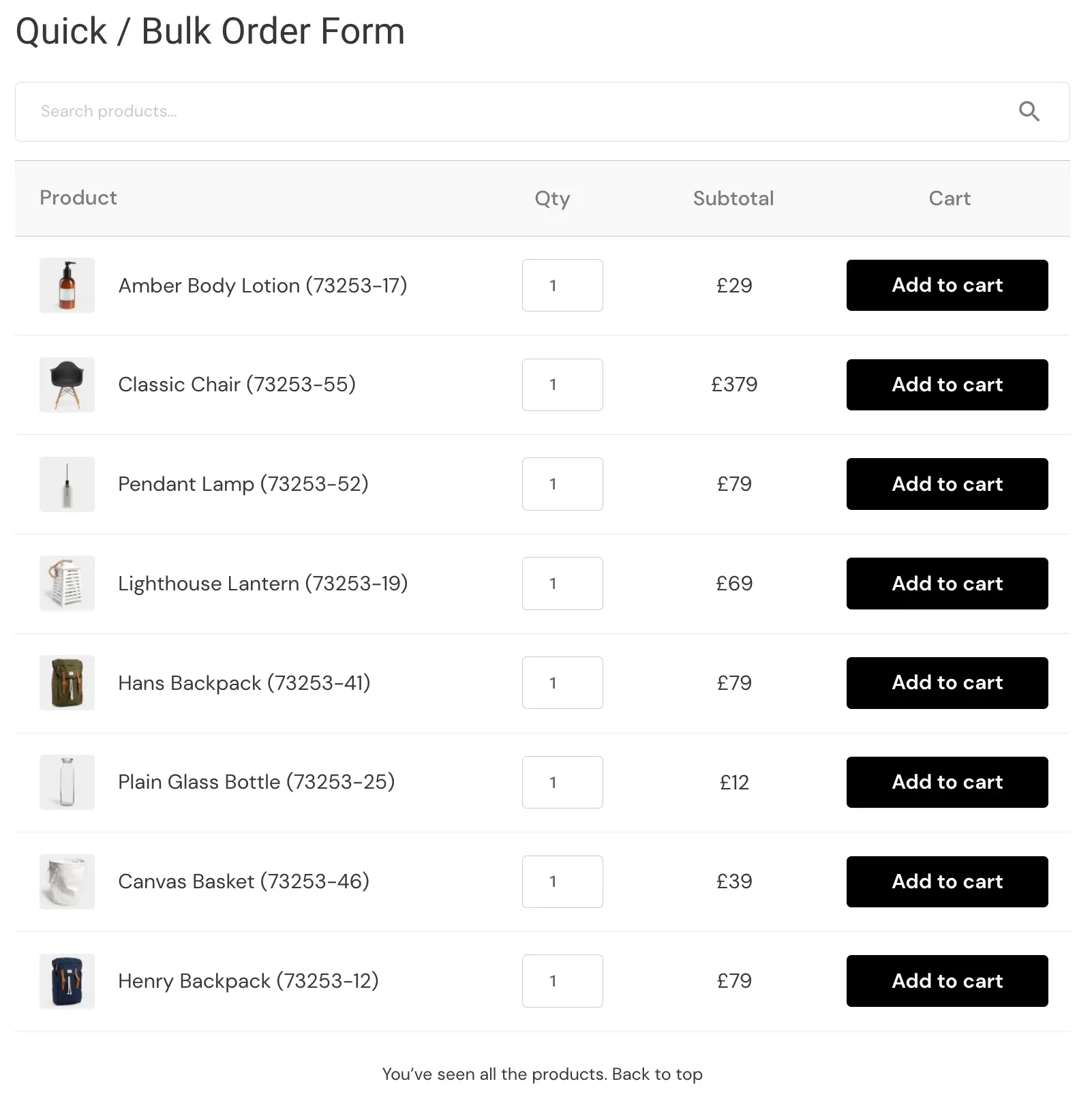
Business buyers rarely browse. A purchasing manager restocking a shop often knows the exact SKUs and quantities, and clicking through product pages one at a time slows them down. The B2BKing wholesale order form is built for this kind of buyer.
The order form uses instant AJAX search by product name or SKU, shows each buyer their own price, and calculates subtotals as quantities are entered. Variable products are listed with every purchasable variation, and the form respects visibility rules, so customers only see products available to their group. It comes with several themes, can show SKUs, images, and stock levels, and can be placed on any page with a shortcode or used from the buyer’s My Account area.
The form also connects to purchase lists. Buyers can save a set of products and quantities, then reorder the same list later in a click, which suits businesses that restock on a regular schedule. Purchase lists can also be created straight from the cart.
Managing Business Customers: The CRM Hub and Subaccounts
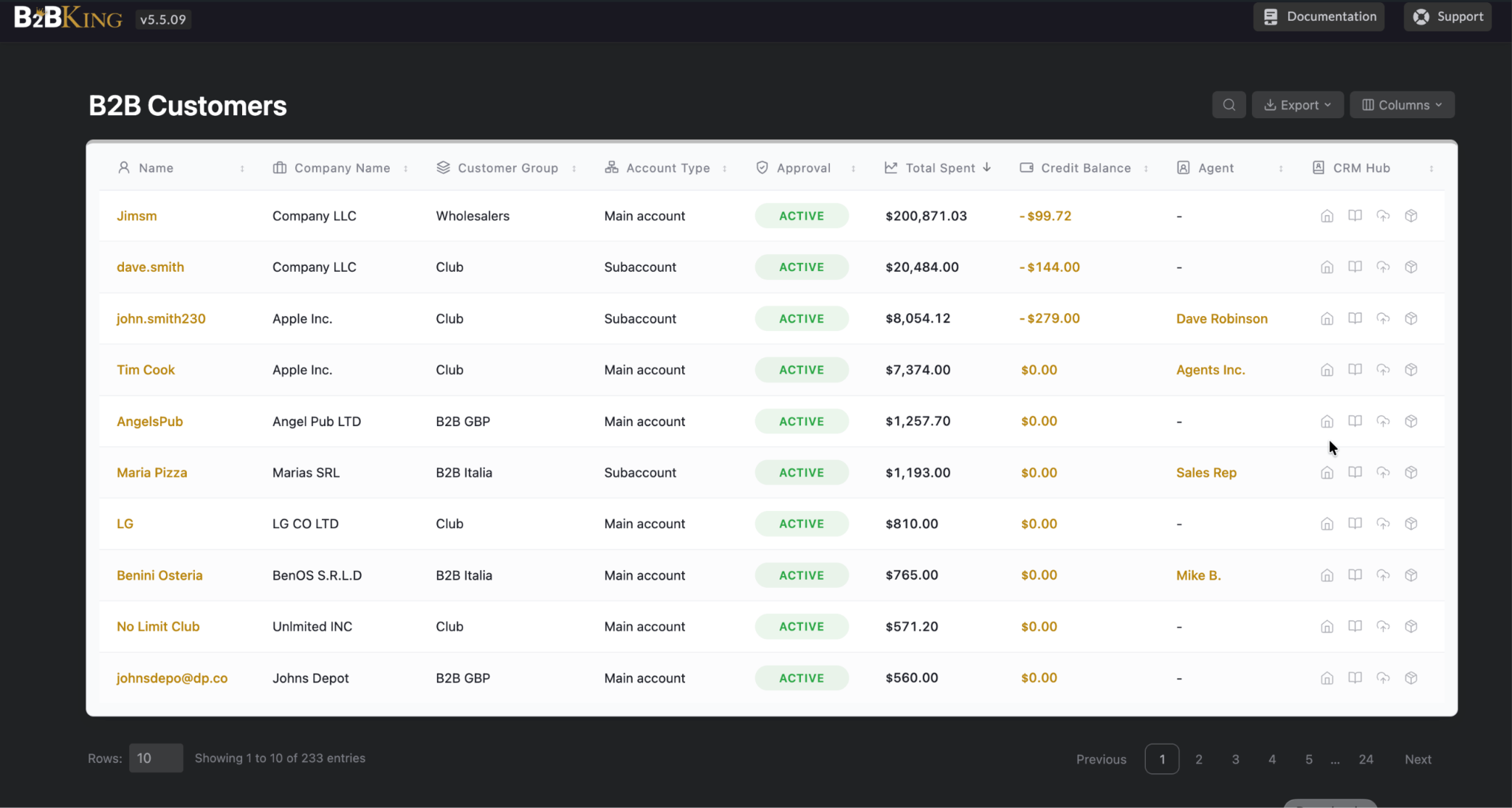
As a WooCommerce B2B store grows, keeping track of accounts becomes its own task. B2BKing includes a dedicated Customers page that lists every buyer with their company name, customer group, account type, approval status, and total spent. Columns can be sorted, so finding your most valuable clients or pending applications takes one click, and the table can be exported to CSV or PDF.
Alongside it sits the CRM Hub, a built-in mini CRM for B2B relationships. It is organized into five tabs:
- Overview: order count, last order date, customer since, billing details, VAT ID, and contact info.
- Notes: private notes about special agreements, calls, or buyer preferences.
- Files: documents uploaded during registration, such as tax licenses or reseller certificates, plus files you add yourself.
- Orders: a quick summary of order history.
- Subaccounts: the team members connected to a company account.
Subaccounts reflect how real companies buy. A main account can add colleagues, each with their own login and permissions such as placing orders or viewing order history, and the store can see who placed each order.
Building a WooCommerce B2B Store With AI
AI assistants have moved from answering questions to taking actions, and that is starting to change how online stores are built. Most of the work of launching a B2B store is not code but configuration: choosing between B2B and hybrid mode, deciding what guests see, creating customer tiers, and setting what each tier pays. These are well-defined, repetitive decisions, which makes them a good fit for AI.
There are two extremes to avoid. Configuring everything by hand is reliable but slow. Asking an AI to code a pricing and visibility system from scratch is fast, but untested code tends to fail on real orders. B2BKing takes a middle path: a proven foundation, configured by AI.
B2BKing registers its core settings through the WordPress Abilities API, part of WordPress core since 6.9, and exposes them over the Model Context Protocol (MCP) using the official WordPress MCP Adapter. This means MCP-compatible assistants such as Codex, Claude, Cursor, and VS Code can read and configure a store directly. A single request like “Set my store up as hybrid B2B/B2C, create a Wholesale group with 15% off everything and a $300 minimum order” is translated into regular B2BKing groups and rules, which remain fully editable in the dashboard.
Permissions are respected, inputs are validated, and developers can disable the integration or make it read-only. You can read more in the B2BKing MCP guide. It is the first step in a broader direction: a B2B plugin you can describe, not just configure.
Tools That Complete the Stack
A complete B2B plugin covers most of the work, but two companion plugins from the same team are worth considering alongside it:
- SalesKing: for businesses with a sales team, it adds a dashboard for sales agents and reps, with commissions and customer assignment. Assigned agents also appear in B2BKing’s Customers page.
- Company Credit add-on: lets business customers buy on credit up to a set limit, with balances visible in the Customers table.
Conclusion
Building a WooCommerce B2B store no longer requires stitching together a long list of single-purpose plugins. A complete solution like B2BKing brings wholesale pricing, hidden prices, registration, quotes, a bulk order form, and customer management into one place, where each feature works with the others.

