
Every Shopify store looks the same from the outside. A homepage, a product grid, an add-to-cart button. Peek under the hood, though, and you’ll find very different engines running. A skincare subscription brand needs something a wholesale hardware supplier would never touch. The setup that works for one niche can sabotage another.
So how do you pick the right one? Start with a plain truth: there’s no single “correct” Shopify setup. There’s just the one that fits how your product gets sold, shipped, and reordered. A good Shopify agency will tell you this before it tries to sell you a theme. Your plan, your theme, your apps, even your checkout flow, should all trace back to how your customers shop.
This piece breaks down a few common niches. Fashion, subscriptions, vitamins and supplements, and B2B wholesale. Each one leans on Shopify a bit differently. And a few levers matter most everywhere: your plan tier, your theme, and the apps you bolt on top.
So, What Exactly Is a “Shopify Setup,” Anyway?
When people say “Shopify setup,” they mean three things bundled together. The plan tier you’re paying for. The theme running your storefront. And the stack of apps handling everything Shopify doesn’t do on its own. Get the mix right, and the store feels invisible to shoppers; they just buy things. Get it wrong, and you’ll be patching workarounds by month three.
Standard Shopify (Basic, Grow, or Advanced) handles most DTC brands just fine. Shopify Plus adds custom checkout options. It also adds several storefronts under one account, and much higher API limits. It’s built for brands running many markets or a huge catalog. Headless setups go further still. They’re built on Shopify’s Storefront API or its Hydrogen framework. Developers own the front end. Shopify runs the backend behind it. That’s a serious commitment, not a starter move. Most stores never need it.
Cost follows the same logic. A five-app stack on Basic can easily cost more per month than a bare-bones Plus account. So the plan tier alone tells you almost nothing about whether a store is set up well. What matters is whether the pieces fit the business wearing them.
Your Niche Calls the Shots
Here’s where things get specific. Four common niches show just how different “the right setup” can look once you zoom in on the actual buyer.
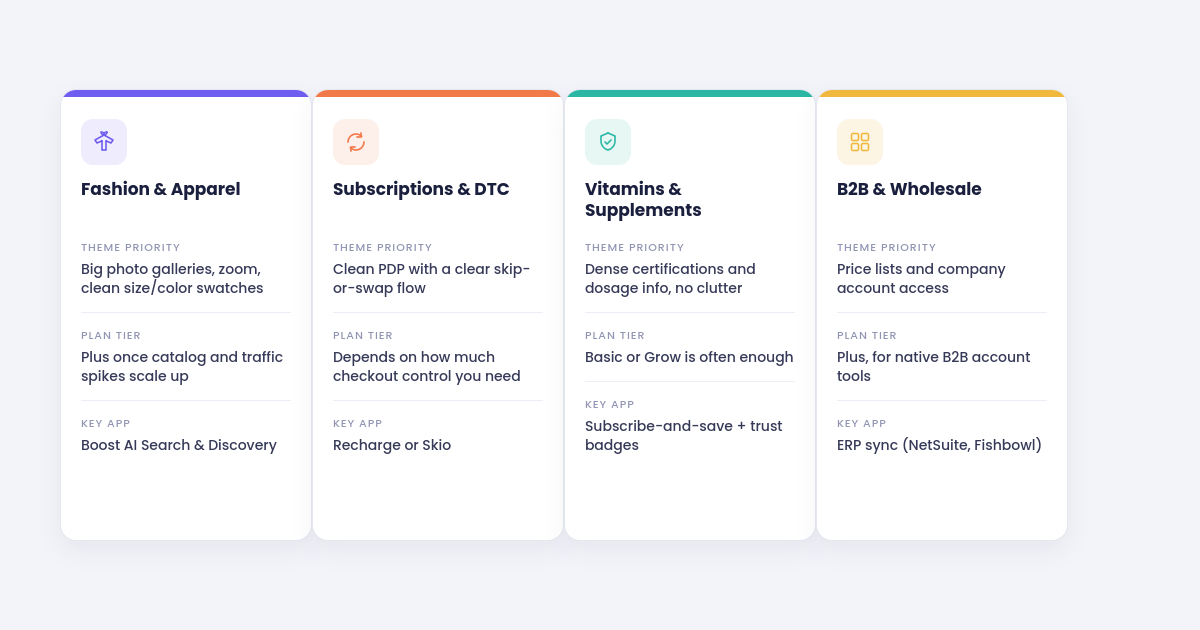
A quick side-by-side of what each niche typically prioritizes in its Shopify setup.
Fashion and Apparel: The Visuals Do the Selling
Clothing shoppers buy with their eyes first. That means themes with strong photo galleries, zoom, and clean size-and-color options matter a lot here. Brands like Gymshark and Rothy’s lean on Shopify Plus partly because their catalogs are big and their traffic spikes hard around drops and holidays.
Search and filtering matter too. A shopper hunting for “size 8 wide, black, under $80” should find it in two clicks, not five. Apps like Boost AI Search & Discovery exist just to solve that problem.
Returns run high in apparel too, sometimes over a third of orders for anything sized. That’s not a small detail. It shapes the whole setup, from size-chart apps on product pages to return tools that keep one bad fit from turning into a lost customer.
Subscriptions and DTC: Retention Is the Whole Business Model
For subscription brands, the product page is barely half the job. The real engine sits in recurring billing and easy skip-or-swap options. Then there’s dunning management: a polite, automated way of chasing a failed payment card. Recharge and Skio both plug into Shopify for this. Picking between them comes down to how much control over checkout you need.
The math is different here too. A brand losing five percent of subscribers a month grows on a very different curve than a one-time-purchase store. Cancelling has to feel easy and fair. But the flow should still offer a discount first, before someone leaves for good.
Vitamins and Supplements: Compliance Meets Conversion
This niche carries a weight most others don’t. Dosage charts, lab certificates, and ingredient panels all need space on the page. So do legal disclaimers: FDA rules in the US, different claim rules under the EU’s EFSA framework. None of that is optional. And none of it looks good bolted onto a generic theme as an afterthought.
Brands here often need storefronts that can carry a lot of information without turning into a wall of text. Certifications, subscribe-and-save pricing, and trust badges all fight for the same space, right next to the “add to cart” button. Shopify themes for vitamin & supplements brands are increasingly built around that exact tension: dense information, clean layout, nothing feeling bolted on.
B2B and Wholesale: A Completely Different Buyer
Wholesale buyers don’t browse. They reorder. Shopify’s B2B tools cover company accounts, payment terms, and bulk pricing. This crowd wants price lists and order history, not a homepage carousel. Picture a hardware supplier with 200 repeat accounts. Now picture a small jewelry brand chasing first-time buyers on Instagram. The two setups barely overlap.
Integrations matter more here too. A wholesale setup needs to talk to whatever system already runs the warehouse. That’s often an ERP or inventory tool; NetSuite and Fishbowl show up a lot in this space. Shopify becomes one piece of a bigger puzzle, not the whole show.
Picking a Plan Without Overpaying, or Underbuying
Basic and Grow cover most stores under a few million a year in sales. They work just fine at that size. Resist the urge to upgrade “just in case.” Advanced starts making sense once you need better shipping rates or sharper reporting.
Plus earns its price tag once you hit real friction: checkout limits, multiple currencies, or API calls that keep timing out during a big sale. If none of that sounds familiar yet, you probably don’t need it yet either.
Themes: Buy One, or Build One?
Shopify’s own free themes (Dawn, Sense, Craft) are genuinely solid starting points. They’re fast, clean, and built on the modern Online Store 2.0 framework. Paid themes like Impulse or Motion add sales features right out of the box. Think lookbooks, countdown timers, upsell blocks.
Custom themes make sense once your brand has a look that off-the-shelf templates can’t fake. Or once you need layout logic no theme ships with. Just know that custom work means ongoing upkeep lands on you, not Shopify.
The Apps That Actually Earn Their Subscription Fee
App overload is real. Plenty of stores run fifteen apps and use four. A tighter, niche-matched stack beats a bloated one:
- Klaviyo for email and SMS tied to real purchase behavior, not generic blasts.
- Yotpo or Judge.me for reviews and photos, which matter a lot in fashion and supplements alike.
- Recharge for subscription logic, if that’s your model.
- Gorgias for support tickets that need real order context, not a canned reply.
- Rebuy for post-purchase upsells that don’t feel pushy.
Pick apps that solve a problem you actually have this quarter. Not one you might have someday.
Signs You’ve Outgrown Your Current Setup
A few honest signals tend to show up before a store officially “breaks”:
- Page speed creeps up every time marketing adds another tracking pixel.
- Checkout hits plan limits during regular sales, not just Black Friday.
- Staff account caps get hit as the team grows past your current tier.
- Manual spreadsheet work patches a gap an app should be closing.
None of this means panic. It just means it’s time for an honest plan review, not necessarily a full rebuild.
Summing It Up
The right Shopify setup was never really about the platform itself. Shopify can support a five-person supplement brand just as well as a huge fashion label. What separates a good setup from a bad one is simple. Does every plan, theme, and app choice trace back to how your customers shop, pay, and come back?
Ask yourself that question before your next app install or theme purchase. If the honest answer is no, that’s worth pausing on. Whatever the sales page promises.
Most stores don’t need a full overhaul. They need a few of the right pieces swapped in. Start small. Pick the one part of your setup that fights your customers hardest. Maybe it’s a clunky size chart. Maybe it’s a subscription flow with too much friction. Maybe it’s a theme that can’t hold your certifications without looking cluttered. Fix that piece first. The rest tends to follow.

