The WordPress 7.0 update marks one of the most important milestones in the evolution of the world’s most popular content management system. Scheduled for final release on April 9, 2026, this new version introduces powerful improvements in collaboration, design tools, performance, and developer capabilities.
With WordPress powering more than 40% of websites worldwide, each major update significantly impacts how businesses, developers, and content creators build and manage WordPress websites. WordPress 7.0 continues the platform’s transition into a modern web application environment by introducing real-time collaboration tools, AI infrastructure, improved media handling, and an enhanced administrative experience.
Currently, WordPress 7.0 Beta versions are available for testing. These beta releases allow the community to evaluate the new features, report bugs, and ensure the final release is stable and reliable.
In this article, we will explore the new features in WordPress 7.0, explain how to test the beta versions, and discuss what this update means for developers, agencies, and site owners.
Eduma – Education WordPress Theme
We provide an amazing WordPress theme with fast and responsive designs. Let’s find out!
WordPress 7.0 Release Timeline
The development process of the WordPress 7.0 update includes several testing phases before the final version becomes available.
Key milestones include:
- Beta 1 release: February 19, 2026
- Beta 2 release: Early March 2026
- Release Candidate versions: Late March 2026
- Official WordPress 7.0 release date: April 9, 2026
Beta releases are intended only for testing purposes. They should not be installed on production websites because they may still contain unresolved bugs or incomplete features.
Testing during the beta phase is essential because it allows developers and website owners to ensure their plugins, themes, and custom code remain compatible with the upcoming version.
How to Test WordPress 7.0 Beta
If you want to explore the WordPress 7.0 beta features, there are several ways to install and test the development versions safely.
1. Using the WordPress Beta Tester Plugin
The easiest method is installing the WordPress Beta Tester plugin on a test site.
Steps include:
- Install and activate the plugin.
- Choose the “Bleeding Edge” channel.
- Select the “Beta/RC Only” stream.
- Update your WordPress installation.
This method allows automatic updates to the latest beta builds.
2. Direct Download
You can also download the beta package manually.
Steps:
- Download the WordPress 7.0 beta ZIP file.
- Upload it to a staging or local WordPress site.
- Install it like a normal WordPress update.
This method is useful for developers who want complete control over the installation process.
3. WP-CLI Command
Developers who prefer command line tools can install the beta version using:
wp core update --version=7.0-beta2
This is often used in development environments or automated testing pipelines.
4. WordPress Playground
WordPress Playground allows users to test WordPress directly in the browser without installing anything locally. This option is ideal for quick experiments with the new features in WordPress 7.0.
Major Features in the WordPress 7.0 Update
The WordPress 7.0 update introduces a wide range of improvements that affect content creation, collaboration, design flexibility, and developer workflows.
Below are the most important changes in detail.
Real-Time Collaboration in the Editor
One of the most anticipated WordPress 7.0 collaboration features is real-time editing.
Previously, WordPress allowed only one user to edit a post or page at a time. If someone else attempted to open the same content, they would be locked out until the first editor finished.
WordPress 7.0 changes this workflow completely.
How Real-Time Collaboration Works
Multiple users can now edit the same post or page simultaneously. The system synchronizes changes across users in real time, similar to collaborative tools like Google Docs.
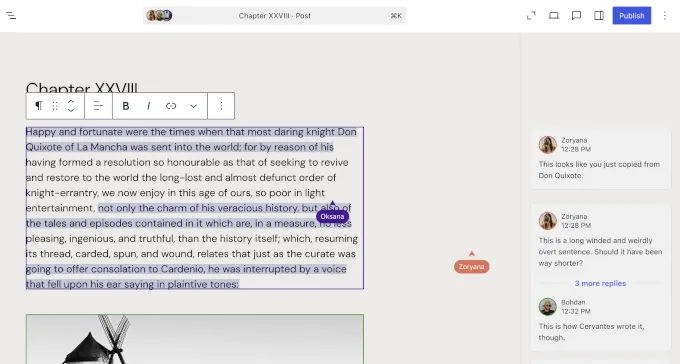
Key capabilities include:
- Live editing from multiple users
- Automatic data synchronization
- Offline editing support
- Visual updates when collaborators change content
This feature is particularly valuable for teams that manage editorial workflows, marketing campaigns, or content production.
For example:
- A writer can create content
- An editor can correct grammar
- A designer can adjust layout blocks
All three users can work at the same time without interfering with each other.
AI Infrastructure with the Web Client AI API
Another important element of the WordPress 7.0 update is the introduction of a new AI integration framework.
Instead of embedding AI tools directly in the core software, WordPress provides infrastructure that allows developers to connect external AI services in a structured and secure way.
What the AI Client Does
The Web Client AI API acts as a centralized system that allows WordPress plugins and themes to interact with AI models.
Possible use cases include:
- AI content generation
- automatic article summaries
- SEO suggestions
- automated media tagging
- customer support assistants
This architecture ensures that different plugins do not conflict with each other when accessing AI services.
Connectors Dashboard
WordPress 7.0 Beta 2 introduces a new Connectors page in the admin panel.
Location:
Settings → Connectors
This interface allows users to:
- add external AI connections
- update API credentials
- remove integrations
- manage multiple AI providers
Developers can also extend the system using new APIs and hooks.
Admin Dashboard Design Refresh
The WordPress 7.0 update also includes a refreshed design for the admin dashboard.
While the interface remains familiar, several improvements make the user experience feel more modern and fluid.
Key Design Enhancements
The dashboard now features:
- updated color schemes
- improved typography
- smoother page transitions
- a cleaner layout
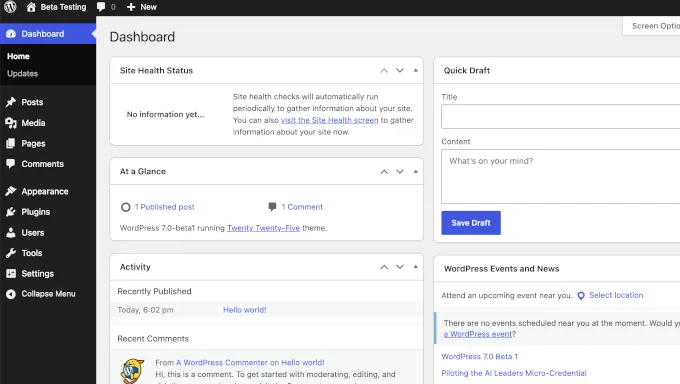
Instead of abrupt page reloads, many admin interactions now use animated transitions. This gives the dashboard a more responsive feel similar to modern web applications.
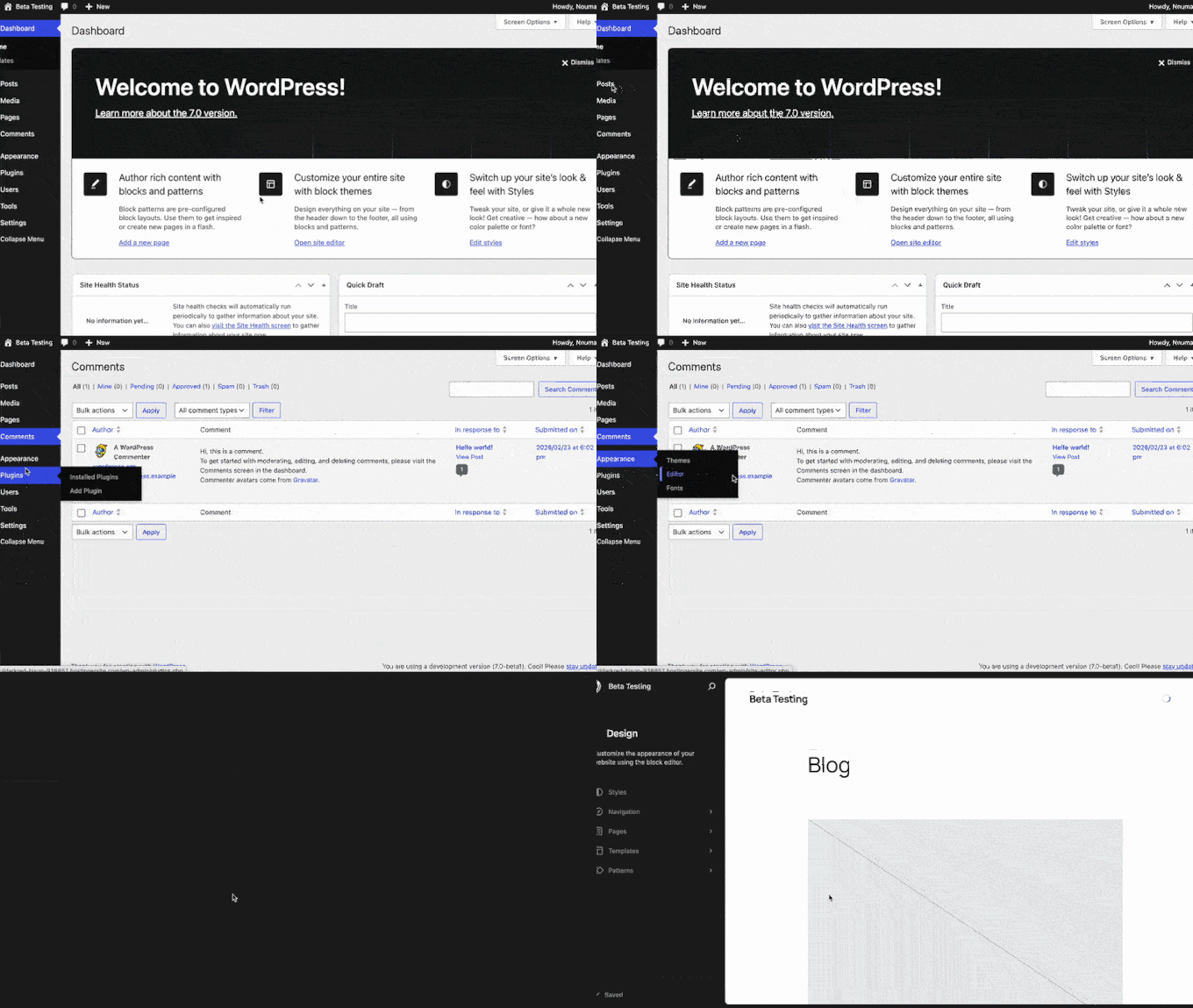
For site administrators who spend hours managing content, this update reduces visual fatigue and improves usability.
Visual Revisions for Pages
The traditional WordPress revision system allows users to restore earlier versions of content. However, comparing revisions previously required reading raw text differences.
WordPress 7.0 introduces visual revision comparisons.
Benefits of Visual Revisions
Users can now:
- see side-by-side comparisons
- review layout changes visually
- restore previous designs instantly
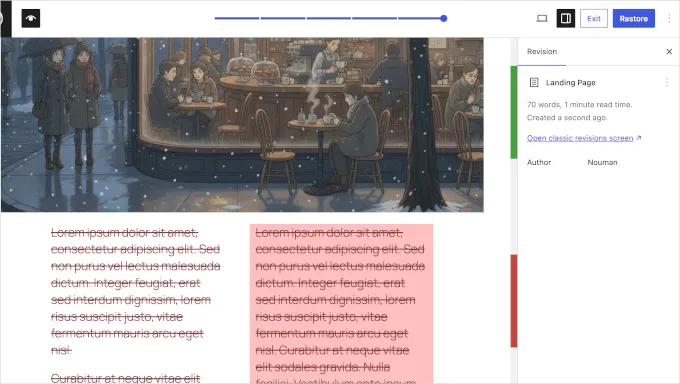
For example, if a page layout breaks after editing a gallery or pricing table, users can easily identify what changed and revert the page to a working version.
This improvement significantly simplifies content recovery and review workflows.
Cover Block Video Backgrounds
Another improvement in the WordPress 7.0 update is the ability to embed video backgrounds directly inside the Cover block.
Previously, users often needed third-party plugins to add dynamic video backgrounds to hero sections. WordPress 7.0 now allows users to insert a video URL directly into the Cover block and use it as a looping background.
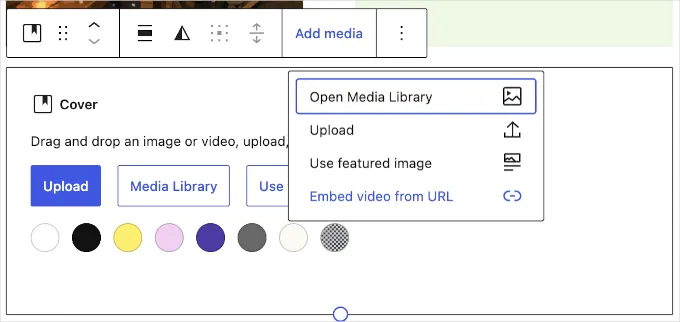
Key benefits include:
- Creating dynamic landing page headers
- Enhancing storytelling with motion backgrounds
- Eliminating the need for additional plugins
Users can still place text, buttons, and other blocks on top of the video background, making it ideal for building visually engaging website sections.
New Blocks and Design Improvements
The new features in WordPress 7.0 also include several new blocks and enhanced design capabilities.
Breadcrumbs Block
The Breadcrumbs block helps users display navigation paths on their pages.
Benefits include:
- improved website navigation
- better SEO structure
- enhanced user experience

Breadcrumbs help both search engines and visitors understand the hierarchy of a website.
Icons Block
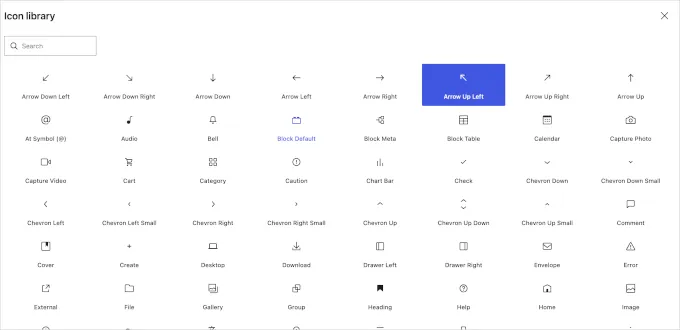
The new Icons block allows users to insert scalable vector icons directly into content.
Previously, many website owners relied on plugins to add icons. Now this functionality is built directly into WordPress.
Users can customize:
- icon size
- color
- background styling
Improved Grid Block
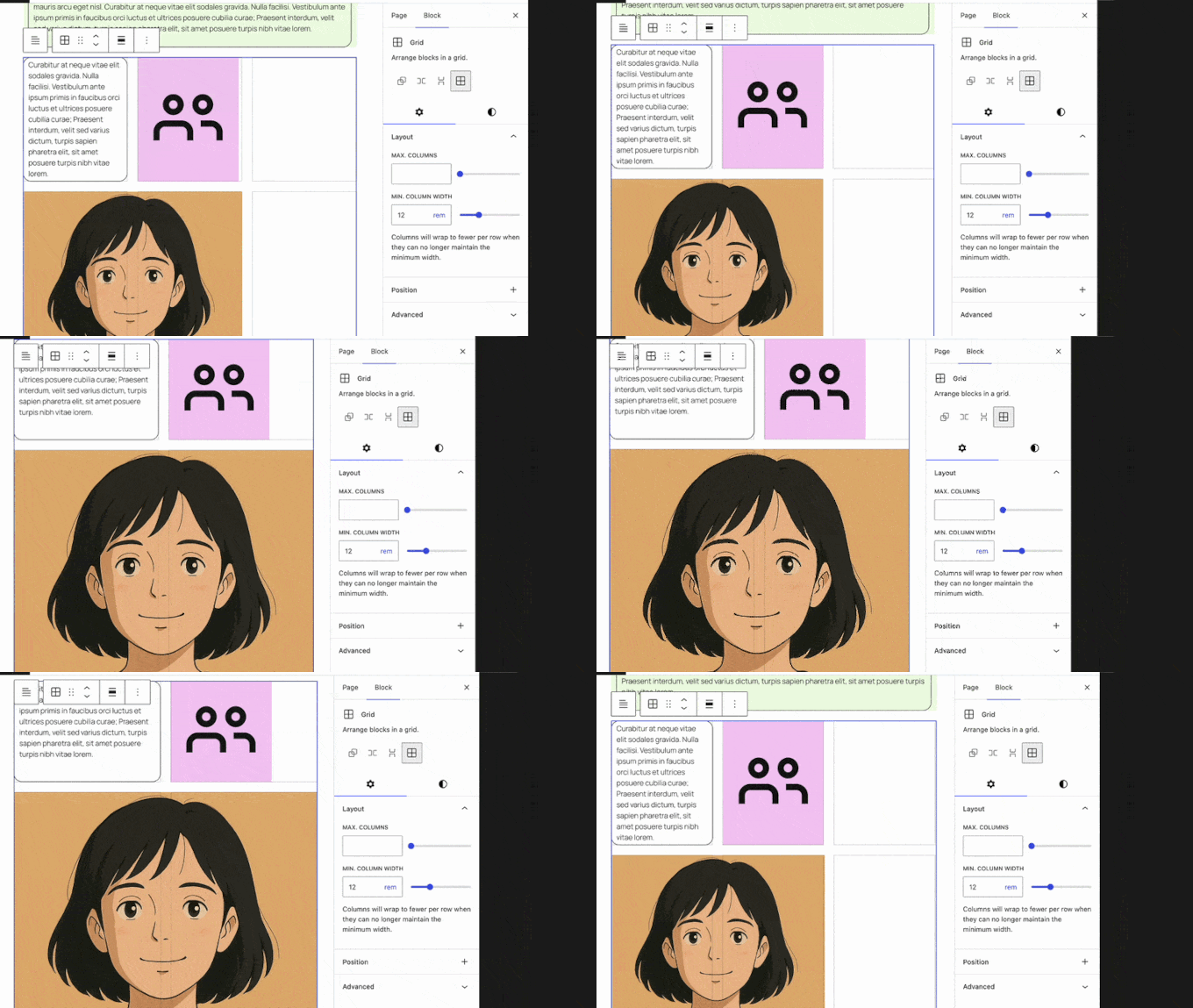
The Grid block now supports responsive layouts automatically.
This means grid-based designs adapt to different screen sizes without requiring custom CSS.
Heading Block Variations
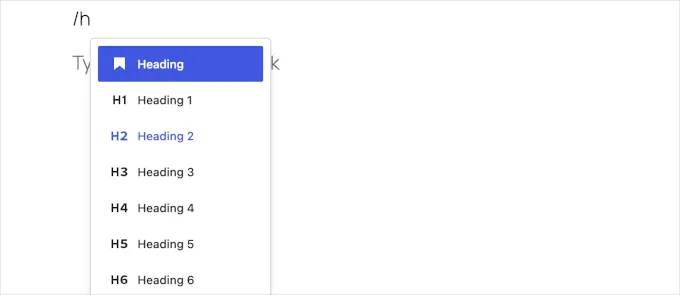
WordPress 7.0 improves heading management by introducing quick-access variations for heading levels.
Instead of using dropdown menus to change heading tags, users can switch between H1–H6 levels directly from the block toolbar.
This small improvement helps writers structure content faster and improves SEO-friendly heading hierarchy.
Navigation Block Overlay Improvements
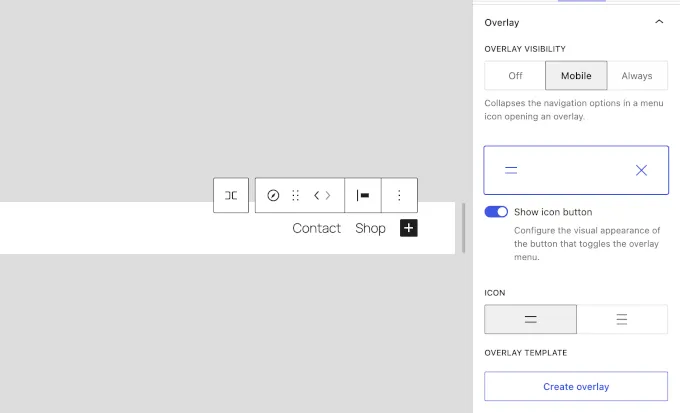
The WordPress 7.0 update also enhances the Navigation block, making it easier to build responsive menus for mobile devices.
The updated navigation system supports customizable overlay menus that appear when visitors open a mobile menu icon.
Key improvements include:
- mobile-friendly overlay navigation
- customizable menu breakpoints
- improved control over responsive layouts
These enhancements make it easier for site owners to create modern mobile navigation without writing custom CSS.
Responsive Editing and Pattern Improvements
WordPress 7.0 introduces more flexible editing tools for layout and content design.
Responsive Editing Mode
WordPress 7.0 continues improving responsive design through enhancements to the Grid block and navigation layouts, allowing content to adapt more smoothly across screen sizes.
This provides a simple way to create mobile-optimized layouts.
Pattern Editing Modes
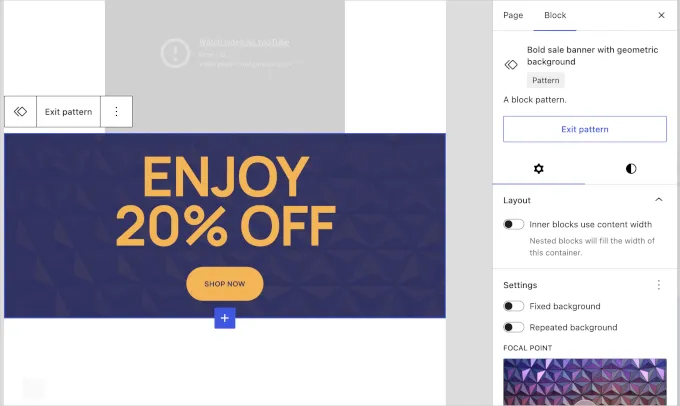
Reusable patterns receive several improvements, including:
- Spotlight Mode
- Isolated Editor Mode
- enhanced tree view navigation
These features allow users to focus on editing specific design components without distractions.
Font Library Available for All Themes
Another improvement in the WordPress 7.0 update is expanded access to the built-in Font Library.
Previously, this feature was limited mostly to block themes. WordPress 7.0 enables the Font Library for all themes, including classic themes.
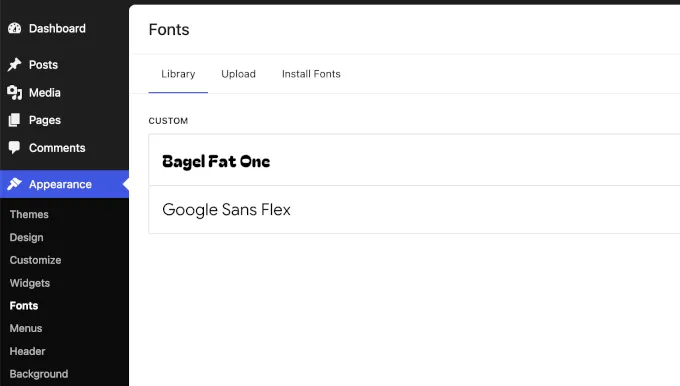
Users can now:
- browse Google Fonts directly in the dashboard
- upload custom font files
- organize typography collections
This change gives designers more flexibility when managing typography across their websites.
Per-Block Custom CSS
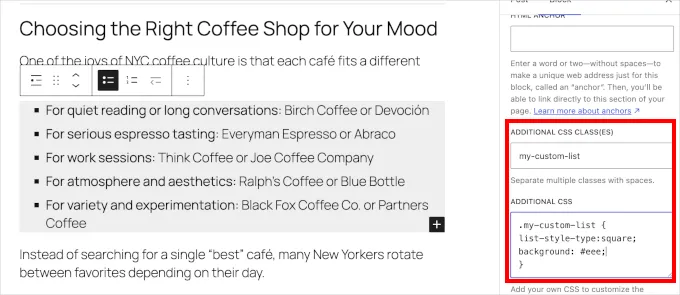
WordPress 7.0 introduces the ability to add custom CSS directly to individual blocks.
Instead of creating a child theme or writing global CSS rules, users can now apply styling to a specific block instance from the block settings panel.
This feature is useful for designers who want to fine-tune layouts, such as:
- customizing block styling without affecting the rest of the page
- adding shadows to a specific button
- adjusting margins for a single section
Client-Side Media Processing
Media management is another area improved by the WordPress 7.0 update.
Large images often slow down uploads and increase server workload. WordPress 7.0 introduces client-side media processing.
How It Works
Instead of sending large files directly to the server, the browser processes them first.
Tasks handled in the browser include:
- image resizing
- compression
- format optimization
Benefits include:
- faster uploads
- reduced server load
- improved site performance
This feature is especially useful for websites that frequently upload large images.
Developer Improvements in WordPress 7.0
The WordPress 7.0 update also introduces several technical enhancements for developers.
PHP-Only Block Registration
Developers can now register blocks entirely using PHP.
Advantages include:
- faster development
- simplified block creation
- automatic inspector controls
Client-Side Abilities API
The new Abilities API provides a standardized method for registering browser-side capabilities.
This API enables:
- richer user interactions
- improved plugin integrations
- more advanced web application features
CodeMirror Update
WordPress 7.0 upgrades the CodeMirror library to version 5.65.40, improving the code editing experience for developers working in the theme and plugin editors.
Preparing Your Website for WordPress 7.0
Website owners should prepare for the WordPress 7.0 release date by following several best practices.
1. Update PHP Version
WordPress 7.0 drops support for older PHP versions.
Minimum supported version:
PHP 7.4
Recommended version:
PHP 8.2 or higher
2. Test Plugins and Themes
Some plugins may need updates to remain compatible with the new system.
Testing during the beta phase allows developers to identify potential conflicts early.
3. Use a Staging Environment
Always test major updates on a staging site before applying them to a live website.
Why the WordPress 7.0 Update Matters
The WordPress 7.0 update represents an important step in transforming WordPress from a traditional CMS into a modern web application platform.
With features such as real-time collaboration, AI integration infrastructure, improved design tools, and faster media processing, WordPress continues to evolve to meet the needs of developers, businesses, and content creators.
These improvements make WordPress more competitive with modern website builders while maintaining the flexibility that developers rely on.
FAQs About WordPress 7.0 Update
When will WordPress 7.0 be officially released?
The official WordPress 7.0 release date is scheduled for April 9, 2026.
Is WordPress 7.0 safe to install now?
Currently, only beta versions are available. These versions are intended for testing and should not be installed on production websites.
What is the main focus of the WordPress 7.0 update?
The main focus of the WordPress 7.0 update is collaboration, modern editing workflows, and improved infrastructure for AI and developers.
Does WordPress 7.0 include built-in AI tools?
No. Instead, WordPress provides an AI infrastructure that allows plugins and themes to connect to external AI services.
Will existing plugins work with WordPress 7.0?
Most plugins will continue to work, but compatibility testing is recommended before updating a live website.
Conclusion
The WordPress 7.0 update represents a significant evolution for the platform. By introducing real-time collaboration, AI infrastructure, improved media handling, and enhanced design tools, WordPress is moving closer to becoming a fully collaborative web development environment.
The beta phase currently allows developers and website owners to explore the WordPress 7.0 beta features and prepare their sites for the official release. Testing during this period is essential to ensure plugins, themes, and hosting environments remain compatible.
When the final version launches in April 2026, WordPress users can expect a faster, smarter, and more collaborative website management experience.
Read more: WordPress 6.8 Update: New Features, Performance Boosts, and Smarter Design Tools
Contact US | ThimPress:
Website: https://thimpress.com/
Fanpage: https://www.facebook.com/ThimPress
YouTube: https://www.youtube.com/c/ThimPressDesign
Twitter (X): https://x.com/thimpress_com