A one page website can be a smart choice when you need to launch fast, keep the message clear, and guide visitors to one main action. It is often used for product launches, events, portfolios, small business pages, and campaign landing pages.
Instead of spreading content across many pages, a one page website keeps everything on a single scrollable page. This makes the user journey simple and helps you focus on the most important message. It also makes planning and design easier, especially when you use Figma to map the layout before building the final site.
In this guide, you will learn what a one page website is, when to use it, why it works, and how to create one step by step using Figma. You will also see practical tips for SEO on one page websites, common design advice, and useful one page website examples to inspire your next project.
Eduma – Education WordPress Theme
We provide an amazing WordPress theme with fast and responsive designs. Let’s find out!
What Is a One Page Website?
A one page website is a website where all key content appears on a single page. Visitors scroll down to read each section instead of clicking through several separate pages.
A typical layout may include:
- a hero section
- an about section
- product or service details
- benefits or features
- testimonials
- contact information
- a final call to action
This format is common for brands that want to share one focused message. It also works well when the content is not too large and the goal is clear.
A multi-page website is better for large businesses with many products, services, or complex content. But for smaller goals, the best one page websites often feel cleaner, faster, and easier to use.
One Page Website vs Multi-Page Website
Choosing between a one-page and multi-page structure depends on your content goals and SEO strategy.
| Feature | One Page Website | Multi-Page Website |
| Best for | Portfolios, landing pages, startups, events | Large businesses and eCommerce websites |
| SEO | Good for focused keywords | Better for broad keyword targeting |
| Navigation | Simple scrolling | Complex navigation menus |
| Development time | Faster to build | More time-consuming |
| Maintenance | Easier to update | Requires more management |
| User experience | Smooth and guided | Better for large content libraries |
A one page website is often the better choice when you want a focused message and a faster launch. Multi-page websites are usually more suitable for businesses with large product catalogs or detailed information structures.
When to Use a One Page Website
A one page website is a strong option in several cases.
Product launches
If you are introducing one product or service, a single page can explain the value, show benefits, and push users toward purchase or sign-up.
Events and campaigns
For limited-time events, a one page website gives visitors all the details they need in one place, such as date, time, location, and registration.
Small business presence
A small business may not need a large site at first. A one page website can present the brand, services, and contact details in a simple way.
Personal portfolio or resume
Freelancers, designers, writers, and other professionals often use one page website examples to show skills, work samples, and contact information quickly.
Focused landing pages
When the goal is one main action, such as booking a demo or downloading a guide, a single page removes distractions and keeps attention on the offer.
Benefits of a One Page Website
The one page website format has several practical benefits.
Simple and clear content flow
All information is placed in one line of movement, so the visitor can follow the story step by step. This works well when the message is short and direct.
Easier user experience
A one page website often feels smooth because users do not need to open many different pages. Scrolling is natural, and the path to action is easy to understand.
Faster design and development
Because there are fewer pages to plan and build, a one page website can save time. This is helpful for teams with limited resources or tight deadlines.
Better for mobile use
Many users visit websites on phones. A one page website can work well on small screens if the sections are arranged clearly and the design is responsive.
Lower maintenance
With only one main page, updates are often easier to manage. You may need to edit content in fewer places, which helps reduce mistakes.
Limits of One Page Websites
A one page website is not the right answer for every project.
It can become too long if you try to add too much content. That may make the page hard to scan and slow to load. It can also be harder to rank for many different keywords because there is only one URL and limited space for content depth.
That is why SEO on one page websites needs extra care. You must choose one primary topic, organize sections clearly, and write with a strong structure. If your business has many services, a multi-page site may be a better long-term choice.
5+ Best One Page Website Builder Options
Choosing the right one page website builder can make the design and launch process much easier. The best option depends on your design skills, customization needs, and development workflow.
Figma
Figma is one of the most popular tools for planning and designing a one page website. It allows teams to create wireframes, prototypes, responsive layouts, and developer handoff files in one place. Figma works especially well for collaborative web design projects.
Framer
Framer combines visual design with website publishing. It is a strong one page website builder for startups, portfolios, and SaaS landing pages because it supports animations, responsive layouts, and fast deployment.
Webflow
Webflow is a professional visual development platform that gives designers more control over layout and interactions. It is commonly used for high-performance marketing websites and advanced landing pages.
Carrd
Carrd is a beginner-friendly one page website builder focused on speed and simplicity. It works well for personal profiles, event pages, and lightweight landing pages.
Elementor
Elementor is a popular WordPress page builder that helps users create one page websites without coding. It offers drag-and-drop editing, templates, and integrations for small businesses and marketers.
How to Create a One Page Website Using Figma
Using Figma makes it easier to plan, design, and refine your layout before development. Below are four simple steps.
Step 1: Plan the page structure
Before you design anything, decide what the page must achieve. A one page website works best when the goal is narrow and clear.
Start with these questions:
- What is the main goal of the page?
- Who is the target audience?
- What action should the visitor take?
- What sections are needed to support that action?
Once you answer these questions, outline the content flow. A good one page website usually follows a logical order, such as:
- Hero section
- Problem or value statement
- Features or services
- Proof or trust signals
- Call to action
- Contact section or footer
This planning stage is important because the page must guide the reader without confusion. Strong structure is one of the main reasons best one page websites feel easy to use.
Step 2: Build a wireframe using Figma
A wireframe is a simple layout draft. It shows where each section will go, without final colors, fonts, or images.
In Figma, start with basic boxes and text placeholders. Focus on structure first. Your wireframe should show:
- header area
- hero section with headline and supporting text
- content blocks for features or information
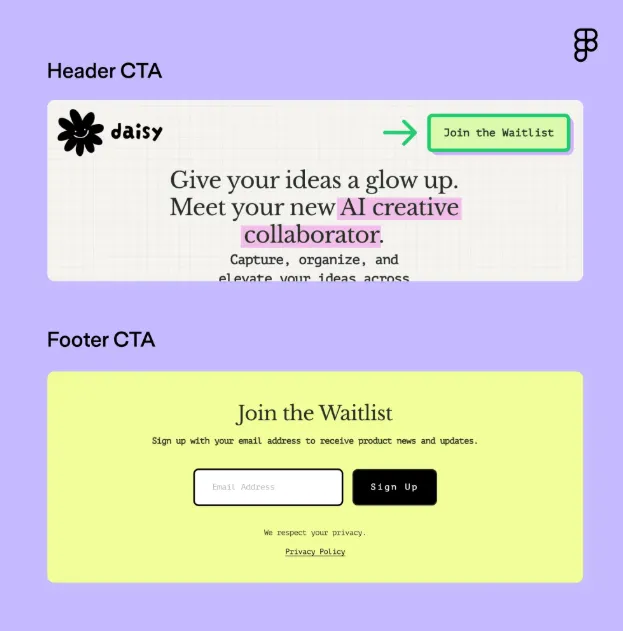
- strong CTA buttons
- footer with contact details
This stage helps you test the flow before spending time on visual design. It also makes teamwork easier because everyone can understand the layout early.
Many designers use Figma Community wireframe kits during this stage to speed up layout planning and maintain consistency across sections. Using reusable components and auto layout can also make responsive adjustments easier later in the design process.
If you are building a one page website for the first time, Figma wireframes are a helpful way to avoid design mistakes later.
Step 3: Design the visual layout
After the wireframe is ready, move to the visual design stage. This is where your page starts to look polished and professional.
Keep these points in mind:
Use simple design
A one page website should stay clean. Do not overload it with too many colors, fonts, or decorative elements. A simple design helps the main message stand out.
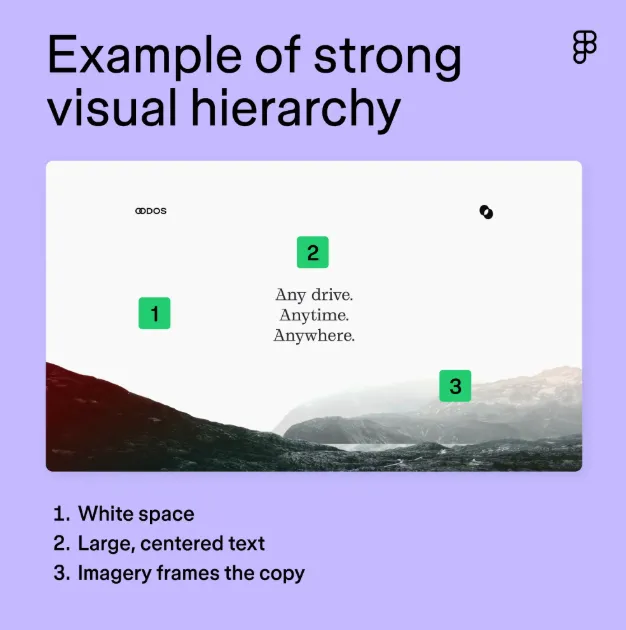
Use strong visual hierarchy
The most important text should be easy to notice first. Use size, spacing, and contrast to guide the eye from one section to the next.
Make it responsive
A one page website must work well on desktop, tablet, and mobile screens. In Figma, test how the layout looks at different sizes so you can catch problems early.
Add enough white space
White space makes content easier to read. It also keeps the page from feeling crowded. This is especially useful on a long scroll page.
Keep branding consistent
Use the same tone, colors, and style throughout the page. This builds trust and makes the brand easier to remember.
When you study one page website examples, you will notice that the best ones use focus, balance, and simplicity instead of heavy decoration.
Step 4: Prepare for development and launch
Once the design is done, check that the page is ready for build. Figma helps designers and developers work together more smoothly.
Before launch, make sure you:
- write clear and concise copy
- use compressed, high-quality images
- add headings with natural keywords
- check links and buttons
- test the page on different devices and browsers
- review spacing, alignment, and readability
- confirm that the CTA is visible and clear
This step matters for both user experience and SEO on one page websites. Search engines need clear headings, useful text, and a page that loads well.
Tips for SEO on One Page Websites
SEO is possible on a one page website, but it needs a smart approach.
Focus on one main topic
A single page should target one main search intent. Do not try to rank for too many unrelated topics on one page.
Use heading structure properly
Use one H1, then H2 and H3 headings to organize the content. This helps both users and search engines understand the page.
Include keywords naturally
Use the main keyword and secondary keywords in a natural way. Do not repeat them too much. Search engines prefer clear, helpful writing over keyword stuffing.
Write enough useful content
A one page website still needs meaningful text. Each section should explain something valuable, not just repeat the same idea.
Optimize page speed
Large images and heavy design elements can slow the page down. Compress files and keep the layout light.
Page speed is especially important for a one page website because all content loads on a single URL. Tools like Google PageSpeed Insights can help identify large images, unused scripts, and layout issues that slow down performance.
According to responsive web design research from Nielsen Norman Group, users are more likely to stay engaged when pages are easy to scan, mobile-friendly, and visually structured with clear spacing and hierarchy.
Add internal and external trust signals
If possible, include testimonials, client logos, awards, or short case proof. These elements help build credibility and support EEAT.
Best Practices for a Strong One Page Website
Here are a few practical rules that improve the final result.
Keep the message focused
A one page website works best when it answers one clear question. What is this page about, and what should the visitor do next?
Make calls to action easy to see
Your CTA should stand out in the header, middle, and footer. Do not hide it. Visitors should know the next step at every stage.
Some of the best one page websites repeat the same call to action multiple times throughout the page. This approach keeps users focused on the next step without forcing them to scroll back to the top navigation area.
Use a sticky menu when needed
If the page is long, a sticky navigation bar can help users jump to each section quickly. This is useful for both usability and clarity.
Add trust-building content
Testimonials, numbers, logos, or short proof points can make the page feel more credible. This matters especially for service businesses and new brands.
Test before publishing
Check the page on real devices, not only in design tools. A small layout problem can hurt the overall experience.
One Page Website Examples by Use Case
Here are some common one page website examples to help you choose the right format.
Startup or product launch page
This type of page introduces a new product and focuses on benefits, features, and sign-up action.
Freelancer portfolio
A simple one page website can show skills, work samples, services, and contact details in a clear way.
Event page
An event page can list the date, agenda, location, speakers, and registration form all in one place.
Small business landing page
A local business may use a one page website to explain services, display contact details, and collect leads.
Personal brand page
A one page website can work well for professionals who want a clean online profile with a short bio and call to action.
Common Mistakes to Avoid on a One Page Website
Even the best one page websites can perform poorly if the structure becomes too crowded or confusing. Here are some common mistakes to avoid:
- Adding too much information to one page
- Using large images that slow down loading speed
- Hiding calls to action too far down the page
- Ignoring mobile responsiveness
- Using weak heading structure
- Overusing animations and visual effects
- Targeting too many unrelated keywords
Keeping the layout simple and focused usually leads to a better user experience and stronger SEO performance.
FAQs
Is a one page website good for SEO?
Yes, a one page website can rank well for a focused topic. The key is to use a clear heading structure, useful content, and one main search intent.
What is the best use for a one page website?
It works best for product launches, events, portfolios, small business pages, and single-purpose landing pages.
Can a one page website have multiple sections?
Yes. A one page website can have many sections, but they should all support one main message and one clear goal.
How many keywords should I use on a one page website?
Use the main keyword and related terms naturally. For SEO on one page websites, quality matters more than repeating keywords many times.
Why use Figma for a one page website?
Figma helps you plan the layout, test the flow, and design the page before development. It also makes teamwork easier.
Conclusion
A successful one page website combines focused messaging, responsive design, and a smooth user experience into a single conversion-driven page. When structured correctly, it can help startups, freelancers, SaaS companies, and small businesses launch faster while keeping visitors focused on one clear action.
Using Figma makes the process easier by helping teams plan layouts, build wireframes, test responsive sections, and prepare designs before development begins. Combined with smart SEO on one page websites, fast loading speeds, and clear calls to action, a well-designed page can improve both search visibility and conversions.
Whether you are creating a portfolio, event page, product launch, or business landing page, studying the best one page websites and applying strong UX principles can help you build a cleaner and more effective online presence.
Read more:
7 Best Figma Plugins for WordPress
Easily Convert Figma to WordPress: A Complete Guide
Google Stitch vs Figma: Top Reasons Designers Are Finally Switching
Contact US | ThimPress:
Website: https://thimpress.com/
Fanpage: https://www.facebook.com/ThimPress
YouTube: https://www.youtube.com/c/ThimPressDesign
Twitter (X): https://x.com/thimpress_com