The best personal websites do more than display a name, photo, and short biography. They give visitors an immediate reason to stay, communicate a recognizable point of view, and make the next action obvious. Whether you are building a portfolio, an online resume, a creator hub, or a professional blog, studying successful personal homepage templates is one of the fastest ways to improve your own. The ten sites below show how strong personal pages combine positioning, proof, personality, and usability without all looking the same.
If you are starting from scratch, first read this practical guide to creating a portfolio website. It explains the foundation you need before choosing colors, animations, or a personal homepage template.
Eduma – Education WordPress Theme
We provide an amazing WordPress theme with fast and responsive designs. Let’s find out!
What Makes the Best Personal Web Pages Effective?
A memorable personal website is not necessarily the most complex one. In fact, many of the best personal web pages are visually restrained. They work because every section supports a clear purpose.
- A clear value proposition: Visitors quickly understand who the person is, what they do, and whom they help.
- Visible evidence: Projects, results, publications, clients, testimonials, or credentials substantiate the claims.
- A distinct personality: The writing, typography, imagery, and interaction style feel connected to the person behind the site.
- Simple navigation: Visitors can reach the portfolio, About page, contact details, and main offer without searching.
- A focused call to action: The homepage guides people toward hiring, subscribing, buying, reading, or viewing work.
- Responsive performance: The page remains readable, fast, and easy to use on mobile devices.
If your primary goal is to display client work or creative projects, compare the layouts in this collection of portfolio WordPress themes. For a service-led site, these freelancer WordPress themes provide a more conversion-focused starting point.
10 Best Personal Website Examples to Inspire You
1. Brittany Chiang: A Focused Developer Portfolio
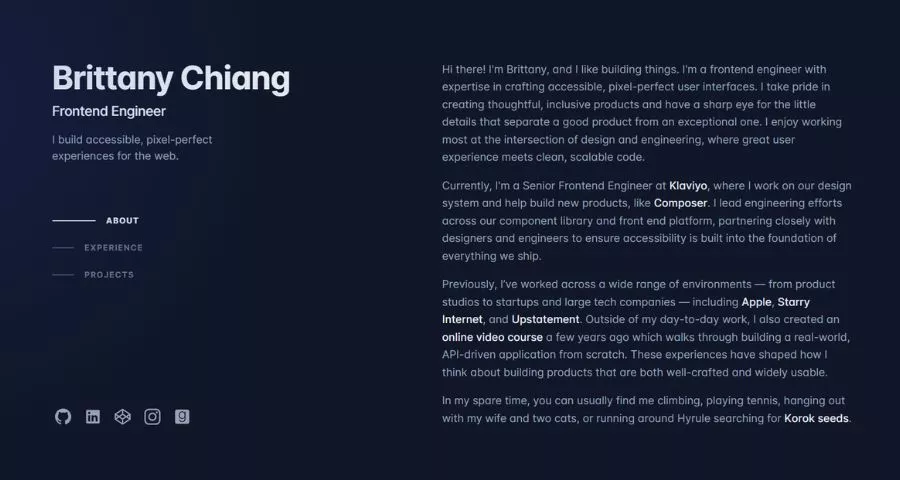
Brittany Chiang’s website is a strong example of a personal developer homepage that stays focused. The opening message establishes her role, specialty, and current direction before leading visitors into selected projects and professional experience.
The dark interface, restrained accent color, and compact navigation create a recognizable visual identity without competing with the content. Project descriptions explain the problem and technology instead of relying on screenshots alone.
- Best for: Developers, engineers, and technical freelancers.
- Key lesson: Curate a few relevant projects and add enough context to demonstrate how you think.
2. Gary Sheng: A Story-Driven Personal Page
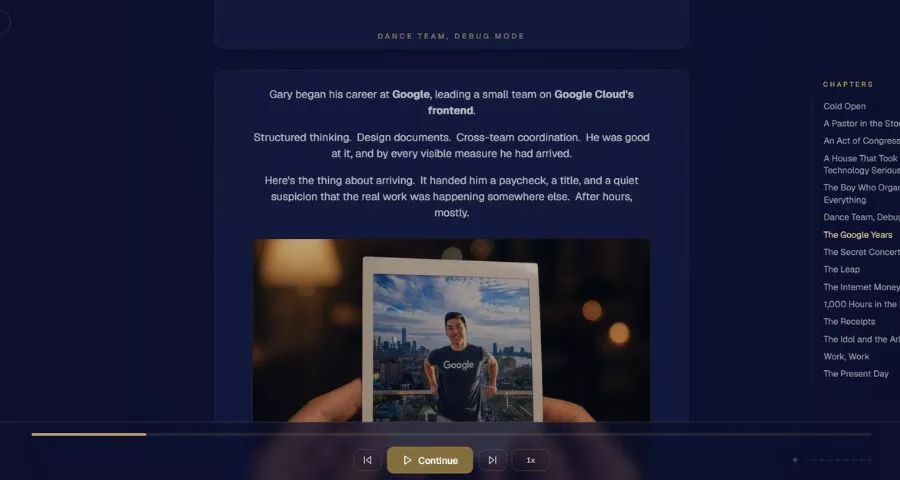
Gary Sheng turns his homepage into a guided professional story. Rather than separating every experience into a disconnected page, he creates a narrative that moves from introduction to values, work, community involvement, and contact information.
This approach is especially useful when your career cannot be summarized by one job title. Photos and short sections make the story personal, while clear headings keep the long page scannable.
- Best for: Community builders, founders, and multidisciplinary professionals.
- Key lesson: Use chronology and transitions to connect different parts of your experience.
3. Robby Leonardi: An Interactive Resume
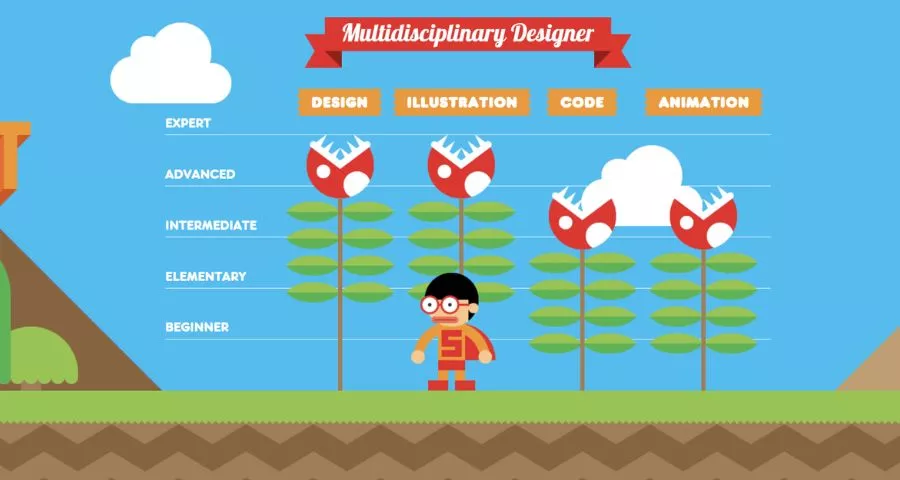
Robby Leonardi’s interactive resume turns career information into a side-scrolling illustrated experience. The site is memorable because its presentation is itself evidence of Leonardi’s design and development skills.
The concept would be excessive for many professions, but it is highly relevant for an interactive designer. That alignment matters: unusual design should reinforce what you want to be hired for, not merely demonstrate that you can add effects.
- Best for: Interactive designers, illustrators, and front-end developers.
- Key lesson: Let the website demonstrate your core skill when the medium supports it.
4. Alice Lee: A Visual Portfolio With Personality
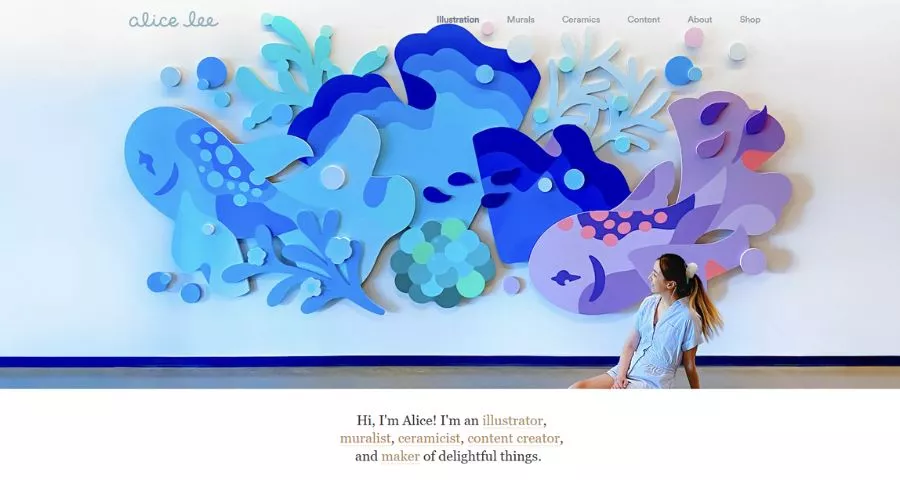
Alice Lee’s site makes illustration the central interface. Instead of describing a visual style at length, the homepage immediately shows it through color, character work, and project imagery.
The portfolio feels playful but remains professional because the project hierarchy is clear. Visitors can quickly identify the kind of work available and move from broad visual interest to specific examples.
- Best for: Illustrators, artists, and visual storytellers.
- Key lesson: When your work is visual, show a distinctive sample before explaining it.
5. Tobias van Schneider: A Strong Personal Brand System
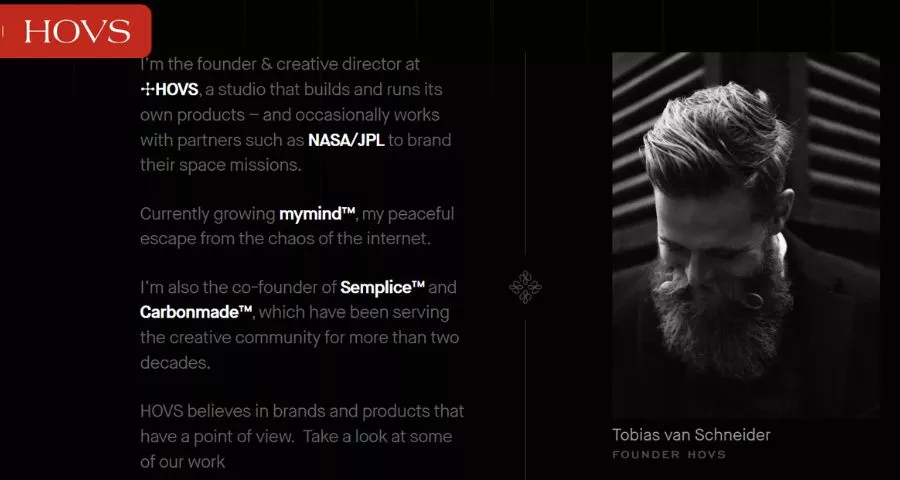
Tobias van Schneider’s personal site combines essays, projects, products, and biography under one consistent brand. The homepage does not force every visitor down the same path. Instead, it creates clear entry points for people who want to read, explore work, or learn more about the creator.
This is a useful model for established professionals with several active projects. Consistent typography and art direction make separate content types feel like parts of one ecosystem.
- Best for: Creative directors, founders, and multidisciplinary creators.
- Key lesson: Create one visual system that can accommodate multiple interests and offers.
6. Austin Kleon: A Content-First Creator Homepage
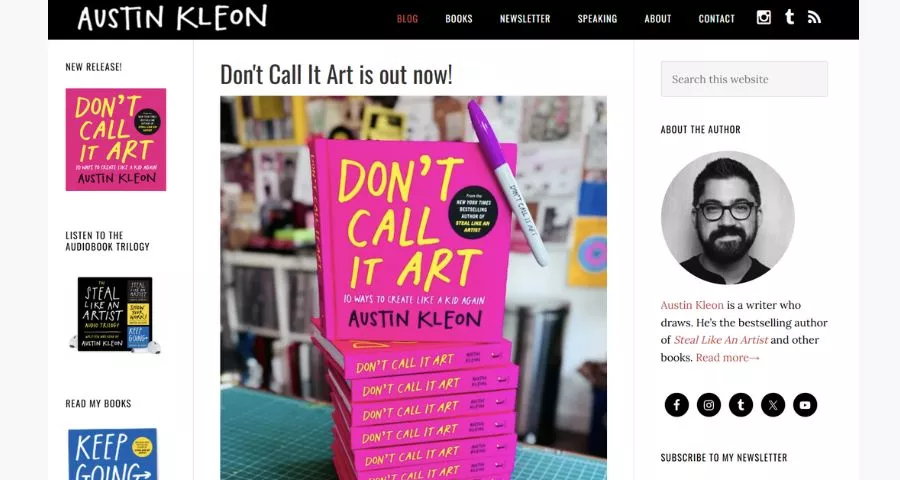
Austin Kleon’s website treats ongoing publishing as the heart of a personal brand. Books remain visible, but fresh posts, recommendations, and creative observations give readers a reason to return.
The site proves that personal pages do not need portfolio animations to feel distinctive. A recognizable voice, consistent illustrations, and a useful archive can establish a stronger identity than decorative effects. Anyone planning a similar content-led site should prioritize layouts that keep articles easy to browse and pleasant to read.
- Best for: Authors, artists, teachers, and newsletter creators.
- Key lesson: Make your latest useful content prominent while keeping cornerstone work easy to find.
7. Seth Godin: Extreme Simplicity Built Around Ideas
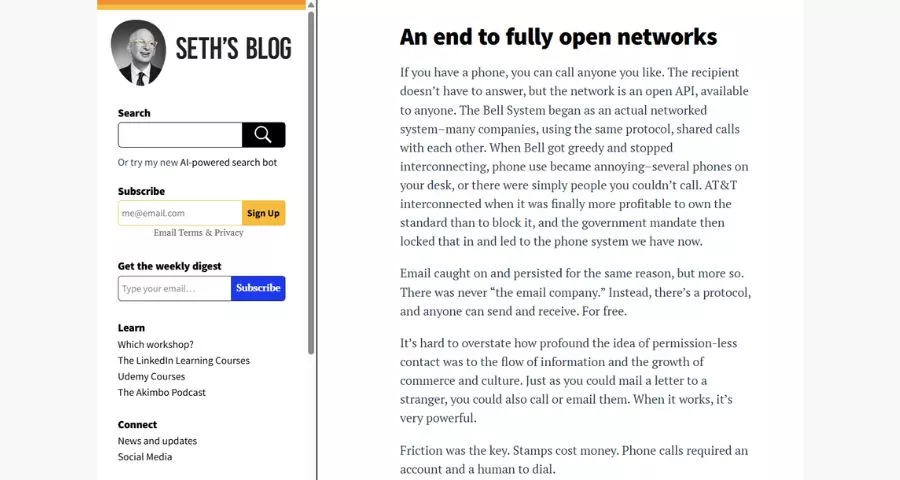
Seth Godin’s homepage prioritizes the blog, reflecting a brand built through consistent ideas rather than visual spectacle. New readers can begin with the latest post, while established visitors encounter the familiar publishing experience they expect.
The design is a reminder that consistency can be a differentiator. If the content is the product, removing unnecessary homepage sections may make the site more effective. ThimPress’s roundup of the best personal blog WordPress themes offers additional content-first examples.
- Best for: Writers, thinkers, consultants, and daily bloggers.
- Key lesson: Design around the activity that creates the most long-term value.
8. James Clear: A Homepage With a Clear Conversion Path
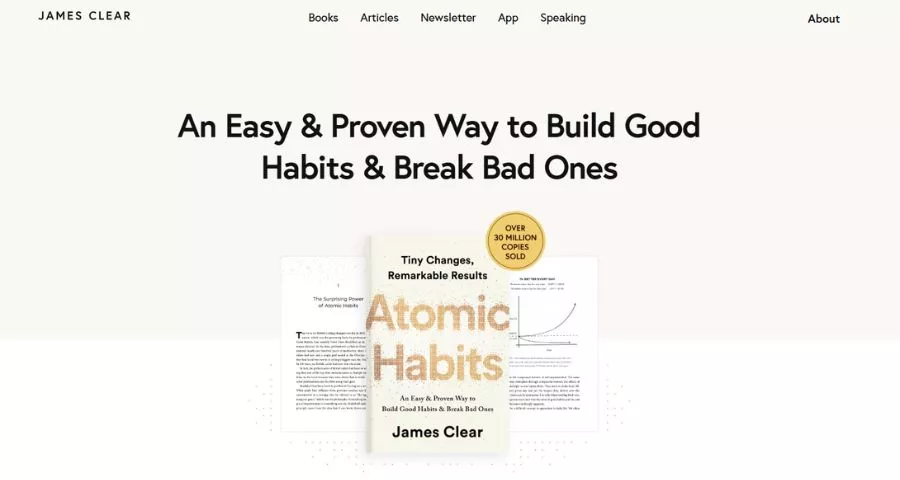
James Clear’s site organizes a large body of work around a simple promise: practical ideas about habits and improvement. Articles, books, and the newsletter support the same positioning, so visitors do not have to reconcile unrelated messages.
The homepage also demonstrates how to build an email list without making the page feel like a collection of pop-ups. The invitation is specific, connected to the content, and repeated at natural decision points.
- Best for: Authors, experts, educators, and knowledge businesses.
- Key lesson: Align your content, lead magnet, and main product around one audience promise.
9. Tim Ferriss: A Personal Media Hub
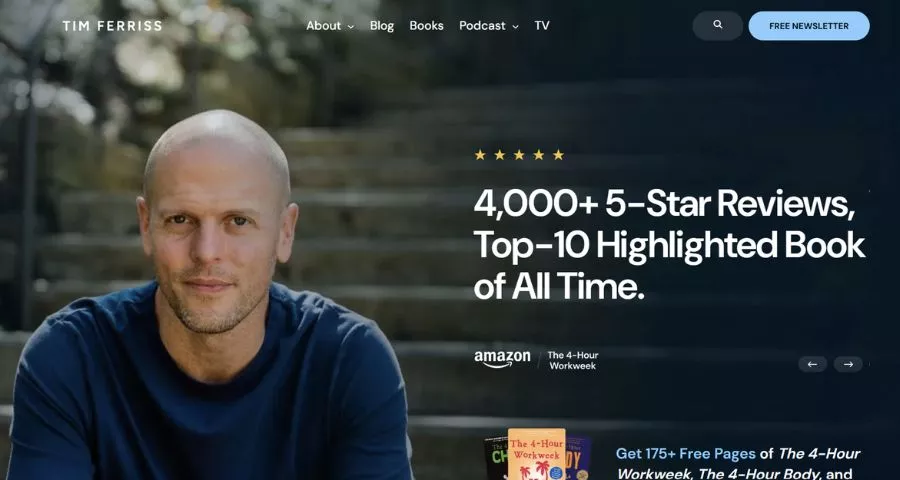
Tim Ferriss uses his website as a central library for podcast episodes, articles, books, and recommendations. The range is broad, but recognizable categories and search tools prevent the archive from becoming overwhelming.
This structure works for creators who publish in several formats. Instead of giving each channel a disconnected microsite, the homepage presents them as different ways to access the same body of expertise.
- Best for: Podcasters, authors, interviewers, and media creators.
- Key lesson: Organize a large archive by visitor intent, not only by publishing date.
10. Tania Rascia: Practical, Searchable, and Human
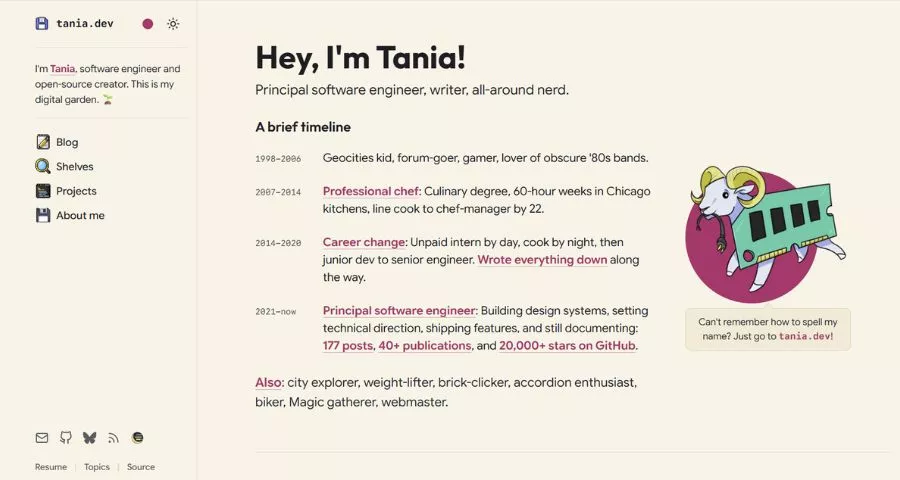
Tania Rascia’s site combines a concise personal introduction with a substantial library of software development articles. The homepage is clean, but it is not empty: visitors can understand the author’s expertise and quickly reach useful work.
The site is particularly effective because it balances personality with information architecture. Categories, article titles, and readable typography help the content remain useful long after publication.
- Best for: Developers, technical writers, and educators.
- Key lesson: Make expertise discoverable through clear organization and genuinely helpful content.
How to Choose a Personal Homepage Template
A personal homepage template should support your goal before it expresses your style. A recruiter, potential client, loyal reader, and social follower arrive with different expectations. Decide which visitor matters most and what you want that person to do.
| Primary goal | Homepage priority | Useful sections |
|---|---|---|
| Find a job | Role and relevant experience | Selected projects, skills, resume, contact |
| Win freelance clients | Problem you solve | Services, case studies, testimonials, inquiry CTA |
| Build an audience | Ideas and publishing promise | Latest content, popular posts, newsletter signup |
| Sell products | Outcome and offer | Featured products, proof, FAQs, purchase CTA |
| Show creative work | Strong visual sample | Portfolio grid, project details, bio, contact |
Next, choose a layout that fits the amount and type of content you have. A one-page structure can work well for a concise profile or focused service; this tutorial on creating a one-page website in Figma shows how to plan the page before development. If you have many projects, compare more layout patterns in this list of WordPress portfolio templates.
How to Build Better Personal Pages
1. Write the First Screen Before Designing It
Your opening section should answer three questions: Who are you? What do you do? What should the visitor do next? Write those answers in plain language before selecting a template. A clever headline is only useful when people can still understand it.
2. Curate Evidence Instead of Uploading Everything
Three detailed, relevant projects are usually more persuasive than twenty unexplained thumbnails. For each selected project, state the situation, your role, important decisions, and the result. Remove outdated work that no longer supports the opportunities you want.
3. Give Every Page a Job
The homepage introduces and routes. The About page builds trust. Project pages provide proof. The contact page removes friction. If two pages do the same job, combine them. If a page has no clear purpose, consider removing it.
4. Start With a Platform You Can Maintain
A beautiful website loses value if updating it feels difficult. WordPress is a practical option when you want control over design, content, plugins, and future growth. This beginner guide explains how to make a WordPress website from the basic setup onward.
5. Secure a Simple Domain and Reliable Hosting
Use a domain that is easy to say, spell, and remember. Your own name is often the best choice, but a stable brand name can work if your work extends beyond one person. Review this domain name and web hosting guide before committing to a provider or plan.
6. Budget for the Whole Website
Account for the domain, hosting, theme, plugins, professional email, and any design or development help. The cheapest initial setup is not always the least expensive to maintain. This breakdown of website development costs can help you build a realistic budget.
7. Test Mobile Usability and Speed
Check the real site on a phone. Confirm that the introduction is readable, project images do not cause layout shifts, buttons are easy to tap, and the contact method works. Compress oversized media and avoid effects that delay the primary content. If performance is weak, follow these steps to improve WordPress website speed.
Common Personal Website Mistakes to Avoid
- Vague positioning: “Welcome to my website” does not explain why the visitor should continue.
- Too many competing calls to action: Asking visitors to hire, subscribe, buy, download, follow, and book at once weakens every option.
- Work without context: A screenshot proves that something exists, not what you contributed or achieved.
- An autobiography instead of an About page: Include the details that help visitors understand your perspective and trust your expertise.
- Hidden contact information: Make the preferred contact method visible and explain what types of inquiries you welcome.
- Design copied without purpose: Borrow useful patterns from examples of personal web pages, but adapt them to your content and audience.
FAQs About Personal Websites
What should a personal homepage include?
A personal homepage should include a concise introduction, a clear value proposition, selected proof of your work, an easy way to learn more about you, and one primary call to action. Add recent content, testimonials, or services only when they support the site’s main goal.
What are the most important personal pages?
Most professional personal websites need a homepage, About page, portfolio or work page, and contact page. A writer or creator may also need a blog and newsletter page, while a consultant may need separate service and case-study pages.
Should I use a personal homepage template?
Yes, if the template matches your content and makes ongoing updates easy. Treat it as a structural starting point, not a finished identity. Replace demo copy, remove irrelevant sections, use your own evidence, and adjust typography and color to fit your professional image.
Is “personel web site” different from a personal website?
No. “Personel web site” is a common misspelling of “personal website.” Both searches generally refer to a site representing an individual, although “personnel website” could separately describe an employee or staff portal.
How often should I update my personal website?
Review core information every three to six months and update immediately after a meaningful role, service, project, or contact change. Content-led sites should follow a publishing schedule that is realistic enough to maintain.
Final Thoughts
The best personal website is the one that communicates your value clearly and can evolve with your work. Use these personal website examples as a pattern library: borrow the focused positioning, strong proof, thoughtful navigation, and distinctive voice, then build a homepage around your own audience and goals. Start small if necessary. A clear introduction, three strong examples, and a reliable contact path can outperform a complex site filled with unfinished pages. Publish that useful foundation, learn from real visitors, and improve it over time.
Read More: How to Edit WordPress Themes Without Breaking Your Site
Contact US | ThimPress:
Website: https://thimpress.com/
Fanpage: https://www.facebook.com/ThimPress
YouTube: https://www.youtube.com/c/ThimPressDesign
Twitter (X): https://x.com/thimpress_com