Your website is often the first thing a client sees before they ever talk to you. The best graphic design website designs show your work fast, load quickly, and make it easy to say yes to a project.
This guide walks through the layouts, tools, and habits that separate a forgettable portfolio from one that books clients. It covers modern website design examples, practical ideas you can copy, and how to build the result on WordPress.
Let’s get started!
Eduma – Education WordPress Theme
We provide an amazing WordPress theme with fast and responsive designs. Let’s find out!
What makes the best graphic design website designs work
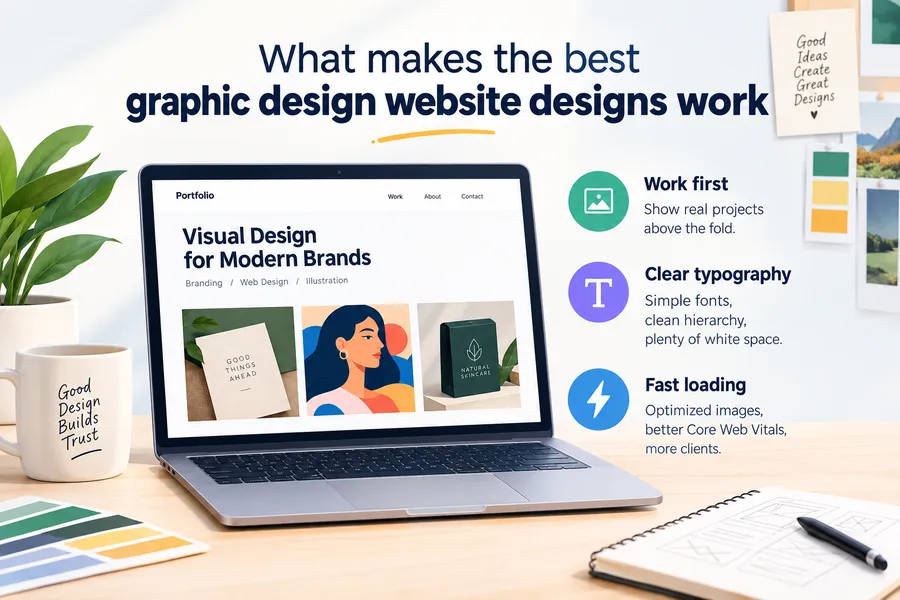
The best graphic design website designs share three traits: the work comes first, the layout is easy to scan, and the pages load fast. If a visitor has to hunt for your projects, they leave. Here is what that looks like in practice.
Your work leads the page
A graphic design website is a visual product, so the homepage should show real projects within the first screen. Skip the long welcome message. A short line that says what you do, followed by your three strongest pieces, does more than a paragraph of introduction.
When I review portfolios, the weakest ones hide the work behind a hero slider or an “enter site” screen. The strongest ones put a project grid right under the headline.
Clear hierarchy and typography
Designers get judged on type. Use one display font for headings and one readable font for body text. Keep body text at 16px or larger, and leave enough white space that each project has room to breathe.
On WordPress, you can set these fonts in the Site Editor under Styles > Typography. This keeps your fonts consistent across every page without touching code.
Speed and Core Web Vitals
Heavy images are the biggest speed problem on design sites. Aim for a Largest Contentful Paint (LCP) under 2.5 seconds, which is the “good” threshold in Google’s Core Web Vitals documentation. Export images as WebP, set sensible dimensions, and turn on lazy loading for anything below the fold.
Be honest with yourself here: a gorgeous full-screen video background that adds four seconds to your load time will cost you more clients than it wins.
Modern website design examples by style
Modern website design examples usually fall into five layout styles, and each one suits a different kind of designer. Pick the style that matches how you want clients to read your work.
| Layout style | Best for | Strength | Watch out for |
|---|---|---|---|
| Minimal grid portfolio | Branding and identity designers | Clean, fast, easy to scan | Can feel generic without strong type |
| Full-screen case studies | Packaging and campaign designers | Tells a story per project | Large images slow the page |
| Bold typography layout | Poster, editorial, and type designers | Strong personality | Hard to read if overdone |
| Interactive and animated | Motion and UI designers | Memorable first impression | Heavy scripts hurt speed |
| Blog-led portfolio | Freelancers who want search traffic | Builds authority over time | Needs regular publishing |
Minimal grid portfolio
This is the most common of the modern website designs, and for good reason. Projects sit in a tidy grid, each with a thumbnail, a title, and a short tag such as “Logo” or “Packaging.” Clicking opens a project page.
It works because visitors know what to do. The risk is looking like everyone else, so use a distinctive color or typeface to make it yours.
Full-screen case studies
Here each project gets a long page with big images, a short brief, and a results note. This style suits designers who want to show process, not only the final file.
Keep each case study to a clear structure: the problem, your approach, the result. Clients read these pages to decide whether you can solve their problem, so say what changed for the client.
Bold typography layout
Some of the best modern web designs lean on oversized headings, tight grids, and few images. This works well for type designers and editorial designers. Test it on a phone before you commit, because large headings can wrap badly on narrow screens.
Interactive and animated layouts
Hover effects, scroll animations, and custom cursors can show off your skills. They also add JavaScript weight. Use motion for one or two moments, such as a project reveal, and leave the rest of the page still.
Blog-led portfolio
A portfolio with a blog gives you something the other styles cannot: search traffic. We cover this in the blog section below.
Web design website ideas you can copy this week
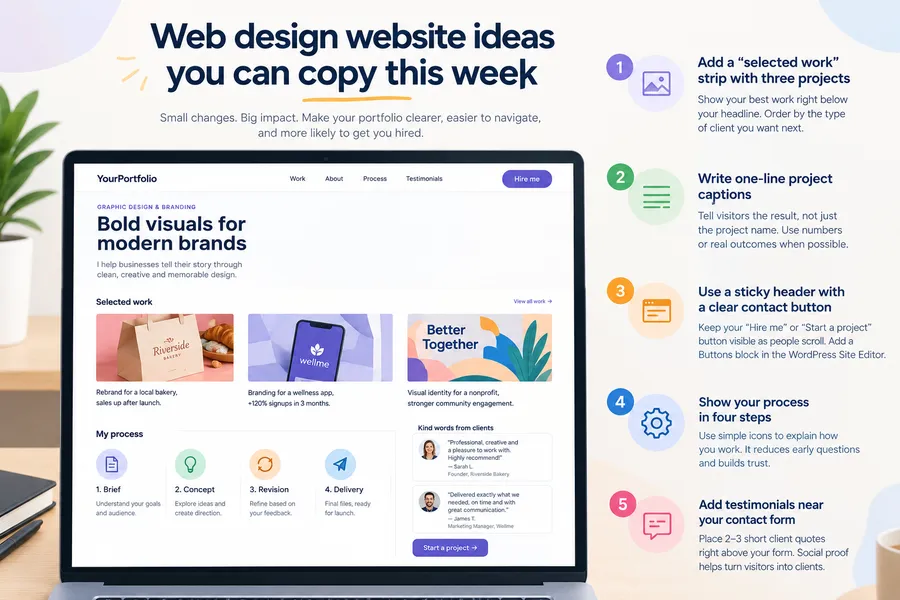
You do not need a full redesign to improve your site. These web design website ideas are small changes that make a visible difference.
Add a “selected work” strip with three projects
Pick your three best projects and place them right below your headline. Order them by the type of client you want next, not by date.
Write one-line project captions
Under each thumbnail, add a short caption that states the result. “Rebrand for a local bakery, sales up after launch” tells a client more than “Bakery branding.” Only claim results you can back up with the client’s permission.
Use a sticky header with a clear contact button
Put a “Hire me” or “Start a project” button in the header so it follows the visitor. In the WordPress block editor, you can add a Buttons block to your header template in the Site Editor.
Show your process in four steps
A simple row of four icons, such as brief, concept, revision, delivery, helps clients understand how you work. It also cuts down on early questions in your inbox.
Add testimonials near your contact form
Place two or three short client quotes right above your form. Social proof near the point of action is one of the easiest conversion fixes.
Blog web page design for graphic designers
Good blog web page design turns a portfolio into a traffic source. A blog lets you rank for searches like “logo design process” or “how to choose brand colors,” and those readers can become clients.
Keep the layout narrow and readable
Set your article column to around 700 to 760 pixels wide, with a line height of about 1.6. Long lines tire readers and make people leave early. Most WordPress block themes let you set the content width under Styles > Layout.
Use a strong featured image and clear headings
Every post should open with a custom featured image in a 16:9 ratio. Then break the text into H2 and H3 headings so readers and search engines can scan it. Add descriptive alt text, for example “Logo design mockup on a business card, shown in a minimal grid layout.”
Link posts back to your work
At the end of each article, link to a related project or your contact page. A post about packaging design should point to your packaging case study. This keeps readers moving through your site instead of leaving.
Publish on a schedule you can keep
Two good posts a month beat ten rushed ones. Pick a pace you can sustain for a year, because blog results build slowly.
Modern web designs: trends to use and trends to skip
Not every trend deserves a place on your site. Modern web designs change fast, and a trend that looks fresh this year can look dated next year.
Trends worth using
- Variable fonts. One font file can give you several weights, which keeps pages light.
- Dark mode support. Many visitors browse in dark mode, so test your colors in both.
- Asymmetric grids. Offset layouts add energy without extra scripts.
- Large, calm white space. It signals confidence and helps your images stand out.
Trends to skip
- Auto-playing sound or video. It annoys visitors and hurts speed.
- Hidden menus on desktop. A hamburger menu on a wide screen makes navigation harder.
- Low-contrast gray text. It looks elegant and fails accessibility checks. Aim for the WCAG contrast ratio of 4.5:1 for body text.
How to build graphic design website designs on WordPress
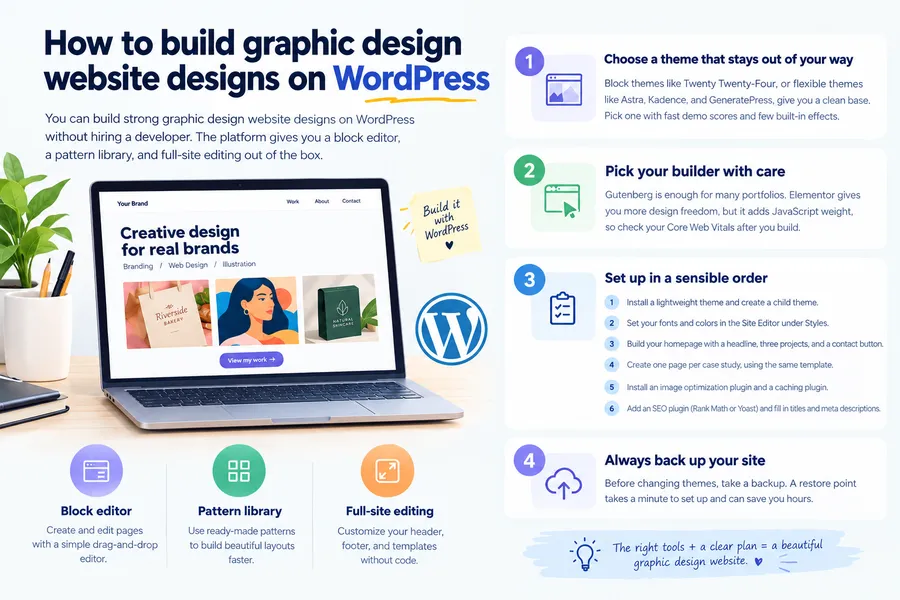
You can build strong graphic design website designs on WordPress without hiring a developer. The platform gives you a block editor, a pattern library, and full-site editing out of the box.
Choose a theme that stays out of your way
Block themes such as Twenty Twenty-Four, or flexible themes such as Astra, Kadence, and GeneratePress, give you a clean base. Pick one with fast demo scores and few built-in effects. You can add your own style on top.
Pick your builder with care
Gutenberg is enough for many portfolios. Elementor gives you more design freedom, but it adds JavaScript weight, so check your Core Web Vitals after you build. If your pages feel slow on shared hosting, move heavy sections back to native blocks.
Set up in a sensible order
- Install a lightweight theme and create a child theme if you plan to edit theme files.
- Set your fonts and colors in the Site Editor under Styles.
- Build your homepage with a headline, three selected projects, and a contact button.
- Create one page per case study, using the same template each time.
- Install an image optimization plugin and a caching plugin.
- Add an SEO plugin such as Rank Math or Yoast, and fill in titles and meta descriptions.
Always back up your site before changing themes. A restore point takes a minute to set up and can save you hours.
Teaching design online with Eduma and LearnPress
If you want to go beyond client work and sell courses, your design site can double as a learning platform. This is useful for designers who teach logo design, typography, or Figma workflows.
LearnPress is a free WordPress LMS plugin that lets you create courses, lessons, and quizzes. Eduma is an education theme from ThimPress that works with LearnPress and ships with ready-made demo layouts for course sites. Together they give you a course catalog, lesson pages, and student accounts without building from scratch.
This setup only makes sense if you plan to teach. If your goal is simply to win freelance clients, a portfolio theme is a lighter and better fit. Check each product’s documentation for the version you are running before you install.
Common mistakes to avoid
Most weak portfolios fail for the same few reasons. Check your site against this list.
- Showing too many projects. A smaller set of strong work beats a long archive of average work.
- No clear call to action. Every page should tell the visitor what to do next.
- Ignoring mobile. Many clients will first open your link on a phone, so check every page on a small screen.
- Missing alt text and page titles. These help search engines understand your images and pages.
- Outdated work. Remove projects that no longer represent your skill level.
How to choose your layout
The right layout depends on the work you want to attract, not on what looks trendy. Use these questions to decide.
- What do you want to be hired for? Branding suits a minimal grid, while motion design suits an interactive layout.
- How much time do you have? A grid takes a weekend. A custom animated site can take weeks.
- Do you want search traffic? If yes, add a blog and plan your topics early.
- Where will visitors come from? If most come from social media, optimize for mobile first.
If you are unsure, start with a minimal grid and add one distinctive element, such as a bold typeface or a custom hover effect. You can always grow the site as your portfolio grows.
FAQs about graphic design website designs
How much does a graphic design website cost?
A basic WordPress portfolio can cost very little: a domain, hosting, and a free theme are the main expenses. Premium themes, paid plugins, and custom development raise the price. Set a budget first, then decide which parts are worth paying for.
Do graphic designers still need a website if they use Behance?
Yes, because your own site gives you control over branding, search visibility, and contact details. Behance and similar platforms are useful for discovery, but you do not own the audience. Many designers use both and link the platform profile back to their site.
What colors work best on a design portfolio?
Neutral backgrounds, such as white, off-white, or dark gray, let your work stand out. Add one accent color for buttons and links. Keep the palette small so the projects stay the focus.
How often should I update my portfolio?
Review it every few months and swap in new work as you finish it. Remove older projects that no longer show your current level. A fresh, focused portfolio signals that you are active and taking on clients.
Conclusion
The best graphic design website designs put your work first, load quickly, and make contact simple. Start by choosing a layout style that fits the clients you want, then apply a few of the web design website ideas above, such as a selected work strip and short project captions. Add a well-planned blog if you want search traffic, and keep your visual choices modern but restrained.
Build on WordPress with a lightweight theme, watch your Core Web Vitals, and test on mobile. If you also want to teach, Eduma with LearnPress gives you a path to launch courses from the same site. Make one improvement today, publish it, and keep refining as your portfolio grows.
Read more: 10+ Best eLearning Authoring Tools in 2026: Features, Pros and Cons
Contact US | ThimPress:
Website: https://thimpress.com/
Fanpage: https://www.facebook.com/ThimPress
YouTube: https://www.youtube.com/c/ThimPressDesign
Twitter (X): https://x.com/thimpress_com