If you have ever typed your own keyword into Google and scrolled for five minutes trying to find your page, you already know why people search for ways to check website ranking in the first place.
Manual scrolling is slow, it is skewed by your own search history and location, and it tells you nothing about yesterday’s position or next week’s trend. This guide walks through exactly how to check website ranking using free tools, what a proper SERP rank checker actually measures, and which rank tracker tool is worth paying for once your site grows past a handful of pages.
By the end of this article you will know which tools to trust for real numbers, how to read a ranking report without getting fooled by daily noise, and how to build a simple weekly habit that keeps you ahead of both algorithm updates and competitors quietly climbing past you.
Eduma – Education WordPress Theme
We provide an amazing WordPress theme with fast and responsive designs. Let’s find out!
Why checking your website ranking actually matters
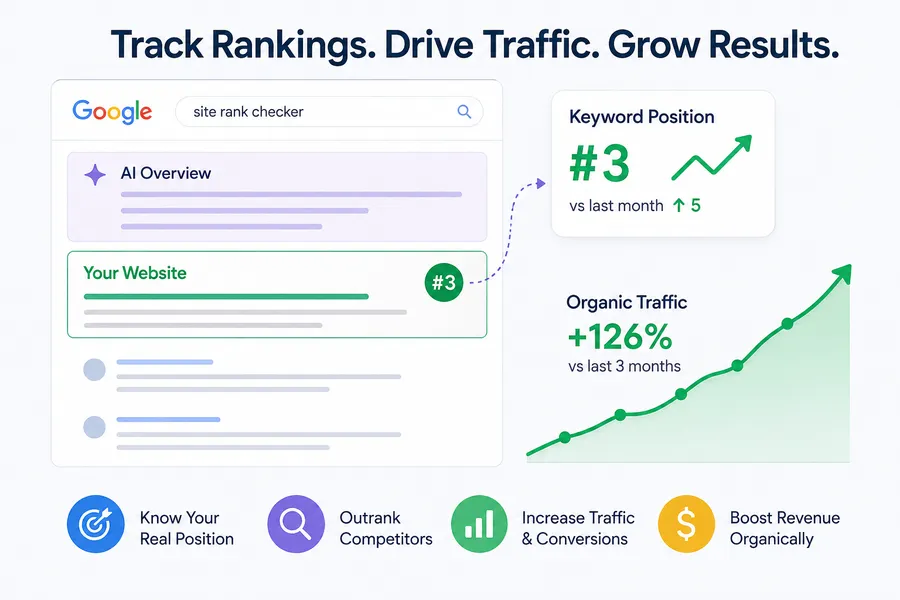
Your ranking position is the single number that tells you whether your SEO work is paying off. A site rank checker turns a vague feeling of “we’re doing okay in search” into an actual data point you can act on, and that data point is what separates guesswork from a real content strategy.
What ranking means on today’s search results
Ranking used to mean one thing: where your blue link sat on page one. That is still true, but the page around it has changed. Featured snippets, People Also Ask boxes, local packs, and AI Overviews now push the classic ten blue links further down the screen, so a page 1 position 3 result in 2023 does not get the same clicks as position 3 does today. When you check your site ranking now, look at more than the number. Check whether an AI Overview or a featured snippet sits above your listing, because that changes how much traffic that ranking actually sends you.
How rankings tie back to traffic and revenue
The correlation between position and clicks is steep. Pages sitting in the top three organic results capture the large majority of clicks on a given search term, while anything past position 10 gets a small fraction of that traffic. This is why a keyword rank checker is not a vanity metric. If you run an online store, a blog, or a course website, moving from position 8 to position 4 on your main keyword can double your organic visits without a single extra dollar in ad spend.
I have watched this play out on client sites more than once. After moving a product roundup post from position 7 to position 3 over three months of internal linking and content updates, the page’s monthly clicks in Search Console nearly tripled, even though the keyword’s total search volume stayed flat. That is the practical reason rank checking earns a place in a weekly routine instead of being something you glance at once a quarter.
How AI Overviews are changing what a top ranking is worth
Search results in 2026 look different from the ten blue links most SEO advice was written for. Google’s AI Overviews now appear above the organic results for a large share of informational searches, and a growing number of tools track whether your content gets pulled into that box alongside a traditional position number. Semrush’s Position Tracking, for example, now reports keyword rankings across search engines including AI assistants, which reflects how much search behavior has shifted toward answer boxes instead of a simple list of links. When you check ranking on Google today, treat the AI Overview and the classic organic listing as two separate battles, because ranking first in the old sense no longer guarantees the same click-through rate it did a few years ago.
How to check website ranking for free
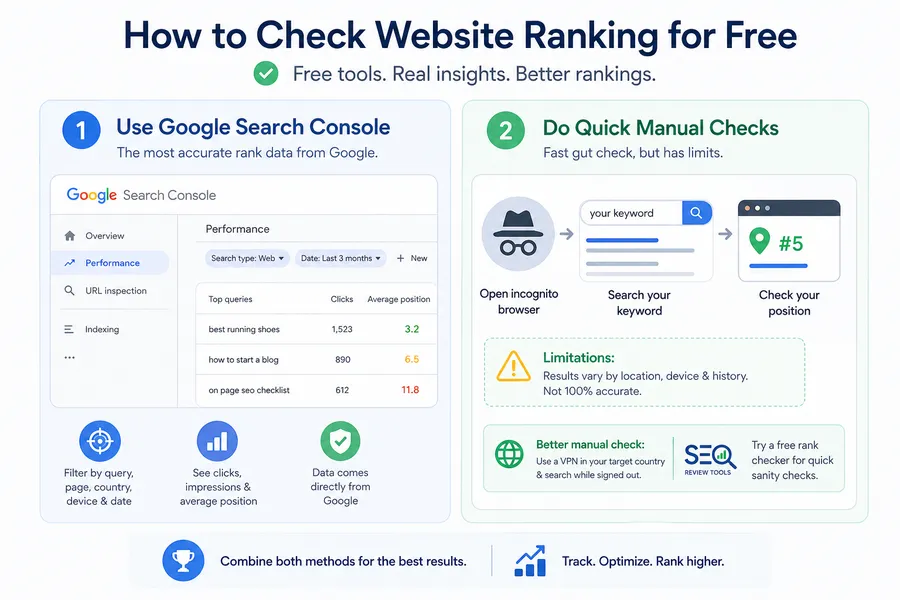
You do not need a paid subscription to get a first read on where your pages stand. Between Google’s own tools and a few honest manual checks, most site owners can get a workable answer in under ten minutes.
Google Search Console: the most accurate site rank checker
Google Search Console (GSC) is the closest thing to ground truth you will find, because the position data comes directly from Google rather than from a third-party tool guessing at your rank. Inside the Performance report, filter by query, then sort by average position to see exactly where each of your target keywords sits, along with the impressions and clicks tied to that position. The one catch is that GSC reports an average position across many searches, devices, and locations, so a single number can hide real swings. If a keyword shows an average position of 6.5, it might mean you are steadily at position 6 or it might mean you bounce between position 2 and position 11 depending on the searcher’s country.
Inside the Performance report, the filters at the top let you narrow results by exact query, page, country, device, and date range at the same time, which is where most people miss useful detail. Filtering a single query down to mobile devices only, for instance, often reveals a ranking that is noticeably worse than the desktop position sitting in the blended average, and mobile is where most searchers actually land on your site.
Quick manual checks and their limits
Opening an incognito browser window and searching your keyword by hand still works for a fast gut check, but treat it as a spot check, not a system. Google personalizes results by location, device, and search history, so your incognito result from a laptop in one city will not match what a mobile user sees three states away. If you want a slightly more reliable manual check, use a VPN set to your target country and search from a signed-out browser, though even this will not perfectly match what a real, tracked SERP rank checker tool reports.
A lightweight browser-based option worth knowing about is SEO Review Tools’ free rank checker, which runs directly in the browser with no account required. It will not replace a proper rank tracker tool for ongoing monitoring, but it is a fast way to sanity check a handful of keywords before you commit to a paid subscription.
8 Best SERP rank checker tools compared
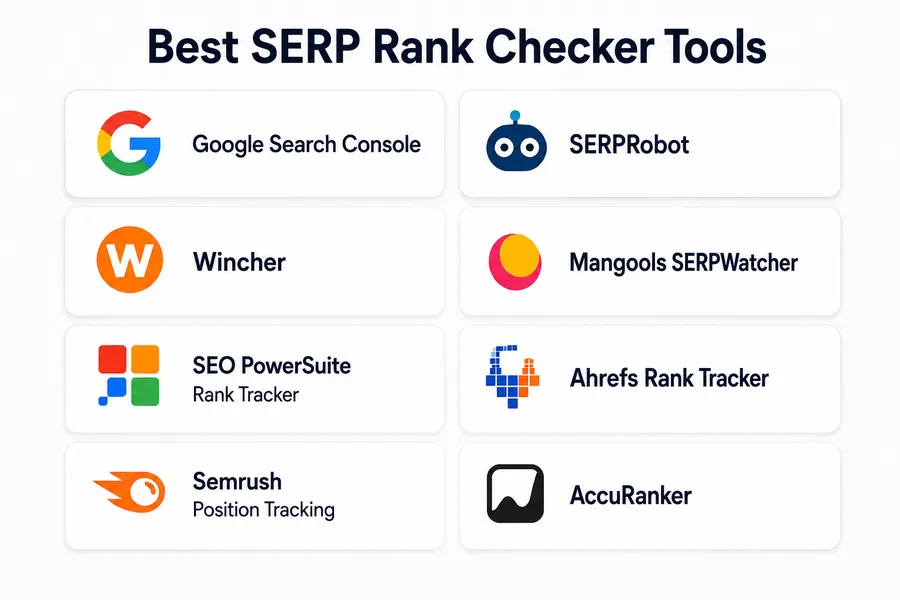
Once you move past occasional spot checks, a dedicated rank tracker tool saves real time by pulling ranking data automatically on a schedule instead of you doing it by hand every morning. Here is how the main options for a site rank checker or keywords ranking checker stack up.
| Tool | Best for | Free tier | Tracking frequency | Notable feature |
|---|---|---|---|---|
| Google Search Console | Verified, first-party position data | Fully free | Daily, reported as rolling averages | Direct data from Google, no estimation |
| SERPRobot | Fast, no-login spot checks | Limited daily checks | On demand | No account required for quick lookups |
| Wincher | Beginners testing rank tracking | Up to 10 keywords | Daily | Simple dashboard with clear trend lines |
| Mangools SERPWatcher | Small sites and solo bloggers | Limited free plan | Daily | Easy interface, ties into Mangools keyword tools |
| SEO PowerSuite Rank Tracker | Desktop-based tracking without constant internet | Freemium desktop app | On demand or scheduled | Scans top 10, top 50, or top 1,000 results |
| Ahrefs Rank Tracker | Agencies already using Ahrefs for research | Paid only | Daily | Tracks 187 countries on desktop and mobile |
| Semrush Position Tracking | Teams wanting rankings plus AI search visibility | Limited trial | Daily | Tracks visibility across search engines including AI assistants |
| AccuRanker | Large keyword portfolios and enterprise teams | 14-day trial | Daily | Fast processing built for thousands of keywords |
Free and freemium options worth starting with
If your budget is zero, start with Google Search Console for verified data, then layer in a free plan like Wincher or Mangools SERPWatcher to track ten or so priority keywords with daily updates and a visual trend line. These free tiers are genuinely useful for a small blog or a local business site with a short keyword list, and they give you the habit of checking rankings weekly instead of never.
Paid rank tracker tools for growing sites
Once your keyword list grows past what a free plan allows, or you need to track competitor domains you do not own, a paid rank tracker tool like Ahrefs, Semrush, or AccuRanker becomes worth the cost. These tools track rankings across dozens of countries, separate desktop from mobile results, and increasingly monitor how often your content shows up inside AI Overviews and AI chat assistants, which has become a real part of search visibility in 2026.
Ahrefs, for instance, tracks rankings across 187 countries on both desktop and mobile, which matters if you run a site with an international audience and need to know whether you rank differently in the United Kingdom than you do in the United States. AccuRanker leans toward speed and scale, built for agencies managing thousands of keywords at once where a slow refresh cycle would make the data useless by the time anyone reads it. None of these paid tools are strictly necessary for a small blog, but once you are managing more than one domain or reporting rankings to a client, the time saved on manual checks adds up fast.
How to check ranking on Google step by step
For anyone who wants a repeatable process rather than a one-off check, here is the sequence worth following every time.
- Open Google Search Console and go to the Performance report.
- Filter by the specific query or page you want to check.
- Note the average position, impressions, and click-through rate together, not the position alone.
- Cross-check with a rank tracker tool set to your actual target country and device, since GSC averages can mask local swings.
- Screenshot or export the data weekly so you can compare trends over time instead of a single snapshot.
- Watch for SERP features above your listing, since a featured snippet or AI Overview changes what that ranking is actually worth.
Following this order keeps you from overreacting to a single day’s fluctuation, which is one of the most common reasons site owners panic over rankings that were never stable to begin with. It also gives you a paper trail. When you eventually make a content change, a title rewrite, or an internal linking push, having weeks of logged positions beforehand means you can actually measure whether that specific change moved the needle, instead of guessing based on memory.
Keyword rank checker free vs paid: what you actually need
A free keyword rank checker is enough if you are tracking under ten keywords, working on one site, and mainly want directional confirmation that your content is moving the right way. A paid tool earns its cost once you are managing multiple sites, tracking competitors, need local rankings across several cities, or want historical data going back further than a free plan allows. Ask yourself how many keywords actually drive your revenue. If the honest answer is five, a free tier covers you. If it is fifty, the time saved by a paid rank tracker tool usually outweighs the subscription fee within the first month.
There is also a middle path many site owners skip: desktop software like SEO PowerSuite’s Rank Tracker, which is a one-time or freemium purchase rather than an ongoing subscription. It runs locally on your computer, can scan the top 10, top 50, or even top 1,000 results for a keyword, and works without a constant internet connection once a scan is queued. This suits anyone who wants deeper data than a browser-based checker without committing to a monthly SaaS bill.
Local businesses need a different kind of check
If your business depends on local customers, checking your site ranking nationally will not tell you much. A local bakery ranking position 2 nationwide could still be invisible in the actual neighborhood searches that matter, because Google’s local pack pulls from a separate, location-based algorithm. When you check site ranking for a local business, use a rank tracker tool that lets you set a specific city or even a specific zip code as the search origin, and check the Google Business Profile insights alongside your organic rankings, since local pack visibility and organic rankings do not always move together.
Setting up a rank tracker tool for ongoing monitoring
Checking rankings once and forgetting about it defeats the purpose. Set up your rank tracker tool with a short list of priority keywords, a realistic check frequency, and a habit of actually reviewing the report.
What to track every week
Keep the weekly review short: which keywords moved up, which dropped, and whether a competitor suddenly appeared in a spot you used to hold. Pair this with Search Console data on clicks and impressions so a ranking change is tied to an actual traffic outcome, not just a number moving on a dashboard.
A simple spreadsheet works fine for the first few months. List your priority keywords down one column, and add a new column each week with that week’s position, pulled either from Search Console or your rank tracker tool of choice. After six or eight weeks, the pattern becomes obvious: which pages are climbing steadily, which are stuck, and which need a content refresh or a stronger internal linking push. Most rank tracker tools will generate this trend line automatically once you have a few weeks of history logged, but building the habit manually first helps you actually understand what the chart is showing instead of skimming past it.
Where this matters for course and education websites
If you are running a course platform, an online school, or any WordPress site built for education content, tracking rank alongside conversions matters even more, since your keyword rankings are often tied directly to enrollment numbers. ThimPress builds Eduma, a WordPress LMS theme built on top of LearnPress, with fast page templates and clean markup that make it easier for course pages to earn and hold strong rankings once your content and tracking are in place. Pairing a theme built for speed with a consistent rank checking habit gives education sites a real edge over slower, generic page builders.
Web page rank checker: tracking pages, not just keywords
Most people default to checking rank by keyword, but tracking by page tells a different and sometimes more useful story. A web page rank checker view groups every keyword a single URL ranks for, which shows you whether one blog post is quietly ranking for twenty related terms or whether your traffic is concentrated on a single high-risk keyword. This page-level view is especially useful before you rewrite or merge content, since it flags every keyword position you could lose if you delete or redirect that URL.
To check this, open Search Console, switch the Performance report from Query to Page, then filter to the specific URL you care about. You will see the full spread of search terms sending that page traffic, along with each one’s average position, which is far more actionable than staring at a single keyword in isolation.
Common mistakes people make when checking rankings
A few habits quietly waste the time people put into keyword tracking.
- Checking rank from a personal, signed-in browser. Your own search history and saved location train Google to show you a version of the results that no other searcher sees, so a ranking you spot this way tells you almost nothing about the real position.
- Reacting to a single day’s ranking drop. Google runs constant small tests and index refreshes, and a keyword can swing several positions in a day without any real change to your SEO. Wait for a trend across at least a week before making changes to a page.
- Tracking only the exact match keyword. Google groups close variations and related phrases under the same search intent, so a rank checker that only watches your one exact phrase misses the dozens of related queries already sending you traffic, which Search Console’s Page filter will surface.
- Ignoring SERP features above your listing. A “position 3” ranking looks like a win on paper, but if a featured snippet or AI Overview sits above it and answers the question directly, your actual click-through rate can be far lower than the position number suggests.
- Never cross-referencing rank data with analytics. A ranking tool tells you where you sit in search. Only your analytics platform tells you whether that position actually converts into signups, sales, or enrollments, and the two numbers should always be read together.
Avoiding these five habits alone will make your rank tracking data far more useful than adding another paid tool to your stack.
Conclusion
Checking your website ranking does not require expensive software or hours of manual searching. Start with Google Search Console for accurate, first-party data, add a free or paid SERP rank checker once your keyword list grows, and build a weekly habit of reviewing trends instead of single snapshots. Whether you run a blog, a store, or an education site built on a theme like Eduma, the sites that grow steadily in search are almost always the ones whose owners actually look at their rankings on a schedule, not the ones with the fanciest tool.
The tools will keep changing. Google will keep testing new SERP layouts, AI Overviews will keep taking up more space above the fold, and new rank tracker tools will keep launching with slightly different dashboards. What stays constant is the habit itself: check your positions on a regular schedule, read the trend rather than the daily noise, and tie every ranking number back to whether it is actually bringing people to your site.
FAQs
Is there a truly free way to check website ranking?
Yes, Google Search Console is completely free and gives you first-party ranking data straight from Google, which is more reliable than most third-party estimates. Pair it with a free plan from a tool like Wincher or Mangools SERPWatcher if you want a simple visual trend line for a short list of keywords.
How often should I check my keyword rankings?
Weekly checks are enough for most sites, since daily rankings can swing based on location, device, and Google’s own testing without reflecting any real change in your SEO. Save daily monitoring for high-value commercial keywords where even small movements affect revenue.
Why does my ranking differ from what a rank checker tool shows?
Google personalizes results by your location, device, browsing history, and even the time of day, so your manual search rarely matches what a tracked tool reports from a neutral location. Rank checker tools query from fixed, unbiased locations specifically to avoid this personalization problem.
Can I check where my website ranks for keywords I am not targeting yet?
Yes, Google Search Console’s Performance report shows every query that triggered an impression for your site, including keywords you never intentionally optimized for. This is often the fastest way to find new content ideas, since you can see exactly which unplanned searches are already sending you traffic.
Read more: LMS Training: 10 Best Platforms for Better Learning
Contact US | ThimPress:
Website: https://thimpress.com/
Fanpage: https://www.facebook.com/ThimPress
YouTube: https://www.youtube.com/c/ThimPressDesign
Twitter (X): https://x.com/thimpress_com