Running a business without customer reviews is like trying to drive a car with a blindfold on. You might be moving forward, but you don’t know if you are heading in the right direction, and nobody outside the car knows if they should trust your driving.
In my experience, getting customers to leave feedback is one of the biggest hurdles for business owners. You know your product is great, and your customers are happy, but they just aren’t writing about it online.
Without enough positive reviews, your brand might look less trustworthy than your competitors. Even worse, a lack of reviews can hurt your ability to rank higher on Google or search results, meaning fewer people find you in the first place.
The good news is that you don’t need to be aggressive or technically advanced to fix this.
In this guide, I will share the most effective ways to get more customer reviews. These are simple, beginner-friendly methods that prioritize building relationships rather than just asking for favors.
Eduma – Education WordPress Theme
We provide an amazing WordPress theme with fast and responsive designs. Let’s find out!
Why Do Customer Reviews Matter?
Before we dive into the “how,” let’s briefly look at the “why.” Customer reviews are more than just a pat on the back; they are a critical business asset.
- They Build Instant Trust: New visitors are naturally skeptical. Honest feedback from real people validates your business immediately.
- They Boost SEO: Search engines love fresh content. A steady stream of reviews helps Google understand that your business is active and relevant, helping you rank higher.
- They Increase Sales: This is often called “social proof.” When a potential buyer sees that others have had a positive experience, they feel safe enough to pull out their credit card.
Quick Answer: How to Get More Customer Reviews
If you are looking for a quick summary, here are the top strategies to increase customer feedback:
- Ask Immediately: Request a review on your “Thank You” page right after a purchase.
- Automate Follow-Ups: Send an email 7–10 days later when the customer has used the product.
- Leverage Support: Train your team to ask for reviews after solving a customer’s problem.
- Use Passive Links: Add review links to email signatures and receipts.
- Go Offline: Use QR codes on packaging or in-store signage.
- Showcase Social Proof: Display existing reviews on your site to inspire others.
- Use Popups: Catch engaged visitors with a simple on-site survey.
- Offer Incentives: Reward loyalty points for on-site reviews (but be careful with rules).
8 Proven Tips to Get More Customer Reviews
Here are the 8 most effective strategies I have found to consistently collect testimonials and ratings.
1. Ask Right After the Purchase (The “Thank You” Page)
The absolute best time to ask for a favor is when your customer is the happiest. In the world of sales, this moment is usually right after they have completed a purchase or booked a service. The dopamine hit of buying something new means they are excited and feeling positive about your brand.
Don’t let this moment go to waste. Instead of just showing a generic order confirmation message, customize your “Thank You” page to include a request for a review. You can embed a simple form right there on the page. Since they are already on your site, the friction is incredibly low. They don’t have to open an email or click a new link; they just type and submit.
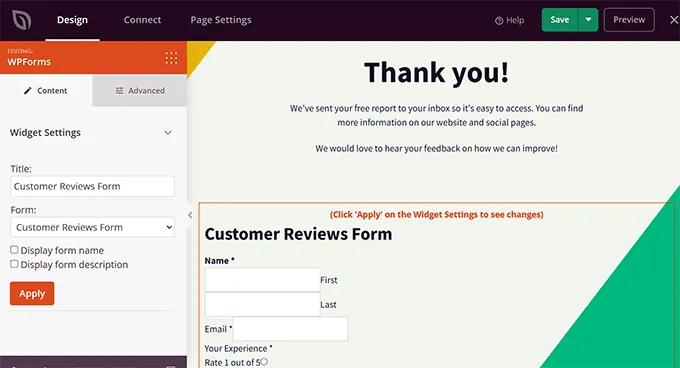
Practical Action Step: If you use WordPress, use a page builder like SeedProd to customize your WooCommerce thank-you page. You can drag and drop a review form directly onto the confirmation screen. Keep the request short: “Loving your experience so far? Let us know!”
2. Send an Automated Email Follow-Up
While asking immediately is great, sometimes customers need time to actually use your product before they can rate it. This is especially true for physical goods that need to be shipped or software that takes time to learn. If you ask too soon, they might ignore you because they have nothing to say yet. To time requests better, many teams use customer journey tools like those from FullStory to understand when users are most engaged and ready to share feedback.
The solution is to set up an automated email that goes out a specific number of days after the purchase. For physical products, wait until you are sure the item has been delivered (usually 7–10 days). For digital downloads, a few days is usually enough. This “nudge” catches them when they have formed an opinion but the purchase is still fresh in their mind.
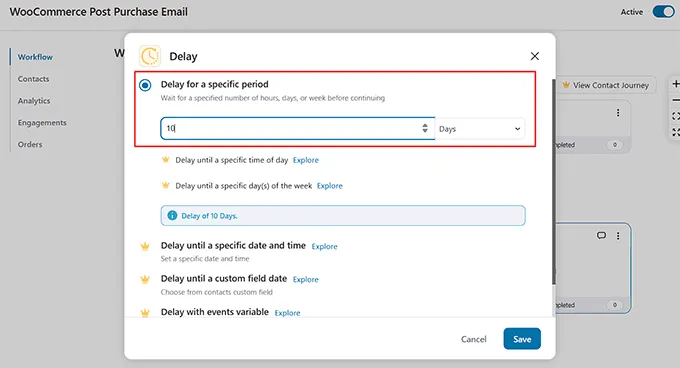
Practical Action Step: Use an automation tool like FunnelKit Automations for WooCommerce. You can create a “workflow” that triggers after a purchase, waits for 7 days, and then sends a friendly email asking, “How is your new item working out?” Include a direct link to your review form.
3. Ask After a Positive Support Interaction
Some of the most glowing reviews come from customers who had a problem that you fixed beautifully. When a customer support agent resolves a tricky issue, the customer often feels a sense of relief and gratitude. This is a golden opportunity to get more customer reviews.
Train your support team to recognize these moments. If a customer replies with “Wow, thank you so much, that fixed it!”, your agent should feel empowered to ask for a review. It feels personal and earned. Because the customer is already engaging with a human, they are much harder to ignore than an automated email.
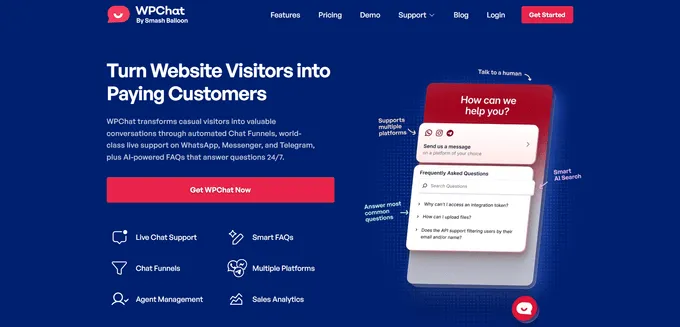
Practical Action Step: If you use a helpdesk tool like HelpScout or a chat plugin like WPChat, create a saved reply or “snippet.” This allows your agents to quickly insert a polite review request link into the chat window right after they close a successful ticket.
4. Add Review Links to Email Signatures and Receipts
Not every review request needs to be a dedicated campaign. Sometimes, a passive approach works wonders by keeping the option visible at all times. Think about how many emails your business sends out daily—order receipts, shipping notifications, newsletters, and personal replies. Each one is an opportunity.
By adding a subtle link to your email footer or signature, you remind customers that their feedback matters without being pushy. It’s a “set it and forget it” strategy. Customers might not click it the first time, but if they see it repeatedly on their receipts or invoices, they are more likely to click it when they eventually have something to say. To make this touchpoint even more effective, use a free invoice generator to generate professional invoices that include a branded review link or QR code.
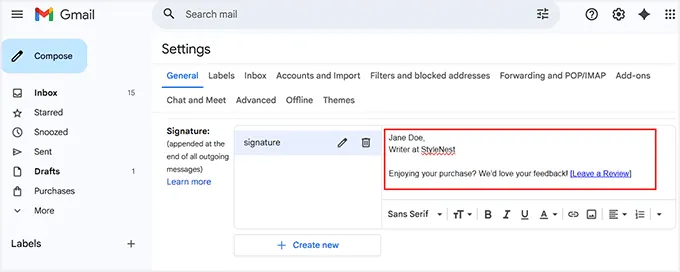
Practical Action Step: Go into your email settings (like Gmail or Outlook) or your eCommerce email template settings. Add a simple line at the bottom: “Happy with our service? We’d love your feedback! [Link].” You can use a free signature generator to make it look professional.
5. Use QR Codes for Offline Customers
If you run a physical store, a restaurant, or ship physical boxes, the digital world can feel far away for your customers. You need a bridge to get them from your physical product to your online review form. QR codes are the perfect tool for this.
Most smartphone cameras now read QR codes automatically. By placing a code on your packaging, business cards, or a sign by the register, you remove the hassle of typing in a URL. A customer can simply point their phone, tap the link, and leave a review in seconds.
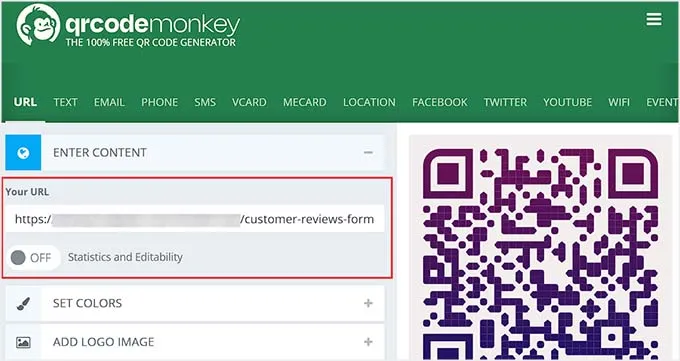
Practical Action Step: Use a free tool like QRCode Monkey to generate a code that links directly to your review page. Print this on a card that goes inside every shipping box with a note saying, “Scan to tell us what you think!”
6. Showcase Existing Reviews to Inspire New Ones
Success breeds success. When visitors see that other people are leaving reviews, they subconsciously realize that this is a community norm. It signals that your business listens to feedback and that other customers are active. This is a psychological trigger known as social proof.
If your review section is hidden away on a dark corner of your website, nobody feels inspired to add to it. By displaying your best reviews prominently—on your homepage, sidebar, or product pages—you remind visitors that their voice matters. It effectively says, “Look at all these happy people; join them!”
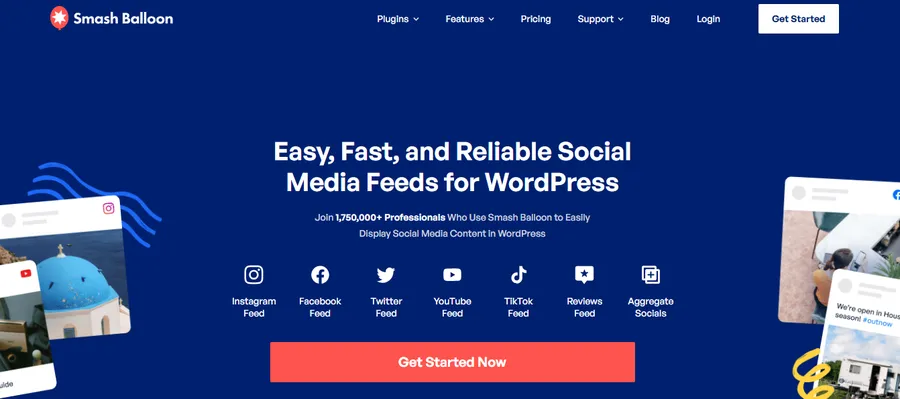
Practical Action Step: Install a plugin like Smash Balloon Reviews Feed Pro. It pulls your reviews from Google, Facebook, or Yelp and displays them in a beautiful, customizable feed on your WordPress site. Seeing a 5-star feed encourages others to contribute their own 5-star rating.
7. Catch Visitors with On-Site Popups
Sometimes users are browsing your site, fully engaged, but they just haven’t thought about leaving a review. They might be returning to buy a second item or reading your blog. These are highly interested users, making them prime candidates for feedback.
An on-site popup can act as a gentle tap on the shoulder. The trick is not to be annoying. Don’t show the popup the second they arrive. Instead, set it to appear after they have scrolled down a certain amount or spent some time on the page. This ensures you are only asking people who are actually interested in your content.
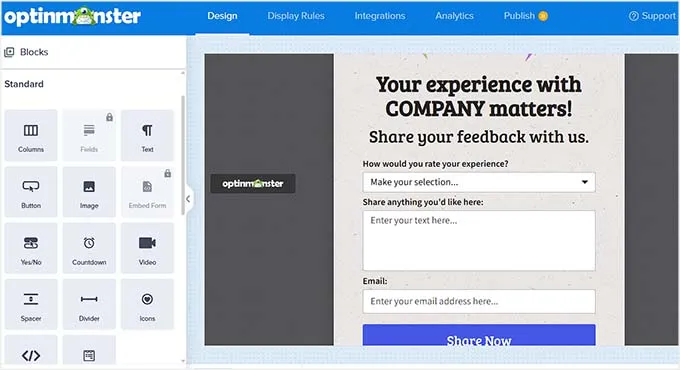
Practical Action Step: Use a tool like UserFeedback or OptinMonster. Create a simple popup that asks a binary question first: “Are you happy with us? Yes/No.” If they click “Yes,” then show the text box for the review. This “micro-commitment” drastically increases response rates.
8. Offer Incentives (The Right Way)
Let’s be honest: people are busy. Sometimes they need a little nudge to take the time to write a review. Offering a small incentive can be the difference between a customer thinking “I’ll do it later” (and forgetting) and doing it right now.
However, you must be careful. Never offer money or gifts for reviews on third-party platforms like Google or Yelp, as this violates their terms of service. But, for reviews collected on your own website for your own store, offering loyalty points or a small future discount is generally acceptable and very effective.
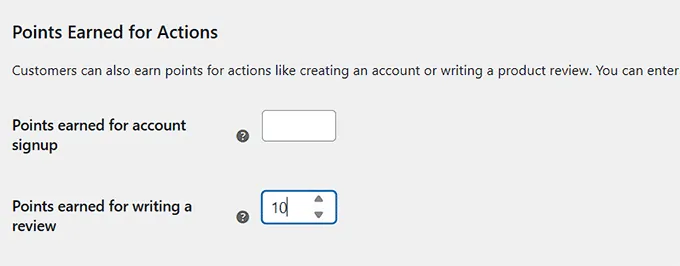
Practical Action Step: If you have a WooCommerce store, use a plugin like Advanced Coupons or a loyalty program plugin. Set up a rule where a customer earns 50 loyalty points (redeemable for a discount) automatically when their review is approved. This turns feedback into a fun, rewarding game.
Common Mistakes to Avoid
Even with the best intentions, you can hurt your chances of getting reviews if you make these common errors:
- Asking Too Soon: If the product hasn’t arrived yet, asking for a review looks unorganized and annoying.
- Being Too Pushy: Sending five emails in one week will get you unsubscribes, not reviews. One request and one reminder is usually enough.
- Ignoring Negative Feedback: If you only allow 5-star reviews and delete the rest, people will notice. A perfect 5.0 score often looks fake.
- Making it Complicated: If a user has to click four times and create an account just to leave a comment, they will quit. Keep forms short.
How to Handle Negative Reviews
You will eventually get a negative review. It happens to the best businesses. The key is not to panic, but to handle it with grace.
- Stay Calm: Do not reply immediately if you are angry. Take a breath.
- Reply Publicly and Politely: Acknowledge their frustration. Say, “I’m so sorry you had this experience.”
- Take it Offline: Ask them to email you directly to resolve the issue. Do not argue in the comments section.
- Ask for an Update: Once you have fixed their problem privately, politely ask if they would be willing to update their review. Most customers are happy to do so if you treated them well.
Frequently Asked Questions
Is it illegal to pay for reviews? Paying for fake reviews is illegal and unethical. Offering a small discount or loyalty points for an honest review on your own website is generally okay, but you cannot force them to leave a positive rating. Always check the rules of the platform (like Google or Yelp) first.
Which platform should I focus on? Start with Google Business Profile if you are a local business, as it helps with local SEO. If you sell online, focus on collecting reviews directly on your product pages to boost conversion rates.
How long should I wait to send a review request? For physical products, wait 7–10 days to ensure delivery. For services or digital downloads, 1–3 days is usually best.
What if I have zero reviews right now? Start by personally emailing your 5–10 most loyal customers. valid them personally and ask for their help. They are usually more than happy to get the ball rolling for you.
Can I use reviews from emails on my website? Yes, but ask for permission first. If a client emails you a compliment, reply and ask, “May I quote this on our website?” Most will say yes.
Conclusion
Learning how to get more customer reviews doesn’t have to be a stressful chore. It is simply about creating opportunities for your happy customers to speak up.
Start small. Choose just one of the tips above—like adding a link to your email signature or setting up an automated follow-up—and implement it today. Over time, these small streams of feedback will turn into a river of social proof that builds trust, boosts your SEO, and grows your business.
The most important step is to just start asking. You might be surprised at how many people are waiting to sing your praises.
Read more: 6+ Best Customer Reviews Plugins for WordPress
Contact US | ThimPress:
Website: https://thimpress.com/
Fanpage: https://www.facebook.com/ThimPress
YouTube: https://www.youtube.com/c/ThimPressDesign
Twitter (X): https://x.com/thimpress_com