Accepting payments directly on a website turns casual visitors into committed customers. Managing these online transactions smoothly requires a reliable, fast, and secure financial system. Many website administrators seek streamlined ways to process checkouts without compromising data security or user experience. The most effective solution is to integrate Stripe with WordPress. Providing a robust infrastructure, this platform handles global transactions effortlessly, supports a multitude of modern payment methods, and ensures that all sensitive customer data remains completely protected.
Whether managing a simple digital storefront, a donation portal, or a comprehensive Learning Management System (LMS) for online courses, establishing a proper financial infrastructure is the foundational step for sustainable business growth.
Eduma – Education WordPress Theme
We provide an amazing WordPress theme with fast and responsive designs. Let’s find out!

The Importance of Secure Online Transactions
Before configuring any technical settings, it is vital to understand how financial processing functions within a website ecosystem. A WordPress Stripe payment gateway acts as the secure bridge between a customer’s bank account and the website owner’s merchant account.
Setting up this system comes with distinct advantages.
- First, the platform offers immediate access to a secure testing environment. This allows administrators to simulate successful and failed transactions without charging real credit cards, ensuring the checkout flow is flawless before public launch.
- Second, the system supports a vast array of global payment methods. By default, standard credit and debit cards are accepted, but administrators can also enable mobile-friendly options like Apple Pay and Google Pay, alongside localized payment processors tailored to specific geographic regions.
If you are still weighing your options before configuring the system, exploring a detailed comparison of Stripe vs. PayPal for WordPress can help you decide which processor best aligns with your business model.
Transaction fees are another crucial factor. Creating an account is free, but standard processing fees apply to every successful transaction. These rates vary depending on the business’s location (such as the US, UK, or EU). While funds are processed immediately during a sale, bank payouts typically require two to seven business days to clear, depending on account history and regional banking regulations.

Essential Prerequisites to successfully add Stripe to WordPress
To successfully integrate stripe with WordPress, a few foundational elements must be established. The website must have an active SSL certificate to encrypt data and ensure secure connections. Additionally, a registered merchant account is required.
Navigating to the official Stripe website allows users to register using an email address, name, and secure password. The platform will require basic business details, including the entity type, website URL, and the nature of the products or services being sold. Depending on regional laws, further identity verification steps may be requested.
Once the profile is complete and verified, the dashboard grants access to API keys. These keys act as the secure communication passwords between the payment processor and the website. Located under the ‘Developers’ section of the dashboard, administrators must copy both the “Publishable Key” and the “Secret Key.”

Advanced Features for Enhanced Checkout
Proper Stripe integration with WordPress allows for sophisticated financial models beyond simple one-time sales.
- Recurring Payments: Administrators can establish automated billing cycles. This is ideal for SaaS products, premium content memberships, or ongoing service retainers. The billing intervals can be customized to daily, monthly, quarterly, or annual schedules.
- Saving Customer Cards: To facilitate faster future checkouts, the system allows customers to securely save their payment details. The sensitive data is vaulted securely on external financial servers, not on the website’s local database, ensuring strict PCI compliance while improving user convenience.
- Flexible Donations: Nonprofits, digital creators, and community organizations can utilize dynamic donation forms. These interfaces allow supporters to choose from preset contribution amounts or manually enter a custom figure, supporting both one-off gifts and recurring sponsorships.
How to Integrate Stripe With WordPress for Education and E-Learning
For institutions and educators running specialized platforms, the requirements differ slightly from standard e-commerce. If a website utilizes an educational theme like Eduma alongside the LearnPress LMS, the integration process is heavily optimized. This specific software ecosystem includes a native add-on, eliminating the need for third-party form builders.
Step 1: Activating the Native Add-on
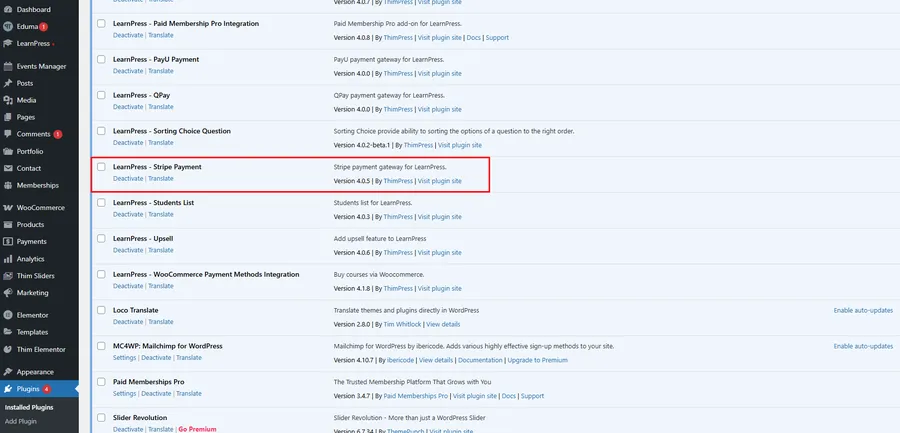
Instead of searching the public repository, administrators using the Eduma theme can locate the required extension directly within their specialized theme dashboard. Searching for the “Stripe Add-on for LearnPress“ and clicking install will automatically attach the extension to the LMS framework.

Step 2: Enabling the Gateway
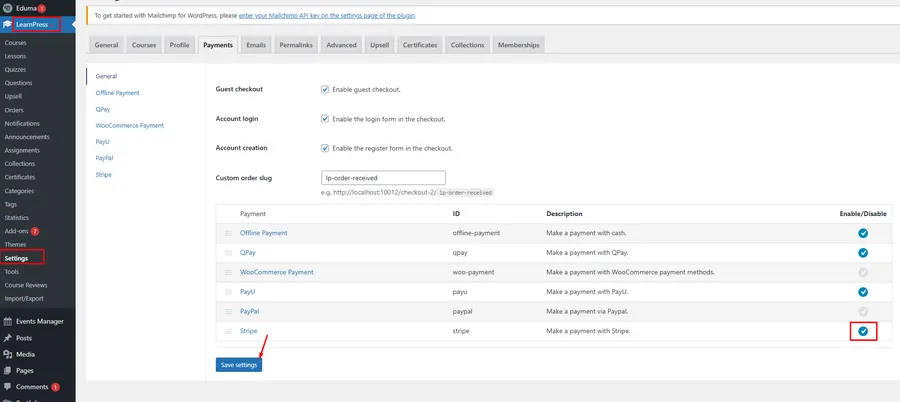
Once active, the payment method must be toggled on. Navigating to the LearnPress settings panel and accessing the ‘Payments’ tab reveals a list of available processors. Checking the enable box next to the new gateway activates it for the educational platform.
Step 3: Finalizing API Details
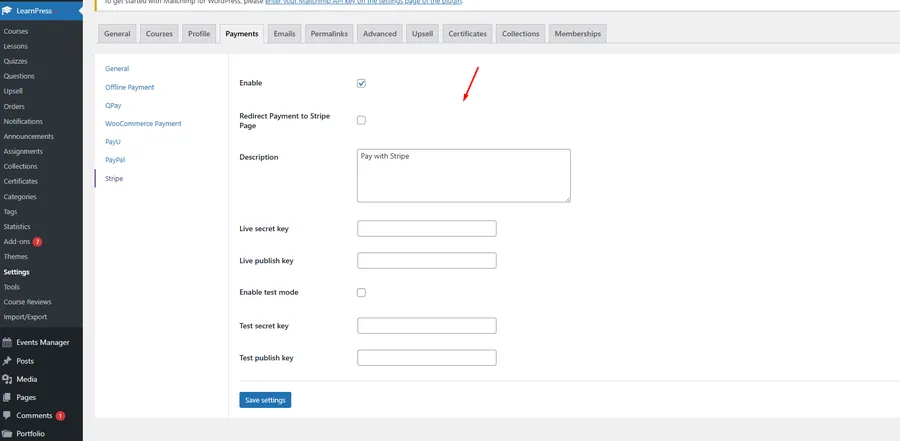
Similar to the general method, the unique API credentials must be inputted. Within the specific settings sub-tab, administrators must paste both the Live Secret Key and the Live Publishable Key. Furthermore, it is highly recommended to input the Test Keys and enable the test mode checkbox for initial quality assurance.
When students browse the course catalog and proceed to enrollment, they will experience a seamless, uninterrupted checkout. The credit card input fields are loaded securely directly on the website, preventing users from being redirected to external, unfamiliar pages, thereby increasing overall course conversion rates.
Conclusion: Best Practices for Testing and Going Live
Regardless of the method chosen to integrate Stripe with WordPress, rigorous testing is mandatory. Test mode must be utilized to simulate various scenarios. External documentation provides specific dummy credit card numbers designed to trigger successful payments, insufficient funds errors, and expired card declines. Testing these variations ensures that automated emails, error messages, and successful redirects function exactly as intended. Only after thorough verification should the live API keys be activated and the test mode disabled.
By following systematic procedures, website administrators can establish a professional, highly secure financial infrastructure. Whether processing single product sales, ongoing subscriptions, or extensive educational course enrollments, a carefully configured system guarantees reliability, fosters customer trust, and streamlines business operations.
Frequently Asked Questions (FAQs) about How to Integrate Stripe with WordPress
1. What is the primary benefit of using this specific payment processor over others?
This processor offers an exceptionally developer-friendly infrastructure, seamless on-site checkout experiences without external redirects, and comprehensive support for global currencies alongside modern digital wallets like Apple Pay and Google Pay.
2. Is an SSL certificate strictly required to process transactions?
Yes, an active SSL certificate is absolutely mandatory. It encrypts the sensitive financial data transferred between the customer’s browser and the server, ensuring PCI compliance and protecting against data interception.
3. Can multiple payment gateways be active on the same website simultaneously?
Yes, administrators can enable multiple options. For example, a website can offer credit card processing alongside PayPal or offline bank transfers, giving customers the freedom to choose their preferred transaction method at checkout.
4. What is the purpose of the provided Test Mode?
Test Mode allows administrators to perform simulated transactions using dummy credit card numbers. This helps verify that the checkout flow, form functionality, and post-purchase automations work flawlessly without transferring real monetary funds.
5. Are there additional costs associated with specialized LMS integration add-ons?
For users operating the Eduma theme, the specific LMS payment add-on is included natively at no extra cost. However, standard processing fees charged by the financial institution for successful live transactions still apply globally.
Read more: Magento Commerce vs. Adobe Commerce: What’s Really Better?
Contact US | ThimPress:
Website: https://thimpress.com/
Fanpage: https://www.facebook.com/ThimPress
YouTube: https://www.youtube.com/c/ThimPressDesign
Twitter (X): https://x.com/thimpress_com