The first major WordPress release of 2026 has officially arrived. After extensive beta testing, the final version is now available, bringing foundational changes to how website owners and developers interact with the content management system.
Before diving into the extensive list of WordPress 7.0 features, it is highly recommended to create a comprehensive backup of your website. If your site is not hosted on a managed WordPress platform, you will need to initiate the installation manually.
To help you navigate this milestone release, we have reorganized and detailed every addition, enhancement, and developer tool included in the core software. Here are the top new capabilities you will find after upgrading.
Eduma – Education WordPress Theme
We provide an amazing WordPress theme with fast and responsive designs. Let’s find out!
1. Device-Specific Block Visibility Controls
For years, website creators relied on third-party page builders to hide or show specific elements based on the user’s device. One of the most anticipated WordPress 7.0 features is the native integration of block visibility controls directly into the core editor.
You can now explicitly dictate whether a block appears on desktop, tablet, or mobile screens without writing any custom code. This allows you to design tailored experiences, such as displaying a complex data table on desktop while swapping it for a simplified summary card on mobile viewports.
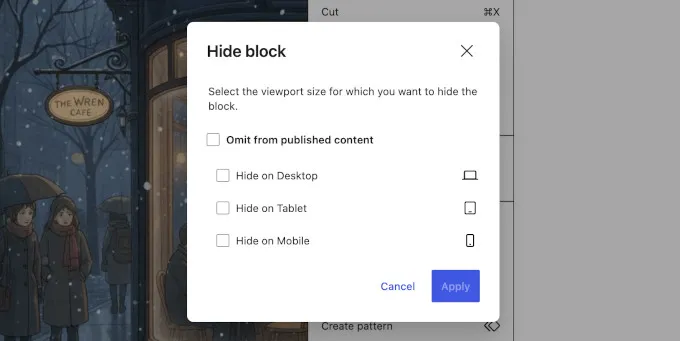
- How it works: Highlight any block and navigate to the visibility settings located in the block inspector or toolbar. Select the devices where the block should remain hidden.
- Visual cues: An indicator icon will appear in the List View next to any block that has active visibility restrictions.
- Breakpoint styling: You can apply distinct styles, such as modified typography scaling or margin spacing, for each specific breakpoint.
2. Centralized WordPress AI Connectors Hub
Artificial intelligence integrations previously required installing multiple plugins and managing API keys across various settings pages. The new WordPress AI connectors screen establishes a centralized, native hub for managing artificial intelligence services.
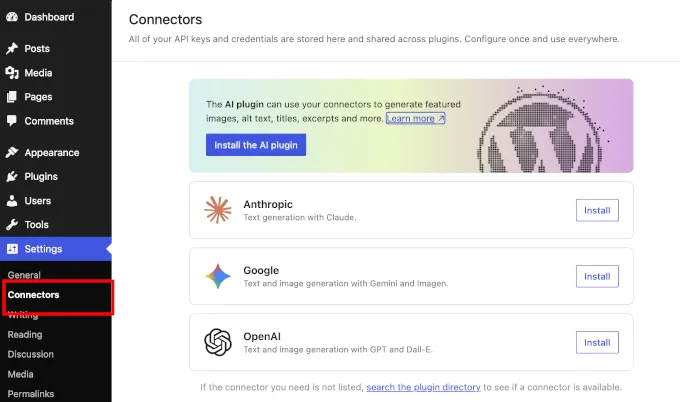
Located under Settings » Connectors, this dashboard acts as a dedicated directory for your AI credentials. At launch, the system supports Google (Gemini), OpenAI (ChatGPT), and Anthropic (Claude). Once you authenticate your chosen provider here, any compatible WordPress plugin utilizing the WordPress AI API will automatically inherit the connection. This eliminates redundant API key entries and secures your credentials in one standardized location.
Privacy Control: If your organization restricts artificial intelligence usage, you can completely disable all LLM functionalities site-wide by adding
define( 'WP_AI_SUPPORT', false );to yourwp-config.phpfile.
3. Custom Block CSS for Individual Elements
Historically, applying a unique style to a single block instance required assigning a custom CSS class and writing rules in the global Additional CSS customizer. The introduction of custom block CSS streamlines this workflow entirely.
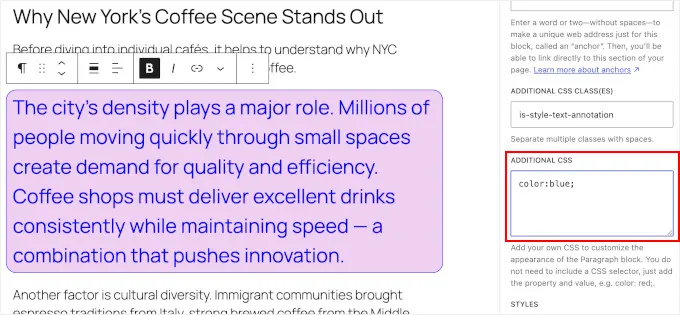
A dedicated Custom CSS text area is now available inside the Advanced panel of the block inspector. Any code entered into this field remains strictly scoped to that specific block.
- Live rendering: Code adjustments reflect instantly in the editor.
- Portability: The CSS is stored within the block’s markup, meaning the custom styling remains intact if you copy, paste, or duplicate the block.
- Permissions: For security, only users with the
edit_csscapability (typically Administrators and Editors) can view and modify this field.
4. Enhanced Visual Revisions Interface
Tracking content changes across a multi-author website is significantly easier with the overhauled visual revisions system. Instead of relying on raw HTML comparisons, the editor now provides a side-by-side visual diff tool.
The interface utilizes a strict color-coding system to indicate modifications:
- Green outlines: Newly added blocks.
- Red outlines: Deleted blocks.
- Yellow outlines: Blocks containing modified attributes or settings.
- Text changes: Green underlined text denotes additions, while red strikethrough text indicates removals.
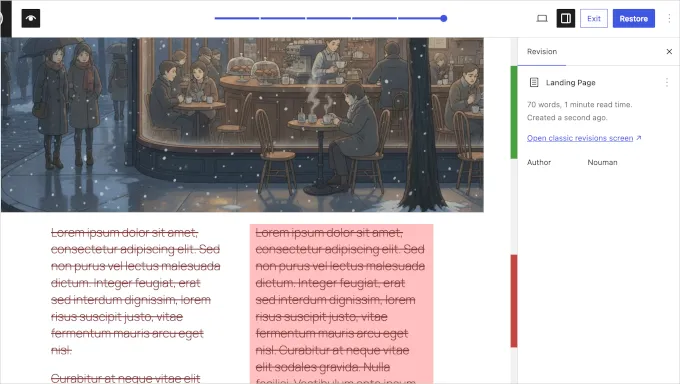
Additionally, the inspector sidebar details the exact block attributes that were altered, offering a comprehensive audit trail for editorial teams.
5. A Faster, Refreshed WP 7.0 Admin Interface
The backend typography and color schemes have been uplifted, but the most impactful change to the WP 7.0 admin interface is its underlying performance. Transitions between core backend screens—such as navigating from the Settings menu to the Posts screen—now occur seamlessly without triggering a full browser page reload.
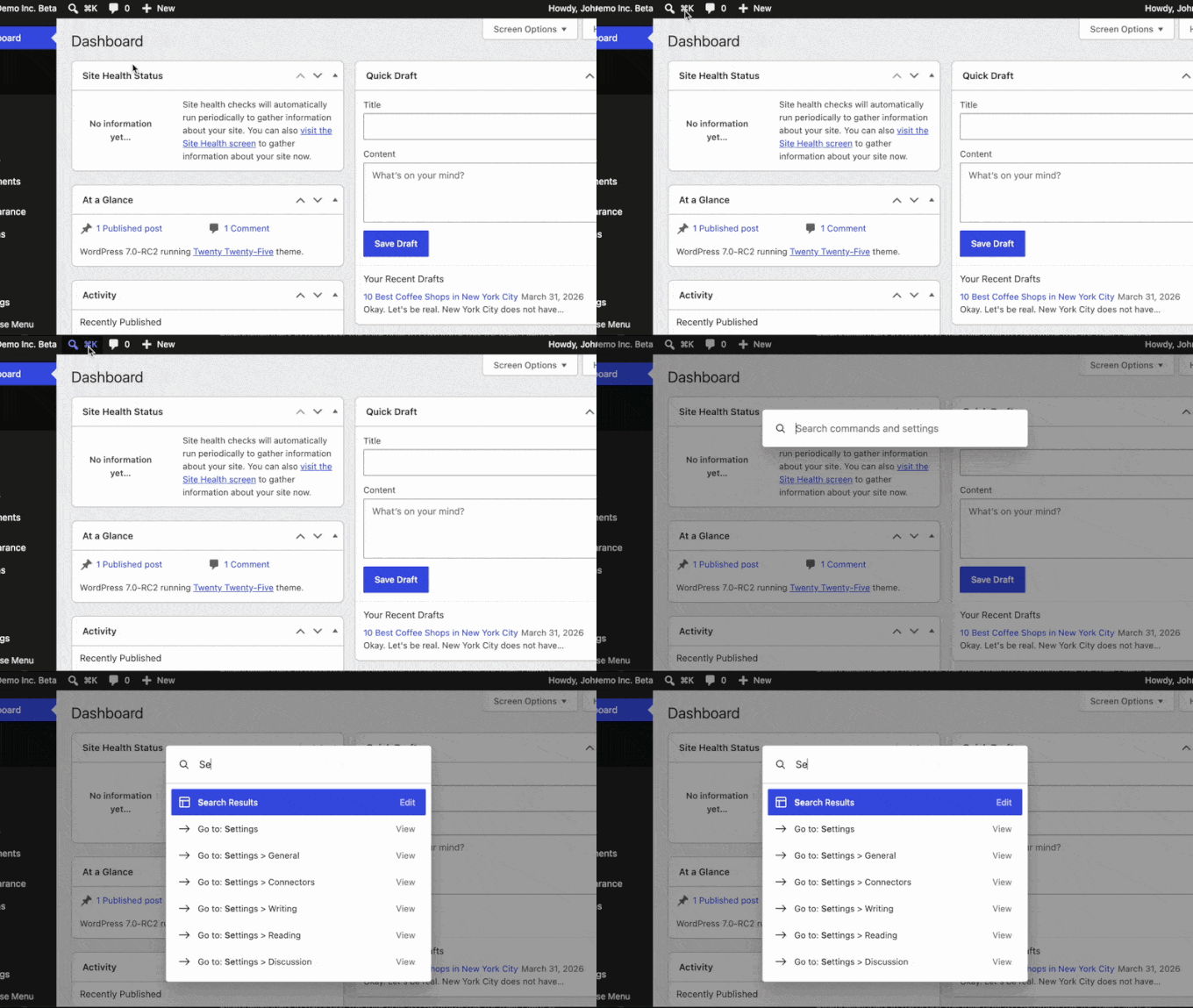
Furthermore, the Command Palette has broken out of the block editor and is now accessible globally across the entire admin dashboard. By pressing Cmd+K (Mac) or Ctrl+K (Windows/Linux), power users can execute commands, jump to specific settings, or search for posts instantly without using a mouse.
6. Three New Native Core Blocks
This release absorbs the functionality of several common plugins by introducing three highly requested core blocks:
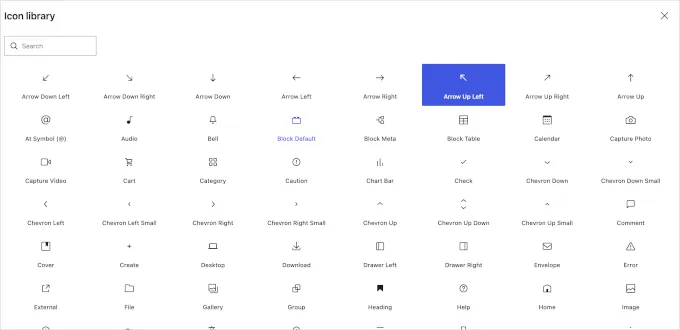
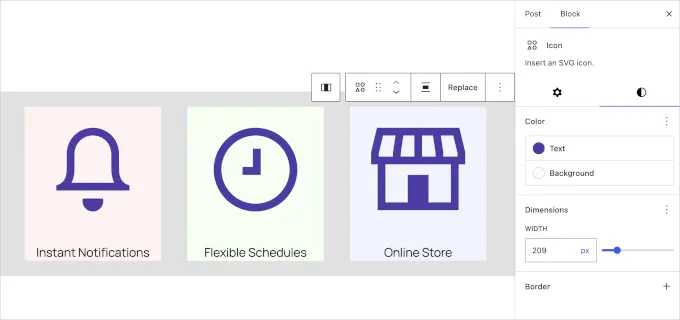
- Icons Block: Insert scalable vector graphics directly into your layouts. The block includes the entire standard WordPress icon library. You can modify the size, color, and padding of each icon natively. Future updates will introduce support for custom third-party icon libraries.
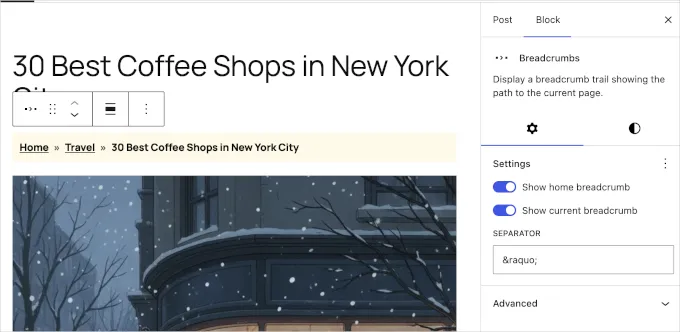
- Breadcrumbs Block: Automatically generate a hierarchical navigation trail based on your site’s architecture. Breadcrumbs enhance user experience and provide search engines with vital site structure data. Developers can manipulate the output using bundled PHP filters.
- Headings Block: Instead of managing six separate heading blocks, WordPress 7.0 consolidates H1 through H6 into a single, unified block. You can toggle the heading level dynamically from the inspector sidebar, ensuring better accessibility compliance and cleaner document outlines.
7. Granular Control Over Navigation Overlays
Mobile menu overlays (often referred to as “hamburger menus”) have exited the experimental phase. The Navigation block now features a “Create overlay” workflow that guides users through configuring mobile menus using pre-built design patterns.
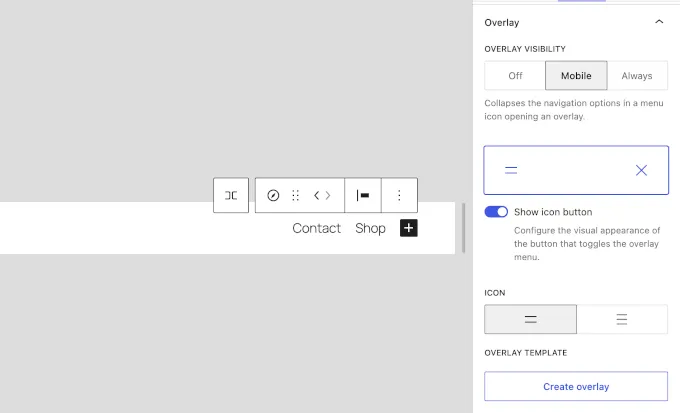
Theme developers are also granted a new navigation-overlay template part, allowing them to define precise behavioral rules for off-canvas menus.
8. Smarter Pattern Editing Mode
To protect complex design layouts from accidental breakage by authors, block patterns now open in “content-only” mode by default. When a user edits a pattern, the interface strips away complex structural and spacing controls. The focus is shifted entirely to the content—allowing users to simply swap out text paragraphs and media files.
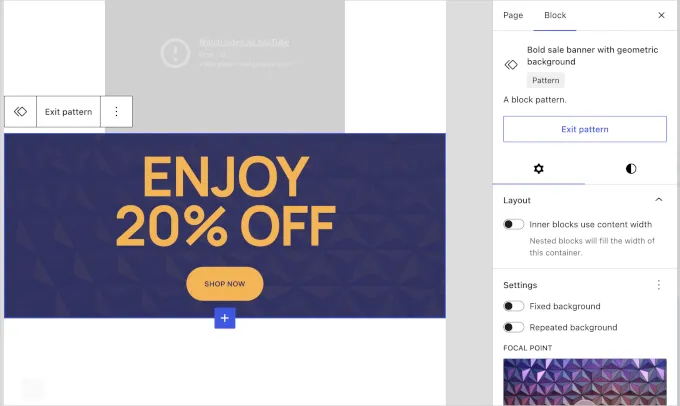
Developers who prefer unrestricted access to pattern structures can bypass this isolation mode by utilizing the disableContentOnlyForUnsyncedPatterns filter in their theme’s functions file.
9. Intuitive Gallery Lightbox Navigation
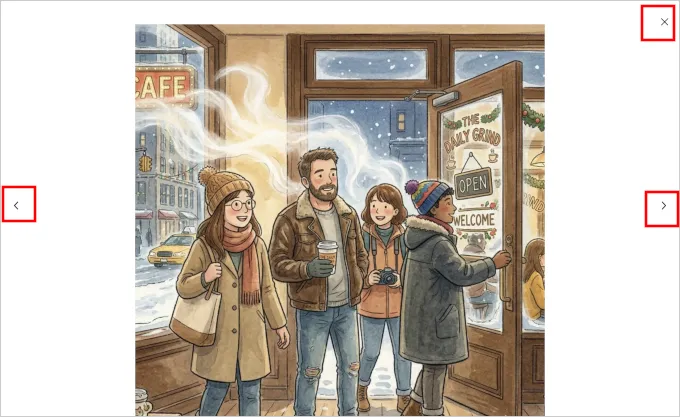
The native image lightbox feature introduced in previous versions has been refined. When users click an image within a Gallery block, the expanded lightbox now includes left and right navigational arrows. Visitors can seamlessly cycle through the entire gallery using either their mouse or keyboard arrow keys without needing to close and reopen the overlay for each consecutive image.
10. Foundational Developer Upgrades
WordPress 7.0 delivers a robust suite of technical improvements aimed at theme and plugin creators:
- Theme.json Pseudo-Elements: Developers can now natively target interactive states such as
:hover,:focus, and:activedirectly within thetheme.jsonconfiguration, minimizing the need for external stylesheets. - PHP-Only Block Registration: Simple, server-side blocks can now be registered entirely through PHP without requiring accompanying JavaScript files, lowering the barrier to entry for custom block creation.
- Block Selectors API: A new
selectors.cssproperty insideblock.jsonallows block developers to dictate exactly which CSS selectors Global Styles should target, preventing styling conflicts. - Global Font Library Expansion: The Font Library now features a centralized management dashboard and is fully compatible with classic themes, breaking its previous restriction to block-based themes.
- WP-CLI 3.0: The command-line interface receives two major command sets:
wp blockfor extracting block data, andwp abilityto interface with the new AI API. - Iframed Editor Enforcement: To guarantee styling consistency between the backend and front end, the post editor will automatically transition to an iframed environment provided all blocks utilize Block API version 3 or higher.
11. Miscellaneous Editor and Security Enhancements
Rounding out the list of WordPress 7.0 features are several targeted quality-of-life improvements:
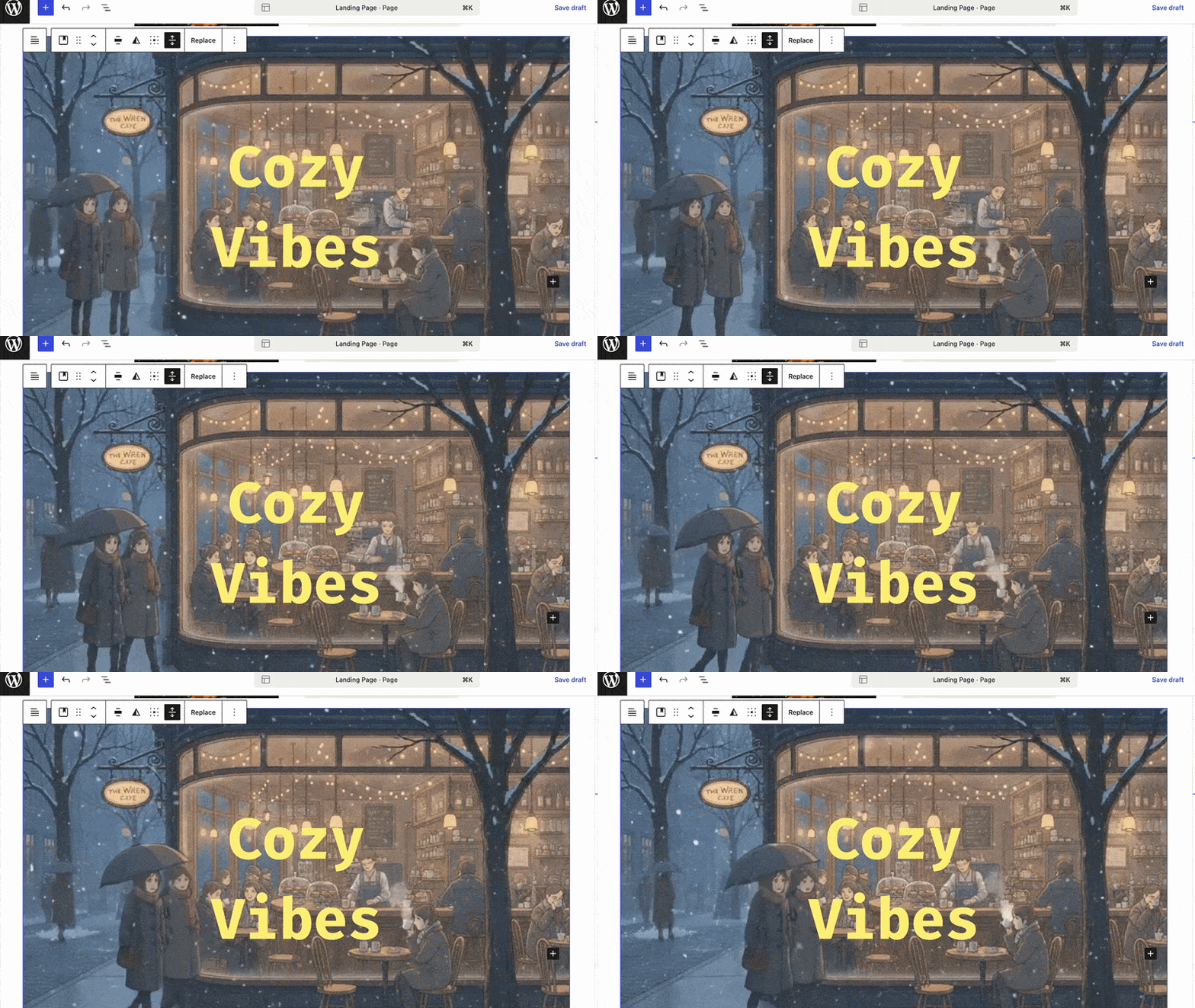
- Remote Cover Videos: The Cover block now accepts external video URLs, eliminating the need to upload heavy video background files directly to your media library.
- Standardized Alignment: Text alignment controls have been uniformly applied to eight specific blocks, including Post Author and Term Description.
- Interactivity API: A new
watch()function optimizes how interactive blocks handle side effects. - Privilege Security: To prevent accidental privilege escalation, the “Administrator” and “Editor” roles are no longer selectable as default roles for new user registrations under general settings.
- PHP Environment: The absolute minimum requirement is now PHP 7.4, though modern environments running PHP 8.3 or 8.4 are strongly advised for optimal security and speed.
12. A Note on Delayed Features
During the beta phase, two ambitious functionalities were previewed but ultimately withheld from the final 7.0 release. Real-time collaboration (RTC) was postponed due to core team concerns regarding server load and potential database race conditions. Similarly, Client-Side Media Processing was extracted into a standalone plugin for further refinement. Both features remain in active development and are expected to debut in subsequent updates.
FAQs
Will the new WordPress AI connectors share my site data publicly?
No. The connectors act as a secure bridge between your server and the AI provider (like OpenAI or Anthropic). Data is only transmitted when you actively utilize an AI-powered plugin feature that requests a generation or analysis.
Do I need a block theme to use the new Font Library?
Previously, yes, but one of the major WordPress 7.0 features is cross-compatibility. The Font Library is now fully accessible regardless of whether you are using a modern block theme, a hybrid theme, or a legacy classic theme.
How do I revert to the old revision system if I don’t like the color coding?
The visual diff system replaces the legacy text-based revisions interface in the block editor. However, you can still view raw code changes by utilizing developer tools or specific revision management plugins, though the visual system is designed to be universally more intuitive.
What happens if I use custom block CSS on an element and later change my theme?
Because the custom CSS is saved directly within the individual block’s attributes, those specific styling rules will persist and render correctly even if you activate a completely different theme.
Conclusion
The release of WordPress 7.0 represents a significant maturation of the site editing experience. By bringing essential tools like block visibility controls and custom block CSS into the core software, WordPress is actively reducing the ecosystem’s reliance on bloated third-party page builders. Furthermore, standardizing the AI integration process ensures the platform is prepared for the next generation of automated web publishing tools.
As always, test this major version on a secure staging environment first. Once verified, you can confidently upgrade and take advantage of a substantially faster, more capable content management system.
Read more: How to Check Competitor Website: Traffic & SEO Wins
Contact US | ThimPress:
Website: https://thimpress.com/
Fanpage: https://www.facebook.com/ThimPress
YouTube: https://www.youtube.com/c/ThimPressDesign
Twitter (X): https://x.com/thimpress_com