Picking a website design package is harder than it should be. You’ve got drag-and-drop builders charging by the month, WordPress hosts charging by the year, and freelance marketplaces charging by the project, and none of the pricing pages line up so you can compare them side by side. I tested and researched the 5 affordable website design packages for small business owners land on most, and broke down what you actually get at each price point.
Eduma – Education WordPress Theme
We provide an amazing WordPress theme with fast and responsive designs. Let’s find out!
How I compared these packages
I looked at five things for each option:
- The real monthly cost on annual billing (not the teaser price),
- What’s included at the small business tier specifically,
- How much technical skill the setup takes,
- Whether ecommerce is available without an upgrade,
- And what a solo business owner runs into in the first few months of using it.
Prices below are accurate as of 2026 and reflect annual billing unless noted, since every one of these providers charges more for month-to-month.
| Package | Starting price | Best for |
|---|---|---|
| Wix Core | $29/month | Small stores that want built-in ecommerce and booking |
| Squarespace Core | $23/month | Service businesses that want a polished, template-driven look |
| GoDaddy Website Builder Premium | $14.99/month | Owners who want one dashboard for domain, email, and site |
| WordPress.com Business | $25/month (annual) | Businesses that want plugin flexibility without hosting headaches |
| Fiverr freelance packages | $500-$5,000 per project | Owners who want a custom design and don’t want to build it themselves |
Wix Core plan
Wix is the platform most small business owners try first, mostly because the free plan lets you build the whole site before paying anything. It’s also the most template-heavy option on this list, with a drag-and-drop editor that leans toward visual flexibility over structure, so you can move almost any element anywhere on the page rather than working within fixed content blocks.
That freedom is a selling point for owners who want a specific look, but it also means Wix expects a bit more design judgment from you than a more template-locked builder like Squarespace.
What’s included
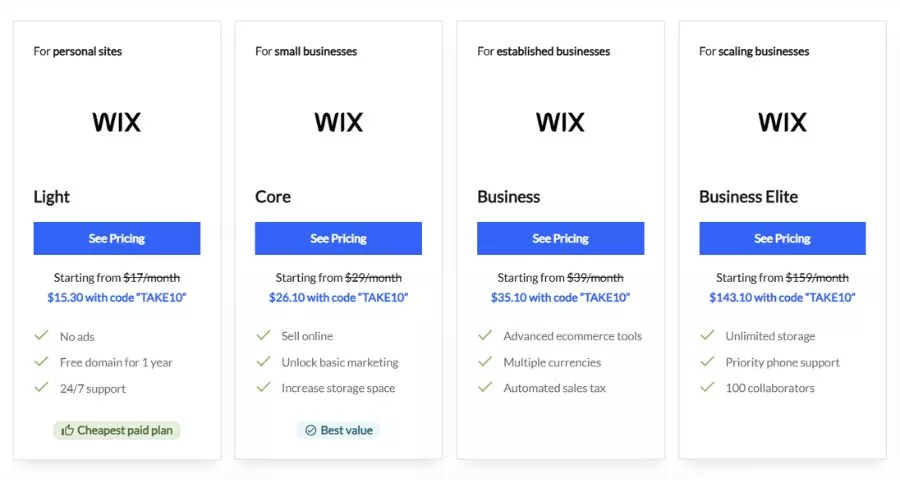
The Core plan is Wix’s entry point for anyone selling online. Wix’s four paid plans are Light at $17/month, Core at $29/month, Business at $39/month, and Business Elite at $159/month, all on annual billing. Core adds the online store, booking tools, and analytics that the cheaper Light plan doesn’t include. When I set up a test store on Core, the checkout, inventory, and coupon tools were all live in the same dashboard I used to edit the page layout, so there was no separate app to configure.
Pricing
Wix’s Light plan costs $17/month and works for personal and small business sites that don’t need to sell anything, while Core at $29/month is the minimum tier that supports ecommerce and online booking. Monthly billing runs higher than the annual rate on every tier, so if you’re comparing sticker prices across builders, check that both quotes use the same billing cycle.
Best for
Core suits a small business that wants to sell a limited number of products or take bookings without adding a separate scheduling app. The template library covers most industries, so you’re rarely starting from a blank page.
Watch out for
Professional email isn’t bundled into any Wix plan. Google Workspace integration runs $6/month per user on top of your Wix plan, so budget for that separately if you want a branded inbox from day one.
Squarespace Core plan
Squarespace is the platform I recommend most often to service businesses (coaches, photographers, consultants) because the templates lean editorial rather than generic.
Where Wix hands you a blank canvas, Squarespace’s block-based editor keeps you inside a more structured layout system, which means less time fighting alignment and spacing and more time filling in your actual content. That structure is exactly why Squarespace sites tend to look more consistent out of the box, even for someone building their first website with no design background.
What’s included
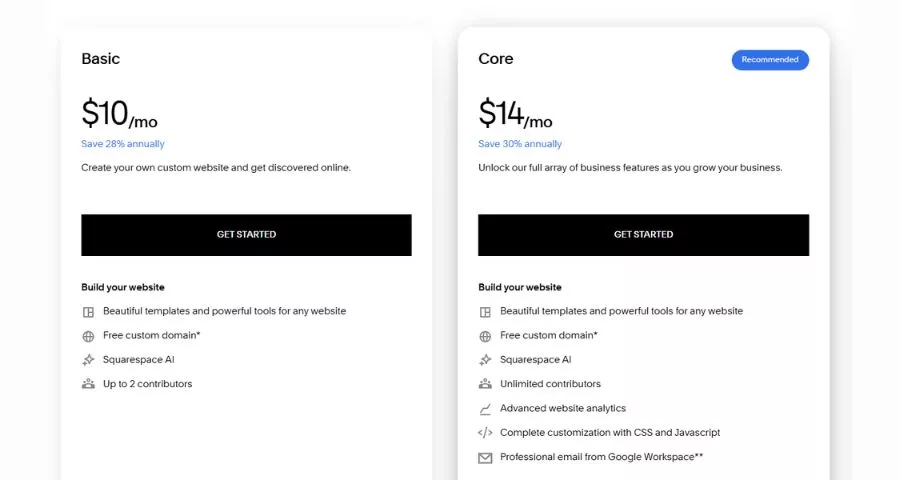
Squarespace’s four plans are Basic at $16/month, Core at $23/month, Plus at $39/month, and Advanced at $99/month, all billed annually. The jump from Basic to Core is the one that matters most for a small business: Core unlocks advanced sales tools and removes the transaction fee that Basic still charges on every sale. On a test site I built on Core, the difference from Basic showed up immediately in the editor. Custom code injection opens up, which is what lets a designer make small CSS tweaks (spacing, font sizing) instead of being boxed into the default template settings.
Pricing
Core costs $23/month on annual billing. A separate cost to plan for is professional web design if you hire someone to build on Squarespace, which typically runs $2,500-$8,000 as a one-time project fee, on top of the monthly plan.
Best for
Small service businesses that care about visual polish more than heavy ecommerce features. If you’re only selling a handful of digital products or booking consultations, Core covers it without the higher-tier processing rates you’d need at real sales volume.
Watch out for
Custom domain renewal after the first free year runs $10-$20/year, and specialty extensions like .studio or .design can cost $30-$70 or more. Factor that into your second-year budget so the renewal invoice doesn’t surprise you.
GoDaddy Website Builder
GoDaddy makes sense for a business owner who wants domain, email, and website all billed from the same account, since that’s genuinely GoDaddy’s biggest selling point over a builder-only platform. Most small businesses already register a domain somewhere, and GoDaddy is the largest registrar in the world, so a lot of owners end up here simply because it’s the path of least resistance from domain purchase to live site.
The builder itself leans on an AI setup flow rather than a template library you browse first, which speeds up the initial build but leaves less room for customization later.
What’s included
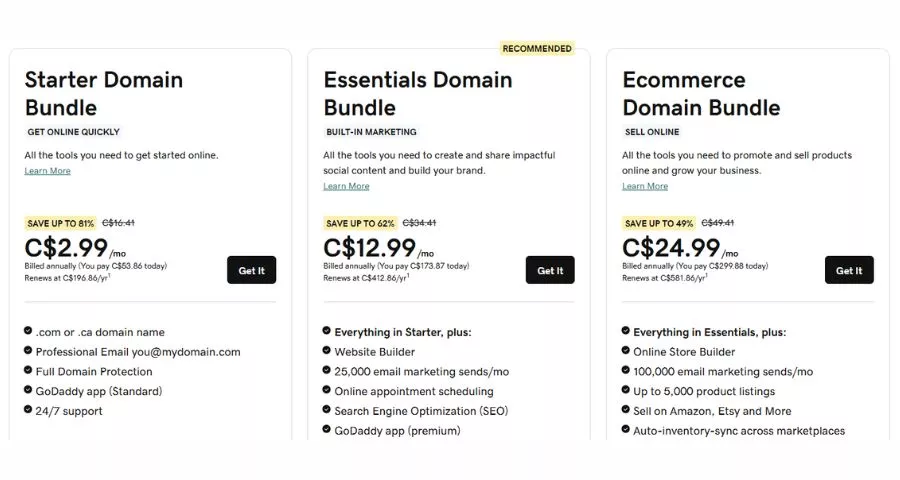
GoDaddy’s website builder plans cost $9.99/month for Basic, $14.99/month for Premium, and $20.99/month for Commerce. Basic covers a brochure-style site: pages, contact forms, and basic search visibility tools, which is enough for a consultant or contractor who mainly needs hours, location, and a way for customers to reach them. Premium adds appointment scheduling, which is the tier most service businesses actually need.
Pricing
Basic starts at $9.99/month, making it the cheapest paid tier of any option on this list. Most small-business users compare Basic, Premium, and Commerce, with prices commonly running $9.99 to $20.99 per month on annual billing before taxes and add-ons.
Best for
Owners who already register domains through GoDaddy and want to avoid juggling three separate logins for domain, email, and hosting. Setting up a Basic site took under an hour in my testing, since GoDaddy’s AI builder generates a starting layout from a short questionnaire rather than a blank template.
Watch out for
Reviewers report being auto-enrolled in upsells like Microsoft 365 Email Essentials during checkout without explicitly requesting them, so review your cart line by line before confirming payment.
WordPress.com Business plan
WordPress still runs a large share of the web, and WordPress.com is the fastest way onto it without managing your own server. WordPress.com hosts the open-source WordPress software that powers more than 42% of the internet, which matters if you eventually want access to the huge plugin ecosystem that self-hosted WordPress is known for.
Unlike Wix or Squarespace, where the platform and the software are the same thing, WordPress.com is a hosting layer on top of open-source WordPress, so what you can and can’t do depends heavily on which plan tier you’re paying for.
What’s included
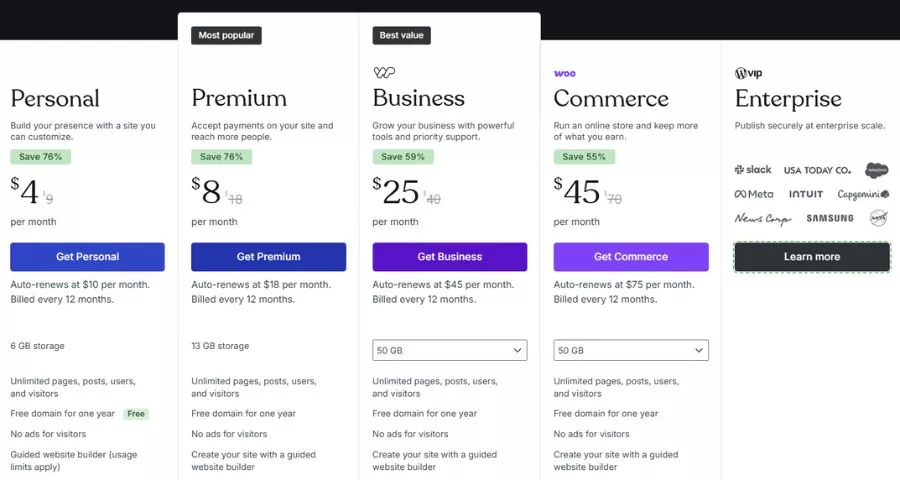
WordPress.com’s paid tiers are Personal at $9/month, Premium at $18/month, Business at $40/month, and Commerce at $70/month on monthly billing, with yearly billing cutting those rates by up to 55%. Business is the tier that matters for a small business site, because it’s the point where custom plugin installation unlocks. Below Business, you’re limited to WordPress.com’s pre-approved plugin list, no Rank Math, no custom form plugins, no WooCommerce.
Pricing
Business runs $40/month on monthly billing or $25/month on the annual plan. That’s a meaningful jump from the $9 Personal tier, but it’s the price of leaving WordPress.com’s walled garden for full plugin access.
Best for
A business that wants WordPress’s flexibility (SEO plugins, custom forms, theme customization) without touching a hosting control panel or running updates manually. If you outgrow WordPress.com later, exporting to self-hosted WordPress.org is a documented path, unlike some closed-platform builders.
Watch out for
Domain renewal after the free first year, and any premium theme or plugin purchased through the WordPress.com marketplace, are billed separately from your plan. Read the plan comparison page carefully; the jump from Premium to Business is the one people underestimate.
Fiverr freelance design packages
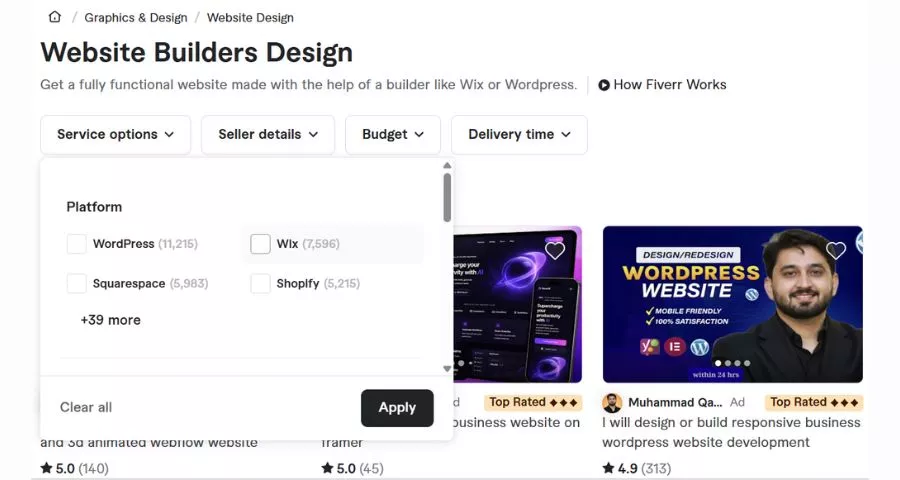
If none of the DIY builders appeal to you, a freelance marketplace package gets you a custom-built site without hiring an agency. Fiverr works differently from the four platforms above: instead of paying a recurring subscription for a tool you use yourself, you’re paying a freelancer once (or per project) to design and often build the site on your behalf, usually on WordPress, Wix, Squarespace, or Webflow.
That trade-off (higher upfront cost, no monthly design work on your end) is worth it for owners who’d rather spend a weekend reviewing mockups than learning an editor.
What’s included
Fiverr packages are typically structured in three tiers (Basic, Standard, Premium) per seller, each adding pages, revisions, and turnaround speed. Small business websites built by Fiverr freelancers typically cost $500 to $5,000, depending on design complexity and the features required. That’s a one-time project cost rather than a recurring subscription, though you’ll still pay separately for hosting.
Pricing
A real example: a local service provider paid $280 for a responsive seven-page WordPress site with a contact form and basic SEO, delivered in five days with two rounds of revisions. Ecommerce builds run higher: a WooCommerce store with 50 products and payment integration landed at $950 in one documented project.
Best for
Business owners who know roughly what they want (a WordPress or Squarespace site with their brand colors and copy) but don’t want to build it themselves. Reviewing a seller’s portfolio and past reviews before hiring matters more here than on any DIY builder, since quality varies a lot between sellers.
Watch out for
Fiverr charges buyers a 5.5% service fee on every transaction, plus a small-order fee on orders under $75. Factor that into the quoted gig price, and confirm upfront whether source files and revisions past the first round cost extra.
How to choose the right package for your small business
Start with whether you plan to sell anything online. If yes, Wix Core or Squarespace Core get you there fastest without a separate ecommerce plugin. If you’re purely a services or information site, GoDaddy Basic or WordPress.com Personal cost less and do the job.
Next, decide how much you want to touch the code yourself. WordPress.com Business and self-hosted WordPress reward some technical comfort with far more customization. Wix, Squarespace, and GoDaddy trade some of that flexibility for a simpler editor.
Finally, if your time is worth more than the design work, a Fiverr package or local freelancer is usually cheaper over a year than the hours you’d spend learning a builder from scratch, especially once you count revisions and the “why doesn’t this look right on mobile” troubleshooting that eats up a weekend.
FAQs About Affordable Website Design Packages
Here are a few questions small business owners ask most often when comparing affordable website design packages.
How much should a small business budget for website design?
A DIY builder plan runs $9.99 to $40 per month depending on the platform and tier, while a custom-built site from a freelancer typically costs $500 to $5,000 as a one-time project. Most small businesses with a simple brochure or service site land toward the lower end of both ranges.
Do affordable web design packages include hosting and a domain name?
Website builders like Wix, Squarespace, GoDaddy, and WordPress.com bundle hosting into the monthly plan and usually include a free domain for the first year. Freelance packages on marketplaces like Fiverr almost never include hosting, so you’ll need to buy that separately from a host or the platform the freelancer builds on.
Can I switch website platforms later without losing my content?
Yes, but the ease of switching depends on the platform you’re leaving. WordPress (self-hosted or WordPress.com Business and above) has a documented export path since your content lives in a portable database, while builders like Wix and Squarespace don’t offer a clean way to export page designs, only raw content like text and images.
Is a $17-per-month website builder plan enough for a small business?
An entry-level plan like Wix Light or Squarespace Basic works fine for a simple informational site with no online sales. The moment you need to accept payments, take bookings, or install custom plugins, you’ll need to move up to a mid-tier plan like Wix Core, Squarespace Core, or WordPress.com Business.
Conclusion
The right package comes down to two questions: do you need to sell something, and how much of the build do you want to do yourself. Among affordable website design packages, Wix or Squarespace cover most small businesses that want to self-manage a store or service site, GoDaddy suits owners who want one bill for everything, WordPress.com rewards a bit of technical comfort with real flexibility, and a Fiverr package makes sense when your time is worth more than the learning curve. Whichever you pick, confirm the annual price and what happens at renewal before you commit.
Read More: How to Create a Game Site
Contact US | ThimPress:
Website: https://thimpress.com/
Fanpage: https://www.facebook.com/ThimPress
YouTube: https://www.youtube.com/c/ThimPressDesign
Twitter (X): https://x.com/thimpress_com