Are you struggling to decide between Eduma and WPLMS for your online academy?
Choosing the right WordPress LMS (Learning Management System) theme is one of the most critical decisions an educator or entrepreneur can make. Your choice will dictate not only how your site looks but also how easily you can manage students, sell courses, and scale your business.
In the world of best LMS themes for WordPress, two giants dominate the conversation: Eduma, powered by the industry-leading LearnPress plugin, and WPLMS, a specialized “social” LMS. Both offer powerful features, but they cater to very different types of users.
In this comprehensive Eduma vs WPLMS comparison, we will break down their technology, performance, and usability to help you decide which one deserves a spot in your WordPress dashboard.
Eduma – Education WordPress Theme
We provide an amazing WordPress theme with fast and responsive designs. Let’s find out!
Overview of Eduma (Education WP)

Eduma is arguably the most popular Eduma WordPress LMS theme on the market. Developed by ThimPress, it is built on top of LearnPress, the #1 LMS plugin on WordPress.org.
Eduma is designed to be a “complete education solution.” Whether you are building a site for a university, a language school, or a massive course marketplace like Udemy, Eduma provides a professional, polished, and incredibly fast framework.
Core Strengths:
- Deep LearnPress Integration: Benefit from a decoupled architecture where your data remains safe even if you change themes.
- User Experience (UX): Includes premium features like Smart AJAX search and sticky sidebars for distraction-free learning.
- Versatility: Offers over 39+ pre-built demos covering everything from Yoga coaching to high-level academic news portals.
Best For: Solo course creators, schools, and professional academies who want a fast, SEO-optimized, and easy-to-set-up platform.
Overview of WPLMS
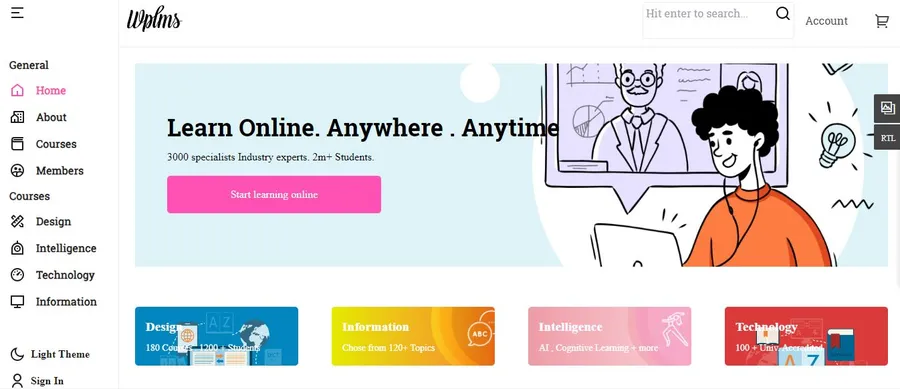
WPLMS is more than just a theme; it is a complex, feature-rich WPLMS WordPress LMS system. It uses a “Headless WordPress” architecture with ReactJS, essentially turning your site into a Progressive Web App (PWA) out of the box.
WPLMS leans heavily into social learning and community features. It mimics the feel of a social network, making it a heavy-duty choice for organizations that prioritize student interaction and real-time notifications.
Core Strengths:
- Mobile-First PWA: Exceptional offline capabilities and app-like feel.
- Social Integration: Built-in live chat, friend requests, and activity tracking.
- AI Readiness: Recently added AI-driven quiz generation and adaptive learning tools.
Best For: Large corporations, social learning communities, and developers who need a headless, app-like experience.
Eduma vs WPLMS: Feature-by-Feature Comparison
Eduma vs WPLMS: LMS Architecture & Technology
Eduma uses a traditional but highly optimized WordPress architecture. It relies on LearnPress, which ensures data portability. This is a huge advantage: if you decide to change your theme in five years, your courses and student data won’t vanish because they are tied to the plugin, not the theme.
WPLMS uses a Headless ReactJS approach. While this makes the interface feel modern and “snappy,” it adds a layer of complexity. Troubleshooting can be harder for non-developers, and you are more “locked-in” to the WPLMS ecosystem compared to Eduma.
Eduma vs WPLMS: Ease of Use & Learning Curve
Eduma is famous for its 1-click demo importer. You can have a professional site running in minutes. The drag-and-drop course builder is intuitive, behaving much like the native WordPress editor.
WPLMS has a steeper learning curve. Because it includes so many internal modules (Vibe Drive, Vibe Calendar, etc.), the settings panel can be overwhelming for beginners. It requires significant time to configure correctly.
Eduma vs WPLMS: Performance & Scalability
Eduma is built for speed. ThimPress has optimized every line of code to reduce CSS/JS requests. Because it follows standard WordPress best practices, it caches easily and ranks highly on Google’s Core Web Vitals.
WPLMS excels in “perceived speed” through its PWA technology. Once the initial app loads, moving between lessons is nearly instant. However, managing 1 million members (as they claim) requires high-end enterprise hosting due to the heavy database load of their social features.
Eduma vs WPLMS: Design Flexibility & Page Builders
Both themes support Elementor, but Eduma offers broader flexibility by supporting WPBakery and SiteOrigin for most of its 39+ demos. Eduma’s designs are “pixel perfect,” focusing on clean typography and modern educational layouts.
WPLMS offers a “Certificate Builder” and layout managers, but its aesthetic is more “app-centric” than “website-centric.”
Eduma vs WPLMS: Mobile & App Support
This is a close race.
- Eduma offers dedicated, native React Native and Flutter mobile apps (sold separately) for a truly premium mobile experience.
- WPLMS turns your site into a PWA (Progressive Web App) automatically. This is great for users who don’t want to download an app from the App Store but still want an “app-like” icon on their home screen.
Pros and Cons Summary
Eduma
| Pros | Cons |
| Data Portability: Your courses stay if you switch themes. | Some advanced add-ons are premium. |
| Speed: Highly SEO optimized and lightweight. | So many demos can make it hard to choose! |
| Ease of Use: Best-in-class UI/UX for students. |
WPLMS
| Pros | Cons |
| Social Features: Built-in chat and groups. | High learning curve for non-techies. |
| PWA: Works offline and feels like an app. | Proprietary system makes data migration difficult. |
| AI Tools: Innovative AI quiz generator. | Can be “bloated” for simple course sites. |
Use Cases: Which One Should You Choose?
Best Choice for Beginners: Eduma
If you want to launch your course today without hiring a developer, Eduma is the winner. Its 1-click setup and intuitive LearnPress backend make it accessible to everyone.
Best Choice for Universities: Eduma
For large scale institutional sites that need high SEO rankings and a professional “clean” look, Eduma’s architecture is more reliable and easier to maintain long-term.
Best Choice for Social Communities: WPLMS
If your course is 50% content and 50% students talking to each other, WPLMS’s built-in social networking features (like BuddyPress on steroids) make it the right fit.
Best Choice for Performance-Focused Sites: Eduma
Eduma consistently scores higher in traditional SEO speed tests (Pingdom/GTMetrix), which is vital for organic Google traffic.
FAQs
Is Eduma better than WPLMS?
Eduma is generally better for users prioritizing SEO, ease of use, and data portability.WPLMS is better for those specifically looking for a social-network-style LMS with offline PWA capabilities.
Can WPLMS handle large-scale LMS websites?
Yes, WPLMS is built for scale, supporting large memberships. However, its complex ReactJS architecture requires a robust server environment to run smoothly.
Eduma vs WPLMS: which is easier to use?
Eduma is significantly easier to use. Its integration with LearnPress follows standard WordPress logic, whereas WPLMS introduces a custom interface that takes time to master.
Conclusion
When comparing Eduma vs WPLMS, the best theme depends entirely on your goals.
Choose Eduma if: You value speed, SEO, and professional design. It is the most reliable “all-rounder” that ensures your data is never locked into a single theme. It’s perfect for growing businesses that need a high-conversion platform with a low technical barrier.
Choose WPLMS if: You are building a complex social community or corporate training portal where offline app access and real-time student interaction are more important than traditional website SEO or simplicity.
Both themes are industry leaders, but for most course creators, Eduma provides the most balanced, future-proof, and user-friendly experience available in the WordPress ecosystem today.
Read more: 8 Best LMS Plugins for WordPress (LearnPress vs TutorLMS vs LearnDash)
Contact US | ThimPress:
Website: https://thimpress.com/
Fanpage: https://www.facebook.com/ThimPress
YouTube: https://www.youtube.com/c/ThimPressDesign
Twitter (X): https://x.com/thimpress_com