
What are rich snippets? They are search results that show extra details, such as star ratings, prices, cooking times, or stock status, under the page title and link. Google builds them from structured data that you add to a page, so the listing tells people more before they click. This guide explains how they work, which ones Google still shows, and how to add them to a WordPress or Shopify site. It reflects Google Search Central documentation as of August 2026.
Eduma – Education WordPress Theme
We provide an amazing WordPress theme with fast and responsive designs. Let’s find out!
Rich snippets definition in plain words
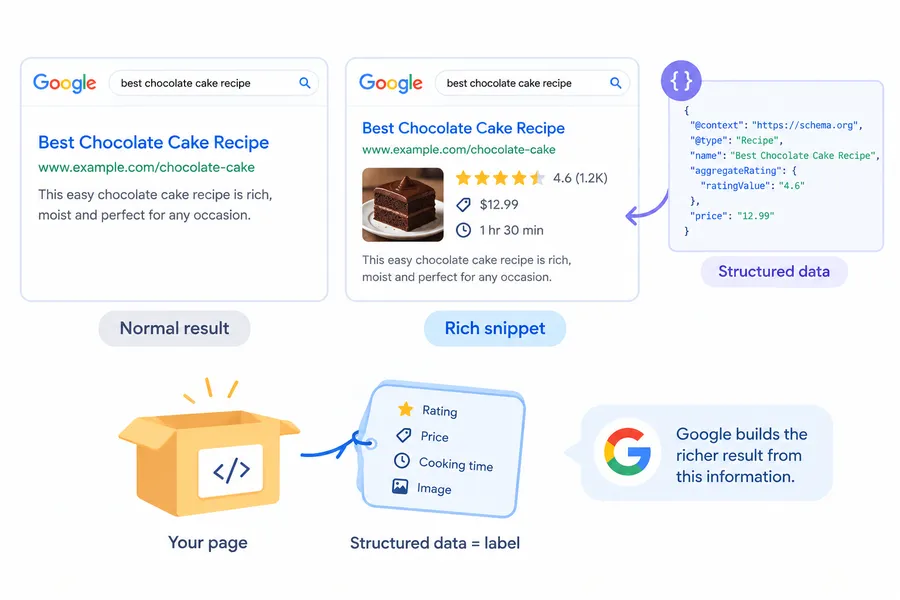
A rich snippet is a search result that includes extra visual details taken from a page’s structured data. The next sections show how that differs from a normal result and why the name keeps changing.
How a rich snippet differs from a normal result
A normal result shows a blue title, a URL, and a short description. A rich snippet adds something more, like a 4.6 star rating, a price in dollars, or a photo of the finished dish. The extra details come from structured data, which is a block of code that labels facts on your page in a format search engines can read. Most sites write it in JSON-LD using the schema.org vocabulary.
Think of your page as a box and the markup as its label. The label says “this is the price” or “this is the cooking time,” so Google does not have to guess.
What Google calls them now
People often type “what is Google rich snippets” into search when they see stars or prices in a listing for the first time. Google’s own documentation calls this a rich result, meaning a richer appearance in search that Google builds from structured data. Many SEOs still say rich snippets, so both names point to the same feature.
Why SEO rich snippets matter
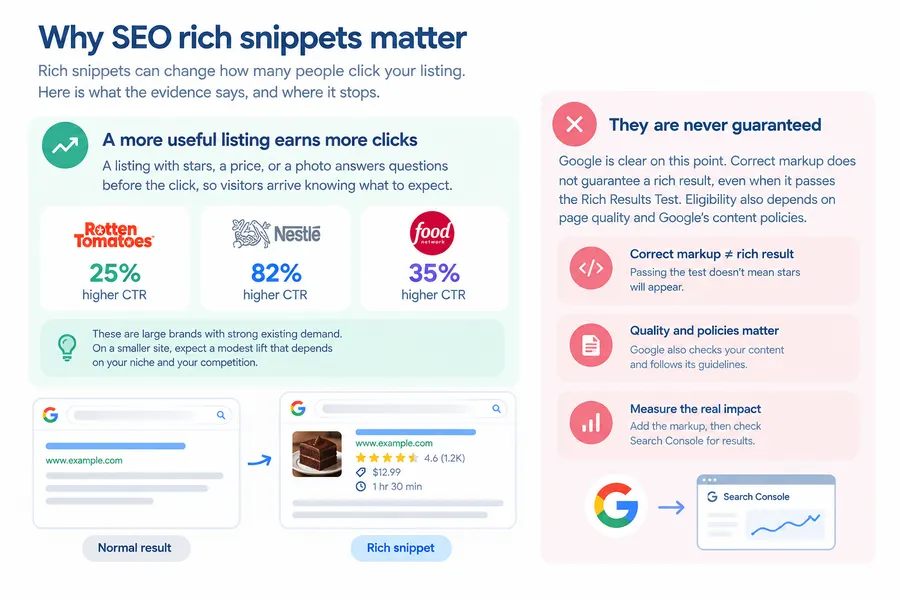
Rich snippets can change how many people click your listing. Here is what the evidence says, and where it stops.
A more useful listing earns more clicks
A listing with stars, a price, or a photo answers questions before the click, so visitors arrive knowing what to expect. Google’s documentation shares several brand case studies. Rotten Tomatoes measured a 25% higher click-through rate on pages with structured data, and Nestlé measured an 82% higher click-through rate for pages shown as rich results. The Food Network reported a 35% increase in visits.
These are large brands with strong existing demand. Treat the numbers as proof that the format can work, not as a promise for a small blog. On a smaller site, expect a modest lift that depends on your niche and on how many competitors also show stars.
They are never guaranteed
Google is clear on this point. Correct markup does not guarantee a rich result, even when it passes the Rich Results Test. Eligibility also depends on page quality and Google’s content policies. Treat SEO rich snippets as an upgrade to a good page, not a replacement for one. Add the markup, then measure the outcome in Search Console instead of assuming stars will appear.
Types of rich snippets that still work in 2026
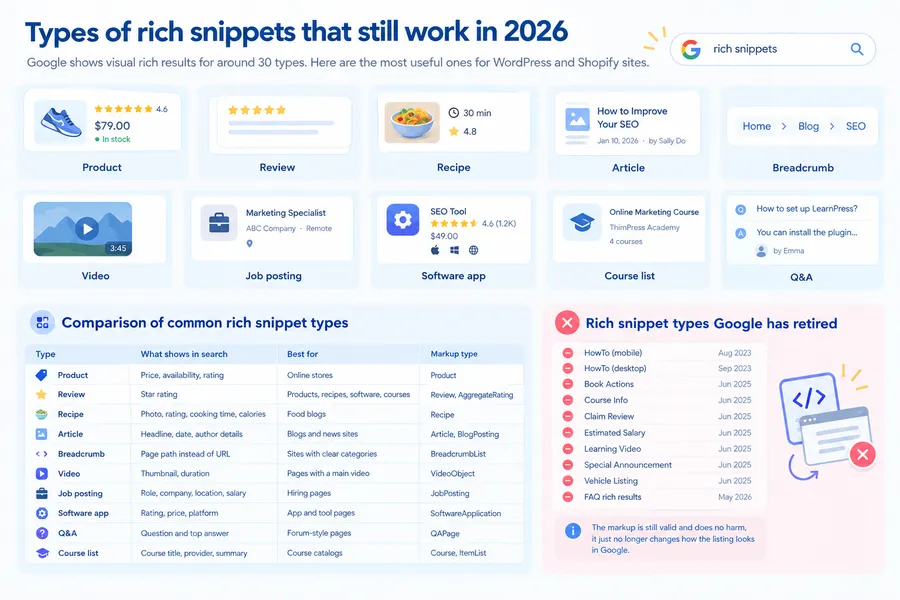
Schema.org defines more than 800 types, but Google’s search gallery lists only about 30 that are eligible for visual rich results. The types below are the most useful for WordPress and Shopify sites.
Product and review snippets
Product snippets show price, availability, and a rating for items you sell. Review snippets show a star rating summarised from reviews on the page, and they suit products, recipes, software, and courses. One limit matters here: Google does not show stars for reviews that a business writes about itself on its own LocalBusiness or Organization pages.
Recipe snippets
Recipe markup can show a photo, rating, cooking time, and calories. Recipes can also appear in a carousel, which is a scrolling row of results from one site.
Article, breadcrumb, and video results
Breadcrumb markup replaces the plain URL with a readable path such as Home > Blog > SEO. Article markup gives Google clear author, headline, and date information. Video markup can add a thumbnail and duration to the listing.
Job, course, software, and Q&A results
Job posting markup shows the role, company, and location. Course list markup shows several courses from one provider. Software app markup shows rating, price, and platform. Q&A markup is built for pages with one question and user-submitted answers, such as a forum thread. It is not meant for a general FAQ section.
Comparison of common rich snippet types
This table compares the most common types of rich snippets side by side.
| Type | What shows in search | Best for | Markup type |
|---|---|---|---|
| Product snippet | Price, availability, rating | Online stores | Product |
| Review snippet | Star rating | Products, recipes, software, courses | Review, AggregateRating |
| Recipe | Photo, rating, cooking time, calories | Food blogs | Recipe |
| Article | Headline, date, author details | Blogs and news sites | Article, BlogPosting |
| Breadcrumb | Page path instead of URL | Sites with clear categories | BreadcrumbList |
| Video | Thumbnail, duration | Pages with a main video | VideoObject |
| Job posting | Role, company, location, salary | Hiring pages | JobPosting |
| Software app | Rating, price, platform | App and tool pages | SoftwareApplication |
| Q&A | Question and top answer | Forum-style pages | QAPage |
| Course list | Course title, provider, summary | Course catalogs | Course, ItemList |
Rich snippet types Google has retired
Many older guides are out of date, so check the date on any advice you follow. Google removed HowTo rich results from mobile in August 2023 and from desktop in September 2023. In June 2025 it retired seven more types: Book Actions, Course Info, Claim Review, Estimated Salary, Learning Video, Special Announcement, and Vehicle Listing. Then FAQ rich results stopped appearing on May 7, 2026, including for the government and health sites that had kept access since 2023.
The markup for these features is still valid and does no harm if it stays on the page. It just no longer changes how the listing looks in Google.
Rich snippets examples you can spot in search
You will find rich snippets in almost every shopping or food search. These rich snippets examples show what the markup produces.
Product listing example
Search for a specific blender or pair of running shoes and you will usually see a price, a rating out of five, a review count, and a stock note such as “In stock” under the title. That comes from Product markup with offers and aggregateRating properties. WooCommerce adds this markup to product pages by default. On Shopify, Online Store 2.0 themes such as Dawn output Product data through the structured_data Liquid filter.
Recipe example
Search for banana bread and the top results often show a photo, a rating, and a cooking time before you open anything. That extra detail comes from Recipe markup on the page.
Rich snippet markup explained
Rich snippet markup is the code that labels your content for search engines. You do not need to be a developer to read it, and most WordPress sites can generate it with a plugin.
JSON-LD, Microdata, and RDFa
Google reads three formats, but it has long stated a preference for JSON-LD. JSON-LD sits in its own script tag, so you can add or edit it without touching your visible HTML. Microdata and RDFa are woven into the page markup, which makes them easy to break when a theme update changes the template.
A simple JSON-LD example
This is a shortened Product example. The name, price, and rating values are sample data, so replace them with real details from your page.
<script type="application/ld+json">
{
  "@context": "https://schema.org/",
  "@type": "Product",
  "name": "Blue ceramic coffee mug",
  "image": "https://example.com/images/blue-mug.jpg",
  "description": "A handmade 350 ml ceramic mug.",
  "sku": "MUG-BLUE-350",
  "brand": { "@type": "Brand", "name": "Example Studio" },
  "offers": {
    "@type": "Offer",
    "url": "https://example.com/blue-mug",
    "priceCurrency": "USD",
    "price": "18.00",
    "availability": "https://schema.org/InStock"
  },
  "aggregateRating": {
    "@type": "AggregateRating",
    "ratingValue": "4.7",
    "reviewCount": "126"
  }
}
</script>
Only mark up a rating if real customers left those reviews and visitors can see them on the page.
Required and recommended properties
Every rich result type has required and recommended properties. If you miss a required property, the markup will not qualify. If you miss a recommended one, it can still qualify but may show fewer details. Read the guide for your type in Google’s search gallery before you build the markup.
How to get rich snippets step by step
The process is the same on every platform: pick the right type, add the markup, test it, and watch the results. These steps explain how to get rich snippets on a WordPress or Shopify site.
The five-step process
- Match the page to a supported type. A product page uses Product, a recipe post uses Recipe, and a blog post uses Article. Do not force a type the page does not fit.
- Write or generate the markup in JSON-LD. A plugin or the example above will do.
- Add it to the page. Use a plugin field or a code snippet, not a random spot in the template.
- Test the URL. Run it through Google’s Rich Results Test and fix every error before you move on.
- Publish and monitor. Request indexing in the URL Inspection tool for your key pages, then check the rich result reports in Search Console.
How to create rich snippets in WordPress
Most WordPress sites do not need hand-written code. In Rank Math, open a post, click the Rank Math icon, go to the Schema tab, and choose a type such as Article, Recipe, or Product. In Yoast SEO, the Schema tab in the sidebar lets you set the page type and article type, and Yoast builds a connected schema graph for the site automatically. Learn more about Rank Math vs Yoast SEO here.
For stores, WooCommerce outputs Product markup on its own. A common problem is duplicate Product items, which happens when a theme and a plugin both output markup. Run the page through the Rich Results Test and switch one source off if you see two items.
If you paste custom JSON-LD into theme files, use a child theme so a parent theme update does not remove it. These steps are based on WordPress 6.x and the Rank Math and Yoast interfaces in mid 2026. Menu labels can change between releases.
How to add rich snippets on Shopify
Online Store 2.0 themes such as Dawn already output Product data, which covers price and availability. Star ratings need a review app that outputs rating markup, so confirm that in the Rich Results Test. If your blog theme does not output Article markup, add JSON-LD in theme.liquid or use a schema app.
Rich snippets tool options compared
You need two kinds of tools: one to create markup and one to test it. Start with the Rich Results Test as your main rich snippets tool for checking, then add a plugin if you run WordPress.
| Tool | Job | Cost | Best for | Main limit |
|---|---|---|---|---|
| Google Rich Results Test | Testing | Free | Checking a public URL or pasted code for Google eligibility | Covers only features Google supports |
| Schema Markup Validator | Testing | Free | Validating any schema.org markup | Does not show whether Google will display a rich result |
| Google Search Console | Monitoring | Free | Tracking rich result reports across a whole site | Reports only after Google crawls the page |
| Rank Math | WordPress plugin | Free and Pro plans | Choosing a schema type per post in the editor | Can overlap with another SEO plugin |
| Yoast SEO | WordPress plugin | Free and Premium plans | Automatic schema graph with little setup | Less control over specialised types |
| Schema Pro | WordPress plugin | Paid | Applying schema rules across many pages | Needs a paid license |
Check each vendor’s current pricing before you buy, because plans change. Always test the live page, since a plugin setting can look correct in the editor and still output nothing on the front end.
Common mistakes that stop rich snippets from showing
Most failed rich snippets come from a short list of avoidable errors. Check these before you change anything else, and fix any errors the Rich Results Test flags first.
Markup that does not match the page
Structured data must describe content that visitors can see. If you mark up reviews, you should include every review that appears on the page, because leaving some out would mislead people who see the listing. Never add ratings to a page that has no real customer reviews.
Using a retired type
Adding FAQ or HowTo markup to win a rich result no longer works, as explained above. Confirm that your type is still in Google’s search gallery before you spend time on it.
Ignoring quality and policy rules
Structured data must follow Google’s content and spam policies, and a structured data issue can lead to a manual action that removes rich result eligibility for the page. Honest markup on a useful page is the safest approach.
FAQs about what are rich snippets
Are rich snippets a ranking factor?
No. Google has stated that structured data is not a ranking factor. Rich snippets can still help your SEO indirectly, because a more useful listing can earn more clicks. Build a good page first, then use markup to make it easier to understand.
What is the difference between rich snippets and featured snippets?
A featured snippet is a summary of an answer that appears at the top of the results. It is pulled from the visible text on your page, and you cannot request it with code. A rich snippet is an enhanced listing built from structured data. A single page can earn both.
How long does it take for rich snippets to appear?
It varies. After you publish and request indexing, Google has to recrawl the page, which usually takes days to a few weeks depending on how often it visits your site. Use the URL Inspection tool to see the last crawl date.
Do I need structured data to appear in AI Overviews?
No. Google’s guidance says AI Overviews and AI Mode have no extra technical requirements beyond normal eligibility for Search and snippets. Structured data can still help Google understand a page, but clear and well-organised content matters more.
Conclusion
So, what are rich snippets? The short rich snippets definition to remember is this: they are enhanced search listings that show details like ratings, prices, and cooking times, built from structured data on your page. They do not guarantee more traffic, but well-built SEO rich snippets give people a reason to click. Start with one page type that fits your site, such as Product for a store or Article for a blog. Use a plugin to create rich snippets, test the live URL, and track the results in Search Console. Then review your markup each year, because Google keeps retiring features that once looked permanent.
Read more: 11 Best WordPress LMS Templates and Themes for Online Learning
Contact US | ThimPress:
Website: https://thimpress.com/
Fanpage: https://www.facebook.com/ThimPress
YouTube: https://www.youtube.com/c/ThimPressDesign
Twitter (X): https://x.com/thimpress_com

