The move toward digital mentorship has created a great opportunity for experts to turn their knowledge into a scalable online coaching business. As demand grows, moving from an expert to a known authority requires a solid technical base and a clear roadmap on how to create an online course. By building a professional site using the best WordPress LMS themes, you can reach students worldwide while staying in control of your time.
This guide breaks down the essential steps to building a professional presence that stands out using powerful tools like LearnPress and the Eduma theme.
Eduma – Education WordPress Theme
We provide an amazing WordPress theme with fast and responsive designs. Let’s find out!
1. Narrowing the Focus to a Profitable Niche
A common mistake is trying to help everyone. In a crowded digital market, being a “general life coach” is often too vague to attract high-paying clients. To succeed in an online business coaching environment, one must be the specific solution to a specific problem.
Successful niches often address urgent pain points:
- Executive Leadership: Helping managers transition into C-suite roles.
- Specialized Career Pivots: Guiding professionals through industry shifts.
- Wellness and Longevity: Moving beyond basic fitness into mental resilience and biohacking.
- Operational Efficiency: Helping founders scale their startups without burnout.
When a focus is narrowed, marketing becomes more precise, and the perceived value of the services increases significantly.
2. Setting Up the Digital Infrastructure with LearnPress
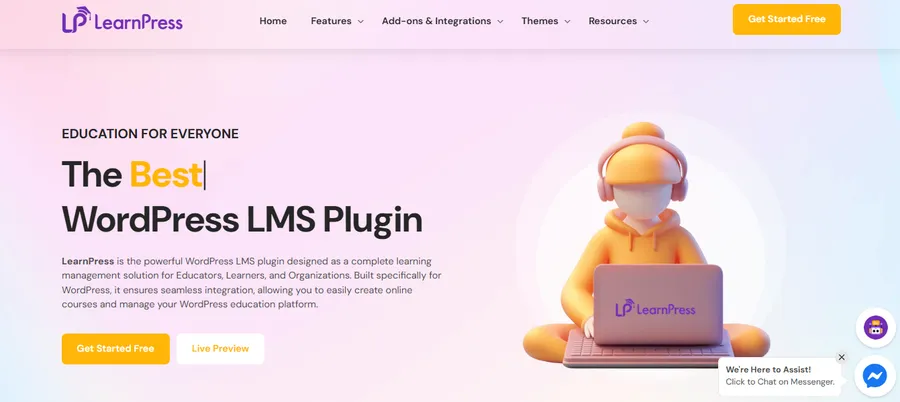
To run a professional online coaching business, the technology behind the scenes must be flawless. WordPress remains the gold standard for flexibility, especially when paired with the LearnPress LMS plugin. This tool provides the “engine” needed to manage courses, students, and payments.
Technical Installation Methods
There are three primary ways to get the platform running:
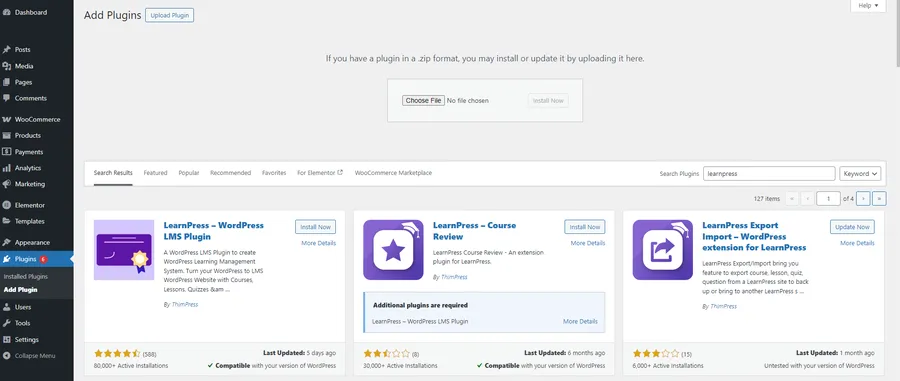
A. Via WordPress Search
This is the most straightforward path for a new online business coach:
- Navigate to Dashboard > Plugins > Add New.
- Type ‘LearnPress’ in the search bar.
- Locate “LearnPress – WordPress LMS Plugin” and click Install Now.
- Activate the plugin to begin the setup.

B. Via Admin Plugin Upload
If the plugin package was purchased or downloaded separately:
- Go to Dashboard > Plugins > Add New.
- Click Upload Plugin at the top of the page.
- Choose the learnpress.zip file from the computer and click Install Now.
- Activate the plugin once the upload is complete.
C. Via FTP
For those with technical experience needing direct server access:
- Login to the FTP account via software like FileZilla.
- Extract the learnpress.zip file locally.
- Upload the extracted folder to the /wp-content/plugins/ directory on the server.
- Activate the plugin via the Installed Plugins menu in the WordPress dashboard.
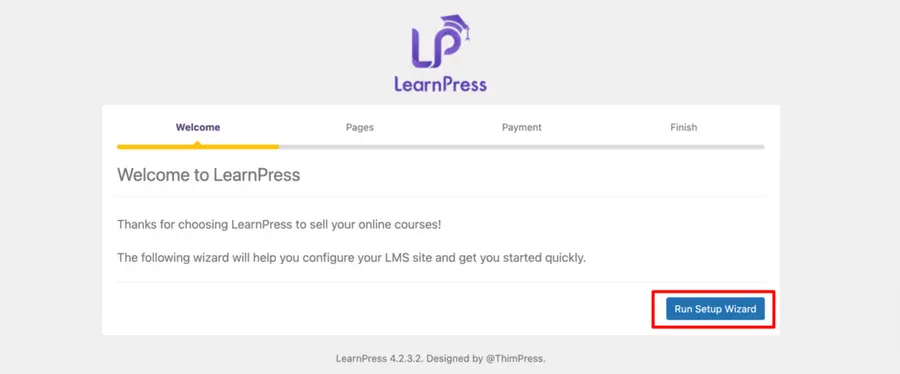
The Quick Setup Wizard helps create essential pages such as Courses, Checkout, and Profile. This step also allows the connection of a PayPal email address, ensuring the business is ready to accept payments from day one.
3. Designing High-Impact Course Content
Content is the heart of a business coach online practice. In LearnPress, building a course is divided into three logical sections: the Overview, the Curriculum, and the Settings.
Course Overview and Presentation
Navigate to LearnPress > Courses > Add New.
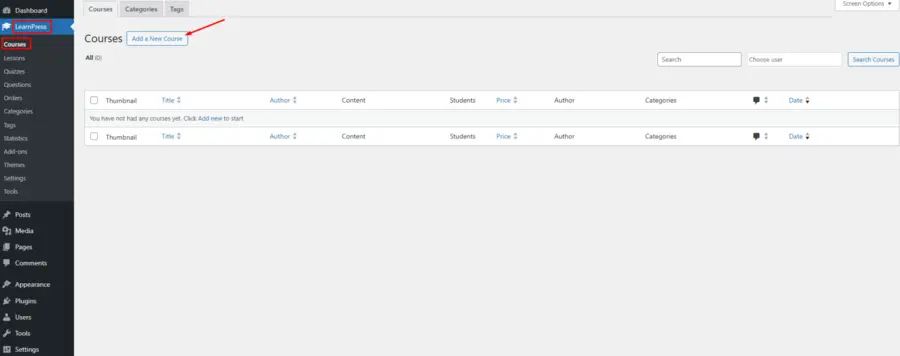
In the Course Description, provide a clear introduction. This text appears in the Overview tab on the course page. It is essential to set a “Featured Image” for every course.
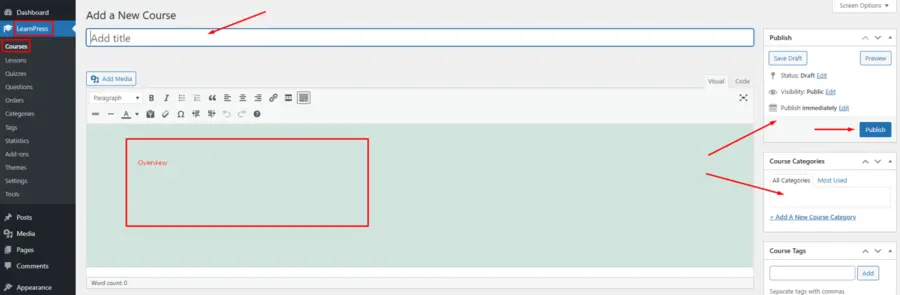
This image acts as the primary visual for the directory. When using a theme like Eduma, these images ensure the layout remains professional and engaging for prospective students.
Building the Curriculum
The curriculum is where the transformation occurs. It allows the organization of knowledge into:
- Lessons: The core teaching materials.
- Quizzes: Checkpoints to ensure progress.
- Content Bank: This powerful feature allows a coach to select items created previously and add them to new courses, significantly speeding up the development of a product suite.
4. Fine-Tuning Course Settings for Better Outcomes
A successful business coaching online professional must manage how students consume content to ensure they stay motivated and achieve their goals.
General Configuration and Access
In the Course Settings area, one can define the Duration (how long a student has access) and enable Block Content to restrict access once the time expires. To encourage continuous learning, the Allow Repurchase option can be enabled. This allows students to reset their progress and retake the course, which is a great way to handle certifications that require renewal.
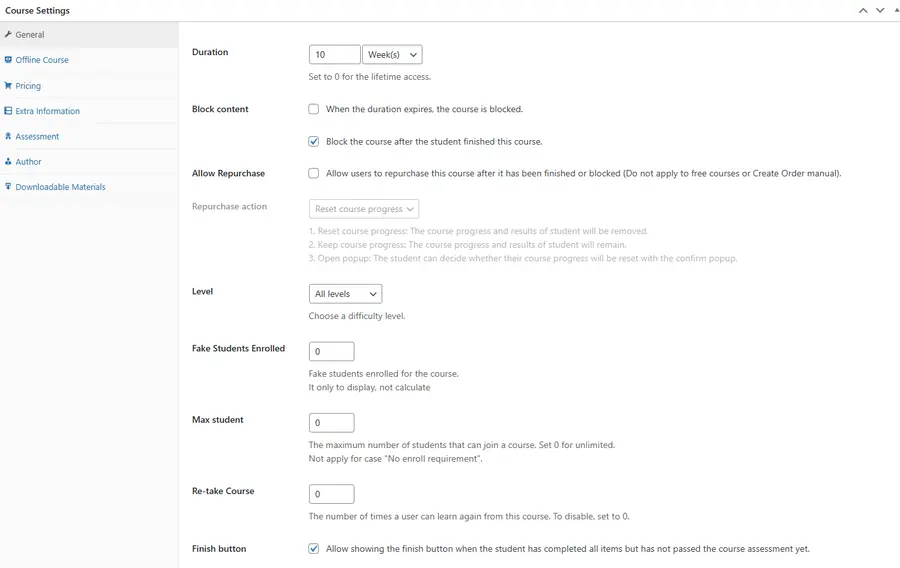
Assessment and Milestones
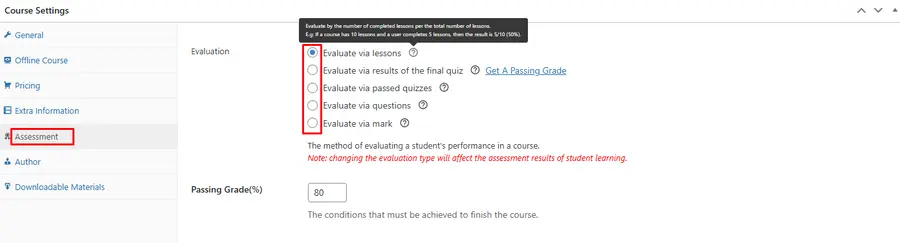
To maintain high standards, use the Assessment tab to set a “Passing Condition.” With five basic options available, a coach can ensure that students only receive credit once they have truly mastered the material. This quality control is what separates a premium service from a generic video course.
Providing Downloadable Materials
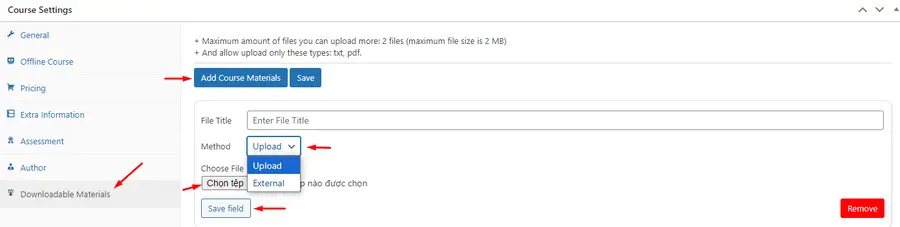
Adding extra value is key to justifying higher rates. Under Extra Information > Downloadable Materials, coaches can upload Docx, PDFs, or worksheets. These resources help students apply what they have learned in real-world scenarios.
5. Elevating the Brand with the Eduma Theme
While LearnPress provides the functionality, the Eduma theme provides the professional aesthetic that a business coach online requires. Eduma is specifically designed to work with LearnPress, offering a “Mobile-first” design that ensures the site looks perfect on any device.
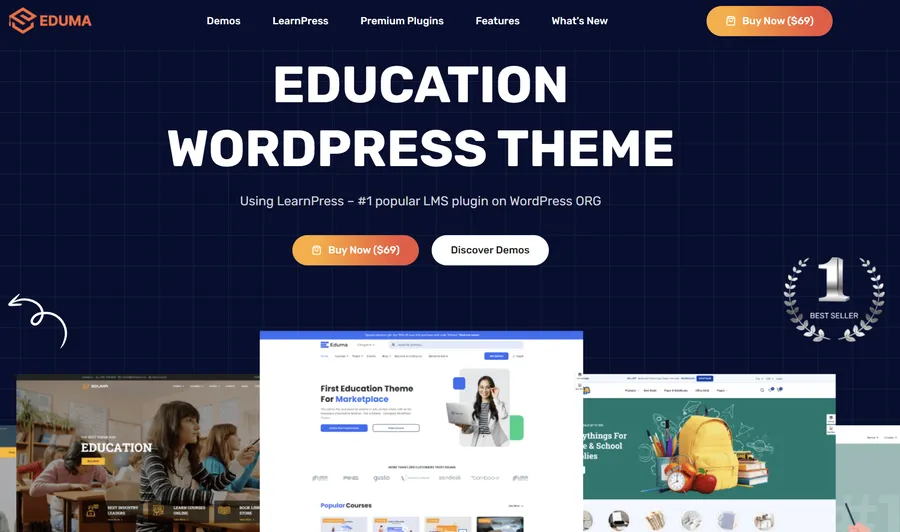
Why Eduma is the Preferred Choice:
- 39+ Premium Demos: These allow a coach to launch a site that looks like a high-end university or a modern marketplace in just a few clicks.
- Drag-and-Drop Building: Customize any section of the site without writing a single line of code using Elementor.
- Premium Add-ons: Eduma users typically receive 22 premium LearnPress add-ons for free, which would otherwise cost over $500 annually.
- Mobile Support: With more people learning on smartphones, Eduma’s responsive design is a competitive advantage.
6. Monetization Strategies and Payment Flow
Profitability in an online coaching business depends on a frictionless checkout process. LearnPress supports several ways to sell courses:
- LP-Checkout: A lightweight, native system for direct sales.
- WooCommerce Integration: Ideal for those who want to use diverse global payment gateways or sell physical products alongside digital courses. You can learn more about LearnPress WooCommerce Integration to optimize your store.
- Membership Models: Using the Paid Memberships Pro add-on allows a coach to offer subscription-based access to a library of content, creating steady, recurring revenue.
7. Strategic Marketing and Scaling
Launching the platform is just the first step. To grow as an online business coach, one must master visibility and social proof.
Onsite Marketing Tactics
LearnPress includes several features to help “sell” the course:
- Fake Students Enrolled: A marketing strategy to show a specific number of students already in the course, building initial trust.
- Featured Review: Highlighting a glowing testimonial directly on the course page can significantly increase conversion rates.
- Course Categories: Properly organizing courses makes it easier for visitors to find exactly what they need.
Search Engine Optimization (SEO)
To attract organic traffic, every page must be optimized for search terms related to online business coaching. Using SEO power words in your titles and regularly publishing blog posts with the help of WordPress SEO plugins will establish authority and improve search rankings over time.
8. Delivering Excellence and Gathering Feedback
The long-term success of an online coaching business relies on client results. By following up with students after a session and offering ongoing support, a coach builds a strong reputation. Excellent service leads to word-of-mouth recommendations, which are more valuable than any paid advertisement. Utilizing the feedback gathered from quizzes and student comments allows for the continuous refinement of the coaching approach.
Conclusion
Building a professional online coaching business is a journey of turning individual expertise into a global asset.
By leveraging the technical power of LearnPress and the professional design of Eduma, any expert can create a platform that rivals major education marketplaces. The transition from a local mentor to an international coach requires a solid foundation, but with these tools and a clear roadmap, the potential for growth is virtually limitless.
Frequently Asked Questions about Building an Online Coaching Business
1. Is starting an online coaching business profitable?
Yes, it is highly profitable because it allows for high margins and global reach. By identifying a specific niche and offering valuable content through a professional platform, a coach can scale their income without a linear increase in workload.
2. What is the benefit of using Eduma over other themes?
Eduma is specifically built for LearnPress. It includes over 39 demos and 22 premium add-ons for free, ensuring that the site is not only beautiful but also packed with the advanced features needed for a professional learning environment.
3. How can a business coach online handle international payments?
By using LearnPress with PayPal or WooCommerce, a coach can accept payments in multiple currencies from around the world, providing a seamless checkout experience for every student regardless of their location.
4. Can I offer both online and offline courses?
Yes, LearnPress has an "Offline Course" feature. When enabled, it disables online-only functions like quizzes and progress tracking, allowing the page to serve as a landing page for in-person workshops or retreats.
5. How do I protect my coaching materials from unauthorized access?
LearnPress allows coaches to "Block Content" after a course expires or once a student finishes. Additionally, you can set requirements such as mandatory enrollment or specific passing grades before materials become downloadable.
Read more: How to Build Online Learning Website WordPress in 7 Simple Steps
Contact US | ThimPress:
Website: https://thimpress.com/
Fanpage: https://www.facebook.com/ThimPress
YouTube: https://www.youtube.com/c/ThimPressDesign
Twitter (X): https://x.com/thimpress_com