Visitors decide whether to stay on an online store or leave in just 50 milliseconds. That fleeting moment dictates the success or failure of an online business. A flawless eCommerce website design is no longer a luxury; it is the ultimate tool to capture attention, build trust, and drive revenue. When users encounter a storefront that is visually appealing, secure, and easy to navigate, they are far more likely to complete a purchase.
Whether launching a new storefront or overhauling an existing one, mastering the visual and functional aspects of the site ensures long-term profitability. This comprehensive guide explores fundamental elements, inspiring free templates, and actionable advice to elevate the shopping experience and maximize conversion rates.
Eduma – Education WordPress Theme
We provide an amazing WordPress theme with fast and responsive designs. Let’s find out!
Content Summary: Master eCommerce Website Design
| Section | Key Information Overview |
| Core Elements | Building consumer trust, visual hierarchy, responsive scaling, and clear navigation. |
| Free UI Templates | High-quality, cost-free layout files including DashStack, Brainwave.io, and more. |
| Actionable Tips | Eight proven strategies to simplify the buyer journey and boost sales. |
| Professional Scaling | Knowing when to partner with specialized agencies for custom development. |
| FAQs | Common questions regarding digital storefront architecture and platforms. |
4 Core Elements of a High-Converting eCommerce Website Design

The most profitable digital storefronts share a singular philosophy: they prioritize the customer journey from the initial page load to the final checkout confirmation. The intersection of eCommerce and web design requires a strict focus on four foundational pillars to guarantee high performance and sustained customer satisfaction.
1. Building Trust with Consumers
When potential buyers land on a new platform, they lack familiarity with the brand’s reliability and product quality. Earning their confidence remains the primary obstacle.
- Transparent Policies: A clear, accessible return policy significantly lowers shopping cart abandonment rates. It reassures visitors that they can reverse a purchase without hidden penalties. Showcasing this guarantee directly on product landing pages removes immediate hesitation.
- Contact Accessibility: Providing a verifiable email address, corporate phone number, and physical location proves the enterprise is legitimate.
- Payment Security: Displaying recognizable security badges and accepting major payment gateways (such as PayPal, Stripe, or Apple Pay) ensures PCI-compliant protection for sensitive financial data.
- Social Proof Integration: Featuring authentic customer testimonials, external reviews, and user-generated media across the platform acts as a powerful indicator of marketplace reliability.
2. Creating a Visually Compelling Experience
Visual perception directly drives purchasing behavior. Crafting a sophisticated visual hierarchy directs the user’s attention precisely where it needs to go.
- Photography: Crisp, high-resolution imagery serves as the ultimate digital ambassador. Utilizing clean white backgrounds alongside engaging lifestyle shots demonstrates the item in realistic scenarios.
- Color Psychology: Strategic modern website color schemes spark emotion and subconsciously guide the visitor. Utilizing high-contrast shades for critical call-to-action buttons makes the next logical step obvious.
- Typography: The selected fonts communicate the underlying tone of the enterprise. Maintaining a clean aesthetic by limiting selections to two complementary fonts—one for structural headers and another for standard paragraphs—keeps the interface highly professional.
3. Focusing on Responsive Layouts
Mobile commerce currently dominates global digital shopping trends. A fully responsive architectural framework ensures the interface adapts seamlessly across large desktop monitors, smartphones, and tablet screens. Structural elements must resize dynamically, while touch targets must remain large enough to accommodate mobile interactions comfortably without user frustration.
4. Designing Clear Site Navigation
Platform navigation must remain entirely frictionless. Shoppers need to locate desired inventory with absolute minimal effort. Limit the primary top-level menu to essential categories, avoiding overly creative labels in favor of direct clarity. Secondary links, including privacy policies and detailed shipping terms, should reside neatly within the site footer.
Free UI Kits and Layout Examples for eCommerce and web design
Analyzing successful eCommerce templates provides a blueprint for excellent eCommerce website design. Instead of building entirely from scratch, utilizing pre-designed, free templates allows for rapid deployment while maintaining professional aesthetics.
1. DashStack – Free Admin Dashboard UI Kit
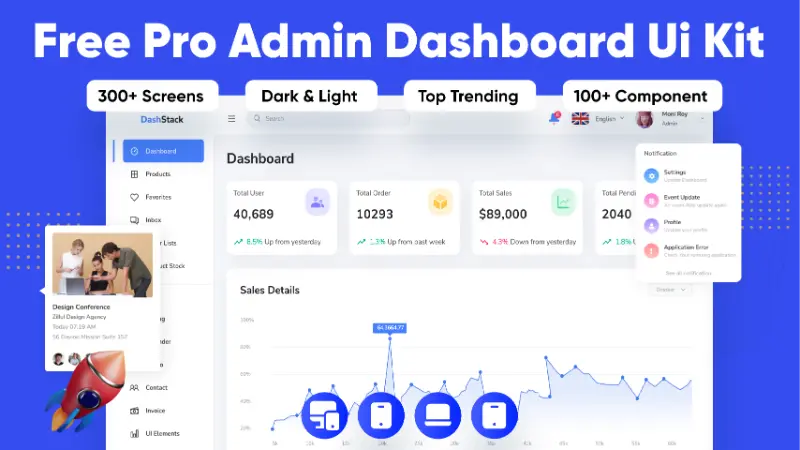
DashStack serves as one of the best HTML5 templates designed specifically to elevate backend administration. This carefully constructed UI kit provides a flawless combination of visual appeal and practical functionality, granting administrators highly intuitive tools.
The system utilizes a structured four-pixel grid and offers complete compatibility with Figma configurations, including variables and updated auto-layout features. Furthermore, it includes both light and dark modes, ensuring a fully responsive experience across mobile and tablet devices.
2. Brainwave.io – SaaS Landing Page UI Kit
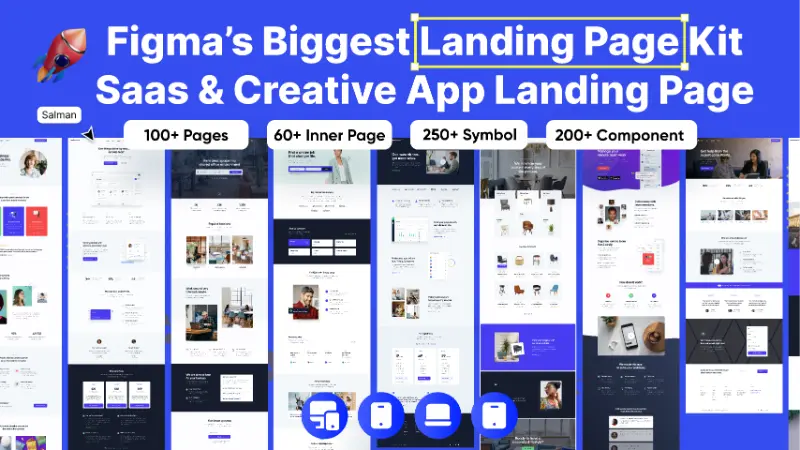
Brainwave.io functions as an extensive collection of pre-designed user interface elements and templates tailored to accelerate platform development. The architecture features a highly organized 12-column grid system spanning 1920 pixels, ensuring perfect alignment across all display types.
Developers benefit from a convenient drag-and-drop methodology, combined with fully customizable files and named layers within Figma.
3. eCommerce Website Design Template
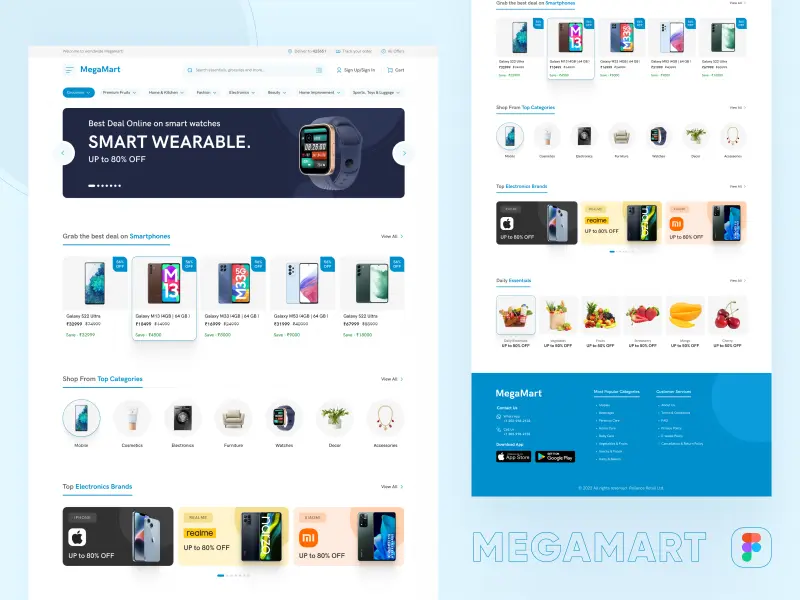
The eCommerce Website Design file completely transforms the digital shopping journey, enabling consumers to browse and purchase items seamlessly. The layout prioritizes essential functionalities, including smooth navigation pathways, highly detailed product descriptions, secure transaction gateways, and comprehensive order tracking systems. Shoppers can quickly locate desired items, analyze customer feedback, and receive personalized product recommendations.
4. CRM UI Kit for SaaS Dashboards

This CRM UI Kit for SaaS Dashboards stands as a premier resource intended to enhance sales management systems and complex digital platforms. Featuring an incredibly detailed and clean aesthetic, the package includes 185 distinct web pages and mobile application screens. Users unlock access to over 200 unique interface components, utilizing vector-based symbols that guarantee effortless customization. Every pixel remains easily replaceable, allowing businesses to seamlessly integrate their unique corporate identity into functional sales tools.
5. NFT Marketplace Template
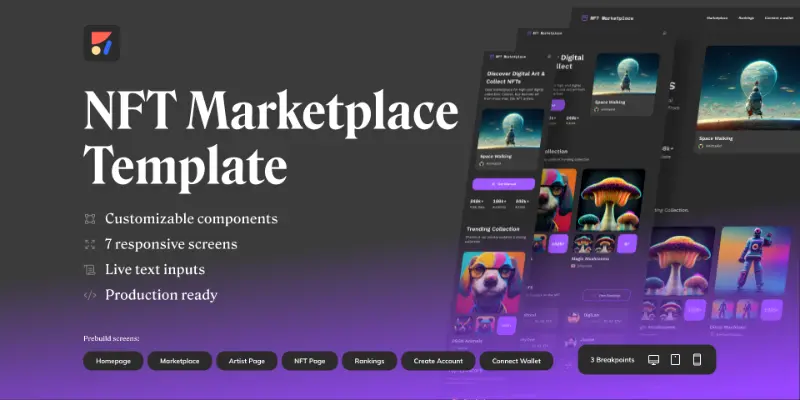
For projects requiring rapid deployment, the NFT Marketplace template allows developers to launch a functional user interface in mere minutes. Utilizing modern AI design generators for visual creation, the layout offers a highly intuitive customization process via dedicated plugins. Users can easily override existing text, adjust stylistic choices, and export the final product directly into HTML, React, or Vue codebases.
8 Essential Layout and Optimization Tips
Applying these proven strategies will transform a standard digital interface into a highly optimized sales engine.
1. Maintain Ultimate Simplicity
Cognitive overload destroys conversion rates. The more distractions you put on your eCommerce web design, the more it takes away from the core objective: completing a sale. Eliminating unnecessary pop-ups, excessive promotional banners, and chaotic color schemes keeps the visitor strictly focused on the inventory.
2. Express Unique Brand Identity
Consumers gravitate toward brands they emotionally resonate with. Establish what differentiates the enterprise from competitors, then weave that specific narrative throughout the copywriting, color palettes, and visual media. Consistency breeds recognition and long-term loyalty.
3. Select the Optimal Technical Platform
The technical foundation dictates future scalability. For instance, using a robust content management system like WordPress paired with the best free WordPress themes allows for ultimate structural flexibility and complete ownership over the digital architecture.
4. Exercise Deep Customer Empathy
Evaluate the digital environment strictly through the eyes of a first-time visitor. Map out the standard user journey to identify and eradicate any frustrating bottlenecks. Ensure internal search functions yield accurate results and filtering systems operate flawlessly.
5. Prioritize High-Quality Media Assets
Grainy or pixelated visuals instantly destroy professional credibility. Invest heavily in premium product photography. Implementing advanced features like interactive 360-degree views, granular zoom capabilities, and augmented reality models provides online shoppers with an experience closely mirroring physical retail.
6. Lead with Absolute Professionalism
A digital storefront must appear completely impenetrable before a user will input sensitive credit card information. Ensure the platform maintains an active SSL certificate, verify that all internal links function correctly, and rigorously eliminate any spelling or grammatical errors in the written content.
7. Leverage Social Proof Strategically
Place positive feedback and user-generated content in close proximity to purchasing buttons. Seeing real individuals vouching for the quality of specific goods provides the necessary psychological push for hesitant buyers to finalize their digital transactions.
8. Optimize the Final Checkout Process
A lengthy, overly complicated checkout procedure causes eager shoppers to abandon their digital carts at the final hurdle. Enableone-click checkout and guest functionalities so visitors do not have to register an account. Provide multiple accelerated payment options likeGoogle Pay orAmazon Pay to make the final click as seamless and rapid as possible.
Conclusion: Scaling with Professional Assistance
While modern software makes it easier than ever to launch an initial storefront, scaling a rapidly expanding enterprise often requires specialized technical expertise. Partnering with a dedicated eCommerce web design company provides access to advanced backend customization, superior load time optimization, and bespoke conversion rate enhancements.
Businesses looking to overhaul their digital presence completely frequently turn to an established eCommerce web design agency to handle complex software integrations and deep technicalsearch engine optimization. Furthermore, securing ongoing eCommerce web design services guarantees that the storefront remains consistently updated with the latest security protocols, layout trends, and functional algorithms, allowing business owners to focus entirely on inventory and logistics.
Great eCommerce web design centers the user by being optimized for mobile devices, creating memorable online shopping experiences, and navigating buyers through a clear buying process with a secure checkout. By focusing heavily on these critical elements, businesses can foster long-term trust and sustained financial growth.
Frequently Asked Questions: eCommerce Website Design
Can an individual build a digital storefront independently?
Yes, modern site builders provide incredibly user-friendly interfaces equipped with drag-and-drop technology, pre-designed templates, and integrated hosting solutions. These platforms empower entrepreneurs to launch functional storefronts without requiring any advanced coding or graphic creation skills.
How can administrators improve main menu navigation?
To enhance navigation efficiency, strict limitations should be placed on the primary header menu. Restrict top-level categories to core areas such as Shop, About Us, and Contact. Move all secondary, administrative links—like return policies and privacy terms—directly into the bottom footer to prevent visual clutter.
Which platform stands as the most optimal choice for digital retail?
The ideal platform depends heavily on specific business requirements. Hosted solutions offer rapid deployment and integrated payment gateways (e.g., Stripe, Shop Pay), making them perfect for beginners. Conversely, self-hosted content management systems provide unparalleled customization and complete ownership, which suits scaling enterprises with complex inventory needs.
What is the estimated cost of launching a digital retail platform?
Launching from scratch can be highly cost-effective if utilizing subscription-based software, which typically involves a small monthly fee. However, costs can escalate significantly if a business requires custom development, advanced third-party plugin integrations, or the specialized services of a professional coding team.
What features define the ultimate storefront builder?
The most capable builders offer an all-in-one ecosystem. They provide hundreds of customizable layout templates, secure hosting environments, unlimited bandwidth, and seamless integration with external marketing applications. The best solutions also grant administrators full control over HTML and CSS for precise structural adjustments.
Read more: How to Migrate WordPress Blog to Shopify (Step-by-Step Guide)
Contact US | ThimPress:
Website: https://thimpress.com/
Fanpage: https://www.facebook.com/ThimPress
YouTube: https://www.youtube.com/c/ThimPressDesign
Twitter (X): https://x.com/thimpress_com