If you have ever sent out a job application and heard nothing back, the problem is rarely your resume. It is usually your portfolio.
Learning how to create a graphic design portfolio that actually shows your thinking, not just your finished files, is what separates designers who get callbacks from designers who get ignored.
This guide walks through every stage of the process, from choosing which projects to include to picking a platform and avoiding the mistakes that make hiring managers close the tab in five seconds.
Eduma – Education WordPress Theme
We provide an amazing WordPress theme with fast and responsive designs. Let’s find out!
What a graphic design portfolio actually needs to do

A graphic design portfolio is not a gallery. It is a sales document that happens to be made of images. Every project you show has one job: to prove you can solve a specific type of problem for a specific type of client.
What clients and hiring managers actually look for
Most people assume a graphic artist portfolio gets judged purely on visual polish. In practice, art directors and hiring managers scan for three things in the first thirty seconds: whether your style fits their brand, whether you can explain your decisions, and whether your work looks finished rather than half-abandoned. A portfolio full of pretty mockups with no context reads as decoration. A portfolio with three strong case studies reads as proof.
This is also why so many “how to make a graphic design portfolio” guides miss the point. They focus on templates and color palettes when the real work happens before you open any design tool at all: deciding what story your body of work is telling.
How to know if your portfolio is actually working
A portfolio is working if it produces two measurable things: replies to cold outreach and inbound messages from people who found it on their own. If you have sent your link out dozens of times and heard almost nothing back, that is data, not bad luck. Before assuming your work is the problem, check the boring stuff first: does the site load in under three seconds, does the contact link actually open an email client, and does the first project a stranger sees represent the kind of work you actually want more of. Designers often blame their skill level when the real issue is a slow site or a confusing homepage.
How to create a graphic design portfolio step by step
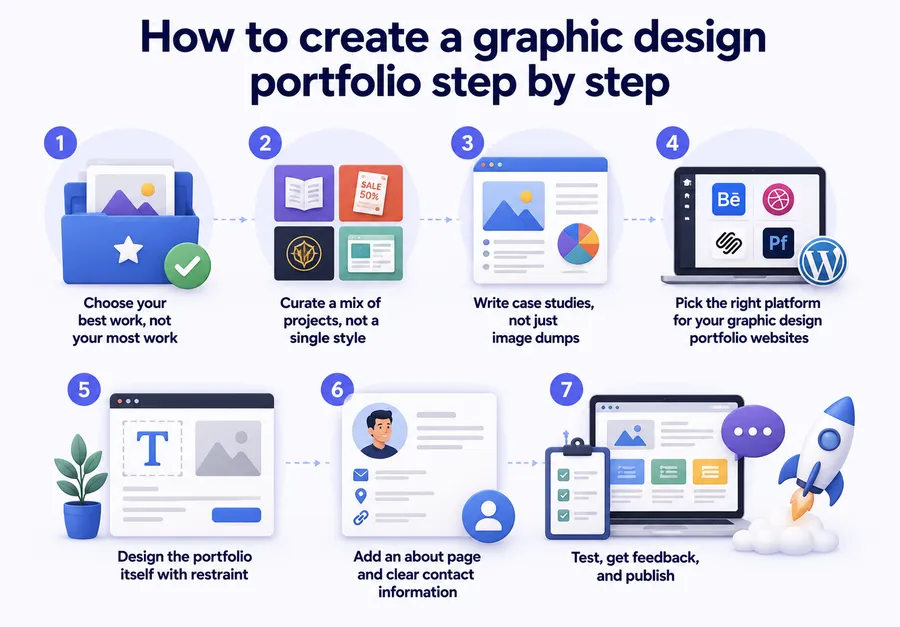
Building a portfolio that converts takes more than uploading your best files. Below is the process most working designers actually follow, broken into steps you can complete in a weekend.
Step 1: Choose your best work, not your most work
Ten strong projects will always beat thirty average ones. Go through everything you have made in the last two to three years and sort it into three piles: work you are proud of, work that is fine, and work you would rather forget. Only the first pile makes the cut. If you are early in your career and do not have ten strong pieces yet, that is fine. Five excellent projects say more about your skill than fifteen mediocre ones padded out to look busy.
Step 2: Curate a mix of projects, not a single style
A graphic and web design portfolio should show range without looking scattered. Include a mix of formats such as branding, print, packaging, and digital layouts, but keep a consistent thread running through the selection, whether that is a strong sense of typography, color, or storytelling. Recruiters and creative directors are checking for versatility inside a defined point of view, not a random assortment of unrelated styles.
Step 3: Write case studies, not just image dumps
This is the step most designers skip, and it is the one that matters most. For every project, write a short case study that covers the brief, the constraints you were working under, two or three key decisions you made, and the final outcome. A one paragraph write-up that explains why you chose a particular typeface for a restaurant rebrand tells a hiring manager more about your thinking than the final logo file ever will on its own.
Keep each case study short. Three to five sentences per project is usually enough. The goal is context, not an essay.
A useful structure to copy is: one sentence on the client and the problem, one or two sentences on the decisions you made and why, and one closing sentence on the result, whether that is a measurable outcome like increased engagement or a qualitative one like client feedback. If a project involved a real business, name the industry even if you cannot name the client, since “a regional coffee roaster rebrand” carries more weight than “a branding project.”
An example case study, side by side
Compare these two ways of presenting the same rebrand project:
Weak: “Logo design for a coffee shop. Client loved it.”
Strong: “A local coffee roaster needed a rebrand ahead of opening a second location. The existing mark did not scale down for packaging, so the new identity was built around a single-color icon that reads clearly at both storefront and bag size. After launch, the owner reported the new packaging was the top reason new customers gave for trying the shop.”
The second version proves a constraint was solved, not just that a logo exists. This is the level of detail hiring managers are scanning for, even if they only spend ten seconds reading it.
Step 4: Pick the right platform for your graphic design portfolio websites
Once your projects and write-ups are ready, you need somewhere to host them. This decision matters more than most designers expect, since the platform affects load speed, how easy the site is to update, and whether it looks professional on mobile. We cover specific graphic artist portfolio sites in the next section, but the short version is this: pick a platform you can update yourself without asking a developer for help every time you land a new project.
Step 5: Design the portfolio itself with restraint
Ironically, one of the most common mistakes on graphic design portfolio pages is over-designing the site around the work. Busy navigation, heavy animation, and loud color schemes distract from the projects you are trying to sell. Let your work be the loudest thing on the page. Neutral backgrounds, generous white space, and simple navigation keep attention where it belongs.
Step 6: Add an about page and clear contact information
A short about section builds trust. It does not need to be long: two or three sentences on who you are, what kind of design work you specialize in, and what you are looking for next. Pair this with a visible contact method, whether that is a form, an email address, or a link to your inbox. Portfolios that hide contact details behind three clicks lose opportunities that would otherwise convert.
Step 7: Test, get feedback, and publish
Before you share the link publicly, send it to two or three people whose opinion you trust, ideally someone who has hired designers before. Ask them to find your contact information and your strongest project without any hints from you. If they struggle, your navigation needs work. Once you have addressed that feedback, publish it and start sharing it in applications, on LinkedIn, and in your email signature.
It also helps to test the link on a phone that is not your own, since browser caches and saved logins can hide problems you would otherwise miss. Open the site in an incognito window, click through every project, and submit a test message through the contact form to confirm it actually arrives.
How to organize a graphic design portfolio by project type
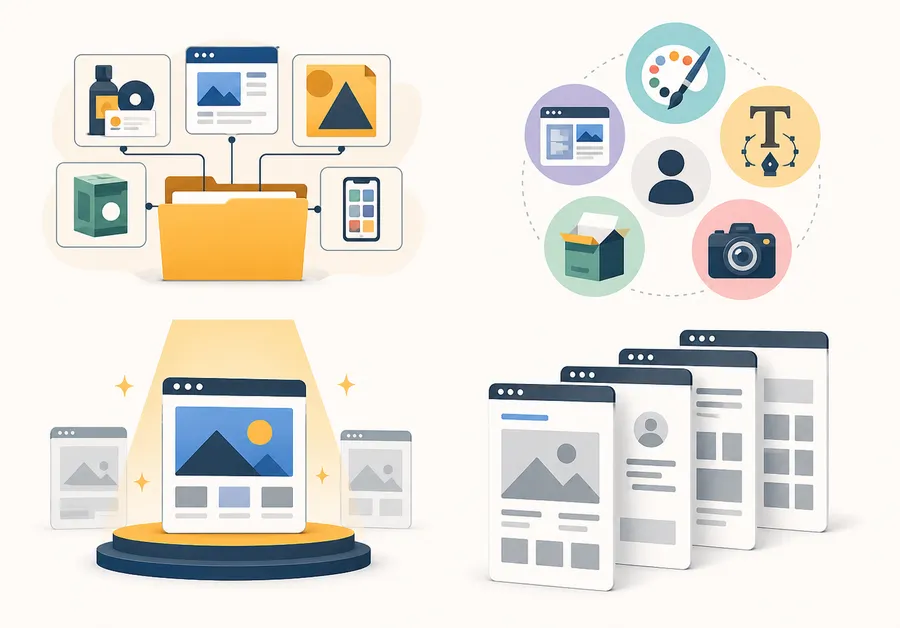
Once the core projects are chosen and written up, the order and grouping on the page matters almost as much as the work itself. A visitor who has to scroll past ten unrelated pieces to find the one style they were hoping to see will often leave before they get there.
Group by discipline when your work spans categories
If your graphic and web design portfolio includes branding, packaging, and UI work, consider grouping projects by category rather than mixing them at random. A visitor who lands on your site looking specifically for packaging examples should be able to filter or scroll straight to that section instead of hunting through everything you have made.
Lead with your strongest, most relevant project
Whatever a target employer or client is most likely to be hiring for, put your best example of that work first. If you are applying to a branding studio, do not open with the one motion graphics project you made three years ago, even if it is technically your favorite piece. Relevance beats novelty when someone is deciding whether to keep scrolling.
Keep project pages consistent in structure
Every project page should follow roughly the same pattern: a hero image, the case study copy, supporting visuals, and a next or previous project link at the bottom. Consistency signals professionalism and makes the site easier to navigate, even if the visual style of each project is different.
Optimizing images and load speed on your portfolio
Design portfolios are image-heavy by nature, which makes load speed one of the most overlooked reasons a strong body of work still fails to convert visitors.
Compress before you upload
Export images at web resolution, not print resolution, and run them through a compression tool before uploading. A hero image does not need to be five megabytes to look sharp on screen. Most platforms and WordPress plugins will compress automatically, but checking manually the first time you upload a batch of images is worth the extra few minutes.
Write specific alt text for every image
Alt text such as “logo1.png” or “project image” tells search engines and screen readers nothing useful. Instead, describe what is actually in the image and which project it belongs to, for example “Packaging design for a coffee roaster rebrand showing the primary logo mark on a kraft paper bag.” This small habit improves both accessibility and how well your graphic design portfolio pages perform in image search results over time.
Use consistent file naming
Name image files descriptively before uploading rather than leaving them as the default export name from your camera or design software. A file named coffee-roaster-packaging-design.jpg is more useful for search visibility than IMG_4021.jpg, and it makes your own file management easier as the portfolio grows.
Choosing between graphic artist portfolio sites
Not every platform fits every designer. Some graphic artist portfolio sites are built for speed and simplicity, others give you full control over layout and branding at the cost of a steeper learning curve. Here is how the main options compare.
| Platform | Best for | Customization | Ongoing cost |
| Behance | Networking and discovery inside the design community | Low | Free |
| Dribbble | Showcasing quick shots and building visibility with recruiters | Low | Free tier, paid Pro plan |
| Squarespace | Designers who want a polished site fast with minimal setup | Medium | Paid monthly |
| Adobe Portfolio | Adobe Creative Cloud subscribers who want a quick, linked site | Medium | Included with Creative Cloud |
| WordPress | Designers who want full ownership, custom branding, and room to grow into a business site | High | Hosting plus optional theme cost |
Behance and Dribbble are useful for visibility and networking, but they are shared platforms, meaning your work sits next to thousands of other portfolios and the layout is largely out of your hands. Squarespace and Adobe Portfolio are faster to set up but limit how far you can customize the site later.
Why many designers move to WordPress over time
Among all the graphic design portfolio websites available, WordPress tends to be the platform designers graduate to once they outgrow the limits of a template-based builder. It gives you full ownership of your site and domain, no dependency on a third-party platform’s design rules, and the flexibility to add a blog, a shop, or even courses later without switching platforms entirely. The tradeoff is a slightly steeper setup, though modern portfolio themes have narrowed that gap considerably.
What to weigh before choosing a platform
Cost is rarely the deciding factor for most designers, since even the paid tiers of these platforms are relatively inexpensive. The more important questions are how much control you want over the design, how comfortable you are updating the site yourself, and whether you plan to expand it into something bigger than a portfolio later, such as a shop, a blog, or paid courses. A designer who only needs a clean, static showcase for the next year or two may be perfectly served by Adobe Portfolio or Squarespace. A designer who wants a long-term home for their brand, with room to grow, tends to be better served by WordPress from the start rather than migrating later.
Building graphic design portfolio pages without writing code
You do not need to know how to code to build a professional site. Most graphic design portfolio pages today are built using visual page builders or pre-made themes.
Portfolio-focused website builders
Drag-and-drop builders such as Squarespace, Wix, and Adobe Portfolio let you drop images into a pre-built grid and adjust colors and fonts through a sidebar panel. These are the fastest route to a live site, which makes them a solid choice if you need something published within a day or two.
WordPress themes and plugins built for portfolios
If you choose WordPress, a dedicated portfolio theme handles the grid layout, lightbox image viewing, and mobile responsiveness for you. Most modern themes also come with a page builder such as Elementor, so you can rearrange sections without touching a line of code. Look for a theme with fast load times, since a slow-loading graphic and web design portfolio will lose visitors before they see a single project, regardless of how strong the work is.
When comparing themes, install a demo first and test it with your own images rather than the placeholder content, since a grid that looks clean with stock photography can behave very differently once it is filled with your actual project files. Check how the theme handles a project with only two or three images versus one with fifteen, and confirm the mobile menu is easy to tap through on an actual phone screen rather than just a browser preview.
Turning your portfolio into a teaching business
Once your graphic design portfolio is live and bringing in client inquiries, some designers take the next step and start teaching what they know, whether that is through one-off workshops or a full video course on branding or typography. If you are already on WordPress for your portfolio, you do not need a separate platform to do this. ThimPress builds the Eduma theme and the LearnPress plugin specifically for this use case, letting you add structured, sellable courses to the same WordPress site your portfolio already lives on, so your case studies and your course catalog sit under one roof instead of two separate logins.
This path is worth considering even if teaching is not your immediate goal. Designers who add a small course, even something as simple as a two-hour workshop on portfolio building or Adobe Illustrator basics, often find it becomes a second, more predictable income stream alongside client work. Because the course lives on the same domain as your portfolio, visitors who like your design work can discover the course without being redirected to an unfamiliar third-party platform, which tends to improve trust and conversion.
Common mistakes that sink a graphic design portfolio
Even strong designers undercut their own work with avoidable errors. Watch for these:
- Showing everything you have ever made. Quantity signals insecurity, not skill. Curate hard.
- Skipping context. An image with no explanation asks the viewer to do the work of understanding it. Most will not bother.
- Slow load times. Large, uncompressed image files are the number one reason graphic design portfolio websites lose visitors before the first project even loads.
- No mobile version. A significant share of hiring managers will open your link on a phone first. If the layout breaks on mobile, that is often the only impression they get.
- Outdated or broken links. Dead contact forms and old email addresses quietly kill opportunities you never even find out about.
- Burying the best work at the bottom. If a visitor has to scroll through five average projects before reaching your strongest piece, most will not make it that far.
- Inconsistent project descriptions. Writing a full case study for one project and nothing for the next makes the site feel unfinished, even if the design work itself is strong.
- Ignoring the homepage first impression. The homepage sets the tone before a single project loads. A cluttered or generic homepage can undercut even an excellent set of projects behind it.
- Using unlicensed fonts or stock imagery in mockups. Beyond the legal risk, experienced reviewers can often spot mismatched or overused stock elements, which weakens the sense that the work is original.
Keeping your portfolio current
A portfolio is not a one-time project. Set a recurring reminder, every three to four months, to review your site: swap out your weakest project for something newer, check that every link and contact form still works, and confirm the case study copy still reflects how you would describe the work today. Designers who treat their graphic artist portfolio as a living document consistently get more inbound interest than those who build it once and forget it.
FAQs
How many projects should be in a graphic design portfolio?
Most hiring managers only need to see between eight and twelve strong projects to make a decision. Quality and clarity matter far more than volume, so it is better to show five excellent case studies than twenty rushed ones.
Do I need a personal website, or is Behance enough?
Behance and similar platforms are useful for visibility and getting discovered by recruiters, but a personal website gives you full control over branding, layout, and first impressions. Many designers use both: a personal site as the main portfolio and Behance as a secondary discovery channel.
Should a beginner graphic designer include unpaid or personal projects?
Yes, especially early in a career when paid client work is limited. Personal projects, rebrand concepts, and self-initiated pieces are acceptable as long as they are clearly labeled as personal work and demonstrate real skill and finished execution.
How often should I update my graphic design portfolio?
Review it every three to four months and swap out weaker projects as stronger ones become available. A portfolio that has not changed in over a year often signals to hiring managers that a designer has not been active or growing.
What if I do not have new client work to add?
If paid projects are slow, fill the gap with a self-directed project rather than leaving the portfolio static. Redesigning the packaging for a product you like, building a fictional brand identity, or reworking an old project with better case study writing all count as legitimate updates. What matters is that the portfolio keeps showing forward progress, even during quiet stretches between paid work.
Conclusion
Knowing how to create a graphic design portfolio comes down to a handful of decisions repeated with discipline: show your strongest work, explain your thinking, and pick a platform you can maintain without friction. The tools and templates matter less than the judgment behind what makes it onto the page. Get that right, and the portfolio does the selling for you, whether a recruiter finds it on Behance or lands on it straight from your resume.
Read more: 8+ Free Construction Templates and Page Designs
Contact US | ThimPress:
Website: https://thimpress.com/
Fanpage: https://www.facebook.com/ThimPress
YouTube: https://www.youtube.com/c/ThimPressDesign
Twitter (X): https://x.com/thimpress_com