Choosing the right HR management software can reduce repetitive work, organize employee information, and make processes such as recruitment, onboarding, payroll, attendance, and performance management easier to handle.
The challenge is that HR tools vary greatly in scope. Businesses that also want to reduce repetitive tasks across other departments can explore these AI productivity tools for additional ways to support everyday work.
This guide highlights five of the best HR platforms for common business needs, followed by 10 additional options worth considering. It also explains how human resource systems work, which features matter most, and how to choose a platform that fits the actual needs of a business.
Eduma – Education WordPress Theme
We provide an amazing WordPress theme with fast and responsive designs. Let’s find out!
Quick Summary of the Best HR Management Software
| Software | Best suited for | Main strengths |
| Rippling | Growing businesses | HR, payroll, IT, automation, integrations |
| BambooHR | Small and midsize businesses | Core HR, onboarding, performance, usability |
| Gusto | Small businesses | Payroll, benefits, hiring, onboarding |
| ADP Workforce Now | Midsize and large businesses | HR, payroll, benefits, workforce management |
| Zoho People | Small and midsize businesses | Core HR, automation, customization |
| Paycor | Small and midsize businesses | HR, payroll, recruitment, talent management |
| Workday | Large enterprises | HCM, analytics, planning, scalability |
| SAP SuccessFactors | Large and global organizations | Core HR, talent, learning, analytics |
| Oracle Fusion Cloud HCM | Large and multinational organizations | Global HR, talent, analytics |
| Sage HR | Small and midsize businesses | Employee records, leave, performance |
| Cezanne HR | Small and midsize businesses | Core HR, training, performance, workflows |
| Namely | Small and midsize businesses | HR, payroll, benefits, performance |
| Freshteam | Recruitment-focused teams | Hiring, applicant tracking, onboarding |
| TriNet HR Platform | Small and midsize businesses | HR administration, benefits, payroll |
| UKG Workforce Central | Large operational workforces | Attendance, scheduling, workforce management |
What Is HR Management Software?
HR management software is a digital system used to store employee information and manage common human resource processes.
Instead of keeping HR information across paper documents, spreadsheets, emails, and separate applications, businesses can use one system to organize important employee data and routine workflows.
Depending on the platform, common functions may include:
- Employee records
- Recruitment
- Candidate tracking
- Onboarding
- Attendance
- Leave management
- Payroll
- Benefits
- Performance reviews
- Employee training
- HR reporting
- Employee self-service
The market includes several related terms, including HRIS, HRMS, HCM, and human resource management software.
An HRIS traditionally focuses on employee records and core HR administration. An HRMS usually combines employee information with additional functions such as payroll, attendance, benefits, and recruitment. HCM platforms often extend further into talent management, learning, workforce planning, and analytics.
Employee learning is often an important part of this broader HCM approach. Businesses that need a dedicated system for staff development can also compare the best LMS platforms for employee training.
However, these definitions are not always consistent. Many software providers use the terms differently.
For that reason, businesses should focus on actual features rather than assuming that every HR management system offers the same functions.
Why Businesses Use HR Management Software
A small team may be able to manage employees through spreadsheets and email. As the company grows, this process can become difficult to control.
Employee information may exist in several files. Managers may use different approval methods. HR teams may repeatedly enter the same data into different systems.
A suitable HR management system software can reduce these problems.
Reduce repetitive HR work
HR departments often spend significant time on administrative tasks.
Examples include:
- Updating employee information
- Preparing onboarding documents
- Reviewing attendance
- Processing leave requests
- Sending reminders
- Collecting forms
- Preparing regular reports
HR management software can automate some of these activities through workflows, notifications, templates, and employee self-service.
HR software is only one part of business automation. Companies looking to automate repetitive tasks across more departments can also review these AI automation tools for business workflows.
Automation does not replace HR decision-making. Instead, it reduces routine work so HR professionals can focus on recruitment quality, employee development, workforce planning, and workplace issues that require human judgment.
Centralize employee information
A human resource information system software can keep important employee information in one structured location.
Centralized records can reduce the risk of departments using different versions of the same employee information.
However, software alone does not guarantee accurate data. Businesses still need clear processes for updating and reviewing records.
Improve HR workflows
Email-based HR processes can become difficult to track.
For example, a leave request may need approval from a manager, HR, and another department. Without a clear workflow, employees may not know whether the request has been processed.
An HR management system can create standard steps and show the current status of each request. Clear workflows become increasingly important as a company grows.
Support better reporting
Many human resources software platforms provide reports and dashboards based on employee information stored in the system.
However, data should still be reviewed in context. A report can identify a trend, but managers still need to understand why the trend exists.
This becomes especially important when businesses use technology to support data-based decisions.
Improve employee self-service
Employee self-service is another important feature of modern HR management software.
Instead of contacting HR for every request, employees may be able to:
- Update personal information
- Submit leave requests
- Review documents
- Check attendance records
- Access company policies
- Complete onboarding tasks
This can reduce simple administrative requests and give employees faster access to information.
5 Best HR Management Software Options
The following five platforms stand out as strong choices for common HR needs. They cover different business sizes, from small companies that need simple payroll and HR administration to growing organizations that require automation and broader workforce management.
1. Rippling
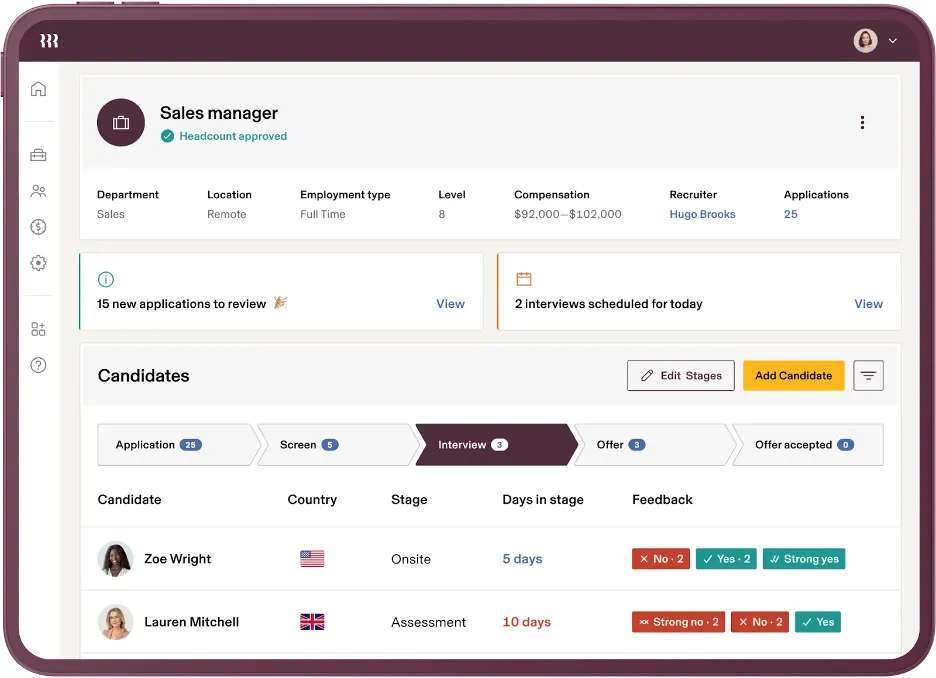
Rippling offers a broader approach than many traditional human resource systems because it connects HR processes with payroll, automation, and IT-related employee management.
Businesses can use the platform to manage employee information, onboarding, payroll, benefits, workflows, and other processes from a connected environment.
One of Rippling’s main strengths is automation. An employee joining or leaving the company can trigger several related processes rather than requiring departments to complete every step manually.
For growing companies, this can reduce the number of disconnected tools used across HR and internal operations.
Key strengths:
- Core HR management
- Payroll
- Benefits
- Employee onboarding
- Workflow automation
- HR and IT connections
- Integrations with other business tools
Best suited for: Growing businesses that want HR, payroll, and operational processes connected through one platform.
Consideration: Rippling is modular, so businesses should review which products they actually need. Adding many modules can increase both cost and system complexity.
2. BambooHR
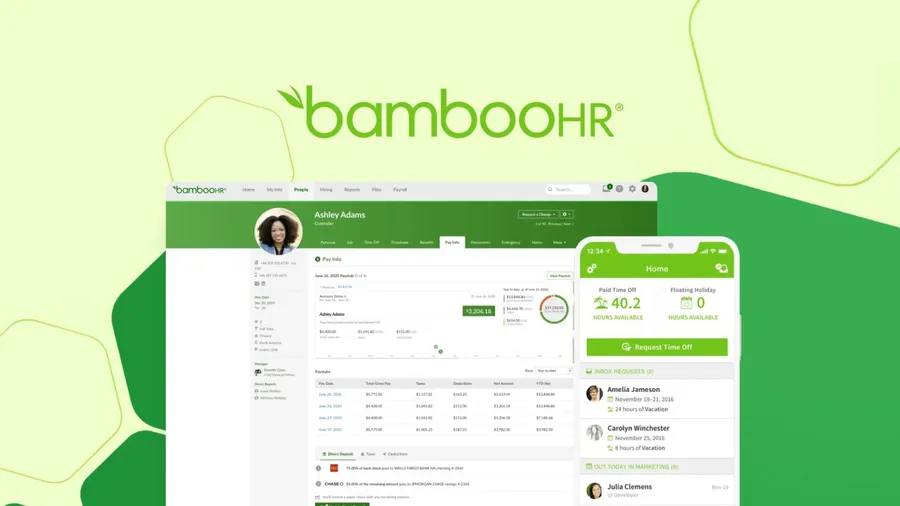
BambooHR is a popular option for small and midsize organizations that need a practical system for managing employee information and common HR tasks.
The platform provides tools for employee records, onboarding, time off, performance management, reporting, and employee self-service.
This balance makes BambooHR easier to consider for companies moving away from spreadsheets but not yet requiring a large enterprise HCM platform.
The interface is also designed around everyday HR processes rather than highly technical system administration.
Key strengths:
- Employee database
- Employee onboarding
- Time-off management
- Performance management
- HR reporting
- Employee self-service
Best suited for: Small and midsize organizations that want straightforward HR management software with a broad set of core HR functions.
Consideration: Businesses requiring payroll, benefits, or other advanced functions should check exactly which services are available in the package and region they choose.
3. Gusto
Gusto focuses strongly on payroll and HR administration for smaller companies.
For businesses searching for human resource software for small business, Gusto can be particularly relevant because it combines payroll with hiring, onboarding, employee records, time tracking, and benefits-related functions.
A small company may otherwise need separate systems for payroll and basic HR administration. Gusto can reduce this fragmentation.
Key strengths:
- Payroll
- Employee records
- Hiring
- Onboarding
- Benefits administration
- Time tracking
Best suited for: Small businesses with straightforward HR requirements and a strong need for payroll support.
Consideration: Gusto may not provide the same level of complex workforce planning, multinational HR management, or enterprise customization as larger HCM systems.
4. ADP Workforce Now
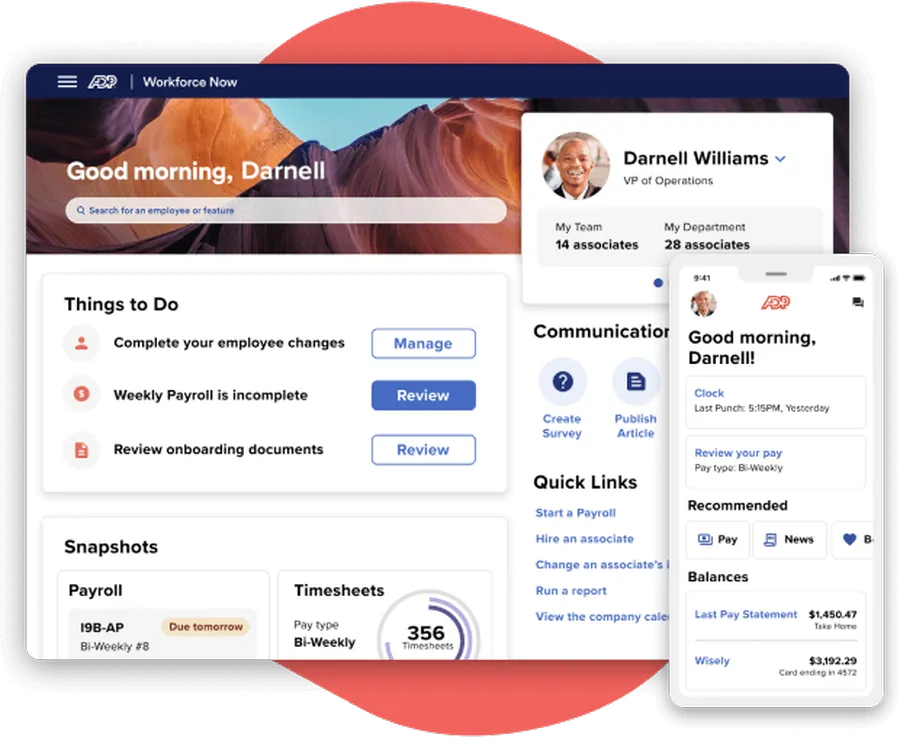
ADP Workforce Now is designed for organizations that need HR and payroll functions within a broader workforce platform.
It includes employee administration, payroll, benefits, time management, talent functions, and reporting.
For midsize and larger companies, combining these functions in one HR management system software can reduce the need to manage several independent tools.
Key strengths:
- Core HR
- Payroll
- Benefits
- Time and attendance
- Workforce management
- Talent functions
- Reporting and analytics
Best suited for: Midsize and large organizations that require established HR and payroll capabilities.
Consideration: The broad feature set can make ADP more complex than smaller HR platforms. Teams may require training and a clear implementation process.
5. Zoho People
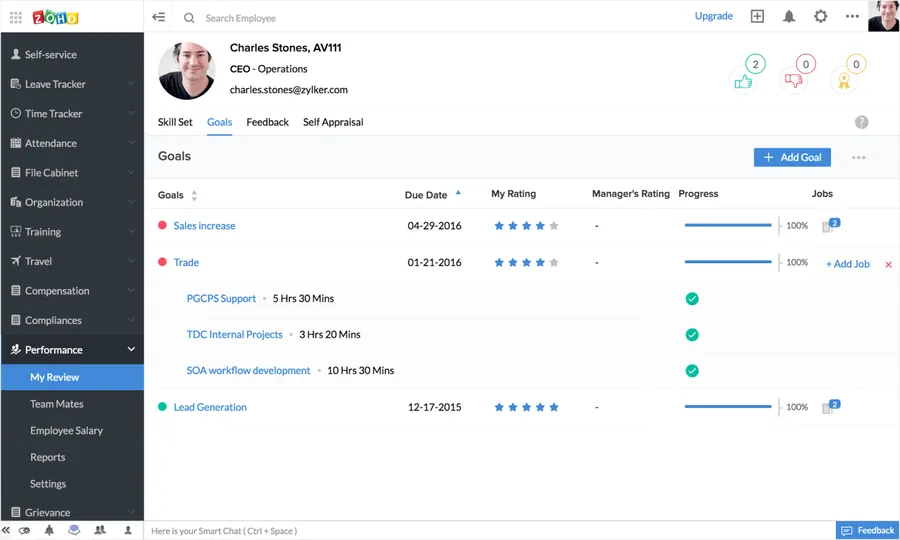
Zoho People provides a flexible set of core HR functions for small and midsize businesses.
The platform supports employee information, leave management, attendance, performance management, workflows, documents, and reporting.
It can be particularly useful for companies already using other Zoho products because employee processes can sit within a wider business software ecosystem.
Zoho People also provides customization options for companies that want HR forms and workflows to match their internal processes.
Key strengths:
- Employee database
- Leave management
- Attendance
- Workflow automation
- Performance management
- HR reporting
- Integration with other Zoho tools
Best suited for: Small and midsize organizations looking for flexible and relatively accessible human resource management software.
Consideration: Companies requiring advanced payroll or recruitment functions should check whether they need additional Zoho products or external integrations.
10 More HR Management Software Options to Consider
The five platforms above cover many common HR requirements, but they are not the only choices. Businesses with more specific needs, such as enterprise workforce planning, recruitment, employee scheduling, or specialized HCM functions, can also consider the following options.
6. Paycor
Paycor provides a broad HCM platform covering HR, payroll, recruitment, onboarding, talent management, workforce management, and employee development.
The range of features makes it useful for companies that want to connect different stages of the employee lifecycle.
For example, information collected during recruitment can move into onboarding and then into ongoing employee administration.
This reduces the need for HR teams to enter the same information repeatedly.
Key strengths:
- Core HR
- Payroll
- Recruiting
- Onboarding
- Talent management
- Workforce management
- Employee development
Best suited for: Small and midsize businesses seeking integrated HR and payroll functions.
Consideration: Businesses should compare packages carefully because feature availability may depend on the selected product bundle.
7. Workday
Workday is one of the strongest enterprise-level human resource management system software options.
It supports core HR, talent management, workforce analytics, employee development, planning, and other large-scale organizational requirements.
Its analytical capabilities are particularly useful for organizations that want to connect workforce information with broader business planning.
However, the system is placed below more accessible tools in this ranking because its size and complexity are not necessary for most small businesses.
Key strengths:
- Enterprise HR management
- Talent management
- Workforce analytics
- Workforce planning
- Employee development
- Large-scale integration
- Global scalability
Best suited for: Large enterprises and organizations with complex workforce requirements.
Consideration: Workday generally requires more planning, implementation resources, training, and system administration than simpler platforms.
8. SAP SuccessFactors
SAP SuccessFactors provides a broad HCM suite designed mainly for larger and international organizations.
Its functions can cover core HR, recruiting, onboarding, performance management, learning, talent development, and workforce analytics.
Companies already using SAP business systems may also consider SuccessFactors because HR data can become part of a broader enterprise technology environment.
Key strengths:
- Core HR
- Recruitment
- Employee onboarding
- Performance management
- Learning
- Talent management
- Workforce analytics
Best suited for: Large enterprises and multinational organizations.
Consideration: Smaller companies may find the implementation and administration requirements greater than necessary for their HR needs.
9. Oracle Fusion Cloud HCM
Oracle Fusion Cloud HCM is another enterprise-focused option designed for large and multinational organizations.
The platform covers global HR, recruiting, talent management, learning, workforce analytics, employee development, and other HCM functions.
Its main advantage is the ability to support complex HR structures across larger organizations.
Key strengths:
- Global HR
- Recruitment
- Talent management
- Workforce analytics
- Learning and employee development
- Enterprise scalability
Best suited for: Large businesses and multinational organizations that require advanced HR management software.
Consideration: Its broad scope can create unnecessary complexity for small organizations with simple employee management requirements.
10. Sage HR
Sage HR offers a more focused set of functions for small and midsize organizations.
The platform can help manage employee information, leave, performance, documents, and other everyday HR processes.
Its relatively focused structure may make it easier to implement than a large HCM platform.
Businesses already using other Sage products may also consider whether Sage HR fits their existing software environment.
Key strengths:
- Employee records
- Leave management
- Performance management
- Employee administration
- HR reporting
Best suited for: Small and midsize organizations with standard HR requirements.
Consideration: Companies should confirm which modules, integrations, and regional services are available before making a final decision.
11. Cezanne HR
Cezanne HR provides core employee management together with performance, training, reporting, and configurable workflows.
The platform sits between basic HR administration tools and large enterprise HCM systems.
For growing organizations, this can provide more structure without introducing the complexity of a platform designed mainly for multinational enterprises.
Key strengths:
- Employee information
- Performance management
- Training management
- HR workflows
- Reporting
- Configurable processes
Best suited for: Small and midsize businesses that need flexible HR management software.
Consideration: Organizations with highly complex global HR requirements should compare its capabilities with larger enterprise platforms.
12. Namely
Namely combines HR administration with payroll, benefits, performance management, and employee information.
It is mainly designed for small and midsize businesses that want several employee processes available through one platform.
A central system can reduce the need to move between separate HR, payroll, and benefits tools.
Key strengths:
- Core HR
- Payroll
- Benefits
- Performance management
- Employee administration
Best suited for: Small and midsize businesses that want several HR processes in one environment.
Consideration: Businesses should compare total cost with the number of functions they expect to use. A broad package offers little value if most features remain unused.
13. Freshteam
Freshteam has a narrower focus than many platforms above because recruitment is one of its strongest areas.
The software helps companies manage job openings, applicants, candidate information, recruitment workflows, onboarding, and employee records.
This makes Freshteam particularly useful for businesses where hiring is currently the main HR problem.
Key strengths:
- Applicant tracking
- Candidate management
- Recruitment workflows
- Hiring
- Employee onboarding
- Employee information
Best suited for: Small and midsize companies with recruitment-focused HR needs.
Consideration: Businesses looking for advanced payroll, workforce planning, or broad enterprise HCM features may need more comprehensive human resources software.
14. TriNet HR Platform
TriNet HR Platform includes HR administration, payroll-related services, benefits, employee information, time management, and other workforce functions.
The platform is particularly relevant to smaller and midsize companies that need support across several administrative HR areas.
Businesses may encounter older content referring to Zenefits when researching this product. Current product information should therefore be checked directly when comparing features.
Key strengths:
- Core HR administration
- Employee information
- Benefits
- Payroll-related functions
- Employee self-service
- Time management
Best suited for: Small and midsize businesses looking for connected HR administration and related services.
Consideration: Avoid relying on old product reviews alone because branding, plans, and available functions can change.
15. UKG Workforce Central
UKG Workforce Central focuses strongly on workforce operations such as employee time, attendance, scheduling, and labor management.
It is therefore different from many general-purpose HR platforms higher in this list.
Companies with large shift-based workforces may find its workforce management functions more relevant than a simple employee database.
Key strengths:
- Time and attendance
- Employee scheduling
- Labor management
- Workforce operations
- Workforce reporting
Best suited for: Large organizations with complex shift, scheduling, or attendance requirements.
Consideration: Businesses researching older Kronos products should review UKG’s current product portfolio and migration options before making a decision.
How to Choose the Best HR Software
The best HR software is not always the product with the most features.
A platform should solve important HR problems without adding unnecessary administrative work.
Before choosing a system, businesses should first define which processes need improvement.
1. Identify the main HR problems
Start by reviewing where HR teams currently spend the most time.
Common problems include:
- Repeated employee data entry
- Complicated leave approvals
- Manual attendance management
- Payroll preparation
- Recruitment tracking
- Slow onboarding
- Inconsistent performance reviews
- Difficult reporting
A company struggling mainly with payroll will have different requirements from a company whose main problem is recruitment.
This simple step can remove many unsuitable options before detailed software comparisons begin.
2. Consider business size
Business size has a strong effect on HR requirements.
A human resource software for small business should usually be simple to operate without requiring a large HR or IT department.
Common priorities include:
- Employee records
- Payroll
- Leave
- Attendance
- Onboarding
- Basic reporting
A large enterprise may require much more.
Common enterprise requirements include:
- Complex permissions
- Multiple legal entities
- Global workforce management
- Advanced analytics
- Talent management
- Workforce planning
- Large-scale integrations
Buying a large enterprise platform too early can increase cost and administrative work.
However, choosing a system that cannot support realistic future growth may also force the business to migrate again later.
3. Review payroll requirements
Not every HR management software platform provides payroll in every location.
Before selecting a product, confirm whether payroll is:
- Included directly
- Available as an extra module
- Provided through another service
- Connected through an integration
- Supported in the required country
Local employment rules, taxes, benefits, and payroll requirements may also affect which system is practical.
4. Check integration options
An HR management system software rarely operates completely alone.
Good integrations can reduce repeated data entry. Poor integrations can create the opposite result because staff may need to update the same information across several platforms.
Check whether required integrations are native, API-based, or dependent on third-party services.
5. Review security and user permissions
HR systems contain sensitive information.
Employee records may include personal information, salary data, contracts, attendance, performance records, and other confidential documents. A suitable human resource information system software should allow each user to see only the information required for their role.
6. Test ease of use
A platform may have an impressive feature list but still fail if employees find it difficult to use.
Whenever possible, businesses should request a demonstration or trial and test real workflows.
For example:
- Can employees request leave quickly?
- Can managers approve requests easily?
- Can HR update employee records without unnecessary steps?
- Can reports be created without technical knowledge?
- Is onboarding clear for new employees?
Ease of use is particularly important because HR systems depend on regular participation from employees and managers.
7. Compare total cost
The advertised subscription price is not always the full cost of an HR management system.
Additional expenses may include:
- Implementation
- Data migration
- Training
- Support
- Additional modules
- Integrations
- Payroll services
- Customization
A low-cost system may become expensive if several extra products are needed.
At the same time, an expensive enterprise platform offers poor value if most of its functions remain unused.
HR Software Comparison by Business Size
| Business type | Main priorities | Platforms to compare |
| Small business | Payroll, simple HR, employee records, onboarding | Gusto, Zoho People, Sage HR |
| Small to midsize | Core HR, performance, reporting | BambooHR, Cezanne HR, Namely |
| Growing business | Automation, integrations, scalability | Rippling, Paycor |
| Midsize to large | Payroll, benefits, workforce management | ADP Workforce Now |
| Large operational workforce | Attendance, shifts, scheduling | UKG Workforce Central |
| Large enterprise | Global HR, analytics, talent, planning | Workday, SAP SuccessFactors, Oracle Fusion Cloud HCM |
This table should only be used as a starting point.
Two companies with the same number of employees may still need very different human resource systems because of differences in industry, location, payroll structure, workforce type, and existing technology.
HRIS vs HRMS vs HCM: What Is the Difference?
The HR software market uses several overlapping terms.
Understanding the basic differences can make product research easier.
HRIS
HRIS stands for Human Resource Information System.
Traditionally, an HRIS focuses on employee information and basic administrative processes.
Typical functions include:
- Employee records
- Job information
- Leave
- Attendance
- Documents
- Basic reporting
A human resource information system software is often the central employee database used by an HR department.
HRMS
HRMS stands for Human Resource Management System.
It generally includes core HR information but may also provide:
- Payroll
- Recruitment
- Performance management
- Benefits
- Time management
- Workforce management
The terms HRMS and HR management system software are therefore often used in similar contexts.
HCM
HCM stands for Human Capital Management.
HCM platforms often cover broader employee lifecycle and workforce strategy functions.
These may include:
- Talent acquisition
- Performance
- Learning
- Career development
- Succession planning
- Workforce analytics
- Workforce planning
The boundaries between HRIS, HRMS, and HCM are not strict.
A product marketed as an HRIS may include features normally associated with HRMS. A human resource management system software may also provide advanced HCM functions.
For this reason, actual features matter more than product labels.
Common Mistakes When Choosing HR Management Software
Choosing the wrong HR platform can create additional work instead of reducing it.
Several common mistakes can be avoided during the selection process.
Choosing based only on feature count
More features do not automatically mean a better platform.
A company that needs employee records, leave, and payroll does not necessarily benefit from advanced succession planning or global workforce analytics.
Unused features can increase cost and complexity.
Ignoring employee experience
HR teams are not the only users.
Managers may need to approve requests. Employees may need to update information or complete reviews.
If the HR management software is difficult to use, adoption can fall and HR teams may receive more support requests.
Forgetting about integrations
A new HR platform should fit the company’s existing technology.
If it cannot connect with payroll, finance, accounting, or other important systems, employees may continue entering information manually.
This reduces many of the expected benefits of automation.
Focusing only on current requirements
Businesses should consider realistic future growth.
A company with 20 employees may have very different requirements after reaching 100 employees.
However, this does not mean buying the largest system available.
A better approach is to determine whether the platform can support likely growth without paying for unnecessary enterprise functions today.
Ignoring data migration
Moving from spreadsheets or another HR management system requires preparation.
Businesses should decide:
- Which employee records need to move
- Which information is outdated
- Who will review the data
- Which documents should be transferred
- How permissions will be configured
- How old records will be stored
Poor data quality can reduce the value of even the best software.
Final Thoughts
Choosing HR management software should begin with business requirements rather than rankings or the number of features advertised.
Among the main options, Rippling offers broad automation and integrations for growing businesses, while BambooHR provides a more accessible core HR experience for small and midsize organizations. Gusto is particularly relevant to smaller businesses focused on payroll, ADP Workforce Now provides broader workforce management capabilities, and Zoho People offers flexible core HR tools.
There is no universal best HR software for every organization.
The goal of human resource management software is not simply to convert existing paperwork into digital records.
A useful platform should reduce unnecessary administrative work, make employee information easier to manage, improve HR workflows, and support the organization as its workforce develops.
Frequently Asked Questions
1. What Is HR Management Software Used For?
HR management software is used to organize employee information and manage HR processes such as recruitment, onboarding, attendance, leave, payroll, benefits, performance management, training, and reporting. The exact functions depend on the platform.
2. What Is the Difference Between HR Software and HRIS?
An HRIS traditionally focuses on employee information and core HR administration. Broader human resources software may also include payroll, recruitment, performance, benefits, talent management, and workforce planning. Because vendors use these terms differently, businesses should compare features rather than labels alone.
3. What Is the Best HR Software for a Small Business?
The best option depends on employee count, location, payroll requirements, budget, and required functions. Small businesses should usually prioritize easy setup, employee records, payroll support, leave management, onboarding, and clear reporting before paying for advanced enterprise features.
4. What Features Should HR Management Software Have?
Useful features may include employee records, attendance, leave, payroll, recruitment, onboarding, performance management, reporting, employee self-service, security controls, permissions, and integrations. The right feature set depends on the company’s size and HR processes.
5. How Should a Business Choose an HR Management System?
Start by identifying the HR processes that need improvement. Then compare each HR management system based on functions, ease of use, payroll support, integrations, security, scalability, implementation requirements, and total cost. Testing real workflows during a demo or trial can also help determine whether the software is practical for employees and managers.
Read more: Sample Privacy Policy Template for Websites & Apps
Contact US | ThimPress:
Website: https://thimpress.com/
Fanpage: https://www.facebook.com/ThimPress
YouTube: https://www.youtube.com/c/ThimPressDesign
Twitter (X): https://x.com/thimpress_com