Endless task lists, scattered notes, and constant notification fatigue destroy focus and drain energy. Professionals do not need more hours in the day; they need the best productivity apps to organize workloads, track time, and eliminate distractions instantly. Furthermore, for those looking to push their efficiency to the absolute limit, pairing these task managers with dedicated AI productivity tools can automate repetitive work and yield even better results.
This comprehensive guide breaks down the ultimate digital toolkit. From advanced time trackers and mindful planners to robust task managers, the following analysis details exactly how to leverage these platforms for maximum efficiency.
By integrating the best productivity apps, individuals can shift from reactive firefighting to proactive, intentional execution.
Eduma – Education WordPress Theme
We provide an amazing WordPress theme with fast and responsive designs. Let’s find out!
Summary of the Recommended Tools
This table provides a high-level look at each tool, its primary strength, and basic pricing details to help professionals quickly identify the best app for productivity based on their specific needs.
| Application | Primary Strength | Best Suited For | Starting Price |
| Todoist | Task Management | Individuals needing simple, effective lists | Free ($4/month paid) |
| Akiflow | Task Consolidation | Professionals overwhelmed by multiple inboxes | $34/month |
| Routine | Focused Daily View | Visual planners prone to task overwhelm | Free ($10/month paid) |
| Toggl Track | Time Tracking | Freelancers and data-driven workers | Free ($10/month paid) |
| Sunsama | Mindful Planning | Individuals aiming to prevent burnout | $22/month |
| brain.fm | Deep Focus Audio | Workers easily distracted by background noise | $14.99/month |
| Focus Traveller | Gamified Pomodoro | Those needing visual motivation to focus | Free ($0.99/month paid) |
| Notion | Note-taking & Wikis | Complex documentation and database creation | Free ($10/month paid) |
| Superlist | Modern List Making | Teams and individuals wanting AI assistance | Free ($6/month paid) |
What Makes a Tool Worth Using?
When searching for a reliable productivity app, it is easy to become overwhelmed by the sheer volume of options available. Software marketplaces are flooded with tools promising to revolutionize daily workflows. However, not every platform will suit every working style.
The top productivity apps featured in this guide were selected based on a strict set of criteria designed to identify applications that genuinely enhance output rather than complicate it.
1. Solving a Singular, Real Problem
The most effective software addresses a specific bottleneck in the daily routine.
A platform should not try to be everything at once unless it is specifically designed as an all-in-one workspace. A dedicated time tracker should excel at time tracking; a daily planner should excel at planning.
When reviewing productivity apps for work, the tools that stand out are those that offer deep, refined functionality in one specific area rather than mediocre functionality across many.
2. Intuitive User Experience
When energy levels are low or distractions are high, a complicated interface is a massive deterrent. The software must be intuitive enough that opening it and interacting with it requires minimal cognitive effort. If a tool requires a multi-hour tutorial just to add a simple task, it generally hinders rather than helps.
The best app for productivity operates with frictionless speed, allowing professionals to capture thoughts and organize projects without breaking their concentration.
3. Seamless Ecosystem Integration
No application exists in a vacuum. The ideal software must communicate efficiently with other essential tools, such as email clients, calendar applications, team communication platforms like Slack, and content management systems like WordPress.
Integration ensures that data flows automatically between systems, eliminating the need for manual data entry and reducing the risk of human error.
4. The 30-Day Utility Test
If a piece of software is installed but remains unopened for thirty days, it does not belong in the workflow. The platforms listed below have proven their long-term value through consistent, daily utility. True personal productivity apps become invisible habits; they integrate so deeply into daily operations that working without them feels unnatural.
Detailed Breakdown of the Top 9 Platforms
1. Todoist: The Standard for Task Management
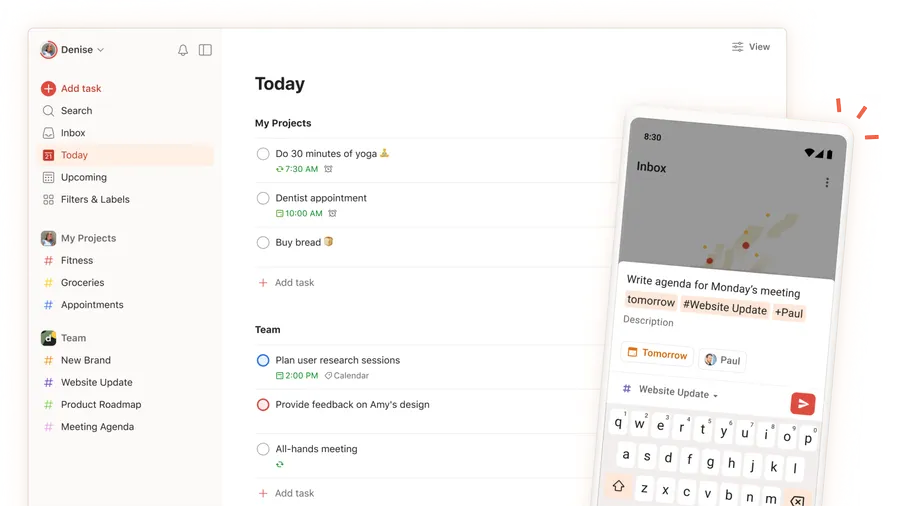
When discussing the best to do apps available on the market, Todoist consistently remains at the forefront of the conversation. It is a highly refined, heavily tested platform that adapts effortlessly to almost any working style.
Core Philosophy and Overview
Todoist operates on the principle of immediate capture. The goal is to get tasks out of the human brain and into a trusted digital system as quickly as possible. It offers traditional list views, Kanban boards for project management, and, for premium users, a robust time-blocking calendar view.
This structural flexibility makes it one of the most reliable best productivity apps for universal use.
Key Features
- Natural Language Processing (NLP): Users can type phrases like “Review the new WordPress plugin draft every Friday at 3 PM,” and the system automatically schedules the recurring task perfectly without requiring manual date selection.
- Karma Gamification: A built-in point system rewards users for completing tasks and maintaining daily streaks, providing a subtle psychological push to stay on track.
- Methodology Templates: The platform offers pre-built templates for popular frameworks such as Getting Things Done (GTD) and the Eisenhower Matrix, accelerating the setup process for new users.
- Cross-Platform Availability: Impeccably designed applications exist for web, desktop, mobile, and smartwatches, ensuring task capture is always accessible.
Ideal Workflows and Use Cases
Todoist is highly advantageous for both individual professionals and small collaborative teams. For instance, a marketing professional can create a shared project with an editor, assigning specific deliverables and setting priority flags.
To streamline operations even further, you can connect Todoist with various best AI automation tools to automatically generate recurring tasks based on triggers from your other platforms.
Pros and Cons
- Pros: Exceptional NLP capabilities, generous free tier, vast integration library connecting to hundreds of other platforms.
- Cons: Calendar time-blocking is restricted to the paid tier; limited color-coding options for visual planners who rely heavily on color differentiation.
Pricing Structure
Todoist offers a comprehensive free plan that covers the basic needs of most individuals. Paid plans, which unlock reminders, advanced calendar views, and increased project limits, begin at an affordable $4 per month.
2. Akiflow: The Ultimate Task Consolidator
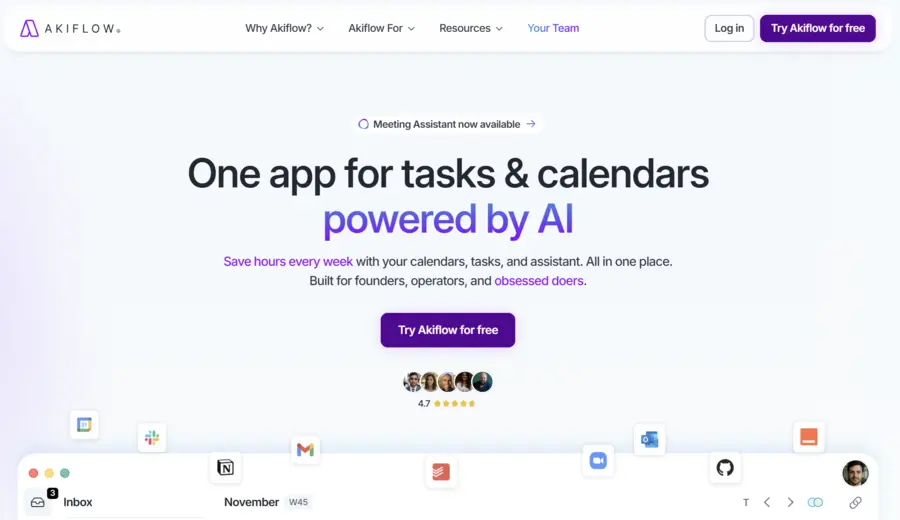
For professionals who find themselves constantly switching between email, messaging applications, and project boards, Akiflow serves as a unified command center. It is specifically designed to eliminate the anxiety of missed messages scattered across different platforms, ranking highly among elite productivity apps for work.
Core Philosophy and Overview
Akiflow functions as an aggregator. Rather than forcing users to manually copy and paste tasks from various sources, it pulls data from integrated tools directly into a single, centralized inbox. From there, users process the inbox, assign time estimates, and drag tasks directly onto a calendar.
Key Features
- Universal Inbox: Integrates seamlessly with Slack, Notion, Asana, Trello, and various email providers, capturing every request in one place.
- Detailed Analytics: Tracks every task completed and every hour spent, providing a comprehensive overview of daily output and time allocation to help measure genuine efficiency.
- Daily Planning Rituals: Prompts users to start the day by reviewing the calendar and end the day by evaluating accomplishments, enforcing strong organizational habits.
- Built-in Scheduling: Features an integrated meeting scheduling tool, eliminating the need for third-party calendar booking links and keeping schedule management internal.
Ideal Workflows and Use Cases
This platform is a lifesaver for managers or freelancers juggling multiple clients. If a client sends a request via Slack, another sends an email, and a third updates a Trello card, all three notifications appear in the Akiflow inbox.
For example, if you frequently use Google Bard to write emails, you can easily pull those drafted conversations directly into Akiflow as actionable tasks without ever losing track of a single thread.
Pros and Cons
- Pros: Drastically reduces context switching; excellent time visualization; robust integration ecosystem that supports complex corporate workflows.
- Cons: The pricing is significantly higher than standard task managers; the interface can feel overwhelming during initial setup due to the sheer volume of data aggregation.
Pricing Structure
Akiflow operates at a premium price point, reflecting its professional-grade capabilities. Subscriptions cost $34 per month, though opting for an annual billing cycle reduces the monthly equivalent to $19.
3. Routine: Precision Focus and Daily Clarity
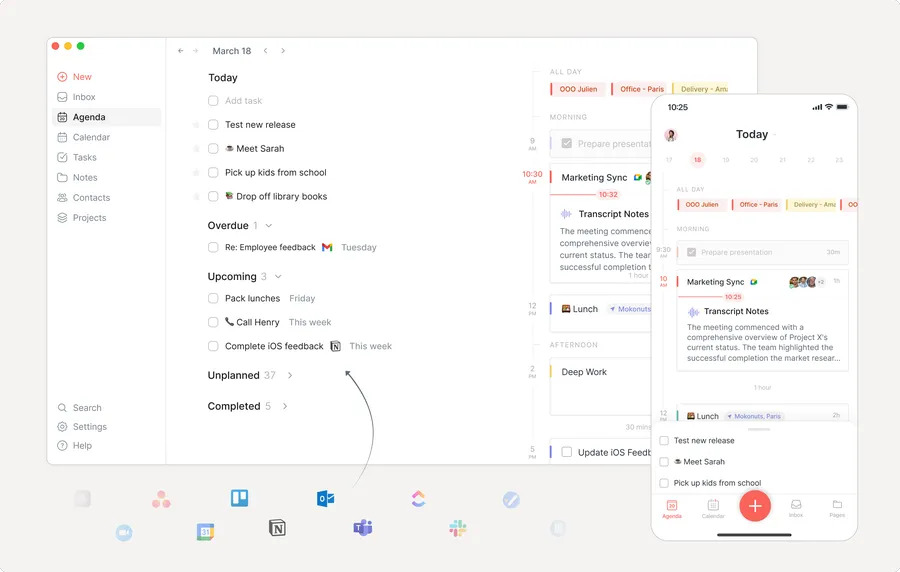
Task lists have a tendency to grow uncontrollably. When a digital list contains dozens of uncompleted items, simply opening the application can induce stress. Routine was built specifically to combat this phenomenon by blending minimalist design with hyper-focused daily views, earning its spot among the top productivity apps.
Core Philosophy and Overview
Routine combines calendar management, task tracking, and note-taking into one cohesive interface. Its standout feature is the localized “Today” view, which deliberately hides the broader, overwhelming backlog of projects and presents only the specific items scheduled for the current day.
Key Features
- Dedicated ‘Today’ View: Isolates immediate priorities from future commitments to reduce psychological friction and analysis paralysis.
- Integrated Note-taking: Instead of utilizing traditional folders, tasks are organized within detailed pages where extensive notes, hyperlinks, and context can be documented alongside the actionable items.
- Dashboard Widget: A quick-capture dashboard that allows users to note thoughts instantly without navigating away from their current work window.
Ideal Workflows and Use Cases
Routine is perfectly suited for individuals whose work requires heavy documentation alongside task execution. For example, a researcher preparing a presentation can keep their reference links, meeting notes, and actionable next steps unified on a single page, and then schedule specific tasks onto their calendar directly from that page.
If you are heavily invested in finding the best personal AI assistants to manage your schedule, Routine feels like a natural extension of that smart, focused delegation.
Pros and Cons
- Pros: Exceptionally clean and calming interface; unique approach blending notes and tasks; strong free version that delivers substantial value.
- Cons: Lacks advanced color-coding capabilities on the calendar; the roadmap is still actively developing, meaning some advanced features available in older platforms are not yet present.
Pricing Structure
Routine provides a very strong free tier that requires no financial commitment for individual use. Upgraded plans with extended history and advanced functionalities start at $10 per month.
4. Toggl Track: Masterful Time Management
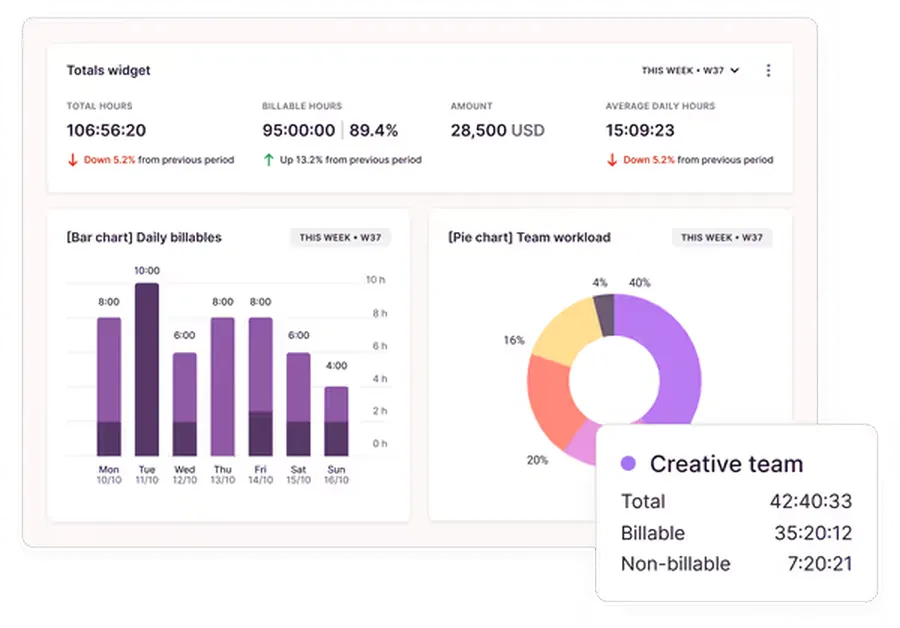
Understanding where time actually goes is often the most critical step in improving efficiency. Many professionals finish a grueling workday only to wonder what they actually accomplished. Toggl Track provides the analytical truth required to optimize schedules, standing as a pillar among productivity apps for work.
Core Philosophy and Overview
Toggl Track is built around frictionless time tracking. Recognizing that forcing users to fill out complex timesheets is a barrier to adoption, the platform relies on a simple start-and-stop timer that can be triggered from almost anywhere on the web.
Key Features
- Ubiquitous Browser Extension: The Toggl timer button embeds itself into hundreds of web applications, including Google Docs, email clients, and project boards, allowing users to track time without opening the native application.
- Granular Reporting: Generates highly detailed visual reports (bar charts, pie charts) breaking down time spent by project, client, or specific task, which can be exported for client review.
- Billable Hours Calculation: Allows freelancers and agencies to assign different hourly rates to different projects, automatically calculating revenue generated based on time worked.
- Idle Time Detection: If the user steps away from the computer while the timer is running, the application prompts a correction upon return, ensuring data accuracy.
Ideal Workflows and Use Cases
Beyond obvious billing uses for freelancers, Toggl Track is an exceptional behavioral modifier. By initiating a timer for a specific task, users create a psychological contract to focus solely on that task.
For instance, a digital marketing specialist spending hours analyzing data from various SEO reporting tools can track exactly how long the audit takes, ensuring their monthly retainer remains profitable.
Pros and Cons
- Pros: Frictionless tracking via extensions; incredibly insightful analytics; perfect for accurate client billing and resource allocation.
- Cons: Remembering to start and stop the timer requires building a new habit; retroactive manual entry can be tedious if the user forgets to track in real-time.
Pricing Structure
The free version is remarkably robust and sufficient for most individual needs. Premium plans, which include scheduled reports and team tracking features, start at $10 per month.
5. Sunsama: Intentional and Mindful Planning
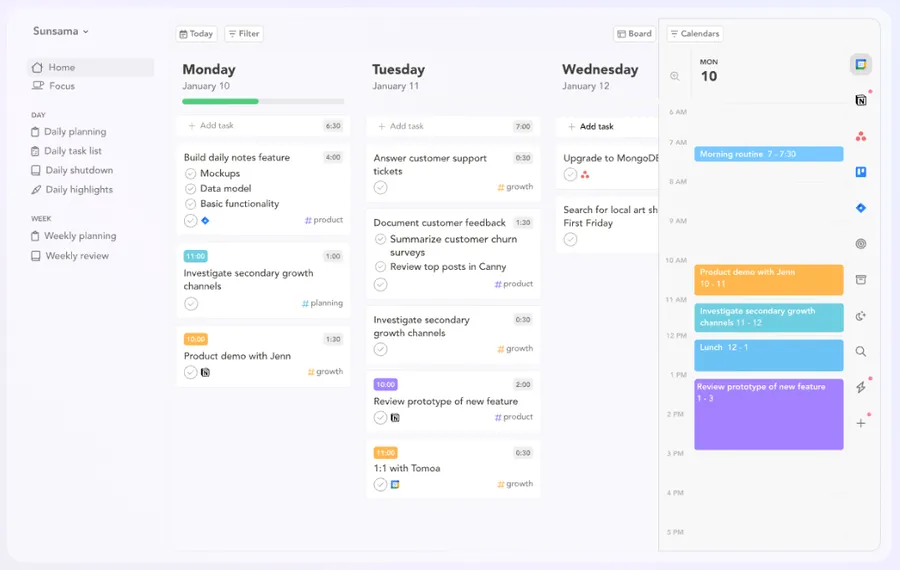
The modern work environment often pushes professionals toward toxic productivity—the belief that every minute must be optimized for maximum output, leading inevitably to burnout. Sunsama offers a radically different, healthier approach to structuring the day, distinguishing itself from other best productivity apps.
Core Philosophy and Overview
Sunsama is an intentional daily planner that forces users to be realistic about their human limitations. It is designed to calculate expected workloads and actively warns users when they have scheduled more tasks than they can reasonably accomplish in a standard workday.
Key Features
- Guided Planning Rituals: Walks users through a step-by-step process each morning to prioritize tasks, assign time estimates, and review calendar availability, ensuring a deliberate start to the day.
- Workload Warnings: Displays alerts if the total estimated task time exceeds a healthy threshold (e.g., more than five hours of deep work in one day), prompting users to reschedule non-urgent items.
- Shutdown Routine: A structured end-of-day process to review accomplishments, move unfinished items, and mentally disconnect from work, which is crucial for work-life balance.
- Broad Integrations: Pulls tasks effortlessly from tools like Jira, GitHub, and Asana into a cohesive daily view, making it ideal for software development teams.
Ideal Workflows and Use Cases
For professionals prone to overcommitting, Sunsama is a necessary intervention. It is highly effective for managers who need to balance continuous meetings with focused project execution.
By dragging tasks directly onto the calendar alongside existing meetings, users gain an accurate, realistic picture of their actual availability. Among top productivity apps, it is the champion of sustainable working habits.
Pros and Cons
- Pros: Beautifully designed aesthetic; promotes long-term mental health and prevents burnout; excellent planning methodology integrated into the software.
- Cons: It carries a higher price tag compared to standard planners; requires a daily time commitment to execute the planning rituals properly.
Pricing Structure
Sunsama is an investment in structured mindfulness, priced at $22 per month. Choosing the annual billing option reduces this cost to $17 per month.
6. brain.fm: Auditory Engineering for Deep Work
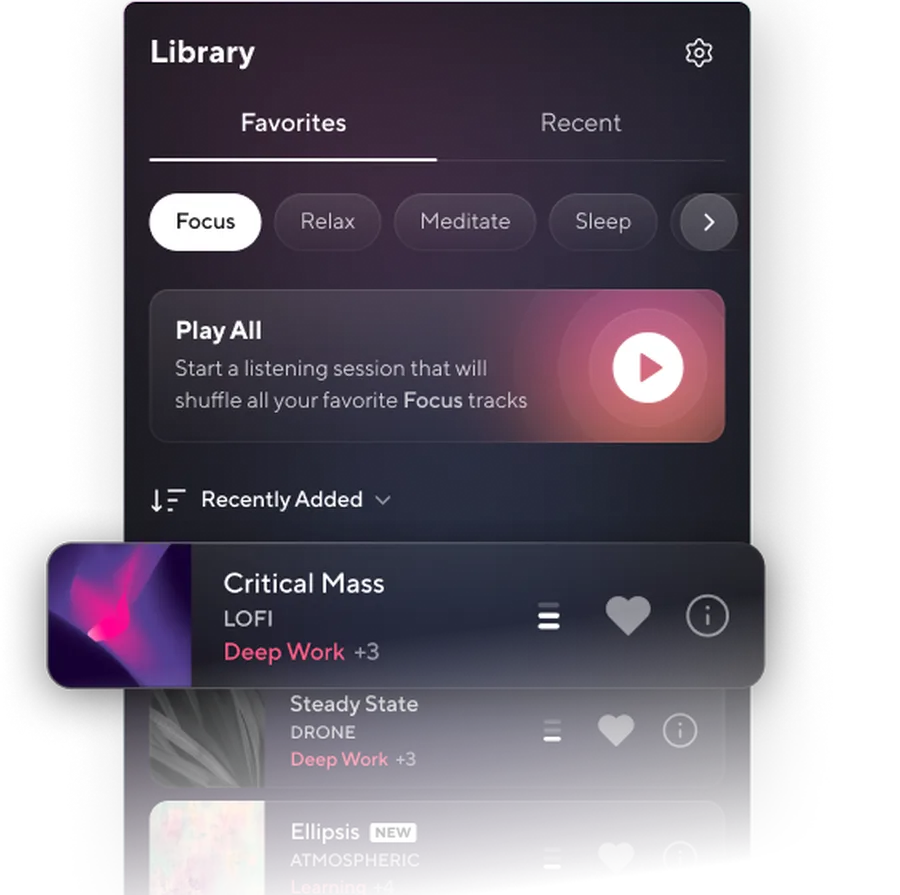
Traditional music, particularly tracks containing vocals, often distracts the brain’s language processing centers, reducing the quality of focus. When absolute concentration is required, relying on engineered audio yields significantly better results. Therefore, a unique productivity app like brain.fm is essential.
Core Philosophy and Overview
brain.fm is not a standard music streaming service. It utilizes patented, science-backed audio generation designed specifically to influence neural activity. By using specific frequency ranges and volume modulations, the audio encourages the brain to enter states of deep focus, relaxation, or sleep.
Key Features
- Neurological Phase Locking: The audio patterns are mathematically engineered to synchronize with the brainwaves associated with intense concentration, bypassing the distraction caused by traditional lyrics.
- Customizable Audio Filters: Users can select different atmospheric environments, ranging from cinematic electronic beats and acoustic guitar to nature sounds like rainstorms and forests.
- Purpose-Driven Modes: Distinct settings designed explicitly for deep work, creative flow, studying, meditation, and sleep induction.
- Timer Functionality: Built-in session timers allow users to align their auditory experience with Pomodoro work intervals, perfectly complementing other best productivity apps.
Ideal Workflows and Use Cases
This application is indispensable for individuals working in noisy environments, open-plan offices, or busy coffee shops. Whether you are drafting long-form content, testing out the latest AI social media post generators for your marketing campaign, or coding complex software, brain.fm allows you to block out external stimuli and drop quickly into a flow state.
Pros and Cons
- Pros: Scientifically designed for measurable focus improvement; highly effective at masking background noise; excellent variety of soundscapes.
- Cons: Subscription required; audio tracks, while varied, may feel repetitive to some users over long periods of extended use.
Pricing Structure
Subscriptions for brain.fm are available at $14.99 per month, or users can opt for an annual plan at $99.99 per year, which significantly reduces the monthly cost.
7. Focus Traveller: Gamified Concentration
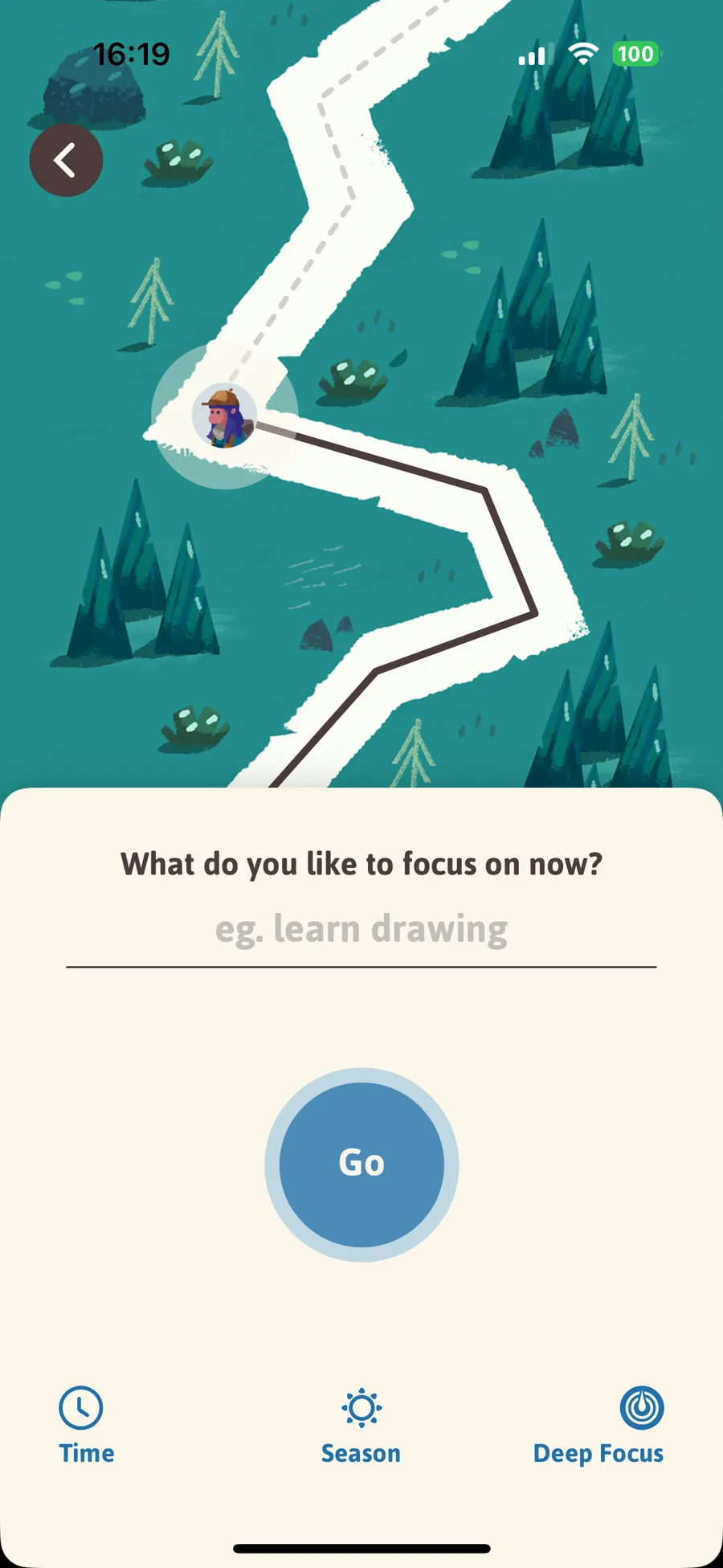
Overcoming procrastination often requires external motivation. For individuals who struggle to stay away from their smartphones while working, applying gamification principles to the traditional Pomodoro technique offers a highly engaging solution, making Focus Traveller one of the most unique personal productivity apps.
Core Philosophy and Overview
Focus Traveller reimagines the standard timer by transforming work sessions into a visual journey. The application forces users to leave their phones alone; interacting with the device halts progress, providing an immediate visual consequence for distraction.
Key Features
- Visual Avatar Progression: Users create a digital mountaineer that slowly climbs a peak only while the timer is running uninterrupted, creating a sense of visual progression.
- Deep Focus Enforcement: If the user exits the application to check messages or social media, the avatar immediately stops climbing, discouraging the habit of rapid context switching.
- Ambient Soundscapes: Features soft, relaxing background audio to accompany the visual timer, aiding in concentration.
- Social Accountability: The “Travel Group” feature allows colleagues or study partners to sync their sessions and focus together virtually, fostering a sense of shared responsibility.
Ideal Workflows and Use Cases
This tool is perfect for students studying for exams or professionals dealing with monotonous administrative tasks. Setting the phone on a desk stand running Focus Traveller creates a clear boundary: as long as the digital climber is moving, the user must remain engaged with their current task. It serves as an excellent supplementary productivity app.
Pros and Cons
- Pros: Highly engaging and motivating visual interface; effectively discourages phone checking; free to use for standard features.
- Cons: Lacks advanced analytics or integrations with external task managers; primarily serves as a standalone behavioral tool rather than a comprehensive management system.
Pricing Structure
The core functionality is entirely free. Users seeking additional terrain themes or cosmetic avatar upgrades can pay a minimal fee of $0.99 per month.
8. Notion: The Comprehensive Digital Workspace
No discussion about the top productivity apps is complete without acknowledging the industry giant that redefined digital documentation. Notion is not merely an application; it is a platform for building entirely customized operating systems for businesses and individuals alike.
Core Philosophy and Overview
Notion operates on a block-based architecture. Every piece of content—a paragraph, an image, a checklist, or a database row—is an individual block that can be moved, formatted, and interconnected. It is the ultimate blank canvas for workflow management, making it an essential entry on any list of productivity apps for work.
Key Features
- Relational Databases: Users can create complex databases that link to one another, turning static information into dynamic project management systems capable of handling vast amounts of data.
- Multiple Data Views: A single database can be visualized as a traditional table, a Kanban board, a calendar, a timeline, or a gallery, adapting to the user’s preferred visual style.
- Advanced Formatting: Excellent text editing capabilities suitable for drafting everything from simple meeting notes to comprehensive company wikis and onboarding manuals.
- Public Publishing: Any Notion page can be published instantly to the web, acting as a lightweight website, a public portfolio, or a client portal.
Ideal Workflows and Use Cases
Notion excels in content management and collaborative documentation. A marketing agency could use Notion to draft a blog post, organize keyword research, and track the publication pipeline for a WordPress client, all within the same interconnected workspace.
Furthermore, users who frequently test out various ChatGPT alternative tools can easily store, organize, and categorize their best AI-generated prompts and responses within Notion’s flexible databases.
Pros and Cons
- Pros: Unmatched flexibility and customization; replaces the need for multiple separate document and spreadsheet tools; massive community template library available for instant setups.
- Cons: Significant learning curve required to master database relations; the endless customization options can become a distraction (commonly referred to as the “setup trap”).
Pricing Structure
Notion is famous for its incredibly generous free tier, which allows unlimited blocks for individuals. Paid tiers for collaborative teams and advanced permissions start at $10 per month.
9. Superlist: The Evolution of Intelligent Lists
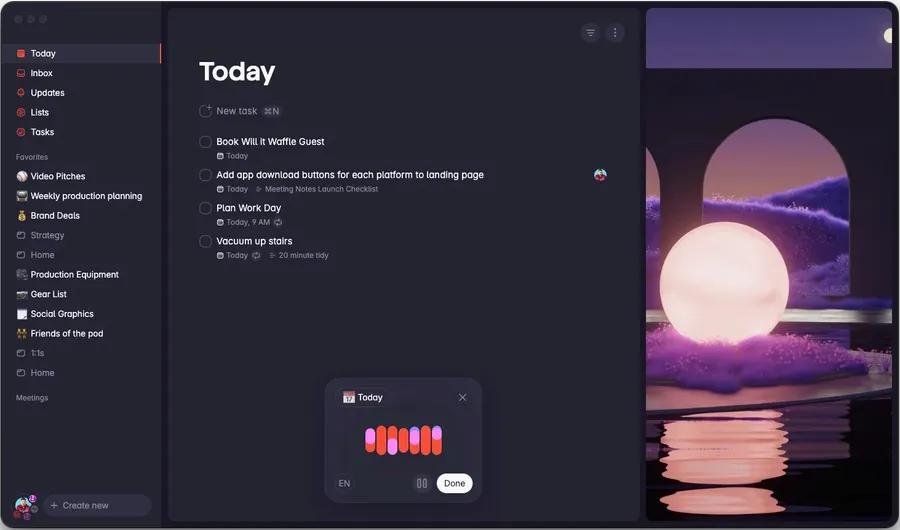
For users who miss the elegant simplicity of legacy applications like Wunderlist but desire modern, AI-enhanced capabilities, Superlist bridges the gap perfectly. It provides robust task management without the heavy administrative burden of complex systems, earning a firm position among the best to do apps.
Core Philosophy and Overview
Superlist prioritizes sleek, minimalist design alongside intelligent automation. It operates on the belief that a task manager should feel weightless. It handles everything from complex corporate subtasks to basic grocery runs with equal visual elegance, proving itself as a top-tier productivity app.
Key Features
- AI Meeting Integration: The software can automatically generate actionable to-do items by analyzing transcripts from virtual meetings, saving significant administrative time.
- Voice Assistant Transcription: Users can dictate rambling thoughts, and the application’s natural language processing will structure the audio into neat, actionable tasks with assigned due dates.
- Real-time Collaboration: Lists can be shared with team members or household partners, syncing instantly across all devices to maintain alignment on shared goals.
- Rich Task Context: Users can attach files, detailed notes, and infinite subtasks to any individual item without cluttering the main view, ensuring all necessary context is retained.
Ideal Workflows and Use Cases
Superlist is optimal for fast-paced professionals who spend significant time in meetings or away from their desks. The ability to dictate a voice memo while commuting and have it automatically transcribed into an organized task list upon returning to the office is a massive time-saver.
Additionally, if you are an educator designing curriculum on the SEO-friendly education WordPress theme, Superlist allows you to rapidly capture lesson ideas and track course development progress seamlessly.
Pros and Cons
- Pros: Gorgeous user interface that encourages daily use; powerful AI integrations that genuinely save time; excellent handling of collaborative tasks.
- Cons: Still a relatively new entrant to the market, meaning the ecosystem of third-party integrations is not yet as vast as established competitors like Todoist.
Pricing Structure
Superlist offers a comprehensive free plan suitable for most casual users. Professional plans, which unlock unlimited AI features and advanced team tools, begin at $6 per person per month.
Conclusion
Finding the perfect digital system is a deeply personal journey. What functions flawlessly for a corporate executive managing global teams may feel overly rigid for a freelance graphic designer. The key takeaway from analyzing dozens of platforms is that the best app for productivity is simply the one that consistently removes friction from the workday.
Start with the free tiers, commit to a consistent methodology, and watch as daily efficiency transforms from an ongoing struggle into a streamlined, manageable, and highly successful process. Empowering a daily routine with the best productivity apps is the definitive step toward sustained professional excellence.
Frequently Asked Questions (FAQs)
1. What exactly makes a platform the best app for productivity?
The ideal software reduces cognitive load rather than adding to it. It should possess an intuitive interface, offer robust integrations with software like email and Slack, and solve a very specific problem (such as time tracking or task consolidation) reliably every single day without unnecessary complexity. Ultimately, the best app for productivity operates seamlessly in the background, allowing the user to focus entirely on the work itself.
2. Are personal productivity apps significantly different from enterprise or team tools?
Yes, tools designed specifically as personal productivity apps (like Routine, Sunsama, or Focus Traveller) prioritize individual focus, daily personal routines, and mental clarity. Enterprise tools often prioritize transparency, task delegation, complex permission structures, and cross-departmental reporting. However, versatile platforms like Todoist and Notion bridge the gap exceptionally well between individual focus and team collaboration.
3. If I am just starting out, which are the top productivity apps to try first?
Beginners should always start with straightforward task management to build foundational habits. Todoist is highly recommended due to its minimal learning curve, generous free tier, and excellent natural language processing. Once a daily habit of logging tasks is firmly established and maintained, users can then explore more complex systems like Akiflow for consolidation or comprehensive workspaces like Notion for database management. Starting simple is the key to successfully adopting the top productivity apps.
4. Do I need to purchase multiple productivity apps for work?
Not necessarily. It is generally recommended to start with one core application that addresses the biggest workflow bottleneck. For many professionals, a single robust task manager is enough to maintain order. Only add specialized software, such as Toggl Track for precise time management or brain.fm for auditory focus, if those specific areas require dedicated improvement. Overloading on productivity apps for work can ironically lead to decreased output due to administrative overhead.
5. Are the best to do apps always free?
While almost all top-tier task managers offer highly functional free versions, premium tiers (typically ranging from $4 to $10 per month) unlock essential features for power users, such as calendar integrations, advanced reminders, automated recurring tasks, and team collaboration tools. For basic personal organization, the free versions are usually more than sufficient. However, for professionals relying on these systems to generate income, upgrading to the paid versions of the best to do apps is a highly justified business investment.
Read more: Top 13 Completely Free Sites to Sell Products Online
Contact US | ThimPress:
Website: https://thimpress.com/
Fanpage: https://www.facebook.com/ThimPress
YouTube: https://www.youtube.com/c/ThimPressDesign
Twitter (X): https://x.com/thimpress_com