A manufacturing company website layout should help a buyer answer three questions: can this supplier make what I need, can I trust its process, and how do I start a conversation? Attractive photography supports those decisions, but the page structure must make technical information easy to find.
An engineer may arrive looking for material options, while a procurement manager needs production capacity, documentation, and a contact. A maintenance technician may need a replacement part or support. Good industrial manufacturing website design gives each visitor a clear route.
This guide explains which pages to build, how to organize the homepage, and what to learn from established industrial websites. You will also find a practical RFQ workflow, WordPress implementation advice, and a launch checklist for a US manufacturing business.
Eduma – Education WordPress Theme
We provide an amazing WordPress theme with fast and responsive designs. Let’s find out!
What Makes a Manufacturing Website Layout Effective?
An effective layout organizes the company’s offer around buyer tasks. It explains products or processes in recognizable language, supplies evidence for important claims, and places the appropriate next action beside relevant information.
A custom machine shop needs a different structure from an equipment manufacturer. The machine shop may prioritize capabilities, materials, and drawing submissions. The equipment manufacturer may need product comparisons, configuration options, dealer information, and service documentation.
Start by identifying your main business model rather than choosing a homepage based on its factory imagery. ThimPress’s website design tips provide a useful framework for defining the audience, content, and functional requirements before visual styling.
Keep recruitment and supplier inquiries accessible, but do not let them obscure the main customer journey. A website can serve several audiences without presenting every action as equally important on the first screen.
Plan Navigation Around How Industrial Buyers Search
Use labels that describe what visitors can find: Products, Capabilities, Industries, Resources, About, and Contact. A small manufacturer may need fewer categories. A large catalog may need product search, filters, and a separate support area.
Organize capabilities around actual processes, such as CNC turning or sheet metal fabrication. Organize product families around recognizable equipment types. Industry pages should explain application-specific requirements rather than repeat the homepage with a different sector name.
Test the menu with someone outside your company. Ask them to find a material specification, a quality document, and the correct contact. Their route will reveal whether internal department names are creating unnecessary confusion.
ThimPress’s introduction to user experience design can help frame those task-based reviews. Keep important pages linked through visible navigation instead of relying on search to compensate for an unclear structure.
A Manufacturing Company Website Layout: Homepage Sections
Open with a specific offer and a useful action
State what you manufacture and for whom. “Precision CNC components for industrial equipment” tells a buyer more than “Engineering tomorrow.” Add a short supporting sentence covering the processes, service area, or production model that matters most.
Use a primary action such as Request a Quote, Discuss Your Project, or Find a Distributor. Choose the action your business can actually support. An instant-quote button is unsuitable if every job requires an engineering review.
Pair the copy with an authentic product, process, or facility image. Keep important wording as live text so visitors can read it at different screen sizes and assistive technologies can access it.
Show relevant proof near the opening
Place a small set of meaningful trust signals after the introduction. These could include verified certifications, production locations, years of relevant experience, or customer logos used with permission. Link to details when the scope matters.
A certification should identify the appropriate business or facility and accurately reflect its current scope. Avoid treating a logo strip as evidence that every product meets every industry requirement. Specific documentation helps buyers perform their own assessment.
Present capabilities or product families
Give each main capability a short description and a route to a detailed page. Describe the outcome or practical scope, not just the machine name. A buyer should understand why they would choose one process over another.
For a product business, use consistent category cards with recognizable images. Avoid mixing product families, industries, and company news in the same grid, where the visitor must guess what each card represents.
Connect the offer to industries and applications
Show the sectors you genuinely serve and the problems your products solve. An application example can explain more than a row of industry icons. Link to a page with relevant materials, constraints, and project evidence.
Keep the claims proportionate. Supplying a component used in one sector does not automatically establish expertise across that entire industry. Explain the actual work you perform and let supporting evidence carry the message.
Explain the process and show project evidence
Outline what happens after an inquiry: project review, technical clarification, quotation, production, inspection, and delivery. Use the sequence your company follows. The purpose is to set expectations before someone submits a drawing.
Add one or two case studies with a clear problem, approach, and result. If customer confidentiality prevents naming the client, describe the application accurately and explain the limitation. Do not invent percentages to make a case study appear more persuasive.
Finish with resources and a clear next step
Offer useful design guides, specification sheets, or selection tools, then repeat the primary contact action. Keep the footer practical with locations, phone numbers, business details, and links to support or careers.
A homepage does not need to display every downloadable document. Show the most useful entry points and let a well-organized resource library handle the full collection. This keeps the page focused while preserving technical depth.
Map Each Buyer Question to the Right Page
| Buyer question | Recommended page | Useful content |
|---|---|---|
| Can you make this component? | Capability page | Processes, materials, size ranges, examples |
| Which model fits my application? | Product category and product page | Comparable specifications and selection guidance |
| Can your quality process support our needs? | Quality page | Current documentation and inspection information |
| Have you solved a similar problem? | Case study | Application, constraints, approach, outcome |
| How do I request a quotation? | RFQ page | Project fields, submission instructions, next steps |
| Who helps after purchase? | Support page | Manuals, service contacts, replacement-part routes |
Use the same terminology across navigation, page headings, and forms. If a product category uses one name and the RFQ form uses another, buyers may question whether they have reached the right team.
Industrial Website Design Inspiration: Four Examples
The following examples illustrate different ways to organize industrial information. The observations are based on the companies’ published websites, not independent conversion tests. Use the ideas as starting points and evaluate them against your own sales process.
1. Protolabs: Connect Processes, Industries, and Resources
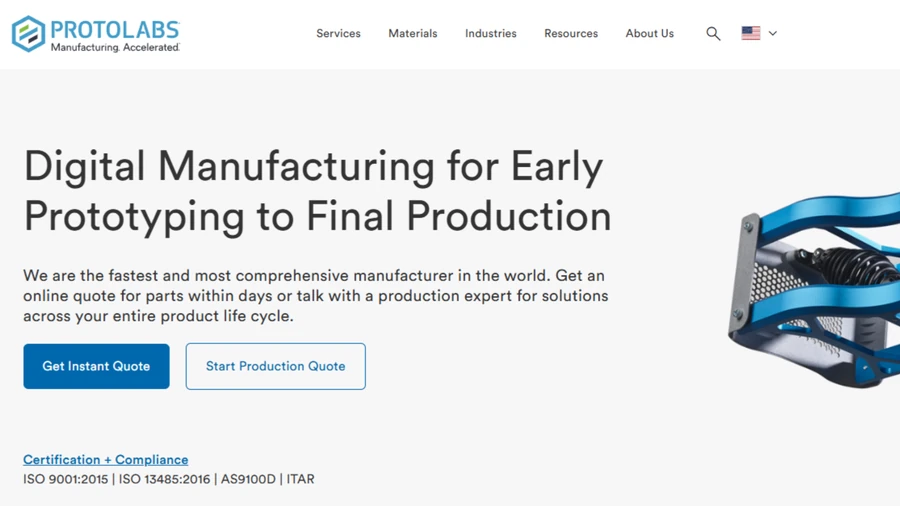
Protolabs provides routes into manufacturing services, industry information, and design resources. Visitors can explore a process or research an application instead of needing to know the company’s internal organization.
The practical lesson is to connect those routes. A buyer investigating a manufacturing service should be able to find relevant design guidance and the next project step without returning to the homepage.
A smaller manufacturer can apply this with a handful of well-connected capability pages. You do not need a large resource library at launch; one accurate guide that answers a frequent engineering question can be more useful than dozens of generic posts.
Keep the quoting experience consistent with your operating model. Use a project discussion or reviewed RFQ when an automated workflow would create expectations your team cannot meet.
2. Xometry: Make the Quote Journey Explicit
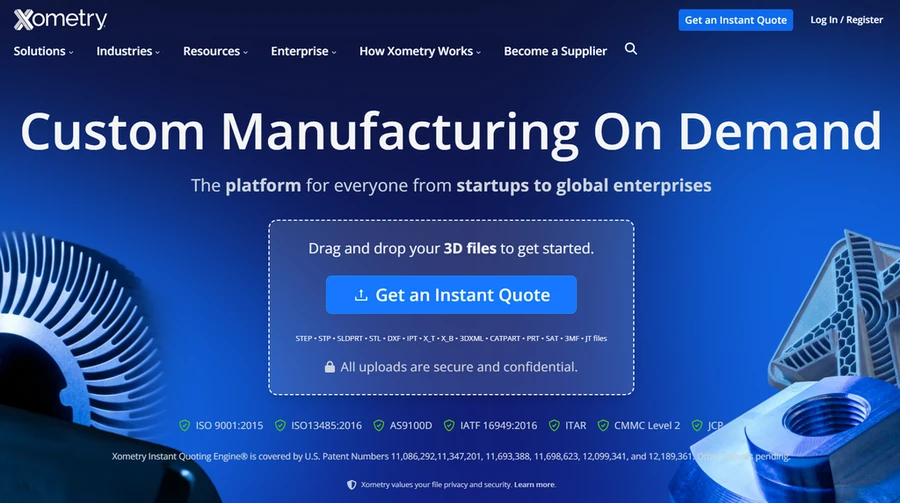
Xometry prominently introduces its file-upload and quoting workflow and organizes manufacturing processes into recognizable groups. It is a manufacturing marketplace and service platform, so its scale and business model differ from a single factory.
The useful design principle is clarity about the action. Visitors can see what starts the process and what type of information they will need. A custom manufacturer can communicate its own submission requirements just as clearly.
Explain accepted file formats, project details, and the next review stage before the form. Give buyers a route to ask a question when they are not ready to submit production files.
A clear RFQ experience is often more valuable than adding several competing homepage buttons. Measure whether the inquiries contain enough information for your sales and engineering teams to respond effectively.
3. Haas Automation: Organize a Technical Product Range
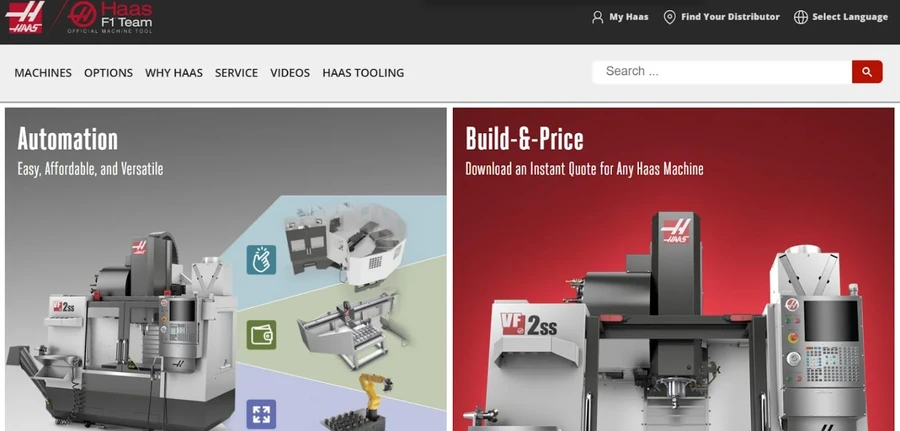
Haas Automation groups its machine offering into identifiable categories, including mills, lathes, and automation systems. That product-family structure gives buyers a starting point before they investigate individual configurations.
The lesson for an equipment manufacturer is to separate discovery from detailed comparison. Start with clear categories, then give product pages enough specification detail to support evaluation.
Use consistent terminology, measurement units, and comparison fields. Highlight where a specification depends on an option or configuration rather than presenting every value as standard.
Product photos, technical documents, and support information should reinforce the same model identity. If the business uses dealers or regional representatives, provide an appropriate contact route alongside the product rather than forcing every visitor into a general inquiry form.
4. Hypertherm: Connect Product Selection With Ongoing Support
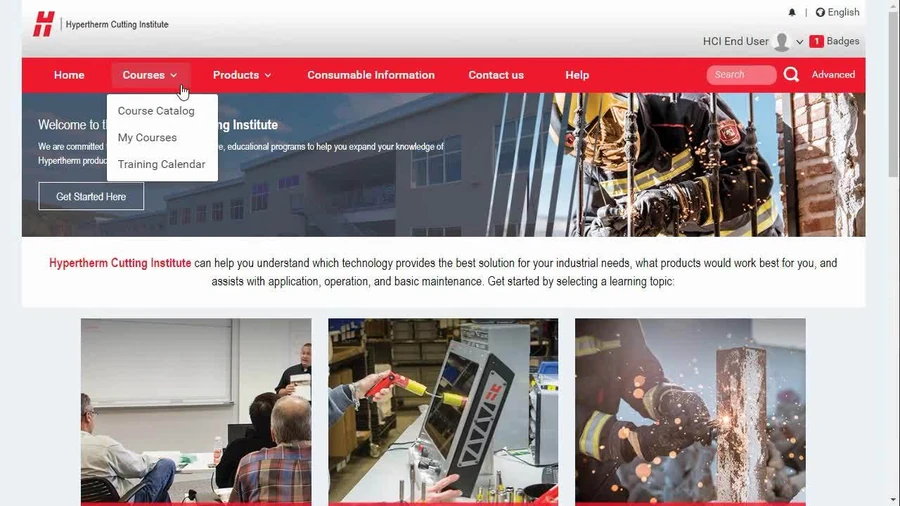
Hypertherm provides product, application, industry, and resource navigation, alongside a product finder and support routes. Its information structure recognizes that visitors may be researching a purchase or maintaining equipment they already own.
The practical takeaway is to separate sales and support tasks while keeping them connected. A customer looking for a manual should not have to submit a new-sales RFQ, and a prospect should not need a product serial number to ask about suitability.
A smaller equipment supplier can apply the same principle through clear product pages, a searchable document library, and distinct contact options.
When collecting industrial website design inspiration, study those task relationships as closely as the colors and photography. The navigation and supporting content often provide the most transferable ideas.
Build Capability Pages That Answer Technical Questions
A capability page should explain the process, suitable materials, relevant part characteristics, and common applications. Include operational limits your team can substantiate, and make clear when feasibility depends on a drawing review.
Use a specification table when values are genuinely comparable. For US buyers, provide clear units and label conversions consistently. Avoid listing a general tolerance as a promise for every geometry, material, and finish.
Place representative images beside the information they support. A close-up part photograph can demonstrate a feature more effectively than an unrelated panoramic factory image. Give documents descriptive titles and indicate when a download opens a PDF.
Connect the page to relevant industries, case studies, and an RFQ action. ThimPress’s guide to landing page SEO offers broader context for building a focused page around a specific visitor need.
Design an RFQ Form That Your Team Can Use
Ask for the information required to start a useful review: contact details, project description, quantity or volume estimate, and relevant requirements. Make optional fields optional, especially when a buyer may still be exploring feasibility.
If drawings are needed, explain the submission process and confidentiality arrangements. Use an appropriately controlled upload workflow for sensitive project files. Have your technical team review storage, access, validation, and retention before accepting customer documents.
Set an accurate response expectation. “Our team will review your request” is preferable to promising a quotation within hours when complexity or missing information can change the timeline.
Test notifications, routing, and confirmation messages with the people who receive the inquiries. ThimPress compares WordPress contact form plugins; evaluate current capabilities against your actual workflow rather than choosing by form appearance alone.
Make Industrial Manufacturing Website Design Readable
Use a restrained visual system with a clear type hierarchy, consistent spacing, and a limited accent palette. Technical content already asks readers to process detail, so unnecessary animation or decorative labels can make the task harder.
ThimPress’s overview of design elements helps explain hierarchy and alignment. Its guides to brand identity and color schemes can support a consistent visual direction.
Use brand colors to distinguish actions and important information without relying on color alone. For additional palette ideas, explore modern website color schemes, adapting the combinations to your brand and readability requirements.
On mobile, keep specification tables usable, navigation labels understandable, and contact controls easy to activate. Check that sticky headers, chat tools, and consent notices do not cover the quote form.
Build the Website on WordPress With Maintainable Templates
Create reusable layouts for capability pages, product pages, industries, and case studies. A shared structure makes updates easier and helps buyers compare information across the site. Your team should not need to redesign a page every time it adds a new material or machine.
Prototype the main customer journey before selecting decorative effects. ThimPress’s guide to planning a page in Figma offers a useful wireframing starting point, even when the final website has many pages.
Decide which content belongs in standard posts, structured product records, or downloadable files. Confirm who can edit technical specifications and who approves publication. A designer and an engineer may share the work; ThimPress explains a graphic designer’s role when defining responsibilities.
Use a protected test environment for theme changes and integrations. Follow the guide to creating a staging site and test with representative content instead of only the theme’s demo pages.
Support Search Visibility and Measure Useful Inquiries
Give each important capability or product a useful, indexable page with descriptive headings and supporting internal links. Avoid publishing many near-identical city or industry pages that offer no meaningful additional information.
ThimPress compares WordPress SEO plugins and explains making a website discoverable in Google Search. Those tools support implementation, while your technical content still needs accuracy and substance.
Measure quote submissions, relevant phone inquiries, and other meaningful contacts. Separate qualified opportunities from spam, job applications, and unrelated requests. A higher form-submission count is not automatically a better business outcome.
Review performance on capability pages and product pages, not only the homepage. Use ThimPress’s WordPress speed guide to plan improvements, and investigate large media or third-party scripts before adding more optimization tools.
Example: Plan a Layout for a Custom Fabrication Business
Consider a fictional US fabricator that makes sheet metal enclosures and welded assemblies. Its current website receives inquiries for work it does not offer because the homepage says only “complete industrial solutions.” The redesign should make the offer more specific before adding new visual effects.
The proposed homepage opens with the actual product types, a factory photograph, and a Request a Quote action. Three capability cards introduce laser cutting, forming, and welding. A short materials section links to accurate process pages instead of presenting an unsupported list of every metal the team has ever encountered.
The quality page explains the inspection approach and provides current documentation where appropriate. A case study shows how an enclosure project moved from a drawing to an assembled part, using approved photographs and a description of the requirements.
The RFQ form asks for contact details, a project description, estimated quantity, and an optional drawing through the approved submission route. Buyers who need an NDA discussion can contact the team before sending technical files.
For validation, the team gives an unfamiliar colleague a realistic task: determine whether the company can review a stainless enclosure project and find out how to start. The review focuses on missing information and confusing steps rather than whether the colleague likes the hero image.
Scope Your Manufacturing Website Design Budget
Separate visual design from the work required to prepare technical content, photography, product records, integrations, and migration. A modest website with ten carefully edited pages can require more preparation than a larger site populated with generic text.
Identify the most difficult page early. That might be a product with many configurable options, a capability with technical constraints, or a document library containing several revisions of the same manual. Prototype it before agreeing that one simple template will cover everything.
Clarify what your team will supply and what the designer must create. Specify who writes specifications, approves claims, selects images, and checks forms. This reduces the risk of reaching launch with an attractive layout and missing technical information.
Budget for ongoing ownership as well. Product information changes, staff contacts move, and documents expire. Reusable templates reduce editing effort, but someone still needs responsibility for keeping the content accurate.
A Practical Launch Review
Test one complete journey from a search landing page to a successful inquiry. Open a capability page directly, find the relevant specifications, follow a supporting case study, and submit the form. Verify the notification and the internal handoff, not just the confirmation screen.
Repeat the review on a phone and check downloadable files, click-to-call controls, and any external portals. Confirm that the sales team understands which page the inquiry came from and can follow up through its normal process.
Record the first improvements you want to assess after launch, such as clearer capability navigation or fewer incomplete RFQs. A specific measurement plan makes later design decisions easier to evaluate.
FAQs About Manufacturing Company Website Layout
What should a manufacturing website homepage include?
Start with a specific offer, relevant proof, capability or product categories, application context, project evidence, and a clear contact action. The order should reflect the information your buyers need before taking the next step.
Is WordPress suitable for manufacturing company website design?
WordPress can support company information, product catalogs, resources, and inquiry forms. Suitability depends on implementation, hosting, integrations, and maintenance. Complex quoting, configuration, or customer portals may require additional development.
Should I publish prices on an industrial website?
Publish prices when they are accurate and useful for the buying process. Custom manufacturing may need a reviewed quotation, while standard equipment or consumables may support displayed pricing. Explain what affects the cost when a fixed price would be misleading.
How should I maintain technical information?
Assign an owner to specifications, certifications, and downloadable documents. Review them when products or processes change. ThimPress’s website maintenance tips can help connect content checks with routine technical upkeep.
Conclusion
A useful manufacturing company website layout helps visitors evaluate fit, verify the company’s capabilities, and contact the right team. Start with those decisions, then choose the visual system and WordPress tools that support them.
Test the experience with real buyer tasks before launch. If someone can find the right capability, understand the evidence, and submit a useful inquiry, your layout is supporting the business rather than simply presenting it.
Read More: How To Do Backlink Building: A Practical Guide
Contact US | ThimPress:
Website: https://thimpress.com/
Fanpage: https://www.facebook.com/ThimPress
YouTube: https://www.youtube.com/c/ThimPressDesign
Twitter (X): https://x.com/thimpress_com