If you have just launched a site and typed your own domain into Google only to find nothing, you already know the problem. Learning how to make your website appear on Google search is the first real milestone for any blog, business page, or online store, because a site that Google cannot find is a site that almost nobody will ever visit. The good news is that getting indexed and ranked is not a mystery reserved for large agencies. It comes down to a handful of technical steps, some patience, and content that actually answers what people are searching for.
This guide walks through exactly how Google discovers websites, why yours might be missing, and the practical steps to fix it, from submitting a sitemap to choosing a theme that does not fight against your SEO from day one.
Most of the advice below applies to any content management system, but a large share of it is written with WordPress specifically in mind, since WordPress still powers roughly 41% of all websites globally, according to W3Techs. That scale also means most of the tools mentioned here, from SEO plugins to sitemap generators, are built with WordPress compatibility as a priority from day one.
Eduma – Education WordPress Theme
We provide an amazing WordPress theme with fast and responsive designs. Let’s find out!
Why your website isn’t showing up on Google search
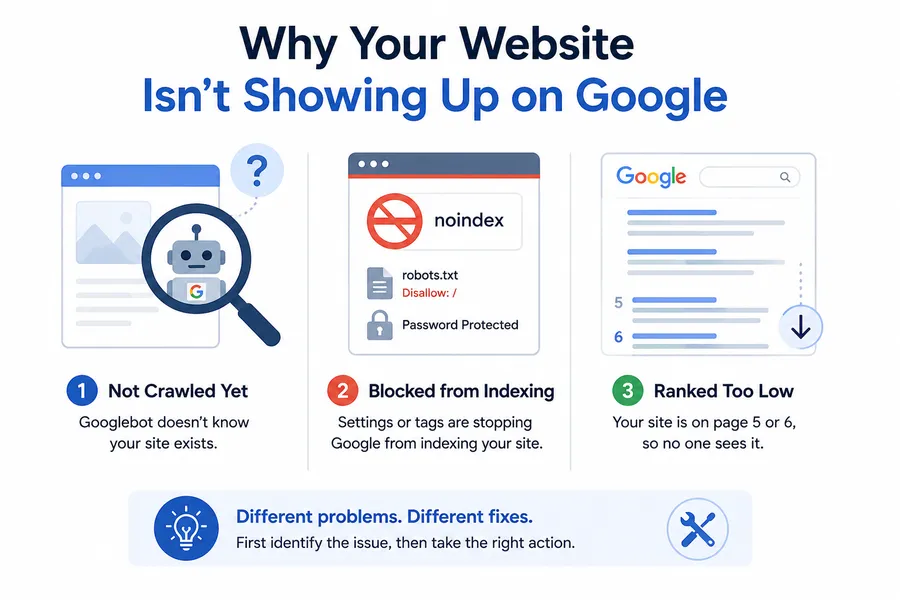
Before fixing anything, it helps to know why a site goes missing from Google search in the first place. Most of the time, it is not a penalty or a mysterious algorithm issue. It is one of a few common, fixable problems.
A brand-new domain simply has not been crawled yet. Google’s crawlers, collectively called Googlebot, discover new pages by following links from sites they already know about, or by reading a sitemap that was submitted directly. If no other site links to yours and you never submitted anything to Google Search Console, Googlebot may not even know your URL exists.
Sometimes the site has been crawled, but a setting is actively blocking it. A noindex tag left over from a staging environment, a robots.txt file that disallows crawling, or a password-protected launch page are common culprits. WordPress site owners run into this constantly after moving from a staging URL to a live domain, because the “Discourage search engines from indexing this site” checkbox under Settings > Reading is easy to forget.
In other cases, the site is indexed but buried on page five or six of the results, which feels the same as not showing up at all if nobody scrolls that far. That is a ranking problem rather than an indexing problem, and it needs a different fix, covered later in this guide.
How Google finds and indexes a website
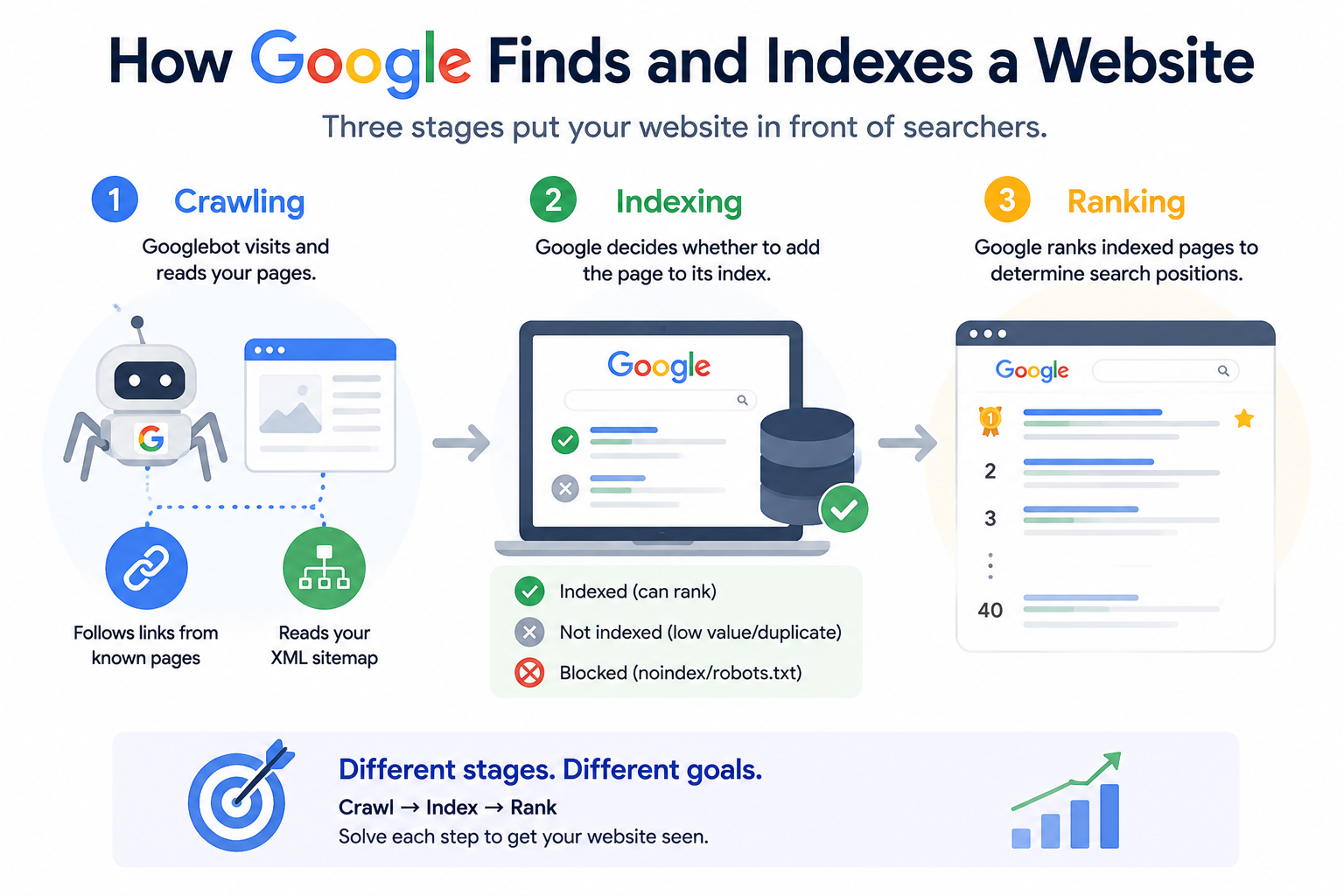
Getting a website in front of searchers depends on three separate stages, and understanding them makes every later step in this guide easier to apply correctly.
Crawling
Crawling is the process where Googlebot visits a page and reads its content, links, and code. Googlebot finds new pages either by following a link from an already-known page or by reading an XML sitemap that lists your URLs directly. A site with no inbound links and no submitted sitemap can sit online for months without a single visit from Googlebot.
Indexing
Once a page is crawled, Google decides whether to add it to its index, which is essentially a massive database of web pages. A page can be crawled but still left out of the index if Google considers it low-value, duplicate, or blocked by a noindex directive. Indexing is the step most people mean when they ask how to get website on Google search, because a page has to be indexed before it can rank for anything.
Ranking
Ranking is what happens after indexing. Google runs the indexed page through its ranking systems, which weigh hundreds of signals including content relevance, page experience, backlinks, and technical health, then decides where the page appears for a given search query. A page can be indexed and still rank on page 40, which is why indexing and ranking need to be treated as two separate goals.
How to make your website appear on Google search, step by step
This is the practical part. Each of the steps below addresses either crawling, indexing, or ranking, and doing them in order gives new and existing sites the best shot at showing up.
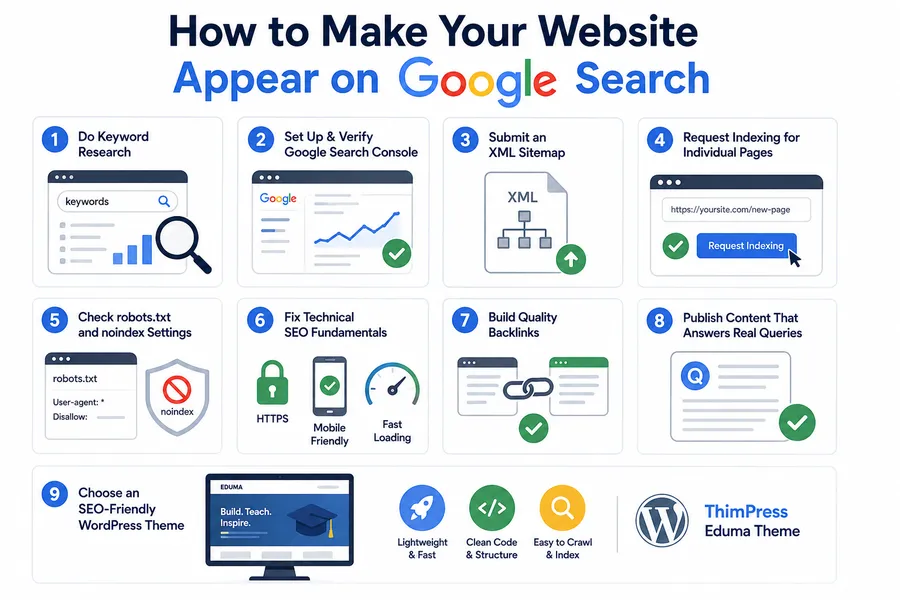
Do basic keyword research before you publish anything
Before touching any technical setting, it helps to know what your audience is actually typing into the search bar. Tools like Google’s own Keyword Planner, Ubersuggest, or the free “People also ask” boxes on a live search results page all show real phrases people search for around your topic. A page built around “getting website on Google search” as a target phrase, for example, should naturally include related terms like indexing, sitemap, and Search Console, since Google’s systems reward content that covers a topic thoroughly rather than repeating one exact phrase over and over.
This step also prevents wasted effort. Writing ten pages targeting the same broad term splits your own site’s authority instead of building it, while mapping each page to a distinct, specific query gives every page its own chance to rank.
Set up and verify Google Search Console
Google Search Console is a free tool from Google that shows exactly how your site is crawled, indexed, and performing in search. Verifying ownership, usually through a DNS record or an HTML file upload, is the single most useful step for anyone wondering how to make your website appear on Google search, because it gives you direct visibility into problems instead of guessing.
Once verified, check the Pages report under the Indexing section. It lists every URL Google has found, along with the reason any page was excluded, whether that is “Discovered, currently not indexed,” “Crawled, currently not indexed,” or a noindex tag. On a freshly launched site, it is common to see most pages sitting under “Discovered, currently not indexed” for the first few days, which simply means Google knows the URL exists but has not crawled it yet. That status usually clears on its own within one to two weeks once a sitemap is submitted.
The Performance report in the same dashboard is worth checking weekly once the site is live, since it shows the exact queries triggering impressions, even before a page ranks well enough to generate real clicks. Watching that report is often the first real signal that a page has started to appear in Google search at all.
Submit an XML sitemap
An XML sitemap is a file that lists every important URL on your site so Google does not have to discover them one by one through links. Most WordPress SEO plugins, including Yoast SEO and Rank Math, generate this file automatically at a URL such as yourdomain.com/sitemap_index.xml. Submit that URL under Sitemaps in Google Search Console.
Submitting a sitemap does not guarantee instant indexing, but it removes the guesswork for Googlebot and speeds up discovery significantly, especially on newer domains with few or no backlinks yet. After submission, the Sitemaps report in Search Console shows how many URLs were discovered versus how many were actually indexed, which is a quick way to spot pages that were found but rejected for quality or technical reasons.
It also helps to keep the sitemap clean. A sitemap padded with tag pages, empty category archives, or thin auto-generated pages sends Google a weaker signal about the site overall, so most SEO plugins allow excluding low-value URL types from the sitemap entirely.
Request indexing for individual pages
For a specific page that needs to appear quickly, such as a new blog post or a service page, paste the URL into the search bar at the top of Google Search Console and use the “Request indexing” option. Google still has to approve the request, and it can take anywhere from a few hours to a few days, but this step is one of the fastest ways to show your website in Google search for a page that was just published.
Check your robots.txt and noindex settings
Open yourdomain.com/robots.txt in a browser and confirm it is not disallowing the sections of your site you want Google to crawl. Then check individual pages for a stray noindex meta tag, which is often left behind after a site redesign or migration. In WordPress, go to Settings > Reading and make sure “Search engine visibility” is unchecked, since that single checkbox adds a sitewide noindex directive that quietly removes an entire site from Google search.
Fix technical SEO fundamentals
Google favors sites that are technically sound. That includes a valid SSL certificate (https instead of http), a mobile-friendly layout, and reasonably fast loading times. Run your homepage through PageSpeed Insights to see a Core Web Vitals score, and pay particular attention to Largest Contentful Paint (LCP), which should ideally sit under 2.5 seconds. A slow, unsecured, or non-responsive site can be indexed and still struggle to rank because Google’s page experience signals work against it.
Structured data, added through Schema.org markup, is another technical layer worth setting up early. Marking up articles, products, courses, or FAQ sections with the correct schema does not guarantee a ranking boost on its own, but it does make a page eligible for rich results, such as star ratings or FAQ dropdowns directly in the search listing, which tend to earn higher click-through rates even at the same ranking position.
Build a handful of genuine backlinks
Backlinks, which are links from other websites pointing to yours, remain one of the strongest signals Google uses for both discovery and ranking. New sites do not need hundreds of links. A handful of relevant ones, such as a mention in a local business directory, a guest post on an industry blog, or a link from a partner or supplier’s site, is often enough to get Googlebot to notice a domain it has not crawled before.
Quality matters more than quantity here. One link from a site in the same industry, with real traffic and editorial standards, tends to do more for both indexing speed and ranking than dozens of links from low-quality directories or link farms, which Google’s spam systems are specifically built to discount or ignore.
Publish content that answers a real search query
Every page you want Google to show should be built around a question or need someone is actually typing into the search bar. Vague “About us” filler rarely earns a ranking, while a page that clearly answers “how to make your website appear on Google search” or a similarly specific query gives Google a clear reason to serve it. Write for the person searching first, then apply keyword and formatting best practices on top of that.
Choose a WordPress theme built with SEO in mind
The theme running your site affects SEO more than most people expect. A bloated theme with unnecessary scripts slows down load times and hurts Core Web Vitals, while a clean, well-coded theme gives Google fewer technical reasons to hold a page back. This is one area where ThimPress’s Eduma theme stands out, since it is built with lightweight, semantic code and clean heading structure that keeps pages fast and easy for Google to crawl, which matters especially for course and education sites that publish a lot of content and need every page indexed correctly.
How to move your website up on Google search rankings
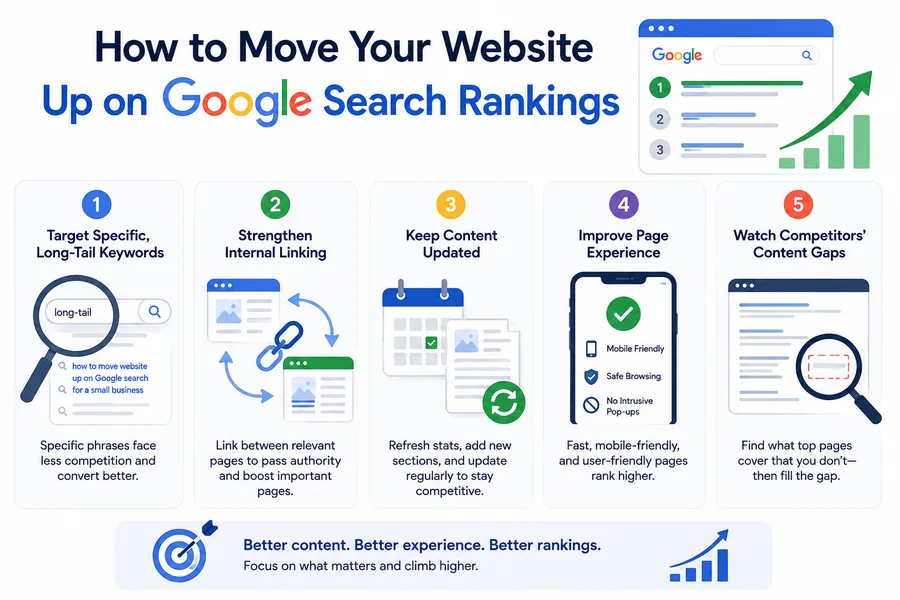
Getting indexed solves visibility in theory. Moving up the rankings is what turns that visibility into actual traffic. These are the levers that matter most once a site is already in Google’s index.
Target specific, long-tail keywords first
New or smaller sites rarely outrank established competitors for broad terms. Targeting more specific phrases, such as “how to move website up on Google search for a small business” instead of just “SEO,” faces less competition and tends to convert better because the searcher’s intent is clearer.
Strengthen internal linking
Linking from older, established pages to newer ones passes authority through the site and helps Google understand which pages matter most. A simple rule is that every new post should link to at least two to three relevant existing pages, and at least one older page should be updated to link back to it.
Keep content updated instead of publishing and forgetting
Google tends to favor pages that show signs of being maintained. Updating statistics, adding new sections, and refreshing the publish date on an existing high-value page often moves it up faster than publishing a brand-new page from scratch. A simple quarterly review of your top ten pages by traffic, checking for outdated screenshots, old prices, or broken outbound links, is usually enough to keep those pages competitive.
Improve page experience signals
Mobile usability, safe browsing status, and intrusive interstitials all factor into ranking. A page that is hard to read on a phone or covered in pop-ups works against every other SEO effort on the site. Testing the homepage and top landing pages on an actual phone, not just a browser’s device emulator, often reveals issues like oversized tap targets or text that requires zooming, both of which quietly push rankings down over time.
Watch your competitors’ content gaps
Searching your target keyword and reading the top five ranking pages shows what Google currently considers a complete answer to that query. If every top result covers a subtopic your page skips, that gap is usually the reason a competitor outranks you even with similar overall quality. Filling it, rather than simply making your existing page longer, tends to move rankings faster than adding unrelated padding.
How to boost website visibility beyond the search results page
Search rankings are not the only lever available. These additional channels feed signals back into Google search and also bring in direct traffic on their own.
| Channel | What it does for visibility | Effort level |
|---|---|---|
| Google Business Profile | Puts local businesses on Google Maps and local search packs | Low |
| Social media sharing | Drives direct traffic and can lead to natural backlinks | Low to medium |
| Guest posting | Builds backlinks and introduces the site to a new audience | Medium |
| Email newsletters | Brings repeat visitors, which supports engagement signals | Low |
| Online directories | Adds citations that support local and niche SEO | Low |
Setting up a free Google Business Profile is one of the highest-impact steps for any business with a physical location or service area, since it puts the site in front of searchers through Maps results and the local pack, both of which sit above standard organic results on many searches.
Social sharing deserves a specific mention here because its effect on Google search is indirect but real. Google does not use likes or shares as a direct ranking factor, but a post that gets shared widely is more likely to be seen by someone who links to it from their own blog or website, and that resulting backlink is what actually feeds back into search visibility.
How long it takes for a new website to appear on Google
Timelines vary, but most sites fall into a predictable range depending on the steps already taken.
A brand-new domain with no sitemap submission and no backlinks can take anywhere from a few weeks to a few months to be discovered naturally. Submitting a sitemap through Google Search Console typically cuts that down to a few days to two weeks for the homepage and main pages. Requesting indexing manually for an individual URL is the fastest option, often resulting in indexing within 24 to 72 hours, though Google does not guarantee approval of every request.
It is worth noting that indexing speed and ranking speed are different clocks. A page can be indexed within days and still take several weeks or months to climb toward the first page for competitive terms, since ranking depends on accumulated signals like backlinks and user engagement that build up over time.
Domain age also plays a background role. A domain that has existed for several years with a consistent publishing history tends to get crawled more frequently than a domain registered last month, simply because Googlebot allocates more frequent crawl visits to sites it already trusts. This is sometimes described informally as a “sandbox” period for new domains, and while Google has never confirmed a formal sandbox mechanism, the practical effect, slower initial indexing and ranking for brand-new domains, is consistent enough that most SEO practitioners plan around it.
Common mistakes that keep websites out of Google search
A few recurring issues account for most of the “why can’t I find my site on Google” questions site owners run into.
Leaving a staging site’s noindex setting active after launch is one of the most common and easiest mistakes to miss, since the site looks completely normal to a human visitor while remaining invisible to Googlebot. Duplicate content across multiple URLs, such as both a “www” and non-www version of the same page without a proper redirect, can confuse Google about which version to index. Thin or auto-generated content that does not add real value tends to get crawled and then excluded from the index rather than ranked. Finally, an overly restrictive robots.txt file, sometimes copied from a template without review, can accidentally block entire sections of a site from being crawled at all.
Conclusion
Getting a website in front of searchers is rarely about one trick. It is the combination of making sure Google can crawl the site, confirming nothing is blocking indexing, and then giving Google genuine reasons to rank the pages once they are in. Start with Google Search Console and a submitted sitemap, clear out any stray noindex settings, and build content around the questions your audience is actually asking. From there, consistent backlink building, internal linking, and a fast, well-coded theme do the rest of the work over time. None of these steps require a huge budget, just a clear order of operations and the patience to let Google’s crawling and ranking cycles run their course.
FAQs
Why is my website not showing up on Google even after a week?
A week is often not enough time for a new domain with no backlinks and no sitemap submission to be fully indexed. Check Google Search Console’s Pages report to see whether the homepage has been crawled yet, and submit an indexing request if it has not.
Do I need to pay Google to get my website listed in search results?
No, standard Google search results are free, and there is no way to pay for a higher organic ranking. Paid Google Ads appear separately, clearly labeled as ads, and do not affect a site’s organic search visibility.
Can a website appear on Google without any backlinks?
Yes, a site can be indexed and even rank for low-competition, specific search terms without backlinks, especially if the sitemap is submitted and the content directly answers a clear query. However, backlinks make both discovery and ranking significantly faster and more reliable for competitive terms.
How do I know if Google has already indexed my website?
Type site:yourdomain.com into the Google search bar. If pages appear in the results, they are indexed. For a more detailed breakdown, including which specific URLs were excluded and why, check the Pages report inside Google Search Console.
Read more: How to check website ranking with free and paid tools?
Contact US | ThimPress:
Website: https://thimpress.com/
Fanpage: https://www.facebook.com/ThimPress
YouTube: https://www.youtube.com/c/ThimPressDesign
Twitter (X): https://x.com/thimpress_com