Choosing between Gutenberg vs Elementor directly dictates website speed, design flexibility, and content management efficiency. When deciding how to build a WordPress website for beginners, administrators must immediately choose between the native, speed-focused block environment and a feature-rich, third-party visual interface. Understanding this technical comparison is the crucial first step to establishing a professional, high-performing digital presence that ranks well on search engines.
Before modular design became the industry standard, understanding what is a page builder was less relevant, as content creation relied heavily on a basic text environment. Comparing the WordPress Classic Editor vs Gutenberg highlights a massive shift in core web development philosophy. The legacy system functioned merely as a digital word processor, severely lacking spatial layout capabilities.
This definitive shift of Gutenberg vs Classic Editor modernized content creation completely, effectively eliminating the strict necessity for basic third-party grid plugins.
Eduma – Education WordPress Theme
We provide an amazing WordPress theme with fast and responsive designs. Let’s find out!
Executive Summary Comparison Table: Gutenberg vs Elementor
The following table provides an immediate, high-level overview of the fundamental differences between the native block system and the leading visual page builder.
| Feature Category | The Native Block Editor | The Visual Page Builder Plugin |
| System Architecture | Default core WordPress component | Independent third-party plugin |
| Editing Interface | Backend interface structured by blocks | True live visual frontend editing |
| Learning Curve | Gentle; intuitive for basic publishing | Moderate; requires learning a robust UI |
| Design Flexibility | Moderate; relies heavily on theme styles | Exceptional; independent of theme limits |
| Performance Output | Outstanding; lightweight semantic HTML | Good; requires strict performance optimization |
| Template Assets | Basic block patterns and layout sections | Extensive library of complete website kits |
| Financial Cost | 100% Free; included with core installation | Free tier available; Premium tiers required |
| Data Portability | High; content adapts well to new themes | Low; deactivation leaves unformatted text |
Understanding the Core Systems WordPress Classic Editor vs Gutenberg
Before analyzing specific technical features, establishing a clear definition of each platform is necessary for any digital strategy.
What is the Native Block Editor?
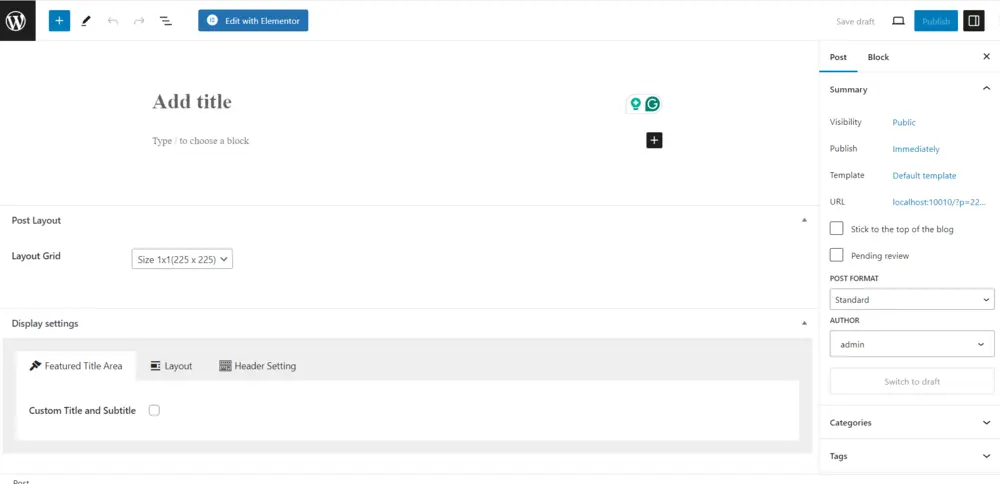
Introduced as the default editing experience in late 2018, this system entirely replaced traditional text-heavy publishing with a highly modular methodology. Instead of utilizing a single text area, administrators construct comprehensive pages by arranging independent blocks.
The primary objective of this built-in tool is to deliver a standardized, highly performant content creation experience directly within the native dashboard.
Key Technical Characteristics:
- Modular Infrastructure: Every single element—whether a basic paragraph, image gallery, or custom call-to-action button—functions as an autonomous block.
- Seamless Native Integration: Being hardcoded directly into the core platform eliminates the need for additional plugin installations, significantly reducing potential software conflicts and security vulnerabilities.
- Full Site Editing (FSE): The platform permits users to design global structural elements natively. Administrators can build custom website headers, footers, and archive templates without writing PHP code.
- Clean Code Generation: The system is engineered to generate highly semantic HTML, keeping the backend database lightweight and ensuring rapid browser rendering.
What is the Visual Page Builder?
Launched in 2016, Elementor is widely recognized among the best drag and drop WordPress page builders. It operates as a comprehensive platform that enables users to structure websites exactly as they will appear to the public end-user on the live frontend.
Professional design agencies frequently prefer this platform because it grants granular control over styling parameters without requiring any foundational knowledge of custom CSS or HTML.
Key Technical Characteristics:
- Live Frontend Visual Editing: Users receive instantaneous visual feedback. Adjustments to padding, typography, or color palettes reflect immediately on the screen.
- Extensive Widget Ecosystem: The system utilizes specialized “widgets” instead of basic blocks, offering highly advanced modules like animated pricing tables, countdown timers, and interactive carousels.
- Advanced Theme Builder Component: The premium iteration permits users to completely override the active theme. This allows for the creation of custom 404 pages and bespoke search result layouts.
- Dynamic Content Integration: The builder connects effortlessly with custom post types and advanced custom fields, pulling data dynamically from the database into the visual layout.
Detailed Technical Analysis: Elementor vs Gutenberg
Evaluating Elementor vs Gutenberg requires a strict, objective breakdown of their capabilities across critical development categories to determine maximum utility for various business models.
1. User Interface and Workflow Ergonomics
A logical, fluid user interface is essential for maintaining productivity, especially for platforms publishing large volumes of daily content. The editing environments of these two systems represent entirely different design philosophies.
The Native Workspace:
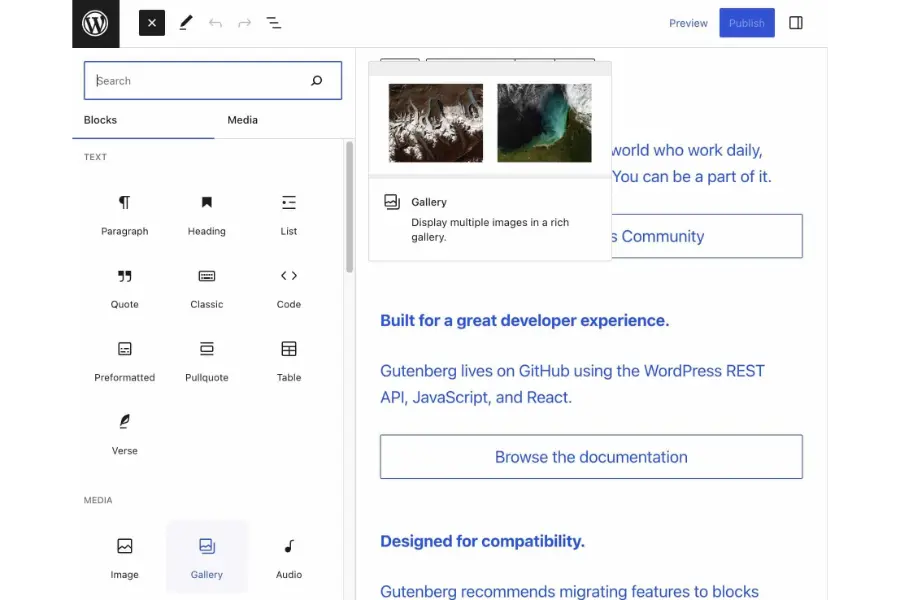
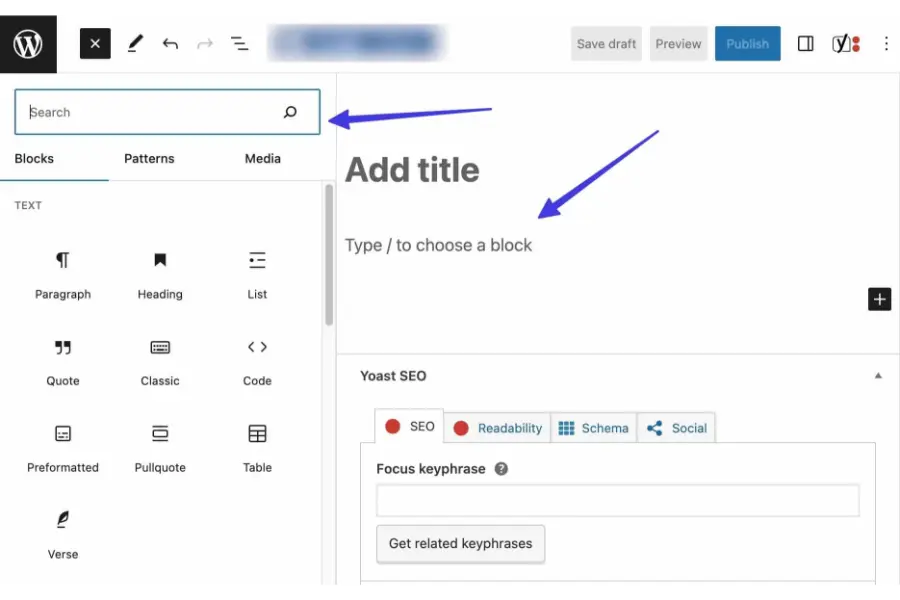
This system operates within a highly minimalist, distraction-free interface. The actual text and media take center stage.
Configuration settings are neatly organized in a right-hand sidebar panel or a contextual hovering toolbar that appears exclusively when a block is actively selected.
Adding new layout elements requires clicking a plus icon and searching for the desired block. Moving elements involves selecting the specific block and utilizing a drag handle or directional arrows, which provides a structured, albeit sometimes rigid, layout experience.
The Visual Workspace:
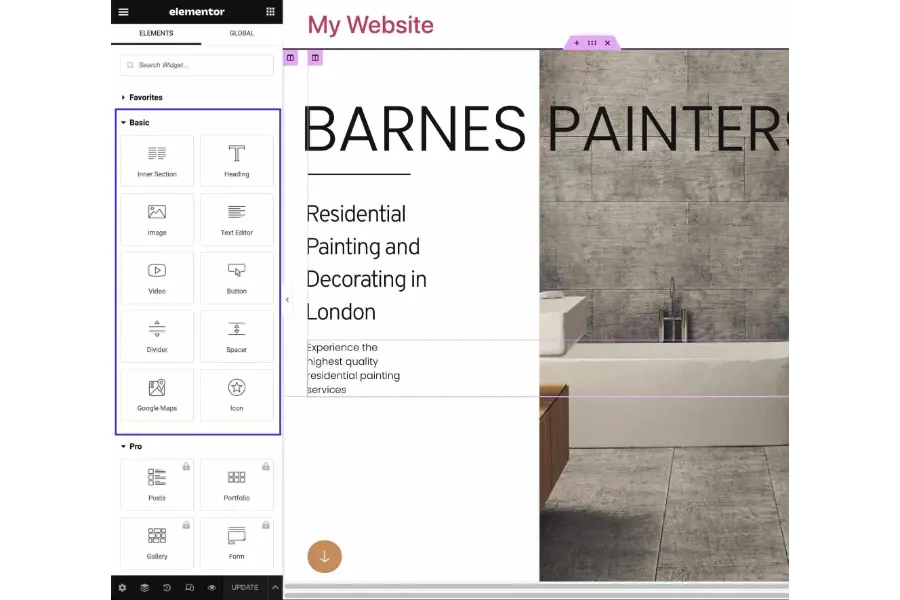
This framework features a robust, fixed left-hand control panel containing an exhaustive list of widgets, style configurations, and advanced layout settings. The remainder of the screen provides a live, one-to-one preview of the active webpage.
Users possess the ability to click anywhere on the page, drag widgets smoothly into designated columns, adjust margins visually by dragging element borders, and utilize right-click functionality to copy and paste entire sections across different pages.
While incredibly powerful, this dense interface presents a steeper learning curve for standard content writers.
2. Design Capabilities and Aesthetic Customization
The distinction between basic content structuring and bespoke, professional web design is highly apparent when comparing Gutenberg vs Elementor in this specific category.
Native Block Editor Capabilities:
The core system offers essential, functional styling options. Administrators can effortlessly adjust text colors, define background hues, modify typography sizes, and apply basic borders.
However, achieving complex overlapping section layouts, intricate custom hover animations, or device-specific visibility rules (such as hiding an image exclusively on mobile devices) often requires installing third-party block library plugins or writing custom CSS code.
The native system prioritizes structural simplicity and uniformity over absolute visual freedom.
Visual Builder Capabilities:
In the battle of Elementor vs Gutenberg, the third-party visual builder excels remarkably in aesthetic control. For example, if developers need to showcase complex property listings, they might utilize specific best free real estate WordPress themes.
The visual builder allows them to customize property grids, adjust image aspect ratios, and tweak hover effects flawlessly without modifying the theme’s core files. Every single widget features three meticulously detailed configuration tabs:
- Content Tab: Manages the actual foundational data, including text input, image selection, HTML tags, hyperlink routing, and basic element alignment.
- Style Tab: Controls complex aesthetic parameters such as typography families, text shadow properties, background gradients, CSS filters, and image blend modes.
- Advanced Tab: Offers precise mathematical control over padding, margins, z-index layering, custom CSS class assignment, scroll-based motion effects, and responsive device visibility.
3. Pre-designed Layouts and Template Libraries
Initiating a website design entirely from scratch consumes significant operational time. Access to professionally designed, ready-made templates accelerates the development timeline and ensures a polished final product. Another major deciding factor in the Gutenberg vs Elementor debate is the robust availability of these pre-designed assets.
Native Patterns:
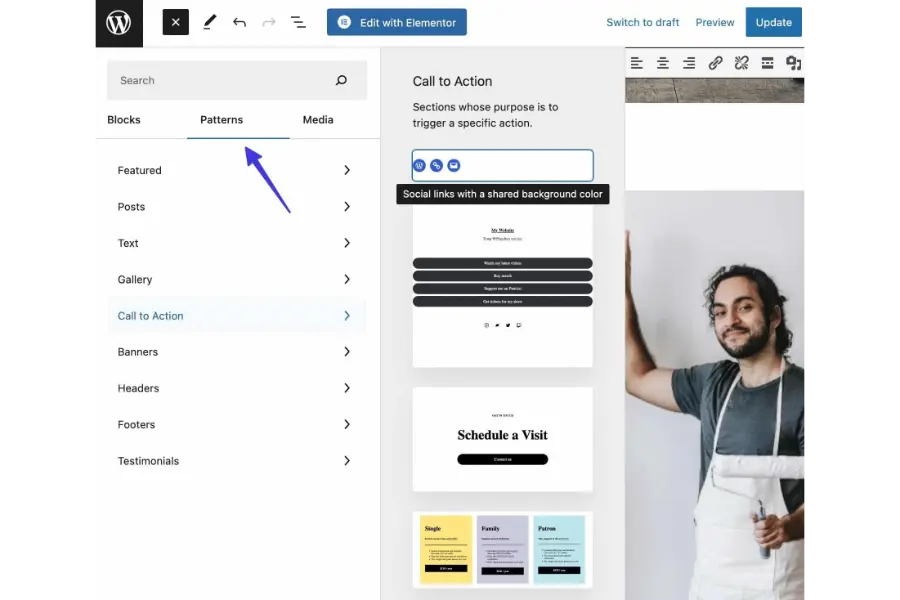
The core editor utilizes a system called “Patterns.” These are predefined, synchronized block arrangements. Examples include a team member directory layout, a pricing tier column setup, or a client testimonial section.
While these patterns are highly useful for rapidly constructing individual posts, the native system currently lacks a massive, centralized built-in library of complete, multi-page website templates.
Visual Template Kits:
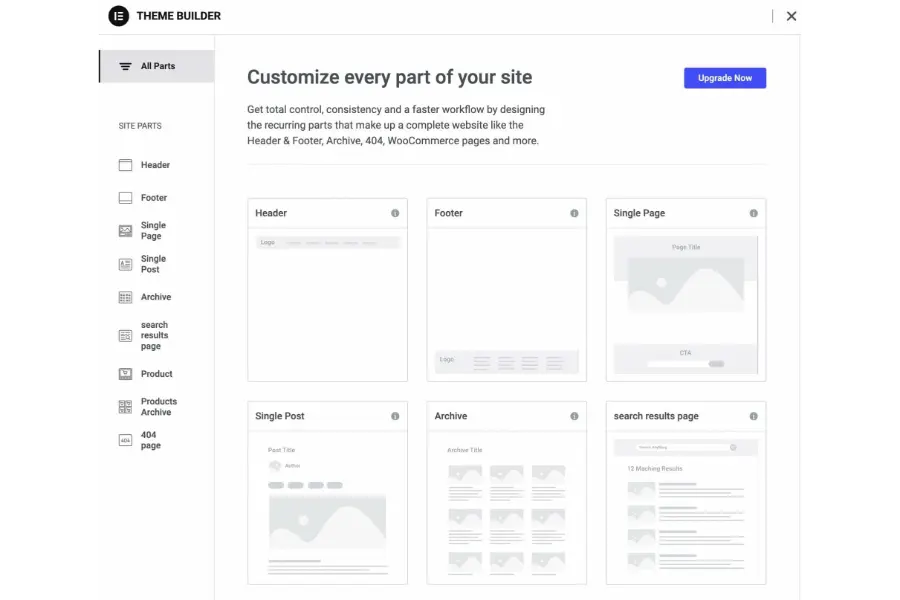
The visual builder distinguishes itself by featuring a vast, highly organized, and searchable library of professional templates. Users frequently combine these visual tools with the best multipurpose WordPress themes to access hundreds of ready-made demo sites across various industries.
Users can import complete, cohesive website kits—including the homepage, about section, service details, and contact forms—with a single automated click. Furthermore, the system empowers designers to save their own custom-configured widgets, complex layout sections, or entire completed pages to a personal library for reuse.
4. Performance Metrics and Page Speed Optimization
Website performance is an undeniable, critical ranking factor. A slow website inevitably leads to increased bounce rates, lower user retention, and decreased conversion rates.
Native Performance Advantage:
Because it is entirely native to the core software architecture, the block editor is inherently lightweight. It is intelligently designed to only load the necessary scripts and cascading style sheets (CSS) for the specific blocks actively utilized on a given page.
This lean, optimized approach results in significantly smaller Document Object Model (DOM) sizes, much faster server response times, and consistently higher scores on automated performance testing tools like Google PageSpeed Insights.
For development teams prioritizing absolute maximum performance and clean HTML output above visual convenience, alternative technical comparisons frequently arise in the industry, such as evaluating Bricks Builder vs Gutenberg.
Bricks is highly regarded for outputting exceptionally clean code compared to traditional visual builders. Nevertheless, the native WordPress block editor consistently remains the most lightweight, standardized option available without the necessity of purchasing premium software licenses.
Visual Builder Performance Considerations:
Visual builders, by their architectural nature, must load substantial additional code libraries to support their extensive drag-and-drop features, global design rules, and complex styling options.
Utilizing highly intricate layouts, numerous scroll animations, and heavy dynamic widgets can inadvertently lead to a bloated DOM structure and slower overall page loading times.
While dedicated optimization tools and utilizing premium WordPress hosting providers can successfully mitigate these performance issues, the native block editor maintains a distinct, natural advantage regarding raw speed.
5. E-commerce Integration and WooCommerce Compatibility
Constructing an effective online store requires highly specialized product presentation, secure data handling, and optimized, frictionless checkout workflows. The battle of Elementor vs Gutenberg presents two distinct methods for building digital storefronts.
Native Store Capabilities:
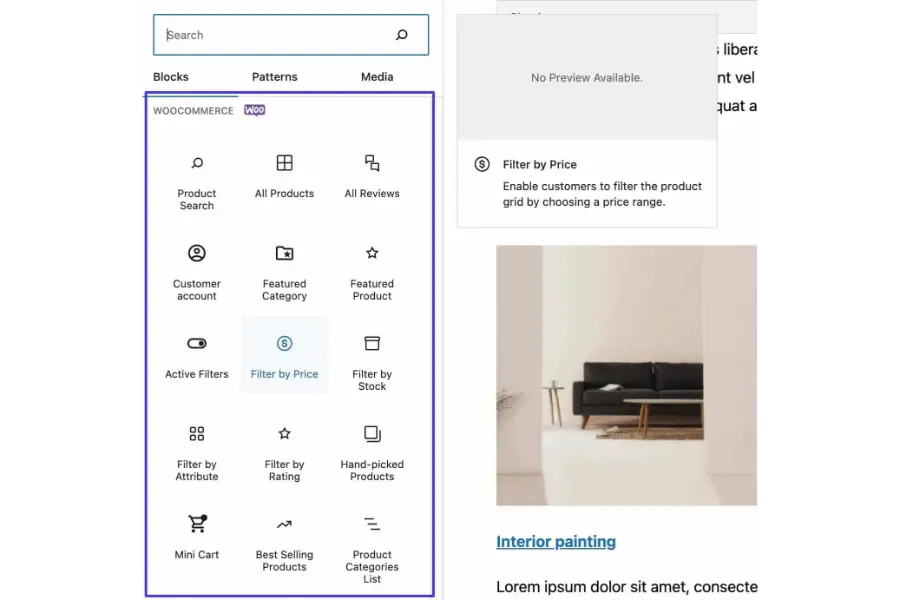
The native editor includes a comprehensive suite of customized blocks specifically engineered for WooCommerce. Store administrators can quickly and efficiently insert dynamic product grids, highlight top-selling merchandise, and implement robust search functionality directly into any page or post.
The platform’s strategic shift toward utilizing block-based checkout and shopping cart pages provides a modern, highly conversion-optimized purchasing experience that requires very little manual configuration.
Visual Store Capabilities:
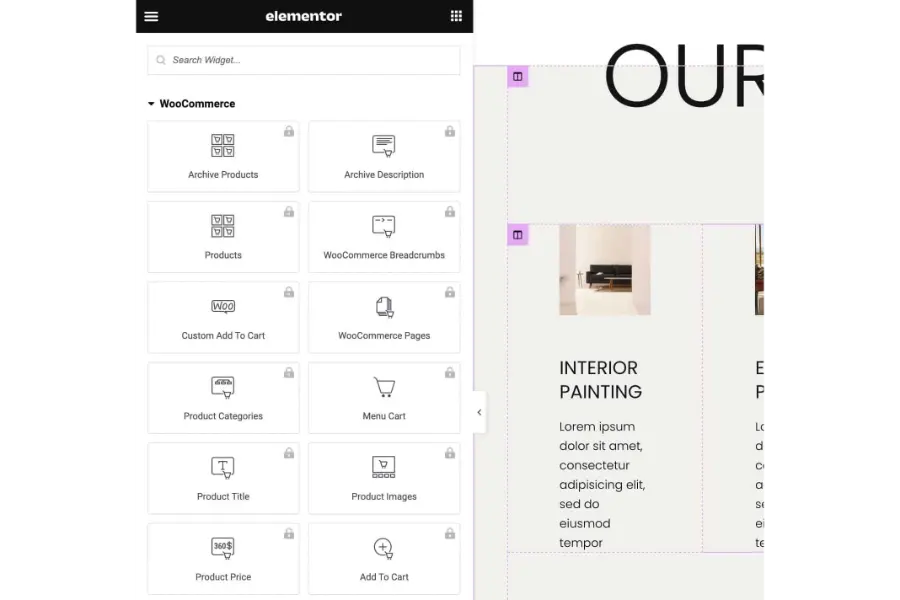
When weighing Elementor vs Gutenberg regarding data portability, a significant technical consideration involves data lock-in. The premium subscription tier of the visual builder provides a complete, dedicated WooCommerce builder module. This powerful toolset allows users to design highly customized, unique product detail pages from scratch.
Administrators can meticulously style the exact physical appearance of the “Add to Cart” button, modify the behavior of the slide-out cart drawer, and create bespoke product archive layouts. This level of visual control is highly beneficial when combined with reliable best WooCommerce hosting to ensure the custom transactional layouts load swiftly and handle high traffic volumes efficiently.
6. Ecosystem Compatibility and Third-Party Extensions
When weighing Elementor vs Gutenberg regarding data portability, a significant technical consideration involves data lock-in.
Standardized Native Compatibility:
Because the block editor serves as the default, mandatory standard for the platform, virtually all modern themes and software plugins are obligated to ensure strict compatibility. Major software providers for forms, galleries, and forums automatically provide native blocks for seamless integration.
If a website owner decides to execute a complete theme change, the content contained within native blocks generally adapts smoothly and gracefully to the new aesthetic rules dictated by the updated theme.
Visual Builder Data Portability Issues:
The visual builder also boasts a massive, vibrant ecosystem. Thousands of third-party add-on plugins exist strictly to provide supplementary widgets. Many premium themes are optimized to work flawlessly with both environments.
For instance, top-tier educational themes provide extensive demo layouts compatible with both the native block system and popular visual plugins, allowing users to choose their preferred workflow seamlessly.
However, a significant technical consideration involves data lock-in. Because the visual builder completely overrides native theme styles and utilizes proprietary formatting, executing a transition away from the visual builder in the future can prove highly problematic. Deactivating the core plugin frequently leaves behind unformatted text wrapped in broken shortcodes, necessitating a complete site rebuild.
7. Search Engine Optimization (SEO) Impact
A common question when analyzing Elementor vs Gutenberg is how the choice of page builder directly influences technical SEO capabilities and indexing efficiency.
Both web development frameworks are highly capable of ranking exceptionally well in search engine results pages (SERPs) if optimized correctly by the administrator. The native editor generally maintains a distinct advantage in raw page speed testing due to its lightweight code generation, which is a recognized, critical ranking factor for Google’s Core Web Vitals. The semantic HTML structure ensures search engine crawlers can interpret the content easily.
Conversely, the visual builder offers excellent on-page SEO flexibility. It allows users to easily assign specific HTML tags (H1-H6, div, section) to any customized widget, ensuring a logical document outline. Both systems integrate flawlessly with the best WordPress SEO plugins to manage meta titles, descriptions, and schema markup, ensuring that neither platform fundamentally restricts organic search potential.
8. Financial Investment and Pricing Models (Gutenberg vs Classic Editor)
When analyzing Gutenberg vs Elementor from a financial perspective, understanding the true cost of ownership over time is vital for sustainable business operations.
| Licensing Tier | Native Block Editor | Visual Page Builder |
| Core Software License | $0 (Included inherently with WordPress core) | $0 (Basic plugin version via repository) |
| Premium Features | Not applicable (Fully native) | Starts at $59/year (For 1 Website License) |
| Agency Plans | Not applicable (Fully native) | Up to $399/year (For 1000 Website Licenses) |
| Ongoing Hidden Costs | May require purchasing premium block themes | Requires robust premium hosting for optimal speed |
Making the Final Decision: Gutenberg vs Elementor Which Page Builder Is Better?
Choosing the optimal page construction framework depends entirely on the specific strategic goals of the digital project, the technical expertise of the management team, and the desired balance between raw performance and unrestricted design flexibility. Resolving the Gutenberg vs Elementor debate requires matching the right tool to the correct business context.
The native block editor is highly recommended for:
- Digital publishers, high-volume bloggers, and content-centric media platforms.
- Technical projects where maximizing page speed scores and maintaining clean code architecture are the absolute highest priorities.
- Users who genuinely prefer a minimalist, distraction-free writing and editing environment.
- Organizations aiming to keep their core technology stack purely native, thereby avoiding reliance on heavy third-party plugins.
The visual page builder is highly recommended for:
- Professional design agencies and freelance web developers tasked with building highly customized sites for demanding clients.
- Dedicated marketing teams require the ability to rapidly deploy highly stylized, conversion-focused landing pages without developer assistance.
- Complex e-commerce businesses that demand highly customized product presentation templates and unique shopping cart behaviors.
- Users who explicitly require pixel-perfect design capabilities, complex animations, and advanced layout control without writing any manual CSS code. Seeking out the best Elementor WordPress themes will further enhance this experience and guarantee deep integration.
If you are still torn between Elementor vs Gutenberg, consider your long-term goals. Ultimately, both systems serve specific, highly valuable purposes within the web development industry. The core native editor continues to mature rapidly, successfully adding impressive full-site building features with every major software update.
Simultaneously, visual builders continue to push boundaries, innovating with advanced dynamic features, marketing integrations, and significant workflow enhancements.
By carefully, objectively evaluating the specific project requirements regarding loading speed, financial budget, and necessary design complexity, professionals can confidently select the optimal framework to ensure a successful, sustainable digital presence.
Frequently Asked Questions (FAQs): Gutenberg vs Elementor
Gutenberg vs Elementor, can both page builders be utilized simultaneously on the exact same website?
Yes, it is entirely possible and quite common to use both systems concurrently on a single domain. A highly effective hybrid approach involves utilizing the visual builder to construct and design complex static pages (such as the primary homepage, the corporate about page, and detailed service offerings) while strictly utilizing the native block editor for publishing daily, text-heavy blog articles. This specific strategy perfectly combines advanced, striking design capabilities with a clean, fast, and optimized writing environment.
Will deactivating and switching away from a visual builder completely break my website layout?
If a webpage is entirely constructed using a third-party visual plugin and that specific plugin is subsequently deactivated, the visual layout will indeed break. The underlying text content often remains intact within the database, but it is typically wrapped in proprietary software shortcodes or completely unstyled HTML blocks. Rebuilding the site visually using the native editor or migrating to a different tool will be absolutely required. Conversely, native blocks generally retain their content structure and adapt to new themes much more gracefully.
Is it strictly necessary to possess coding knowledge to effectively use the default block editor?
Absolutely no coding knowledge is required to build standard pages, publish posts, and format content using native blocks. The core system provides highly intuitive visual controls for managing typography, color palettes, and structural layout grids. However, for highly complex or profoundly customized design requirements that extend beyond the built-in settings, a foundational understanding of CSS can be highly beneficial to refine the final visual output.
Which specific option is definitively better for search engine optimization (SEO) practices?
Both web development frameworks are highly capable of ranking exceptionally well in search engine results if configured correctly by the administrator. The native editor generally maintains a distinct advantage in raw page speed testing due to its lightweight code generation, which is a recognized, critical ranking factor. However, third-party visual builders can absolutely achieve excellent performance scores if they are strategically paired with high-quality server hosting, robust caching plugins, and strict image optimization techniques.
Do traditional third-party themes still matter when utilizing Full Site Editing capabilities?
With the formal introduction and expansion of Full Site Editing within the native core, the fundamental role of the traditional theme is undergoing a massive shift. Modern block themes now function more as a collection of design tokens, color palettes, and basic structural templates rather than rigid, hard-coded PHP structures. While traditional themes remain widely utilized across the web, the development industry is gradually moving toward block-based themes that empower users to customize virtually every structural aspect of the site directly within the native user interface.
Read more: MemberPress Plugin Review: Is It Still Worth It?
Contact US | ThimPress:
Website: https://thimpress.com/
Fanpage: https://www.facebook.com/ThimPress
YouTube: https://www.youtube.com/c/ThimPressDesign
Twitter (X): https://x.com/thimpress_com