Finding the perfect solution to monetize content, manage subscribers, and protect digital assets is the most critical decision for any digital business. Building a profitable subscription site requires a robust infrastructure that eliminates technical friction. Administrators are likely seeking a clear, unbiased MemberPress plugin review to determine if this platform truly lives up to its industry-leading reputation.
In this comprehensive MemberPress review, the evaluation bypasses promotional material to examine core functionalities, ease of use, and overall structural value. Whether the goal is launching a simple premium blog or a complex digital academy, understanding how this software handles payments, access rules, and member management is absolutely essential for long-term scalability.
By analyzing its operational capacities, site owners can make a highly informed decision. For those still conceptualizing the core website structure, exploring the differences between an LMS vs membership WordPress plugin is highly recommended before proceeding. Furthermore, finding the best WordPress membership plugin requires aligning software capabilities precisely with organizational goals.
Eduma – Education WordPress Theme
We provide an amazing WordPress theme with fast and responsive designs. Let’s find out!
Executive Summary and Quick Comparison
Before exploring the granular details, the following table provides a high-level summary of the software. It is presented alongside a brief comparison to highlight the primary distinctions in functionality, specifically addressing the frequent MemberPress vs SureMembers debate.
| Feature Category | MemberPress | SureMembers |
| System Approach | All-in-one comprehensive solution | Lightweight, modular content restrictor |
| Payment Processing | Built-in (Stripe, PayPal, Authorize.net) | Requires third-party e-commerce plugins |
| Access Control | Global rules for categories, tags, and files | Block-level and specific page protection |
| Content Dripping | Advanced scheduling and access expiration | Native dripping, excellent for LMS integration |
| Reporting | Built-in financial and membership analytics | Relies entirely on third-party reporting tools |
| Pricing Model | Premium annual subscription tiers | Highly affordable annual and lifetime options |
Core Functionality: Access Control and Membership Plans

The fundamental purpose of any subscription software is the ability to restrict access to premium material reliably. In this area, the platform excels by offering an advanced, highly flexible rules system.
Key Access Control Capabilities:
- Flexible Membership Levels: Administrators can create an unlimited number of tiers, encompassing free trials, one-time payments, and recurring monthly or annual subscriptions.
- Global Rules System: Instead of configuring restrictions on a tedious, page-by-page basis, administrators can formulate broad rules that instantly protect all content housed under specific categories or tags.
- Granular Protection: The software provides strict control, allowing site owners to protect individual files, custom post types, and specific URLs.
- Partial Content Protection: For businesses that utilize a paywall model, non-members can view introductory paragraphs before being prompted to subscribe.
Throughout this MemberPress plugin review, it becomes evident that the rules system requires logical organization. As a website scales, maintaining a clear hierarchy of access rules is essential to prevent administrative confusion.
When evaluating MemberPress features and pricing, the capacity to handle complex business models natively remains a significant strength. To ensure the site looks as professional as it functions, exploring some of the best membership WordPress themes provides excellent aesthetic foundations.
Content Dripping and Access Expiration
Maintaining subscriber engagement over long periods is a common challenge for digital businesses. The platform addresses this retention issue through robust content scheduling features.
- Content Dripping: Release articles, videos, or course modules on a predetermined schedule based on the exact date a user registers. For example, a user might receive access to module one immediately upon registration, while module two unlocks exactly seven days later.
- Access Expiration: This functionality is highly beneficial for promotional campaigns, limited-time offers, or trial periods. Access to specific materials can automatically revoke after a set number of days, creating a seamless, automated marketing funnel that requires zero manual intervention.
For educators specifically looking to expand teaching tools, reviewing the best WordPress plugins for education websites can further enhance this automated delivery experience. As noted in any thorough MemberPress review, automated dripping drastically reduces administrative workloads.
Member Management and User Experience
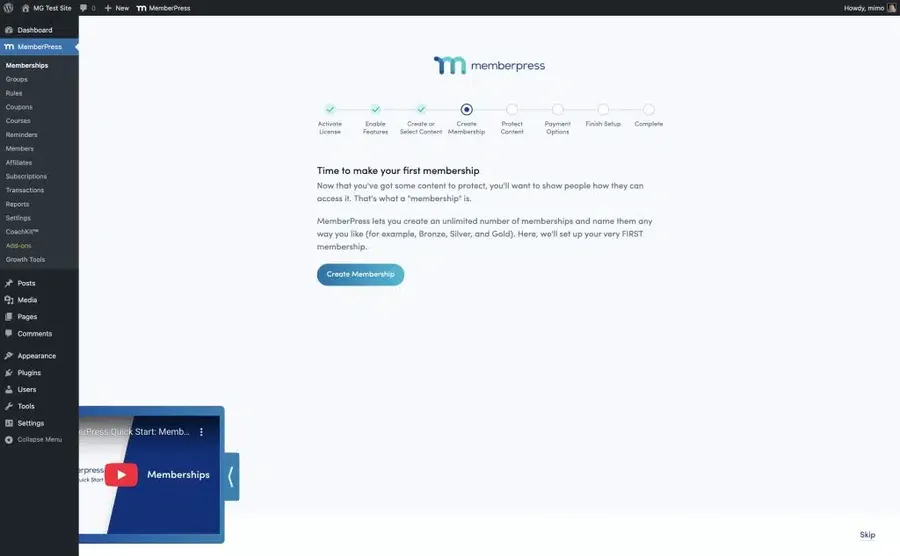
A successful digital platform must provide a frictionless experience for both the subscriber and the administrator. Managing thousands of users requires a streamlined, automated approach.
Administrative Dashboard Metrics:
The built-in reporting system tracks essential metrics, including total active members, revenue generation, refund processing, and the average lifetime value of customers. (Note: While the reports are highly useful for financial tracking, certain advanced metrics, such as exact churn rate, must be calculated externally.)
Self-Serve User Experience:
For the end-user, the software generates a clean, intuitive account dashboard where subscribers can autonomously perform the following actions:
- View active plans and billing history.
- Update payment methods seamlessly.
- Download PDF invoices for corporate accounting.
- Autonomously upgrade, downgrade, or pause active subscriptions.
Empowering users to manage their own accounts significantly reduces the burden on customer support teams.
Furthermore, administrators can configure custom automated emails for critical events, such as credit card expiration warnings, cart abandonment reminders, and onboarding welcome sequences. Reading any professional MemberPress review will confirm that this level of self-service is crucial for retention.
Ecosystem Expansion: Courses, Coaching, and Communities
In recent updates, the software has evolved significantly beyond basic content restriction. It is transforming into a versatile platform capable of hosting diverse digital business models.
When deciding is MemberPress worth it, the inclusion of these premium ecosystem expansions often justifies the investment.
| Premium Add-on | Primary Functionality |
| Online Courses | Fully integrated Learning Management System (LMS) allowing educators to build curriculums, track student progress, and issue quizzes without requiring a separate course plugin. |
| CoachKit | Designed specifically for mentors and consultants, this suite facilitates direct client communication, milestone tracking, and cohort management within the main dashboard. |
| ClubSuite | Introduces social features, allowing the creation of user directories, private forums, and member profiles, transforming a static website into an interactive community hub. |
| Corporate Accounts | Enables B2B organizations to sell bulk licenses. A parent company can purchase a master account and distribute sub-accounts to its employees. |
For organizations whose primary goal is to build a massive educational hub, learning how to create an online course marketplace using WordPress helps maximize the utility of the best WordPress membership plugin available.
Third-Party Integrations
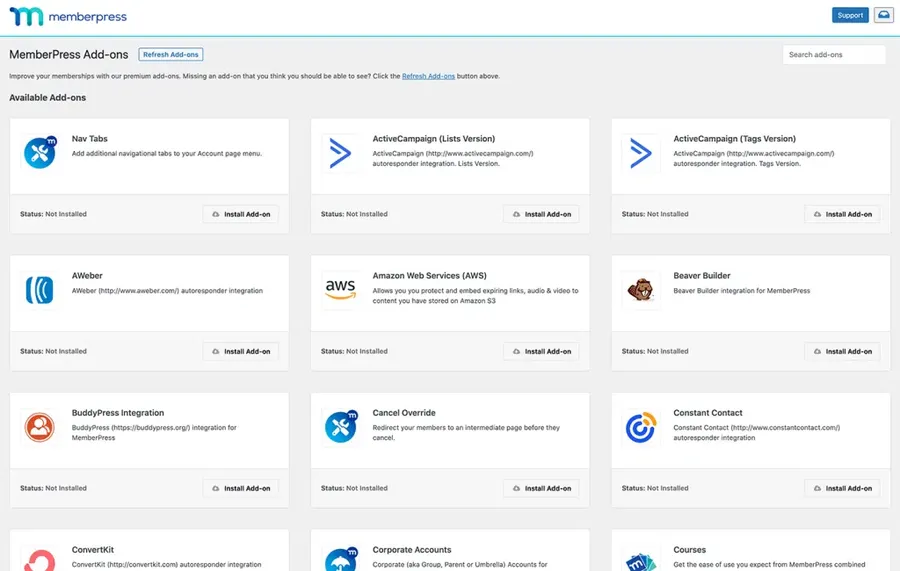
No software operates in isolation. Advanced digital businesses require extensive data sharing between applications. The platform supports a vast array of integrations, though availability is strictly tied to the active license tier.
- Standard Integrations: Connects seamlessly with popular community forums like bbPress and various page builders.
- Marketing Automation: Seamlessly links with major email service providers such as ActiveCampaign, ConvertKit, and Drip to trigger targeted email campaigns based on membership status.
- Advanced Workflows: The highest tier provides access to Zapier integration, bridging the platform with thousands of external applications for highly complex, custom automated workflows.
Any comprehensive MemberPress plugin review must highlight that native integrations eliminate the need for costly custom development.
MemberPress Features and Pricing Analysis
Evaluating the financial investment is critical for long-term sustainability. A thorough look at MemberPress features and pricing reveals a tiered structure designed to accommodate different stages of business maturity. The software operates on an annual subscription model.
| License Tier | Target Audience | Key Features & Inclusions | Payment Gateways & Fees |
| Launch Tier | Beginners & New Sites | Core access control, built-in LMS for courses. | Stripe integration (Note: Includes a transaction fee). |
| Growth Tier | Established Businesses | Advanced content dripping, customizable coupons, order bumps, critical marketing integrations. | Stripe, PayPal, and Square (Eliminates the transaction fee). |
| Scale Tier | High-Volume Enterprises | Corporate Accounts for bulk licensing, affiliate marketing management tools, Zapier integration. | Authorize.net included alongside others. |
While the standard retail pricing positions the software as a premium investment, developers frequently run promotional campaigns during the initial year of purchase.
Site owners should calculate their long-term operational costs based on the standard renewal rates to ensure financial alignment. Understanding MemberPress features and pricing thoroughly prevents unexpected operational expenses.
MemberPress vs SureMembers: A Detailed Comparison
When analyzing the current software landscape, the MemberPress vs SureMembers debate frequently arises among website administrators. These two systems represent fundamentally different technical philosophies.
The SureMembers Philosophy (Lightweight & Modular):
- Prioritizes extreme speed, simplicity, and modularity as a pure content restriction tool.
- Integrates directly into the native block editor to lock specific paragraphs or images seamlessly.
- Relies entirely on integration with modern e-commerce systems (like SureCart or WooCommerce) because it does not process payments natively.
- Offers highly competitive pricing, including rare lifetime licensing options.
- Features built-in security protocols, such as anti-spam CAPTCHA integrations.
The MemberPress Philosophy (All-In-One Solution):
- Reduces reliance on external tools by centralizing business operations.
- Handles payments, subscriptions, content protection, email reminders, and course delivery within a single unified dashboard.
- Avoids the complexities of managing multiple interconnected software licenses.
- Ideal for users who prioritize operational efficiency over modular customization, despite having a naturally larger code footprint.
The conclusion of the MemberPress vs SureMembers comparison ultimately depends on whether an organization prefers an all-in-one ecosystem or a modular technology stack. For users exploring all available competitors on the market, reviewing a detailed comparison of Paid Memberships Pro vs MemberPress demonstrates how other industry giants stack up.
Security, Privacy, and Compliance
Handling user data and processing financial transactions requires rigorous security standards. The platform adheres strictly to modern compliance requirements, which is why it is frequently named the best WordPress membership plugin for enterprise use.
- GDPR Compliance: Provides tools such as mandatory consent checkboxes on all registration forms and user data export options.
- Digital Asset Protection: File downloads are securely encrypted and protected from unauthorized direct linking.
- Payment Security: Utilizes secure API connections with global gateways (Stripe and PayPal), ensuring that sensitive credit card data is never stored locally on the website server.
(Administrators are strongly advised to pair the platform with a dedicated website security firewall to protect against brute-force login attempts and external vulnerabilities.) Evaluating security protocols is a vital step when determining is MemberPress worth it.
Is MemberPress Worth It?
Determining the ultimate value of a software product depends heavily on the specific operational requirements of the organization. When asking is MemberPress worth it, administrators must consider technical expertise, budget limitations, and long-term business goals.
- When it might be overly robust: For a simple blog looking to restrict a few articles without processing direct payments natively, simpler alternatives may suffice.
- When it is highly recommended: For serious entrepreneurs building comprehensive digital academies, premium content libraries, or recurring subscription businesses.
The ability to launch a WordPress website, protect content, accept recurring credit card payments, issue courses, and manage a private community from a single plugin justifies the premium pricing model. It eliminates the frustration of troubleshooting conflicting software tools and provides a stable, highly scalable foundation for digital commerce.
For educators prioritizing dedicated course-building functionalities over general subscriptions, reading an in-depth LearnPress review provides insight into a different approach to digital learning. Nevertheless, as the best WordPress membership plugin for general purpose access control, the investment yields significant administrative relief.
Conclusion
Navigating the complexities of digital subscription management demands software that is both resilient and adaptable. Throughout this detailed MemberPress plugin review, the platform has consistently demonstrated why it remains an industry standard. While lightweight, modular alternatives exist for highly specific use cases, few tools can match the sheer breadth of functionality provided here.
From its meticulous access rules and automated communication tools to its expansive premium add-ons for coaching and courses, the software covers every conceivable requirement for a modern digital business.
For site owners seeking a comprehensive, all-encompassing solution that scales effortlessly with organizational growth, it undoubtedly remains the best WordPress membership plugin available on the market today. This comprehensive MemberPress plugin review serves as the definitive guide to advancing digital publishing initiatives successfully.
FAQs
Does the software require coding knowledge to set up?
No coding expertise is required. The platform features an intuitive, straightforward interface. The integrated setup wizard guides administrators through configuring payment methods, creating basic subscription tiers, and applying initial access rules without writing a single line of code.
Can existing subscribers be migrated from another platform?
Yes. The platform includes a dedicated import tool. Administrators can format existing user data, including active subscription statuses and historical transaction records, into a standard CSV file and import it directly into the system to ensure a seamless transition.
Is a separate plugin needed to process credit card payments?
No separate e-commerce plugin is necessary. The software natively integrates with major payment gateways, allowing administrators to securely accept recurring subscriptions and one-time payments directly through the website interface.
How does the system handle failed subscription payments?
The software includes automated billing management. If a recurring credit card payment fails, the system will automatically revoke or pause the user’s access to protected content. It will then trigger automated email reminders prompting the user to update their billing information.
Is it possible to sell multiple different membership tiers simultaneously?
Absolutely. Administrators can create an unlimited number of subscription products. Furthermore, the system supports upgrade and downgrade paths, automatically prorating financial differences when a user decides to switch between a lower and a higher tier.
Read more: How to Disable WordPress Plugins: 6+ Methods
Contact US | ThimPress:
Website: https://thimpress.com/
Fanpage: https://www.facebook.com/ThimPress
YouTube: https://www.youtube.com/c/ThimPressDesign
Twitter (X): https://x.com/thimpress_com