Picking a tutoring website template is not just about finding something that looks good on the homepage. If you run one-on-one lessons, manage a small group of tutors, or run a full online academy, the tutor website template you choose decides how easy it is to take bookings, sell courses, and get paid without wrestling with WordPress plugins every week.
This guide walks through what actually matters when comparing tutoring website templates, what features to check before you buy, and which options are worth a closer look in 2026.
Eduma – Education WordPress Theme
We provide an amazing WordPress theme with fast and responsive designs. Let’s find out!
What makes a good tutoring website template
A good tutoring website template is one that matches how you actually teach and how students actually book you, not just one with a clean design. Before you open a single demo, it helps to separate the visual layer (colors, fonts, homepage layout) from the functional layer (booking, payments, course delivery), because most buyers only judge the first and get surprised by the second after purchase.
Core features to look for
At minimum, a tutoring website template should ship with a booking or appointment system, a way to list tutors or subjects, a contact or inquiry form, and clear pricing pages. If you plan to sell recorded courses alongside live sessions, check whether the template supports an LMS plugin like LearnPress, Tutor LMS, or LifterLMS out of the box, since retrofitting course functionality onto a template that was never built for it usually means extra development hours.
WordPress vs HTML tutor templates
WordPress tutor website templates give you a dashboard, plugin support, and the ability to add pages without touching code, which is why most tutoring businesses end up here. HTML tutoring templates, like TutorX from ThimPress, are lighter and faster out of the box, but every change (new page, new section, new booking rule) needs a developer or at least comfort with editing markup directly. If you are non-technical and expect to update content often, a WordPress-based tutor website template is almost always the safer long-term choice.
Key features every tutor website template should have
Once you narrow down a shortlist, run each candidate through the same checklist instead of judging by screenshots alone. A template that looks polished in a demo can still fall short once you try to configure it for your own subjects, tutors, and pricing tiers.
Booking and scheduling functionality
Look for templates that either include a built-in booking calendar or are confirmed compatible with WordPress booking plugins such as Amelia, Bookly, or WooCommerce Bookings. When I tested a few tutor marketplace demos, the ones that handled recurring lesson slots and time zone conversion cleanly saved the most setup time, while templates that only offered a static contact form meant adding a separate booking plugin and re-styling it to match.
Course and LMS integration
If part of your offer is pre-recorded lessons, quizzes, or certificates, confirm the tutoring website template lists compatibility with an LMS plugin in its documentation. LearnPress integration is worth checking specifically if you want quizzes, drip content, and student progress tracking without paying for a separate course platform.
Payment and WooCommerce support
Most tutor website templates handle payments through WooCommerce, Stripe, or PayPal, but the depth of that support varies. Some templates only support a single one-time payment for a course; others support subscription billing, per-session invoicing, and instructor payouts if you run a tutor marketplace rather than a single-tutor site. Decide early which pricing model you need, because switching a template’s payment structure after launch usually means rebuilding checkout pages.
Mobile responsiveness and speed
A large share of tutoring inquiries now come from a phone, often a parent booking on behalf of a child between other tasks. Test the live demo on an actual phone, not just by resizing a desktop browser window, and check how long the homepage takes to load using PageSpeed Insights. A tutoring website template with heavy sliders and large uncompressed images will feel fine in the demo and slow on a real hosting plan, especially shared hosting.
How to choose the best tutoring website template for your business

There is no single best tutoring website template, only the one that fits your teaching model, your technical comfort level, and your budget. The decision gets much easier once you answer three questions before browsing further.
Define your teaching model
A solo tutor selling one-on-one sessions needs a simple template with a booking form and a clean about page. A tutor marketplace connecting multiple instructors with students, similar to what Tuturn or iSchool are built for, needs multi-vendor support, instructor profiles, and a review system. An online school running structured courses alongside live tutoring, closer to what Edubin or MaxCoach offer, needs stronger LMS integration than a simple booking layout provides.
Check compatibility with page builders
If you plan to customize sections yourself, confirm which page builder the tutoring website template uses. Elementor is the most common choice among the templates in this category, and it is worth checking whether the template requires Elementor Pro for key sections, since that adds an extra yearly cost on top of the theme price. Templates built on the block editor with Gutenberg patterns tend to be lighter, but customization options are usually narrower than Elementor.
Test the demo before buying
Import the demo content on a staging site before committing, not just on the live preview in your browser. This is the only way to see how the template behaves once it is running on your own hosting, with your own plugins active, and it catches conflicts that a browser preview never shows. Pay attention to how the Customizer or Elementor panel reloads when you swap the accent color or logo, since a sluggish editing experience early on is usually a sign of a heavier theme overall.
Consider scalability and ongoing support
Your tutoring website may start with only a few services, but your needs can change as the business grows. When comparing tutoring website templates, think beyond what you need on launch day. Check whether the template can handle additional tutors, subjects, courses, booking options, and payment methods without requiring a complete redesign.
Support and update frequency also matter. A template that receives regular updates is less likely to become difficult to maintain as WordPress, plugins, and security standards change. Before buying, check when the template was last updated, how long support is provided, and whether documentation is available for common setup tasks.
It is also worth checking how easy it is to switch hosting or change plugins later. A template that depends heavily on proprietary features can make it harder to move your tutoring website to another setup. Choosing a template that works with widely used WordPress plugins gives you more flexibility as your business develops.
Finally, consider your content workflow. If you regularly publish articles, add new courses, update tutor profiles, or create promotions, make sure these tasks are straightforward from the WordPress dashboard. The best tutoring website template should not only look professional but also make everyday website management simple.
6+ Top tutor website templates worth considering
The templates below cover different use cases, from single-tutor sites to full tutor marketplaces, based on current listings and demo testing.
TutorX by ThimPress

TutorX is an HTML tutoring template built specifically for mentoring and tutoring services, with four demo variations and 18 page layouts. It suits developers or agencies who want a fast, lightweight starting point and are comfortable editing HTML and CSS directly rather than working inside a WordPress dashboard.
Eduma by ThimPress

Eduma is ThimPress’s flagship education WordPress theme, built around LearnPress and compatible with WooCommerce and Elementor. It ships with a large library of pre-built demos covering different education niches, and if you are specifically after a tutor-style layout, it is worth checking the current demo list on the Eduma product page before purchase, since demo availability can change between updates.
Tuturn – online tutors marketplace theme

Tuturn is built for a tutor marketplace model, where multiple instructors list their own profiles and students book classes directly. It handles the instructor-student matching flow that a single-tutor template usually cannot, which makes it a better fit for platforms rather than solo tutoring businesses.
SmartHead – tutoring service and online school theme
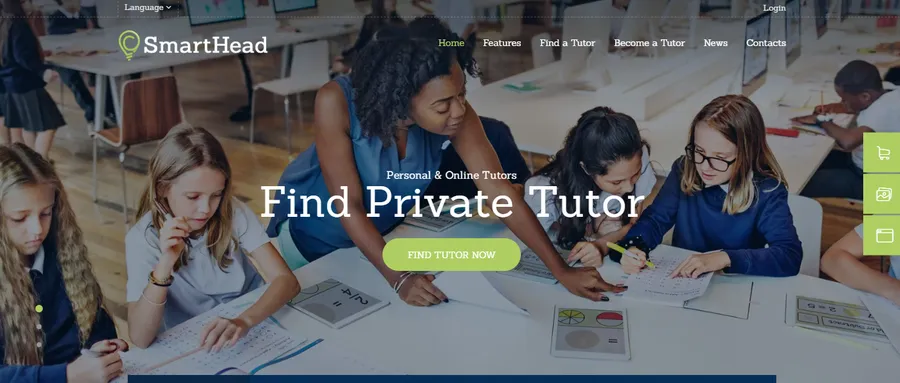
SmartHead ships with four homepage variations built around tutoring services and online schools, along with WPBakery, appointment booking, and Mailchimp integration. It works well for a small tutoring business that also wants a newsletter signup baked into the design rather than added later.
Owly – tutoring and eLearning theme
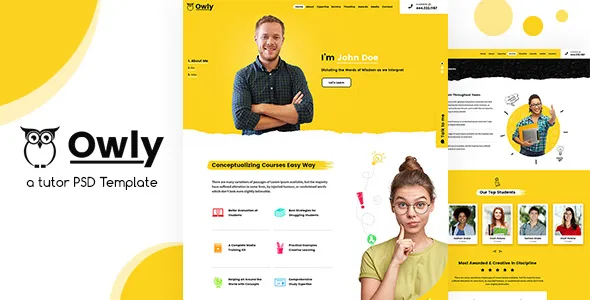
Owly combines tutoring and eLearning in one theme, aimed at coaches and online instructors who teach both live sessions and structured courses. It is a reasonable middle ground if you are not yet sure whether your business will lean more toward one-on-one tutoring or full course sales.
Facultic – tutoring, teacher, tuition theme
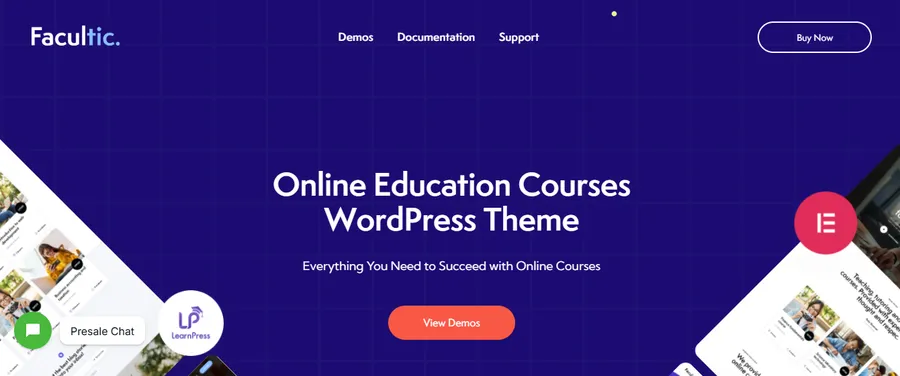
Facultic pairs tutoring and tuition pages with LearnPress for online courses, and includes Elementor, WooCommerce, and WPML support along with a one-click setup wizard. The WPML support is worth noting if you plan to teach in more than one language or serve an international student base.
Step-by-step: setting up your tutoring website template
Once you have picked a template, the setup process is similar across most of the options above.
- Install the required plugins first. Most tutor website templates list required plugins (Elementor, WooCommerce, a booking plugin) in their documentation. Install and activate these before importing demo content, or the import can fail partway through.
- Import the demo content on staging. Run the import on a staging copy of your site rather than production, so you can undo mistakes without affecting a live site.
- Set up your booking or LMS structure. Add your subjects, tutors, or courses into the structure the template expects, whether that is a custom post type for tutors or a course builder for lessons.
- Connect payments. Configure WooCommerce, Stripe, or PayPal with real test transactions before going live, checking that confirmation emails and receipts are formatted correctly.
- Test on mobile and check page speed. Run the finished site through PageSpeed Insights and open it on an actual phone before announcing the launch, since this is where most tutoring templates lose points if left unoptimized.
FAQs
What is the difference between a tutoring website template and a general education theme?
A tutoring website template is built around booking, instructor profiles, and one-on-one or small-group lesson scheduling, while a general education theme is usually built for course sales and school-style content. Some templates, like Owly, blend both, but it is worth checking which use case a template was designed for first before assuming it covers booking out of the box.
Do I need WooCommerce for a tutor website template?
You need WooCommerce if you plan to sell paid sessions, courses, or subscriptions directly through your site rather than handling payment manually. Most WordPress tutor website templates list WooCommerce compatibility in their feature list, but confirm whether it is included by default or requires separate setup.
Can I use Elementor with any tutoring website template?
You can use Elementor with a tutoring website template only if the theme was built to support it, since not every theme is coded for full Elementor compatibility. Check the template’s compatibility list on its sales page, and note whether it needs Elementor Pro for key sections like pricing tables or booking forms.
How much does a good tutoring website template cost?
Premium tutoring website templates typically range from around $12 for a simple HTML or PHP starting template up to $70 for a full-featured WordPress theme with ongoing support and updates. The higher end usually includes more built-in demos, page builder compatibility, and access to plugin bundles like LearnPress or booking add-ons.
Final thoughts
Choosing the best tutoring website template comes down to matching the template’s built-in structure to how you actually run your tutoring business, whether that is solo sessions, a small team, or a full marketplace. Start by defining your booking and payment needs, shortlist two or three templates that match, and always test the demo on a staging site before you commit. A tutoring website template that looks great in a preview but fights you on setup will cost more time in the long run than paying slightly more for one built around the features you actually need.
Read more: How to Check URL Redirect: Full Guide
Contact US | ThimPress:
Website: https://thimpress.com/
Fanpage: https://www.facebook.com/ThimPress
YouTube: https://www.youtube.com/c/ThimPressDesign
Twitter (X): https://x.com/thimpress_com