A construction website is often the first thing a client checks before they pick up the phone. If it loads slowly, hides your past projects, or makes the quote form hard to find, that client moves on to the next contractor in the search results.
This guide explains what a strong site needs, which pages to build, and which templates make the job faster.
Eduma – Education WordPress Theme
We provide an amazing WordPress theme with fast and responsive designs. Let’s find out!
What makes a good construction website?
A good construction website proves that your company can deliver, makes it easy to ask for a quote, and loads fast on a phone. Everything else is a bonus. Most contractors do not need animated intros or clever effects. They need trust, clarity, and speed.
It shows proof of real work
Buyers of construction services spend large sums and take real risks, so they look for evidence before they call. A portfolio with real project photos, short case studies, client names (with permission), licences, and safety records does more than any slogan. Stock photos of smiling workers in clean hard hats are easy to spot, and they hurt trust.
It makes contact easy
Every page should have a clear next step. That usually means a phone number in the header, a “Get a quote” button, and a short form with only the fields you truly need. Name, phone, email, project type, and a message are enough for most companies. Long forms lose leads.
It works well on a phone
Many people check a contractor from a phone, often on a job site or in a car. Buttons must be large enough to tap, the phone number should be a tap-to-call link, and images must not push the layout wider than the screen. Google’s Core Web Vitals give a clear target here. According to web.dev, a good Largest Contentful Paint (LCP) is 2.5 seconds or less. Check your homepage in PageSpeed Insights on mobile before you launch.
Why construction web design needs a different approach
Construction web design is not the same as designing a blog or an online shop, because the buyer is making a high-value, high-risk decision. The sales cycle is long, several people may be involved, and trust matters more than price on the first visit. Understanding this changes how you plan the site. Good web design for construction company brands starts with the buyer, not with colours or fonts.
Long sales cycles and high-trust buyers
A homeowner planning a renovation may visit your site three or four times over several weeks. A property developer may compare five contractors before sending a tender. Your site must work for both: quick answers for the first visit, and deeper proof (case studies, certifications, team profiles) for the return visit.
You serve more than one audience
A website for construction company work is read by clients, but also by suppliers, subcontractors, job seekers, and sometimes local council staff. A simple menu with separate paths for “Services”, “Projects”, “Careers”, and “Contact” keeps each group from getting lost. A careers page also helps with hiring, which is a real pain point in the industry.
Search is local and specific
Most people search for a service plus a place, such as “commercial builder” or “kitchen renovation near me.” Your pages should name the services you offer and the areas you cover in plain language. A separate page for each main service and each key area usually performs better than one long page that tries to cover everything.
Pages every website for a construction company needs
A website for a construction company works best with a small set of focused pages rather than a large, confusing structure. Use it as a checklist when you plan a website for construction company work. The table below shows the core pages, their job, and what to include on each.
| Page | Main job | What to include |
|---|---|---|
| Homepage | Give a quick first impression | Clear headline, main services, three to six project photos, trust badges, quote button |
| Services | Explain what you build | One section or page per service, typical project types, process overview |
| Projects (portfolio) | Prove your experience | Photos, location, project type, size, your role, short results summary |
| About | Build trust | Company story, years in business, team photos, licences, insurance, safety record |
| Contact or quote | Turn visits into leads | Short form, phone, email, address, map, working hours |
| Careers | Attract workers | Open roles, benefits, how to apply |
| Blog or news | Support SEO | Project updates, local guides, cost guides, safety tips |
Homepage
Your homepage should answer three questions within five seconds: what you build, where you build, and how to contact you. Put a strong project photo at the top, a short headline, and a button. Below that, list three to six services, add a few recent projects, and show any licences or industry memberships.
Services and portfolio
Service pages should be written for the buyer, not for you. Describe the problem, your process, the typical timeline, and what the client can expect. The portfolio should be easy to filter by type, such as commercial, residential, industrial, or renovation. Each project page needs a short story: the brief, the challenge, and the result.
About, contact, and trust pages
The About page is often the second most visited page on a contractor site. Show real faces, real numbers, and real credentials. On the contact page, keep the form short, show your phone number as text (not an image), and add a map. If you work in several areas, list them.
Construction company website examples you can learn from
Looking at construction company website examples helps you see which layouts work for different business types. Rather than copying one brand, study the pattern that fits your company and adapt it. Here are four common patterns you will see across the industry.
The general contractor site
Large general contractors usually use a wide, image-led homepage, a filterable project gallery, and a clear split between market sectors such as healthcare, education, and commercial. The strongest ones also publish safety statistics, sustainability commitments, and leadership profiles. If you bid on large tenders, copy this level of detail.
The residential builder or renovator site
Home builders and renovators usually focus on before-and-after photos, client reviews, and a simple quote form. The tone is warmer, and the layout is simpler. Prices or “starting from” ranges often appear, because homeowners want a rough idea of cost early.
The engineering and industrial site
Engineering and industrial firms lean on technical credibility. Their sites show certifications, equipment, capacity, and detailed service descriptions. Downloadable brochures and case studies are common, because buyers pass them to colleagues.
The interior design and fit-out site
Interior and fit-out businesses sell on visual quality. Large galleries, clean typography, and short project descriptions work best. You can see this style in the live demos of the MegaBux construction theme, which cover construction, architecture, and interior design layouts on one theme.
Construction industry web design tips that improve leads
Good construction industry web design is mostly about removing doubts and making the next step obvious. These practical tips for web design for construction company sites apply whether you use a template or a custom build. They also make any construction website easier to manage later.
Use one main call to action
Choose one primary action, usually “Get a free quote” or “Request a call back”, and repeat it in the header, the hero section, and the footer. Several competing buttons confuse visitors.
Use real photos and short videos
Photos taken on your own sites build more trust than stock images. A 30 to 60 second video of a finished project or a site walkthrough can help. Compress every image before upload, and use modern formats such as WebP, so pages stay fast.
Show licences, insurance, and safety records
Put licence numbers, insurance cover, and safety certifications where buyers can see them, ideally on the homepage footer and the About page. Many commercial buyers check these before they ask for a quote.
Write case studies with numbers
A case study that says “Completed a 2,400 square metre warehouse fit-out in 14 weeks, on budget” is stronger than “We deliver quality work.” Use your own real figures, and only publish details your client has approved.
Set up local SEO
Create a Google Business Profile, keep your name, address, and phone number identical across your site and directories, and add local business schema using a plugin such as Rank Math or Yoast SEO. Add location names to service page titles where it makes sense.
Watch speed and accessibility
Heavy sliders, large videos, and too many plugins slow a site down. Test on a mid-range phone, not only on your office computer. Use sufficient colour contrast, add alt text to project photos, and make sure the site can be used with a keyboard. These steps help every visitor, and they support SEO.
How to choose a construction template
A construction template saves weeks of design work, but only if it fits your business and your skills. Before you buy, check the points below. They prevent the most common regrets after launch.
Match the template to your company type
A residential renovator and an industrial manufacturer need different layouts. Look for demos that match your services, and check that the portfolio, service, and quote sections are already built.
Check the page builder
Some templates use WPBakery, some use Elementor, and some use the block editor. Pick the one you or your team can edit comfortably. A template that depends on a builder you dislike will slow you down on every update.
Look for demo import, support, and updates
One-click demo import saves hours. Also check when the template was last updated, whether support is included, and how long it lasts. A theme that has not been updated for years can break after a WordPress or WooCommerce update.
Use a child theme
If you plan to edit theme files, use a child theme first. Otherwise, a theme update can erase your changes. Many premium themes include one.
Check speed before you buy
Run the live demo through PageSpeed Insights. A demo loaded with large images and sliders will not tell you everything, but it shows the starting point.
Best construction templates compared
The best construction templates give you project galleries, service pages, and quote forms without much custom work. The table compares five options at a glance. Features and pricing change, so confirm details on each official page before you buy.
| Template or theme | Page builder | Construction-ready layouts | Pricing model | Best for |
|---|---|---|---|---|
| MegaBux | WPBakery | Yes, built for construction, architecture, and industrial | One-time license | Contractors, engineers, interior designers |
| Astra with Starter Templates | Elementor, Gutenberg, others | Yes, via the starter library | Free and paid plans | Small builders who want flexibility |
| Avada | Avada Builder | Yes, via prebuilt websites | One-time license | Agencies and larger company sites |
| Divi | Divi Builder | Yes, via layout packs | Subscription or lifetime | Visual editing and custom designs |
| Kadence | Block editor | Yes, via starter templates | Free and paid plans | Fast, block-based builds |
MegaBux construction WordPress theme
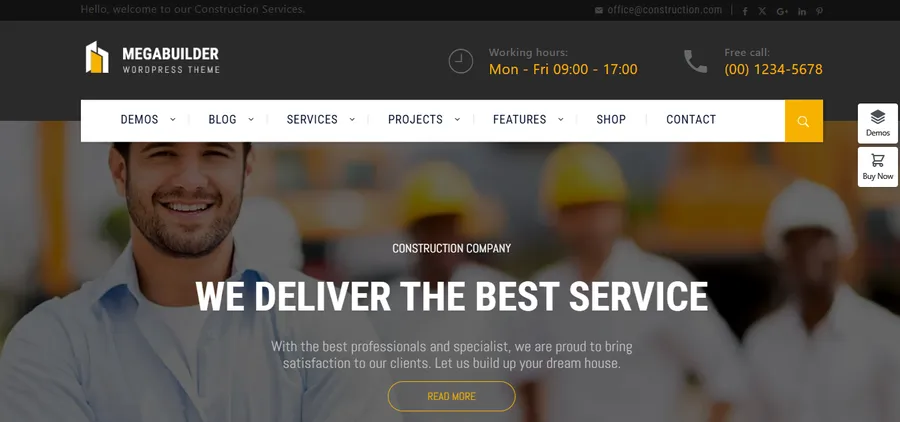
MegaBux is a WordPress theme from ThimPress made for construction, architecture, interior design, industrial, and engineering businesses. Its focus is narrow on purpose, so the layouts already match what these companies need. The theme costs $29 for a regular license on ThemeForest, and it was last updated in February 2026, according to the ThemeForest listing.
Best for: Contractors, building companies, engineers, architects, and renovation teams who want a ready-made site with minimal setup.
Key features:
- Three premade demos and three header styles
- One-click demo install
- WPBakery drag-and-drop builder included
- Revolution Slider, portfolio layouts, service pages, and pricing tables
- Contact details and “Get a quote” call-to-action blocks across the layouts
- WooCommerce, WPML, and RTL support
- Child theme, documentation, and VIP support forum
Pros:
- Built around construction needs instead of a generic multipurpose layout
- Quick setup, because you import a demo and replace content
- Portfolio and service layouts reduce the time spent on custom design
- Low entry price compared with many page-builder subscriptions
- Backed by ThimPress, a long-running theme author with a documentation site and a support forum
Cons:
- Only three premade demos, so the choice is smaller than in large multipurpose themes
- Uses WPBakery, so it suits people who are comfortable with that builder, and it is not optimized for the block editor
- Support on the regular license is six months, with extension available
In practice, the workflow is simple. You install the theme, import the demo closest to your company, swap the text and photos, and adjust colours and headers. The main task is writing good content, not fighting the layout. If you want to see the layouts live, open the MegaBux demo.
Astra with Starter Templates
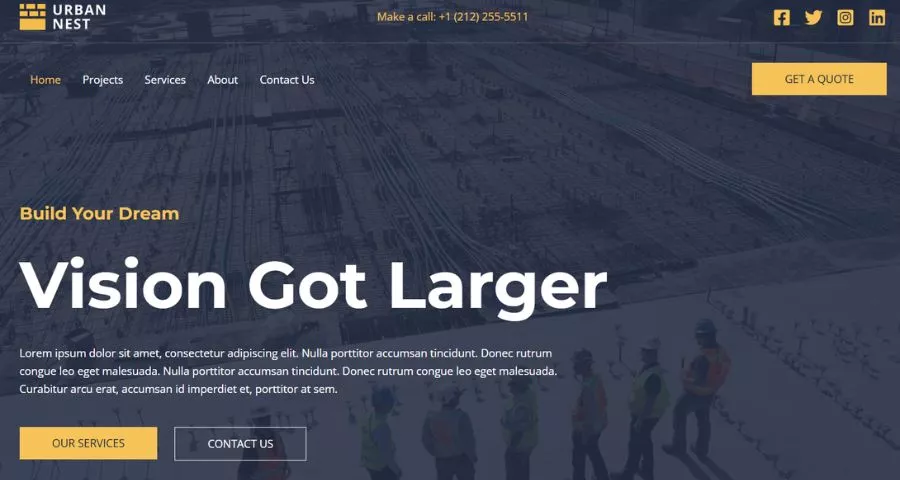
Astra is a lightweight WordPress theme with a large library of starter sites. You can pick a construction-style starter and import it into Elementor, the block editor, or another supported builder.
Best for: Small contractors who want flexibility and a free starting point.
Key features:
- Starter Templates library with business and construction-style designs
- Works with several page builders
- Header and footer builder
- WooCommerce compatibility
Pros:
- Free version available, so you can test before spending money
- Light code base that helps with speed
- Wide choice of builders
Cons:
- Some of the best starter sites and options need the paid version
- The library changes over time, so a specific demo may not stay available
- Because it is so flexible, beginners may feel they have too many choices
Avada
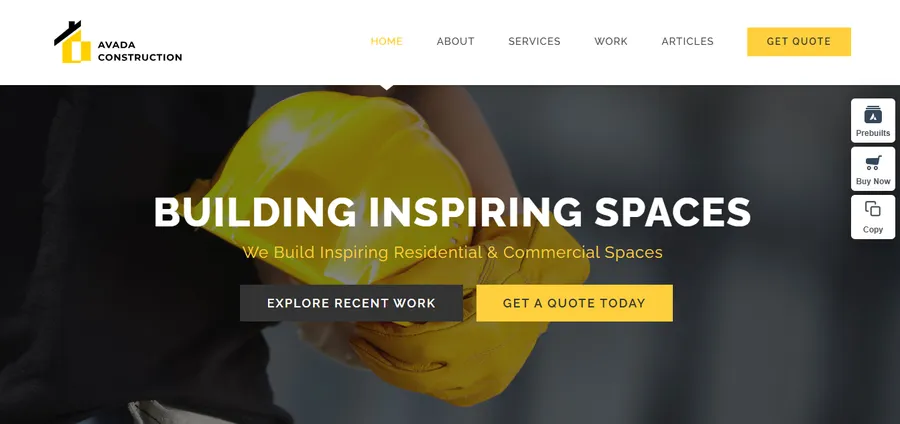
Avada is a well-known multipurpose theme with its own builder and a large set of prebuilt websites. It suits companies that want strong design control in one package.
Best for: Agencies and mid-size construction companies with several service lines.
Key features:
- Avada Builder with live editing
- Prebuilt websites for many industries
- Portfolio, forms, and layout tools
- Regular updates
Pros:
- Many built-in options without extra plugins
- Large user base and documentation
- One-time license model
Cons:
- The large feature set can add weight, so you must disable what you do not use
- A steeper learning curve for first-time site owners
- Switching away later can leave builder shortcodes behind
Divi
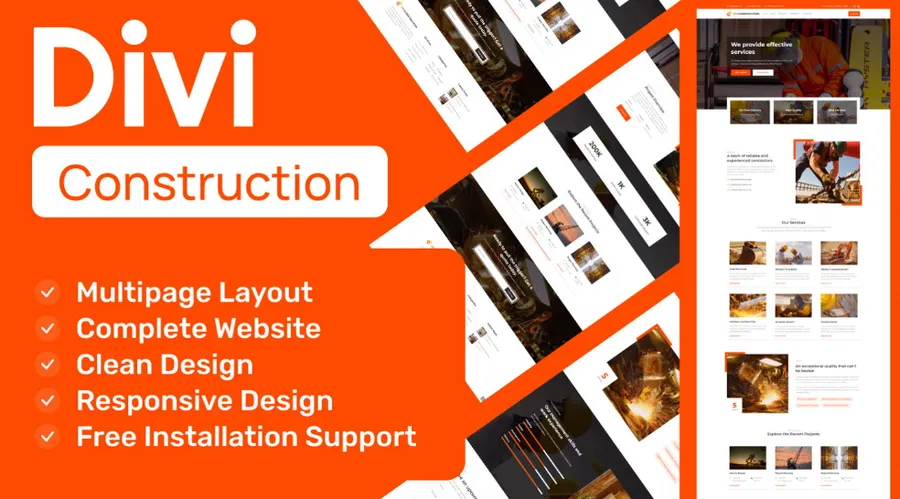
Divi is a theme and visual builder from Elegant Themes. It offers layout packs that can serve as a construction template when you adapt the pages to your own brand.
Best for: Owners who want to design visually and change layouts often.
Key features:
- Visual builder with drag-and-drop editing
- Layout packs and reusable sections
- Built-in A/B testing tools
- Role editor and global styles
Pros:
- Easy to edit visually without code
- Good for custom page layouts
- Large community and tutorials
Cons:
- Shortcode-based content can be hard to move to another theme
- Needs careful setup to keep pages light
- Subscription or lifetime pricing may not suit every budget
Kadence
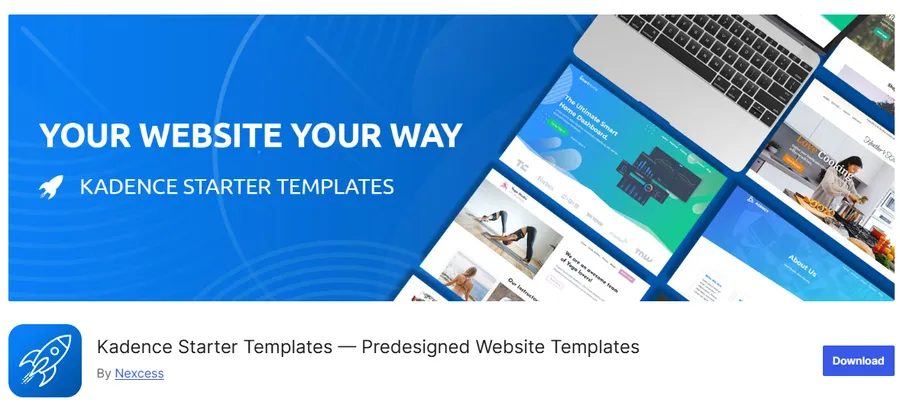
Kadence is a modern theme built around the block editor. Its starter templates give you a design you can customize with Kadence Blocks.
Best for: Site owners who prefer the native WordPress editor and a fast, clean build.
Key features:
- Starter templates for several business types
- Header and footer builder
- Block library for sections, forms, and galleries
- WooCommerce support
Pros:
- Works well with the block editor and full-site editing direction of WordPress
- Free version is capable
- Light and fast when set up carefully
Cons:
- Fewer industry-specific demos than some competitors
- Advanced blocks and starter sites may need the paid plan
- You may need to build some construction sections yourself
Which one should you pick?
If you want a construction-focused site that is quick to launch, choose MegaBux. If you want a free, flexible starting point, try Astra or Kadence. If you want deep design control and have time to learn a builder, Avada or Divi can fit. Whichever you choose, test the demo on mobile first.
How to build your site with MegaBux
You can build a working construction website with MegaBux in a few focused steps. The process below follows the usual theme workflow. Steps may differ slightly by version, so check the official documentation while you work.
- Prepare hosting and backups. Use a host that supports current WordPress and PHP versions. Take a backup before you install anything, or work on a staging site.
- Install and activate the theme. Go to Appearance > Themes > Add New > Upload Theme, choose the zip file, then activate it. Install the plugins the theme asks for.
- Check the system status. The theme adds a dashboard to your WordPress menu. Open it and confirm your server meets the requirements before importing demo content.
- Import a demo. Pick the demo that is closest to your business. Importing gives you pages, menus, and sample projects that you can edit.
- Replace the content. Change the logo, headings, text, and photos. Keep your phone number and quote button visible in the header.
- Build your service and portfolio pages. Add one entry for each service and each completed project. Use real photos, location, size, and result.
- Set up contact forms. Use Contact Form 7 or the form option included with the layout. Send a test enquiry to confirm emails reach you.
- Add SEO basics. Set a unique title and meta description for each page using Rank Math or Yoast SEO. Add location names where they fit.
- Test speed and mobile. Run PageSpeed Insights, fix oversized images, and test the site on a real phone.
If you plan to edit PHP or template files, do it in the included child theme so that updates do not overwrite your work. After launch, update WordPress, the theme, and the plugins on a regular schedule, and recheck forms after every major update.
FAQs
How much does it cost to build a construction website?
The cost depends on whether you use a template or a custom design. With a template such as MegaBux, the theme license is $29 for a regular license on ThemeForest, and you still need to pay for hosting, a domain, and any premium plugins. A custom design by an agency costs far more, mostly because of design and development time.
How long does it take to launch a construction website?
A template-based site can usually go live within one to three weeks if your photos, text, and project details are ready. The slowest part is almost always content, not the theme. A custom build often takes several weeks to a few months.
Does a small contractor need a blog?
A blog is not required, but it helps if you publish useful local content. Topics such as permit tips, cost guides, material choices, and project updates can bring in search traffic and show expertise. If you cannot post regularly, a few strong guides are better than many thin posts.
How often should a construction website be updated?
Add new projects after each major job, and review your main pages at least twice a year. Update WordPress, your theme, and plugins as new versions are released, after taking a backup. Old project photos, wrong phone numbers, and expired certifications can quietly cost you leads.
Conclusion
A successful construction website is simple: it shows real proof, makes contact easy, and loads quickly on a phone. Plan your pages around the buyer’s questions, treat your construction website as a sales tool, use strong project photos, and keep one clear call to action on every page. Good construction web design supports your sales team around the clock.
A ready-made construction template saves time and reduces cost when you plan a website for construction company work, provided it matches your business and your editing skills. If you want a theme made for contractors, engineers, and interior designers, MegaBux is a practical place to start, and you can view the live demo before you decide. Pick your template, import a demo, add your real projects, and launch. Then keep improving the site with new case studies and regular updates.
Read more: Magazine Cover Template: Free Options & Design Ideas
Contact US | ThimPress:
Website: https://thimpress.com/
Fanpage: https://www.facebook.com/ThimPress
YouTube: https://www.youtube.com/c/ThimPressDesign
Twitter (X): https://x.com/thimpress_com