Every website that collects user data needs a privacy policy. That includes sites that use Google Analytics, have a contact form, or run any kind of email signup. If your site touches personal information in any way, a clear privacy policy is not optional. It is a legal requirement in most countries and a prerequisite for using tools like Google Analytics, Meta Ads, and most app stores.
This guide walks you through exactly what to include, how to write it in plain language, and where to publish it so it actually satisfies legal requirements and builds user trust.
Eduma – Education WordPress Theme
We provide an amazing WordPress theme with fast and responsive designs. Let’s find out!
What is a Privacy Policy and Why Does Your Website Need One?
A privacy policy is a legal document that tells your website visitors what personal data you collect, why you collect it, how you use it, and what rights they have over that data. It creates a transparent agreement between you and the people who visit your site.
What counts as collecting personal data?
More happens on a typical website than most people realize. Even without a contact form or checkout page, your site may collect personal data through tools running in the background.
Common examples include IP addresses logged automatically by your server, browser identifiers stored by tools like Google Analytics, email addresses from newsletter signups, cookies set by advertising pixels, and payment details handled by third-party processors like Stripe or PayPal. Under the GDPR, IP addresses alone qualify as personal data. That means almost every website needs a privacy policy, even a simple blog.
Legal obligations by region
Privacy laws vary by region but the core requirement is consistent: if you collect personal data, you must disclose it.
The GDPR (General Data Protection Regulation) applies to any business that processes data from people in the European Union, regardless of where the business is based. It requires a privacy policy written in plain language that covers lawful basis for processing, user rights, and data retention timelines. The CCPA (California Consumer Privacy Act) and its updated version, the CPRA, give California residents the right to know what data is collected about them and to opt out of its sale. Canada’s PIPEDA requires policies in clear, simple language with a contact person named for questions. Australia’s Privacy Act of 1988 and the UK’s Data Protection Act have similar disclosure requirements.
As of 2026, over 20 U.S. states have enacted comprehensive privacy legislation, and enforcement is accelerating. In 2025 alone, European regulators issued approximately 1.2 billion euros in GDPR fines. Missing a privacy policy is not a theoretical risk.
Third-party requirements
Even if you are confident your jurisdiction does not require one, major platforms do. Google Analytics, Google AdSense, Apple App Store, Google Play, and Meta Ads all contractually require you to have a privacy policy in order to use their services. Without one, you risk account suspension or removal from app marketplaces.
What to Include in a Basic Privacy Policy
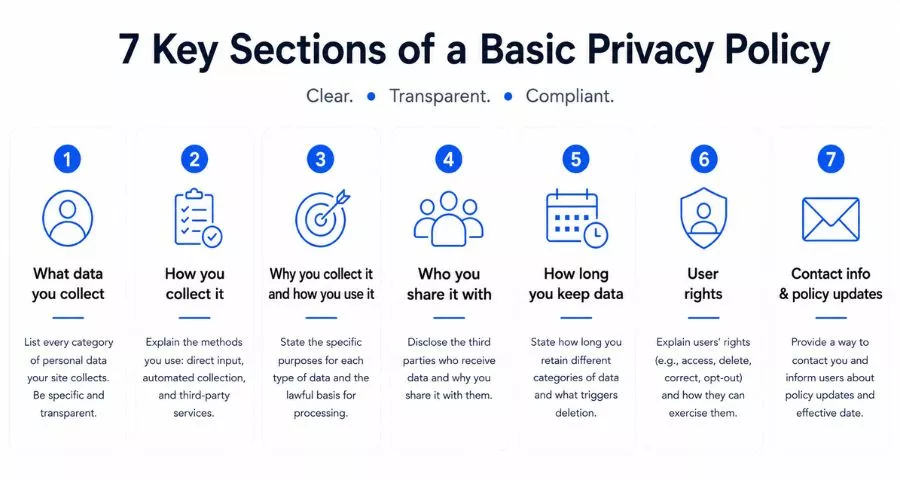
A privacy policy does not need to be 20 pages long. A well-written basic policy covers seven core sections. Here is what each one needs to contain.
1. What data you collect
List every category of personal data your site collects. Be specific. Generic statements like “we collect some information” do not meet the informed consent standard required by laws like GDPR and CCPA.
Your list might include: full name, email address, phone number, billing address, IP address, browser type and version, device identifiers, cookies and tracking data, location data (if applicable), and any data submitted through forms. If you also collect data through third-party services like Google Analytics or Facebook Pixel, note that these tools collect data on your behalf.
2. How you collect it
Explain the methods you use to gather data. The three main categories are direct input (contact forms, checkout pages, account signups), automated collection (cookies, tracking pixels, server logs), and third-party services (analytics platforms, payment processors, social media integrations).
Being explicit about automated collection is important. Many users do not realize that simply visiting a website causes their IP address and browser data to be logged. Naming this upfront prevents confusion and demonstrates transparency.
3. Why you collect it and how you use it
State the specific purpose for each type of data you collect. Vague language like “to improve user experience” is not sufficient under most privacy regulations. Instead, tie each data type to a concrete use: email addresses are collected to send order confirmations and newsletters; IP addresses are logged for security and fraud prevention; cookie data is used for analytics and to serve relevant ads.
If you operate in the EU or UK, this section also needs to state your lawful basis for processing. The most common bases are consent, legitimate interest, and contractual necessity.
4. Who you share it with
If any third party receives user data, it must be disclosed. This includes payment processors, email service providers, cloud hosting services, analytics platforms, and advertising networks. You do not need to list every individual vendor, but you do need to name the categories (for example, “payment processors” or “email marketing platforms”) and ideally the specific companies involved.
For each third party, a brief note about why the data is shared is good practice. For example: “We share order details with our payment processor, Stripe, solely to complete your purchase. Stripe’s privacy policy governs how Stripe handles your data.”
5. How long you keep data
Data retention is one of the most commonly overlooked sections in a basic privacy policy, but GDPR explicitly requires it. State how long you store different categories of data and what triggers deletion. For example: account data is retained for the duration of the account and deleted within 30 days of a deletion request; transaction records are kept for seven years for tax compliance; analytics data is retained for 26 months in line with Google Analytics defaults.
6. User rights
Visitors have rights over their own data, and your policy needs to tell them what those rights are and how to exercise them. Under GDPR, these include the right to access, correct, delete, and port their data, and the right to object to processing or withdraw consent. Under CCPA, California residents can request to know what data is held about them, request deletion, and opt out of the sale of their data.
Provide a clear method for users to submit requests, whether that is an email address, a web form, or both. Include a realistic response timeline. GDPR requires a response within 30 days.
7. Contact information and policy updates
Include a direct contact method for privacy-related questions. This can be an email address, a mailing address, or a contact form link. If you are based in the EU or handle EU data at scale, you may also need to name a Data Protection Officer (DPO) or EU representative.
Add an “effective date” or “last updated” date at the top of your policy. When you update the policy, notify users via email or a site banner. Regulations like GDPR require that consent be re-obtained if the policy changes in a material way.
How to Write a Basic Privacy Policy from Scratch
Writing your own policy is practical for most small to mid-size websites. Here is the process from start to finish.
Step 1: Audit what data you actually collect
Before writing a single word, map out every touchpoint on your site that could collect data. Go through your analytics platform, your forms, your checkout flow, and your third-party integrations. List the data type, how it is collected, where it is stored, and how long you keep it. This inventory becomes the factual backbone of your policy. A policy that does not reflect your actual practices is worse than no policy at all: it creates legal liability.
Step 2: Identify which laws apply to you
Your applicable laws depend on where your users are, not where your business is registered. If you have European visitors, GDPR applies. If you have California visitors and meet the CCPA thresholds (annual revenue over $25 million, or data on more than 100,000 consumers, or more than 50% of revenue from selling personal data), CCPA applies. Most businesses publishing content publicly will have users in multiple jurisdictions and should write a policy that covers GDPR and CCPA at minimum, since these are currently the most demanding frameworks.
Step 3: Use a template or generator as a starting point
For most websites, a free privacy policy generator or template is a practical way to get the structure right before customizing. Tools like Termly, iubenda, and TermsFeed offer free generators that walk you through your data practices and output a formatted policy. The output needs customization. Remove sections that do not apply and add any practices specific to your site. Never publish a template unedited. A generic policy that describes data practices you do not actually have is misleading and can create compliance problems of its own.
Step 4: Draft each required section
Work through the seven sections covered above: data collected, collection methods, purposes and use, third-party sharing, retention periods, user rights, and contact information. Write each section in plain language and keep it specific to your actual practices. If you run a content-only site with Google Analytics and no contact form, your policy will be short. If you run an ecommerce store with a customer account system, newsletter, and affiliate tracking, it will be longer.
Step 5: Have it reviewed
For most small sites, a legal review is not strictly necessary if you used a reputable generator and customized it accurately. But if your site collects sensitive data (health information, financial details, data from children under 13, or large volumes of personal data), have a privacy attorney or compliance specialist review the draft. The cost of a legal review is far lower than the cost of a regulatory fine or consumer lawsuit.
Step 6: Publish and link to it prominently
The best-written privacy policy is useless if users cannot find it. Regulators require that your policy be “easily accessible,” which in practice means linked in your website footer so it appears on every page. You should also link to your privacy policy in any form where you collect personal data, including your contact form, newsletter signup, and checkout page. For apps, the policy needs to appear in the app’s settings or help menu and on your App Store or Google Play listing.
Step 7: Set a review schedule
Privacy laws change. Your data practices will change. Review your policy at minimum once per year and update it any time you add a new tool, change a third-party vendor, or start collecting a new data type. Add the updated date to the top of the policy and notify users of material changes.
Free Tools to Help You Write a Privacy Policy
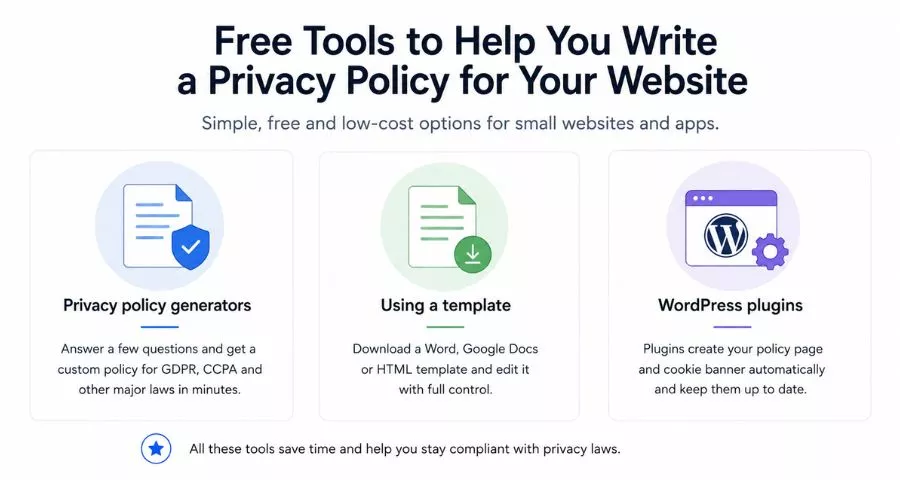
Several free and low-cost tools can speed up the drafting process, especially for small websites and apps.
Privacy policy generators
Termly offers a free generator that outputs a policy covering GDPR, CCPA, and other major regulations. The free tier includes a hosted policy with a unique URL you can link to, which makes updates easier since you only update one document. iubenda is widely used by WordPress sites and integrates directly as a plugin, which means the policy renders on your site automatically. TermsFeed provides a questionnaire-based generator that covers most common data practices and outputs a formatted policy in under 10 minutes.
Using a template
A downloadable template in Word, Google Docs, or HTML format works well if you want full control over the document. The advantage over a generator is that you can see every clause and edit it directly without working inside a tool’s interface. The disadvantage is that you need to be more careful about completeness. Templates available from Termly and TermsFeed are built by legal teams and cover the most commonly required clauses.
WordPress plugins
If your site runs on WordPress, the easiest path is a dedicated plugin. The WP Legal Pages plugin and iubenda for WordPress both generate a privacy policy page automatically based on your answers to a setup questionnaire. They also handle cookie consent banners, which is a separate but closely related requirement under GDPR’s ePrivacy rules. Both plugins update policies when laws change, which removes some of the maintenance burden.
Basic Privacy Policy: Common Mistakes to Avoid
Most basic privacy policy problems fall into a few predictable patterns. Knowing them upfront saves a significant amount of time.
Copying another site’s policy verbatim
Another site’s privacy policy reflects their specific data practices, not yours. Publishing it on your site is inaccurate, potentially a copyright violation, and almost certainly incomplete for your actual situation. Start from a generator or template and customize it.
Writing it once and forgetting it
A privacy policy that was accurate in 2022 may not be accurate in 2026. If you added Google Analytics 4 after writing your original policy, or switched from Mailchimp to a different email provider, or added a Facebook Pixel, those changes need to be reflected in your policy. Outdated policies are a common cause of regulatory complaints.
Burying it where users cannot find it
A privacy policy linked only in a secondary sitemap page or accessible only by navigating through your about page does not satisfy the “easily accessible” standard. Footer links are the baseline. If your site collects sensitive data, consider surfacing the link more prominently in your site navigation.
Using jargon instead of plain language
If a 14-year-old would not understand what your policy says, it needs to be rewritten. Privacy laws in multiple jurisdictions require plain language. Beyond legal compliance, a readable policy actually builds user trust. Users are more likely to share their email address with a site that explains clearly what it will and will not do with it.
FAQs About Privacy Policy
Can I use a free privacy policy for my website?
Yes. Free privacy policy generators from tools like Termly, iubenda, and TermsFeed produce policies suitable for most small and mid-size websites. The key requirement is that you customize the output to reflect your actual data practices. A free generated policy that accurately describes what your site does is legally more defensible than a paid template filled with irrelevant clauses left unedited.
What is the difference between a privacy policy and a terms and conditions?
A privacy policy covers how you collect, use, and protect personal data, and what rights users have over it. Terms and conditions (also called terms of service) govern the rules of using your website or service, covering things like acceptable use, intellectual property, and dispute resolution. They are separate documents. You need both if your site allows users to register accounts, make purchases, or submit content.
How often should I update my privacy policy?
Review your privacy policy at least once per year and update it immediately whenever you change how you collect or use data. Common triggers for an update include adding a new analytics tool, switching email providers, adding a checkout flow, installing a new ad pixel, or running a giveaway that collects entries. When you update the policy, change the “last updated” date at the top and notify existing subscribers or users by email if the change is material.
Conclusion
Writing a basic privacy policy comes down to being honest and specific about your data practices, using plain language, and making the document easy to find. Start with a free generator, customize it to match what your site actually does, and link to it from your footer and any form that collects personal data. Review it once a year or any time your data practices change, and you will stay ahead of most compliance requirements without needing a legal team.
Read More: How to Perform a Website Traffic Check
Contact US | ThimPress:
Website: https://thimpress.com/
Fanpage: https://www.facebook.com/ThimPress
YouTube: https://www.youtube.com/c/ThimPressDesign
Twitter (X): https://x.com/thimpress_com