Your default WordPress menu works fine for a three-page brochure site. The moment your site has product categories, blog sections, a shop, and a contact page, that simple dropdown starts working against you. Visitors can not find what they need, bounce rates climb, and internal linking suffers. A mega menu plugin fixes all of that by turning your navigation into an organized, multi-column panel that can carry images, widgets, icons, and WooCommerce products.
This guide compares the five best WordPress mega menu plugins available now, covering real features, honest pricing, and exactly who each one is built for.
Eduma – Education WordPress Theme
We provide an amazing WordPress theme with fast and responsive designs. Let’s find out!
What makes a good WordPress mega menu plugin?
A solid mega menu plugin does more than add extra columns to your dropdown. Before picking one, run each option against this checklist.
- Compatibility with your theme and page builder. Not every mega menu plugin integrates cleanly with every theme. If you are running Elementor, Divi, or a block-based theme on WordPress 6.x, confirm that the plugin supports your setup before installing. Conflicts between a poorly written menu plugin and your theme’s header scripts are surprisingly common, and they usually show up as broken mobile menus or mis-aligned dropdowns on tablet viewports.
- Mobile responsiveness and touch support. More than half of web traffic now arrives on mobile devices. A mega menu that renders beautifully at 1440px and collapses into an unusable accordion at 390px is a problem. Look for plugins that offer configurable breakpoints and separate mobile menu controls.
- WooCommerce integration. If you run a store, you want the ability to surface product categories, cart totals via AJAX, and featured items directly in the navigation. Several plugins in this list support that; a few do not, or lock it behind a premium tier.
- Performance impact. Mega menu plugins load CSS and JavaScript on every page load. A bloated plugin can add noticeable weight to your Time to First Byte (TTFB) and Largest Contentful Paint (LCP). Lightweight plugins that load only what they need, and defer non-critical scripts, are always preferable, especially on shared hosting.
- Ease of use. Drag-and-drop builders lower the learning curve significantly. A plugin that requires you to write custom CSS for every layout adjustment is a liability if you are not a developer or if multiple non-technical users manage your site.
1. Max Mega Menu
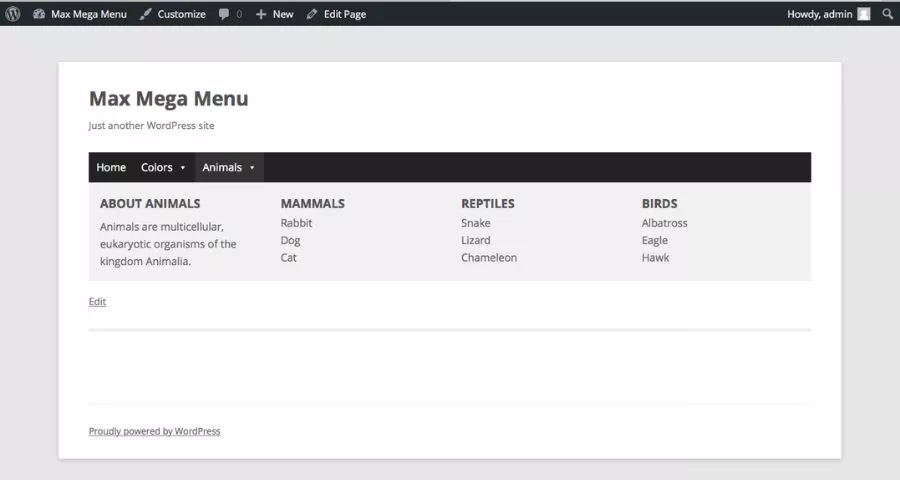
Best for: Most WordPress sites, from blogs to WooCommerce stores
Max Mega Menu is the most widely used dedicated mega menu plugin in the WordPress ecosystem, and after spending time with it across several different theme setups, it is easy to see why. The plugin installs in minutes and automatically converts your existing WordPress menu into a mega menu without touching your theme files. You do not need to rebuild your navigation from scratch.
Key features
The free version available on WordPress.org covers more ground than most sites will ever need. You get a drag-and-drop grid layout builder for arranging submenu columns, widget support so you can drop any WordPress widget directly into a menu panel, multiple menu location support, and a built-in theme editor for styling without writing CSS.
The Pro tier (starting at $29 per year) adds the features that content-heavy sites and WooCommerce stores need most: sticky menus, tabbed mega menus where each tab serves as its own content panel, vertical menus, accordion-style mobile menus, icon support via FontAwesome and Genericons, hundreds of Google Fonts, and a real-time WooCommerce cart total displayed inline in the menu using AJAX. The tabbed mega menu is particularly useful for stores with multiple product categories; you can set up one top-level item, break it into tabs by category, and populate each tab with a widget showing featured products.
Compatibility
Max Mega Menu is built for the WordPress block editor, works cleanly with classic themes, and has documented integrations for the most common page builders. The Divi integration requires one extra CSS adjustment in Appearance > Customize > Header and Navigation to prevent Divi’s dropdown animation from overriding the plugin’s own transitions.
Pricing
Free version available on WordPress.org. Pro plans start at $29 per year for a single site, with a 30-day money-back guarantee. Multiple site licenses are available at higher tiers.
Who it is best for
Max Mega Menu is the most sensible default choice for WordPress site owners who want a proven, actively maintained plugin that works with almost any theme. The free version is genuinely complete; Pro is worth it once you need WooCommerce cart integration or tabbed layouts.
2. UberMenu
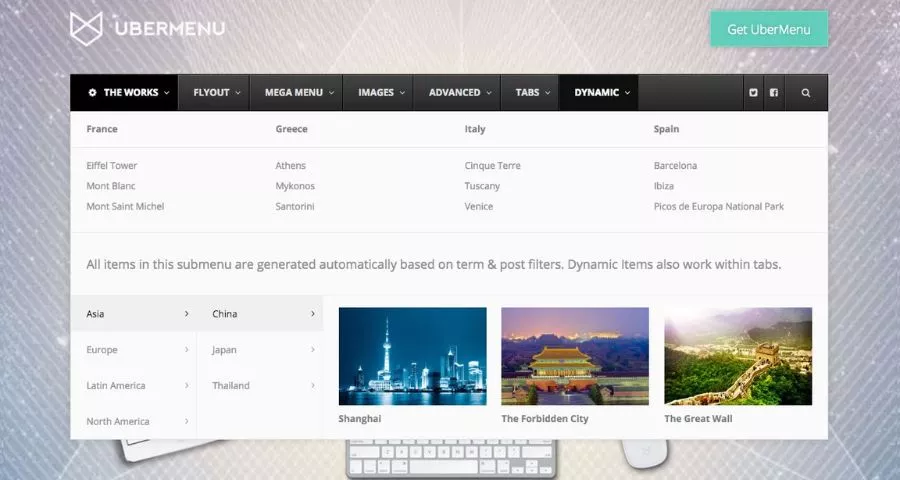
Best for: Developers and agencies building complex, content-rich navigation
UberMenu has been selling on CodeCanyon for over a decade and has accumulated more than 90,000 sales with a user rating of 4.7/5.0 stars, one of the most tested mega menu plugins in existence. It is a premium-only plugin at $29 (one-time payment via CodeCanyon), which includes six months of support and all future updates.
Key features
UberMenu is built around a highly customizable item-level editor. Every menu item in WordPress gets an UberMenu button in the Appearance > Menus panel, and clicking it opens a detailed settings panel where you can control layout, content type, width, animations, and more. The plugin introduces its own set of special menu elements: Columns, Rows, Dividers, Tabs Blocks, Dynamic Posts, Dynamic Terms, Menu Segments, and Widget Areas. This gives you far more structural control than a standard grid-based builder.
Dynamic Posts and Dynamic Terms are two features worth calling out. Dynamic Posts automatically pulls recent or featured posts into a menu panel, so your navigation can display your latest blog entries without any manual updates. Dynamic Terms works the same way for taxonomies, meaning product categories in WooCommerce will populate automatically as you add them.
Compatibility
UberMenu supports WordPress 6.0 through 6.8, integrates with the block editor and Elementor, and is listed as compatible with WooCommerce 6.x through 8.x and WPML. It works with most modern themes without modification.
Pricing
$29 one-time purchase on CodeCanyon, which covers the core plugin with six months of developer support. Extensions (Icons Pack, Extra Skins, Sticky, Conditional) are each $8 additional. If you want the full feature set, budget around $58 for the lifetime package.
Who it is best for
UberMenu is the right choice for developers building client sites who need fine-grained control over every element of the navigation, plus dynamic content that updates automatically. It is also a good fit for news sites and large content publishers who need Dynamic Posts integration. The learning curve is steeper than Max Mega Menu, but the depth of customization is unmatched at this price point.
3. Hero Menu
Best for: Site owners who want a professional-looking mega menu built quickly
Hero Menu is a CodeCanyon premium plugin that positions itself around speed of setup and clean visual output. The price is around $20 to $25 depending on current CodeCanyon pricing, which covers lifetime updates and six months of developer support.
Key features
The standout quality of Hero Menu is its interface: it genuinely reduces the time from installation to a finished, polished mega menu. You can create multi-column dropdown layouts, add icons to menu items, set background images for specific dropdown panels, include featured post images, and control hover animations, all through a visual editor that does not require any CSS knowledge.
The image support in Hero Menu is more flexible than most plugins at this price: you can attach large header images to specific dropdown sections, add small inline icons per item, and pull in featured images from posts you are linking to. For agencies building sites for clients in retail, hospitality, or publishing where visual navigation matters, this makes the presentation significantly more polished.
Compatibility
Hero Menu works with any theme that follows WordPress coding standards. It does not have the deep page-builder-level integrations that some other plugins offer, which can be a limitation if your site is built entirely in Elementor and your client expects to manage menu content through the visual editor. For standard WordPress theme setups, compatibility is solid.
Pricing
Approximately $20 to $25 on CodeCanyon, with six months of support included. Support can be extended to twelve months for an additional fee.
Who it is best for
Hero Menu is well suited to small and medium WordPress sites where the priority is a clean, visually refined navigation built without developer involvement. It is also one of the better value options if you are looking for image-rich mega menus on a limited budget.
4. Groovy Mega Menu
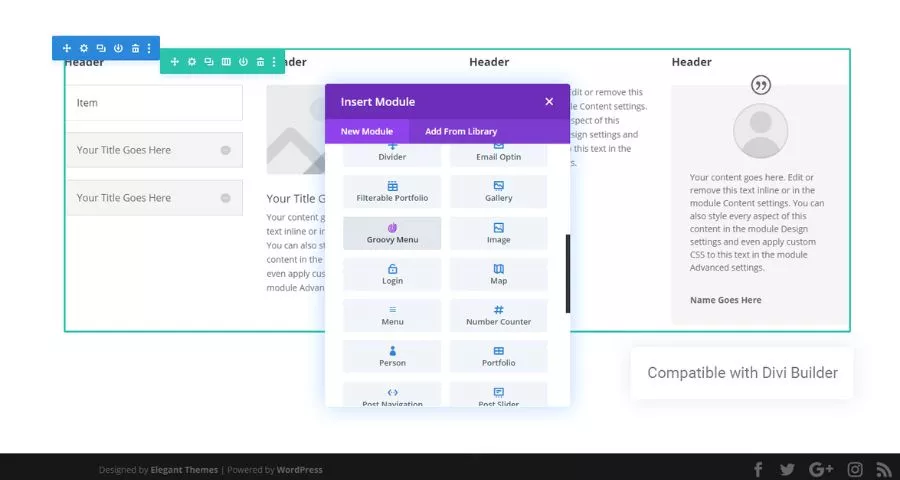
Best for: Sites using Elementor, Divi, or WPBakery as a page builder
Groovy Mega Menu is available in both a free WordPress.org version and a Pro version sold on CodeCanyon at $39. The free version has accumulated over 4,000 downloads on WordPress.org with a 4.3 to 4.4 out of 5.0 star rating, and the Pro version holds a 4.95/5.0 rating across 2,500-plus sales, which is unusually high.
Key features
Groovy Mega Menu‘s most significant differentiator is its page builder compatibility. Unlike most mega menu plugins that require you to build layouts inside their own editor, Groovy Mega Menu lets you use Elementor, Divi, and WPBakery Page Builder directly inside your menu panel. If your team already uses Elementor for everything else on the site, being able to design a menu panel in Elementor and pull it into navigation as a widget or shortcode is a real productivity advantage.
The plugin ships with an online preset library containing 20-plus ready-to-use menu templates and more than 2,000 icons, so you are not starting from a blank layout every time. For dynamic sites, it supports inserting widgets and shortcodes into menus, which makes it straightforward to display a recent posts widget, a newsletter signup form, or a WooCommerce product carousel directly in the navigation.
Compatibility
Groovy Mega Menu has been specifically designed to work cleanly with Elementor, Divi, and WPBakery Page Builder. It is WPML-compatible, making it a viable option for multilingual sites. It works with most WordPress themes that follow standard header hook conventions.
Pricing
Free version available on WordPress.org. Pro version costs $39 on CodeCanyon, which includes six months of developer support. A twelve-month support extension is available for an additional $12.75.
Who it is best for
Groovy Mega Menu is the best pick for teams that have already built their site in Elementor or Divi and want their mega menu to be designed and maintained inside the same visual editor rather than a separate plugin panel. It is also a strong option for multilingual sites due to solid WPML support.
5. WP Mega Menu
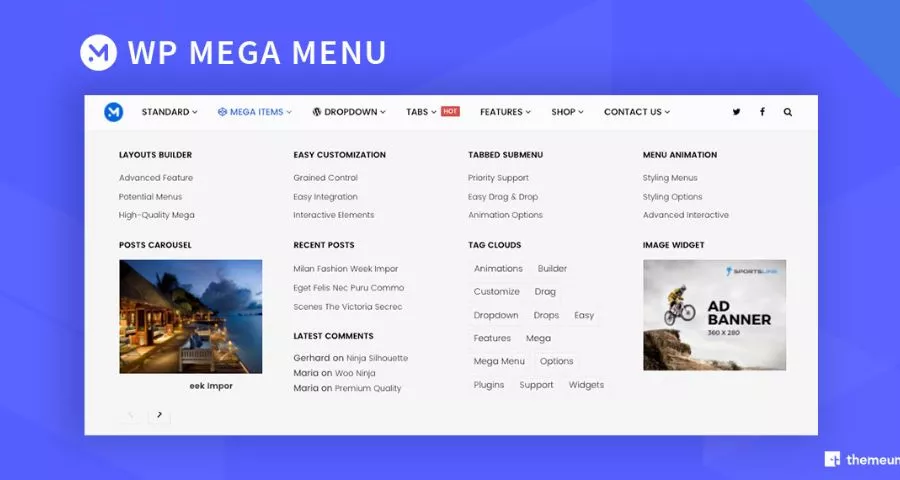
Best for: Budget-conscious sites that need WooCommerce integration
WP Mega Menu by Themeum is a freemium plugin available on WordPress.org with a Pro version starting at $29 per year for a single site license. It has a compact feature set that covers most standard use cases without overwhelming newer users.
Key features
WP Mega Menu uses a drag-and-drop builder that lets you construct multi-row, multi-column submenus without writing code. The widget support is broad: you can add WooCommerce cart and product widgets, social media icon rows, custom HTML, and standard WordPress widgets into any submenu panel. Shortcode support extends this further, so if you have a plugin that generates output via shortcode, an email opt-in form, a product showcase, or a countdown timer, you can embed it directly in your navigation.
The grid-based layout builder is straightforward to work with. Rows and columns snap into place, and items can be resized by dragging column handles. For users coming from a page builder background, the interaction model will feel familiar. One thing to be aware of: the free version’s customization options for typography and color are limited. Most of the styling controls that make menus look polished are behind the Pro tier.
Compatibility
WP Mega Menu is built for standard WordPress installs and works with most themes out of the box. It does not have the deep page-builder integration of Groovy Mega Menu, but it is stable and well-tested against current WordPress versions.
Pricing
Free version on WordPress.org. Pro starts at $29 per year per site.
Who it is best for
WP Mega Menu is a solid choice for small WooCommerce stores and general-purpose WordPress sites that need a functional, widget-ready mega menu at minimal cost. If you already use other Themeum products, the ecosystem consistency is a genuine benefit.
WordPress Mega Menu: Quick Comparison Table
| Plugin | Free version | Paid price | Best for | WooCommerce | Page builder support |
|---|---|---|---|---|---|
| Max Mega Menu | Yes | From $29/year | Most sites | Pro only | Block editor, classic themes |
| UberMenu | No | $29 one-time | Developers, content sites | Yes | Elementor, block editor |
| Hero Menu | No | ~$20–$25 one-time | Visual menus, quick setup | Limited | Standard themes |
| Groovy Mega Menu | Yes | $39 one-time | Elementor/Divi users | Pro only | Elementor, Divi, WPBakery |
| WP Mega Menu | Yes | From $29/year | Budget WooCommerce stores | Yes | Standard themes |
FAQs About Mega Menu Plugins for WordPress
Does adding a mega menu plugin slow down my WordPress site?
A well-coded mega menu plugin adds a small amount of CSS and JavaScript to your page load, but the performance impact is usually negligible on properly hosted WordPress sites. Plugins like Max Mega Menu and UberMenu load lightweight scripts and do not add render-blocking assets when configured correctly. If you notice a performance drop after installing a menu plugin, check whether the plugin’s scripts are loading on pages that do not display the menu, disabling them globally where not needed will recover most of the overhead.
Can I use a mega menu with any WordPress theme?
Most mega menu plugins work with any theme that follows WordPress coding standards, but compatibility is not guaranteed across all theme configurations. Premium themes that build custom header templates in page builders like Elementor or Divi sometimes require plugin-specific integration steps to display mega menus correctly. Groovy Mega Menu and UberMenu have documented compatibility with these builders. Before purchasing a premium mega menu plugin, check the plugin’s compatibility list or run the free version on a staging site first.
Do mega menu plugins work with WooCommerce?
Yes, but the level of WooCommerce support varies significantly between plugins. Max Mega Menu Pro and UberMenu both allow you to display live cart totals, product categories, and featured products directly inside the navigation panel. WP Mega Menu also supports WooCommerce widgets in submenus. Most free plugin tiers offer only basic WooCommerce widget support; real-time AJAX cart updates are typically a Pro feature.
How do I add a mega menu to WordPress without a plugin?
WordPress does not include native mega menu functionality. You can build a basic multi-column dropdown using custom CSS applied to your theme’s navigation, but this requires comfort with CSS positioning, z-index management, and responsive breakpoints. For most site owners, a dedicated plugin is faster, more maintainable, and produces better results across devices than a hand-coded solution.
Conclusion
Choosing the right mega menu plugin for WordPress comes down to knowing what your site actually needs. Max Mega Menu is the safest all-round pick for most WordPress sites, while UberMenu and Groovy Mega Menu serve developers and page builder users who need more structural control. Whichever WordPress mega menu plugin you go with, the payoff is the same: cleaner navigation, faster access to key content, and a site that holds visitor attention longer than a plain dropdown ever could.
Read More: TOP 8 best WordPress theme builders
Contact US | ThimPress:
Website: https://thimpress.com/
Fanpage: https://www.facebook.com/ThimPress
YouTube: https://www.youtube.com/c/ThimPressDesign
Twitter (X): https://x.com/thimpress_com