You want people to sign up, create a profile, post updates, and talk to each other on a site you own. This guide walks through exactly how to build a social media website using WordPress and BuddyPress, step by step, covering the setup, the right themes, the features that make it feel like a real platform, and the realistic costs you should expect along the way.
Eduma – Education WordPress Theme
We provide an amazing WordPress theme with fast and responsive designs. Let’s find out!
What you need before you start
Before you touch a plugin settings page, you need three things in place: a domain, hosting that can handle a growing database, and a decision to build on WordPress instead of a fully custom stack.
Domain name and hosting
Pick a domain name that’s short and easy to say out loud, the same instinct behind names like Google or Facebook.
For hosting, avoid the cheapest shared plan you can find. Social networks generate a lot of database activity fast, since every profile update, comment, and group post is a new database entry, so a well-provisioned shared hosting account with more than 256MB of memory and unlimited storage is a reasonable starting point, even though the site can quickly grow to need heavier resources as it scales.
If you’re budgeting, plan to move to a VPS or managed WordPress host once you’re past a few hundred active members.
Choosing WordPress as the foundation
WordPress wasn’t built as a social network platform. It started as blogging software and grew into the CMS that runs a large share of the web. That matters here because it means you’re not relying on a single-purpose tool. You get the ecosystem: themes, security plugins, SEO tools, caching, and a plugin built specifically for this job.
That plugin is BuddyPress. It’s a set of WordPress plugins that already powers more than 8.1 million user profiles, and it turns WordPress into a genuine community or social network tool, letting users register, create a profile page, add friends, and send messages to each other. It’s also a WordPress-affiliated project, not a third-party add-on, which means it stays in step with core WordPress updates instead of breaking every time WordPress ships a new version.
How to build a social media website with BuddyPress
Here’s the actual build process, from a blank WordPress install to a working profile-and-groups system.
Install BuddyPress on WordPress
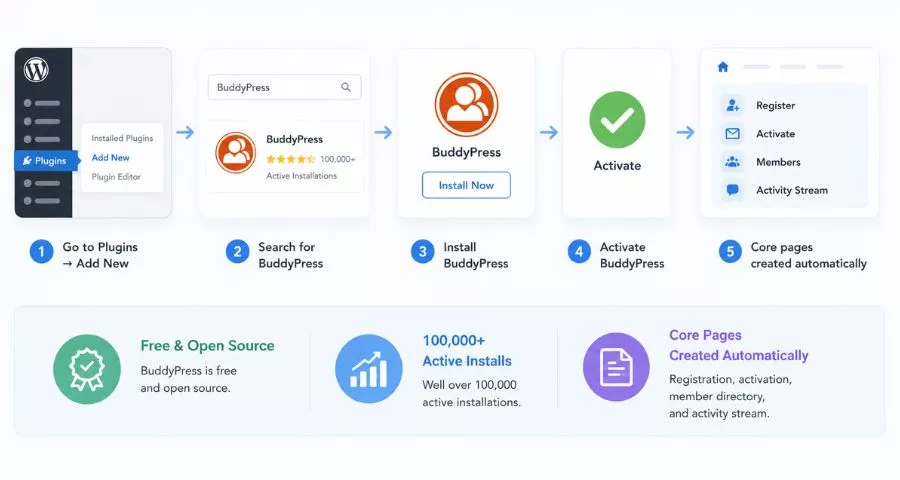
Once WordPress is installed on your hosting account, go to Plugins > Add New, and search for BuddyPress. Install it, then activate it.
BuddyPress is free and open source, and it has well over 100,000 active installs, so you’re not experimenting with something obscure.
The moment you activate it, WordPress automatically generates the core pages your network needs: registration, activation, member directory, and activity stream.
Configure BuddyPress components
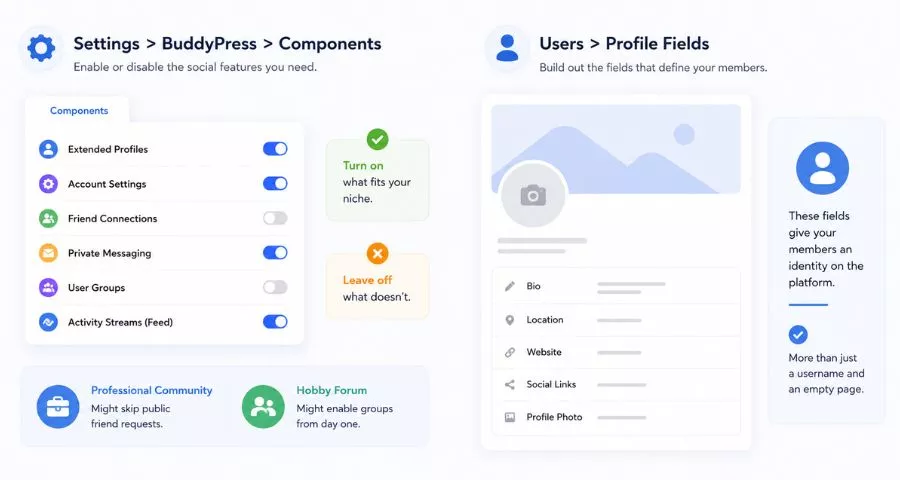
Head to Settings > BuddyPress > Components. This is where the actual social features get switched on or off.
You’ll see options for extended profiles, account settings, friend connections, private messaging, user groups, and the activity feed. Turn on what fits your niche and leave off what doesn’t. A tight-knit professional community might skip public friend requests. A hobby forum might want groups on from day one.
Under Users > Profile Fields, build out what a profile actually shows: bio, location, website, social links, and a profile photo field.
These fields are what give your members an identity on the platform instead of just a username and an empty page.
Set up BuddyPress pages
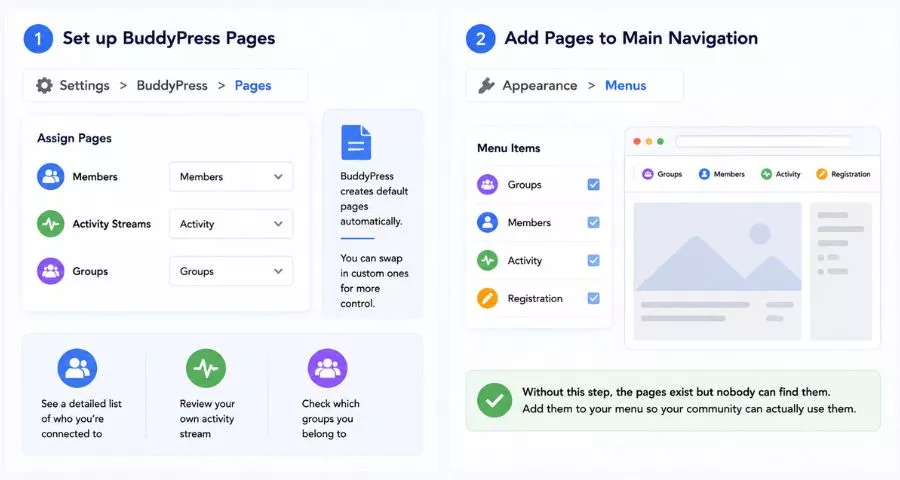
Navigate to Settings > BuddyPress > Pages and assign the Members, Activity Streams, and Groups pages. These pages matter because members use them to see a detailed list of who they’re connected to, review their own activity stream, and check which groups they belong to. BuddyPress creates default pages automatically, but you can swap in custom ones if you want more control over layout.
Once the pages exist, go to Appearance > Menus and add Groups, Members, Activity, and Registration to your main navigation. Without this step, the pages technically exist but nobody can find them, which defeats the entire point of building the network in the first place.
Picking a theme that actually looks like a social network
BuddyPress works with any WordPress theme, but the default appearance is plain. Since functionality is only part of the experience, and design is what makes a site feel like an actual social platform instead of a WordPress site with extra plugins, theme choice matters more here than on a typical blog.
A few themes are built specifically for this job. Astra is lightweight and pairs cleanly with BuddyPress at no cost. BuddyX was purpose-built around BuddyPress communities and includes a free version, with a layout style that leans toward the familiar Facebook-style activity feed most users already recognize.
BuddyBoss goes further: it’s a full theme and plugin combination with built-in membership tools, Zoom integration for voice chat, gamification through GamiPress, and templates aimed squarely at community sites, though it comes at a premium price point starting around $288 per year for a single site.
If you’re already comfortable with Elementor, Hello Elementor gives you a blank, flexible base that plays well with BuddyPress’s templates without fighting your page builder.
Features to add so your site feels like a real platform
A profile page and a friend list are the baseline. What separates a functional social network from a bare-bones one is the layer of features on top.
- Activity streams and groups. Once these two BuddyPress components are switched on, your site gets its core “social” feel. Members can post updates, join groups organized around shared interests, and react to each other’s posts, which is the behavior loop that keeps people coming back.
- Media sharing. BuddyPress on its own handles text well but photo and video sharing needs an add-on. A dedicated media plugin lets members upload images and video directly into their activity stream and group discussions, which matters if your niche is visual (fitness, food, fashion, or hobby communities especially).
- Private messaging and notifications. Direct messaging is a native BuddyPress component. Pair it with an email notification plugin so members get pinged when someone replies to them or a group they follow posts something new. Without notifications, activity drops off fast because nobody remembers to check back.
- Moderation tools. Every post that comes through the Activity screen in your WordPress admin panel can be reviewed, marked as spam, or deleted. Set your community guidelines before launch, not after, so you’re not improvising moderation decisions on day one.
How can I create a website like Facebook without coding
You don’t need to write a line of PHP to get the Facebook-style layout: activity feed in the center, profile sidebar, groups in the navigation. That layout comes from theme choice, not custom code.
BuddyX and BuddyBoss both ship with that structure out of the box, and BuddyPress’s activity stream is designed to function the same way a Facebook or Twitter feed does: a running list of what everyone in your network is posting, filterable by “everyone” or “just my friends.”
Where BuddyPress starts to show its limits is custom, original functionality. It handles registration, profiles, groups, friends, and messaging well because those are its built-in components.
If you want something Facebook has but BuddyPress doesn’t, like Stories, Reels, or algorithmic feed ranking, you’ll either need a specialized add-on plugin or custom development. For a first version of a niche community site, though, the built-in feature set covers what most people are actually looking for.
How much does it cost to build a social media website
This is where WordPress pulls dramatically ahead of custom development, and it’s worth being specific about the gap.
- Building with WordPress and BuddyPress: the plugin itself is free. Your recurring costs are hosting, a domain, and optionally a premium theme or plugin. A modest shared hosting plan plus a domain runs somewhere in the range of $5 to $15 a month to start. If you add BuddyBoss or other premium plugins for gamification, mobile app support, or advanced media handling, plan for total costs somewhere between $500 and $1,000 a year for a fully featured setup.
- Building custom, from scratch: hiring developers to build the equivalent functionality without WordPress is a different budget entirely. Costs for a custom social networking site typically range from $20,000 to $100,000 or more, depending on complexity and features, and that’s before ongoing hosting and maintenance, which alone can run $1,000 to $5,000 a month once the platform needs regular bug fixes, updates, and security patches. For a native mobile app version of a social platform, enterprise-scale builds with personalized feeds and real-time systems can run anywhere from $50,000 to $500,000.
The honest takeaway: WordPress and BuddyPress make sense if you’re validating an idea, serving a niche community, or don’t have investor funding behind you. Custom development makes sense once you have proven demand and need features no plugin combination can deliver, like a proprietary recommendation algorithm.
Turning your site into an app and launching it
Once your BuddyPress site is stable, some builders want a mobile app version so members can check activity from their phone without opening a browser. No-code app builders can sync with your custom post types and BuddyPress data, and since your members already have accounts on the website, they can log into the same account through the app instead of registering twice.
Before you announce launch, do one full pass through the whole registration-to-posting flow yourself: sign up as a new user, upload a profile photo, join a group, post an update, and send a message. Small friction points, like a confusing activation email or a missing “join group” button, are far easier to catch before your first real member hits them.
FAQs About How to Build a Social Media Website
How long does it take to build a social media website with WordPress?
A basic setup with WordPress, BuddyPress, and a compatible theme can be live in a single day once hosting and a domain are ready, since installing BuddyPress follows the same steps as any other WordPress plugin: search for it under Plugins > Add New, install, and activate. The bigger time investment is configuration, not installation. Setting up components takes minutes, but BuddyPress ships with several components active by default, including extended profiles, account settings, activity streams, and notifications, while others like groups and private messaging need to be turned on manually and mapped to their own pages.
If you add a premium theme like BuddyBoss or a media plugin, budget extra time for license setup and template customization on top of the base install.
Is BuddyPress free to use?
Yes, BuddyPress is free and available directly from the official WordPress plugin directory, and it’s actively maintained rather than an abandoned side project, with over 1,200 companion plugins built for it in the WordPress.org repository alone, developed by both the core team and third-party developers. You only pay when you want extras: a premium theme like BuddyBoss, a media upload plugin, or a gamification add-on.
Can I monetize a BuddyPress social network?
Yes, and there’s more than one route depending on what your community values. The most common approach is paid membership tiers using a plugin like Paid Memberships Pro or MemberPress, both of which support multiple payment gateways including Stripe, PayPal, Authorize.net, and 2Checkout, configurable from a single settings page. A second option is sponsored or private groups, where a specific group’s access is gated behind a one-time or recurring fee.
Does a social media website need a lot of ongoing maintenance?
More than a static brochure site, yes, because active communities generate constant new content and accounts that all need attention. The core maintenance checklist looks like this: keeping WordPress core, the BuddyPress plugin, your theme, and any other plugins updated, testing updates on a staging site first, and maintaining regular backups.
On top of that technical upkeep, moderation becomes more important as the community grows, which is why it’s worth defining community guidelines around spam, trolling, profanity, personal attacks, and spammy links right at launch rather than improvising later.
Conclusion
Building a social media website doesn’t require a development team or a massive budget. WordPress and BuddyPress give you the profiles, groups, activity streams, and messaging that make a network feel alive, and the right theme takes care of the look. Start small with a niche audience, get the core features working well, then layer in extras like media sharing or a mobile app once your community is actually asking for them.
Read More: 8+ Best Backlink Monitoring Tools Worth Using
Contact US | ThimPress:
Website: https://thimpress.com/
Fanpage: https://www.facebook.com/ThimPress
YouTube: https://www.youtube.com/c/ThimPressDesign
Twitter (X): https://x.com/thimpress_com