A free SERP checker shows you where a page ranks on Google for a given keyword, in the country and language you choose. If you publish content for a living, you need that number more often than you might expect. Rankings shift almost daily, and what you see when you search from your own laptop is rarely what your visitors see.
This guide explains how a free SERP checker works, how to read its results, and how to build a simple tracking routine that costs nothing. It also covers the mistakes that make ranking data misleading.
Eduma – Education WordPress Theme
We provide an amazing WordPress theme with fast and responsive designs. Let’s find out!
What a free SERP checker does
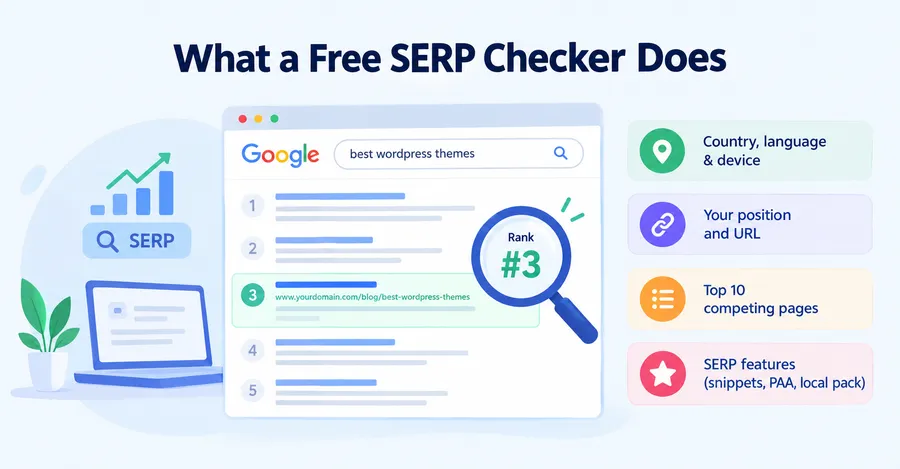
Before you pick a tool, it helps to know what the data represents. A SERP is the search engine results page, and your position on it is the number most SEO reports start with.
Definition
A free SERP checker is an online tool that looks up a keyword on Google and reports the position of a chosen domain or URL in the results. Some tools also list every ranking page, so you can see who sits above and below you. The better ones let you set the country, language, and device, because Google returns different results for each. A search engine position checker tool that ignores location gives you numbers you cannot trust.
What data you get
Most tools return a similar set of fields:
- Your current position for the keyword
- The exact URL that ranks, which helps you spot pages competing with each other
- The top ten competing pages
- SERP features such as featured snippets, People Also Ask boxes, and local packs
- The device, language, and location used for the check
A basic SEO SERP checker stops at position. A good SERP analysis tool adds the context around that position, such as who owns the snippet and what kind of pages Google prefers for the query.
Why SERP position matters for SEO
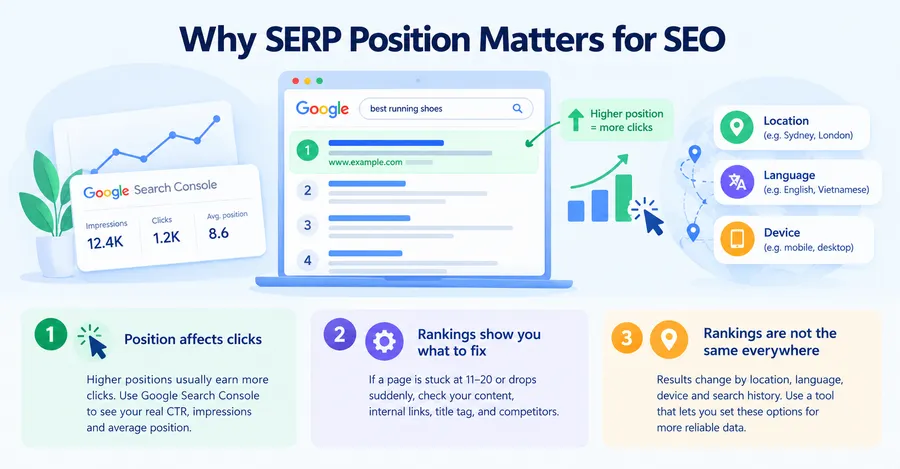
Position is not the goal by itself, but it is the fastest signal that something is working or broken. Here is how to use it properly.
Position affects clicks
Higher positions usually earn more clicks, which is why SEO teams watch ranking movement closely. Click-through rates vary by industry and by what else appears on the page, so treat any published average as a rough guide only. The most reliable source for your own numbers is the Performance report in Google Search Console, which shows impressions, clicks, and average position for each query.
Rankings show you what to fix
A page stuck between positions 11 and 20 often needs deeper content, stronger internal links, or a sharper title tag. A page that suddenly dropped may have lost ground to a competitor, or Google may have changed how it reads the intent behind the query. Tracking SERP keyword ranking over time is how you tell these cases apart.
Rankings are not the same everywhere
Google adjusts results by location, language, device, and sometimes search history. Someone searching in Sydney can see a different order from someone in London. A single manual search is therefore a weak measurement, and a tool that lets you control these settings is much more useful.
How to check SERP position for keyword terms
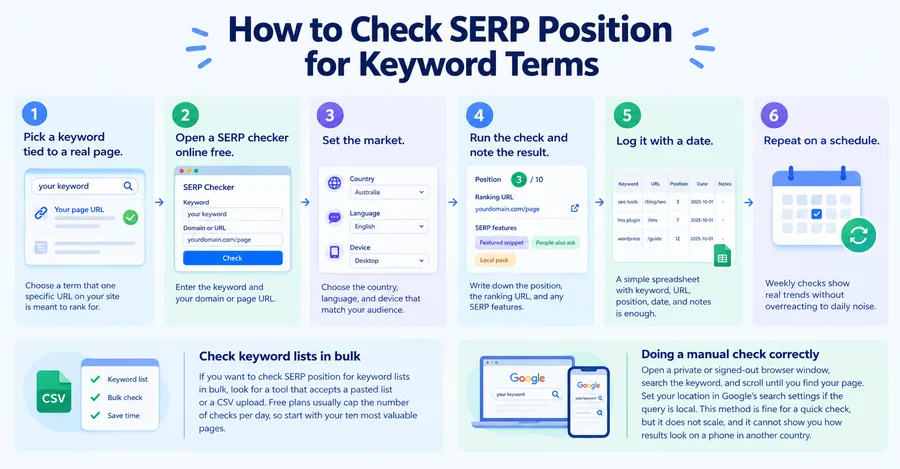
You can get a reliable reading in about five minutes without creating an account. The steps below work with most online tools, and the logic is the same if you use Search Console instead.
Step-by-step method
- Pick a keyword tied to a real page. Choose a term that one specific URL on your site is meant to rank for. Checking random keywords gives you data you cannot act on.
- Open a SERP checker online free. Enter the keyword and your domain or page URL.
- Set the market. Choose the country, language, and device that match your audience. Mobile matters, because Google uses mobile-first indexing for most sites.
- Run the check and note the result. Write down the position, the ranking URL, and any SERP features on the page.
- Log it with a date. A simple spreadsheet with columns for keyword, URL, position, date, and notes is enough.
- Repeat on a schedule. Weekly checks show real trends without overreacting to daily noise.
If you want to check SERP position for keyword lists in bulk, look for a tool that accepts a pasted list or a CSV upload. Free plans usually cap the number of checks per day, so start with your ten most valuable pages.
Doing a manual check correctly
You can also check by hand. Open a private or signed-out browser window, search the keyword, and scroll until you find your page. Set your location in Google’s search settings if the query is local. This method is fine for a quick sanity check, but it does not scale, and it cannot show you how results look on a phone in another country.
Free SERP checker vs other ways to track rankings
No single method covers everything, so it helps to compare the options side by side. The table below shows where each approach works well and where it falls short.
| Method | Cost | Accuracy | Best for | Main limit |
|---|---|---|---|---|
| Free online SERP checker | Free | Good with location and device settings | Quick spot checks and competitor positions | Daily check limits |
| Manual search in a private window | Free | Low to medium | One-off sanity checks | Slow and affected by location |
| Google Search Console | Free | High for your own queries | Real impressions, clicks, and average position | Shows only your site, and positions are averages |
| Paid rank tracking suite with a SERP position tool | Subscription | High | Large keyword sets, history, and reports | Cost for small sites |
In practice, a mix works best. Use Search Console as your source of truth for traffic and average position. Use a free SERP checker when you need an exact position for one keyword, or when you want to see what competitors are doing on the same results page. Move to a paid option only when your keyword list grows beyond what free limits allow.
How to do Google SERP analysis
Position tells you where you are. Google SERP analysis tells you why you are there and what it would take to move up. The process is simple if you take it one layer at a time.
Read the search intent first
Look at the top five results and ask what the searcher wants. If every result is a how-to guide, a product page will struggle to rank. If the results are comparison lists, a short definition post will not match the intent. Intent mismatch is one of the most common reasons a well-written page sits on page two.
Study the pages ranking above you
Open the top results and note the content type, the heading structure, how fresh the page is, and which questions it answers. You are not copying them. You are looking for the minimum standard Google appears to expect for this query. A SERP analysis tool that exports titles, URLs, and snippets into a spreadsheet saves time here, but you can also do it by hand for a small keyword set.
Check the SERP features
Notice whether the page shows a featured snippet, a People Also Ask box, a video carousel, images, or a local pack. Each feature is a separate chance to appear, and each one changes how many clicks the organic results receive. If a snippet exists, check whether the answer comes from a short paragraph, a list, or a table, then format your own answer in a clearer way.
Find the gaps
Compare your page with the top results and write down what is missing: a definition, a table, a step list, recent data, an expert quote, or a better example. Fixing two or three clear gaps beats rewriting the whole article. Then track the keyword again after a few weeks to see whether the change helped.
Common mistakes with a SERP position tool
Ranking data is easy to misread. These are the errors that cause the most wasted effort.
Checking while signed in
Personalized results can push pages you visit often higher than they really rank. Always use a signed-out or private window, or a tool that queries from a neutral location.
Ignoring location and device
A page can rank third on desktop in one country and eighth on mobile in another. If you do not set these values, you are comparing numbers that do not match.
Reacting to daily changes
Positions bounce around, especially for new pages. A move from position 6 to 9 and back within a week is normal. Wait for a pattern over several weeks before changing a page.
Tracking only head terms
Broad keywords are competitive and slow to move. Long-tail queries often bring faster wins and clearer signals. Include a mix in your list.
Confusing average position with actual rank
Search Console reports an average across all impressions. A page with an average position of 8.2 may rank first for some searches and twentieth for others. Use a checker for exact positions and Search Console for the broader picture.
Best practices for tracking SERP keyword ranking
A small, tidy tracking routine beats a huge messy one. These habits keep your data useful.
- Track 20 to 50 keywords at first. Choose terms linked to your most important pages, not every phrase you can think of.
- Group keywords by page and intent. This makes it obvious when two of your pages compete for the same term.
- Log changes you make. Add a note whenever you update a title, add a section, or build links. Without notes, you cannot connect a ranking move to its cause.
- Check weekly, review monthly. Weekly checks catch problems early. Monthly reviews show whether your work is paying off.
- Compare against two or three real competitors. Rankings are relative. A drop may simply mean someone else improved.
- Cross-check with Search Console. If your checker says position 5 but Search Console shows almost no clicks, investigate the snippet, the title, or the SERP features above you.
Keep a record of results for at least six months. Seasonal topics, algorithm updates, and site changes all show up more clearly in long histories than in snapshots.
Tracking rankings on course and education sites
If you run an online academy, tracking works the same way, but the keyword set looks different. You will care about course names, certification terms, “how to learn” queries, and comparison searches. Course sites also tend to have many similar landing pages, so keyword cannibalization is common. Running a free SERP checker for each target keyword shows you which URL Google actually picks, so you can fix overlaps by merging pages or adjusting internal links.
Site structure helps here. Eduma, the WordPress education theme from ThimPress, is built around course pages, instructor profiles, and a blog layout that work with the LearnPress plugin. Giving each course its own page with a clear heading structure makes rank tracking easier, because you can match one keyword to one URL. If you are planning an online learning site, review the current feature list on the Eduma page before you decide, since theme features change with each release. If you already use another setup, the tracking method in this article still applies.
FAQs about free SERP checker
How accurate are free SERP checkers?
Free SERP checkers are accurate enough for spot checks when you set the correct country, language, and device. They can differ from what you see personally because they query from a neutral location. For your own site, compare their results with Google Search Console to confirm the trend.
Do SERP checkers break Google’s rules?
Google’s terms discourage automated queries without permission, so reputable tools rely on licensed data providers or compliant methods. If you use a tool, choose one that explains where its data comes from. Avoid scripts that send repeated automated searches from your own IP address.
What is a good SERP position?
A position on the first page, from 1 to 10, is a good target, and the top three positions usually receive the largest share of clicks. A good position also depends on the keyword. Ranking fifth for a high-volume, high-intent term can be more valuable than ranking first for a rarely searched phrase.
What is the difference between a rank tracker and a SERP checker?
A SERP checker looks up a keyword at a single moment and shows you the results page. A rank tracker runs those checks automatically on a schedule and stores the history so you can see trends. Many tools combine both features, but free versions usually offer only the one-time check.
Conclusion
A free SERP checker is the simplest way to see where your pages stand on Google and what stands in front of them. Use it with the right country, language, and device settings, and pair it with Google Search Console so you can trust the trend, not just one reading. Then move from checking to analysis: read the intent, study the pages above you, look at the SERP features, and fix the gaps you find.
Start small. Pick ten keywords, check them this week with a SERP checker online free, log the results, and review them in a month. That routine, repeated consistently, will teach you more about your SEO than any single report. If you are building a course website, set up one keyword per course page from the beginning, and tracking will stay clean as the site grows.
Read more: Email Automation Tools: 10 Best Options
Contact US | ThimPress:
Website: https://thimpress.com/
Fanpage: https://www.facebook.com/ThimPress
YouTube: https://www.youtube.com/c/ThimPressDesign
Twitter (X): https://x.com/thimpress_com