A newspaper template should make your best reporting easy to find and comfortable to read. A polished homepage matters, but readers also need clear categories, useful search, credible bylines, and article pages that work on a phone.
For a digital publication, the right template is part of an editorial system. It must support the people who publish stories, the readers who return for updates, and the business model that funds the work.
This guide focuses on website templates rather than printable newspaper pages. It compares five WordPress starting points, explains the layouts a news site needs, and shows how to evaluate advertising, subscriptions, performance, and ongoing maintenance before launch.
Eduma – Education WordPress Theme
We provide an amazing WordPress theme with fast and responsive designs. Let’s find out!
What Is a Newspaper Website Template?
A newspaper website template defines the layout of a digital news publication. It usually combines a homepage, topic archives, individual stories, search results, and supporting pages. In WordPress, those layouts may be supplied by a theme, a page builder, or a combination of both.
A theme controls the broader presentation system, while a template controls a particular page type. A prebuilt demo is a sample website arrangement that may include templates, settings, and placeholder content. These terms are related, but they are not interchangeable.
WordPress’s Template Editor documentation explains how templates control posts and page types. The editing experience depends on the theme and the tools it supports.
Before shopping, define whether you need a local newsroom, a specialist industry publication, a review site, or a visual magazine. ThimPress’s overview of blog theme types can help distinguish different publishing approaches.
Choose an Online News Website Template Around Your Publication
A frequently updated newsroom needs visible recency, clear topic navigation, and an efficient editing workflow. An online magazine website template may give more space to photography, curated features, and articles designed to remain relevant for longer.
These approaches can overlap. A city publication might combine daily reporting with weekend features, while a business magazine publishes breaking updates alongside analysis. The template should support that mix without forcing every story into the same visual treatment.
Decide how many sections you can maintain with real content. A demo containing twelve topic modules can look impressive, but empty or stale sections weaken the experience after launch.
Start with an editorial plan and then compare ThimPress’s WordPress magazine theme options. Judge the fit by your publishing schedule and story types rather than the number of demo layouts.
Five Newspaper Template Options for WordPress
The following shortlist includes dedicated publishing themes and a free block-theme foundation. These are editorial recommendations based on their published positioning and capabilities, not a hands-on speed ranking. Verify current compatibility, package contents, and support terms before committing.
1. Magazette: A ThimPress Option for News and Magazine Sites
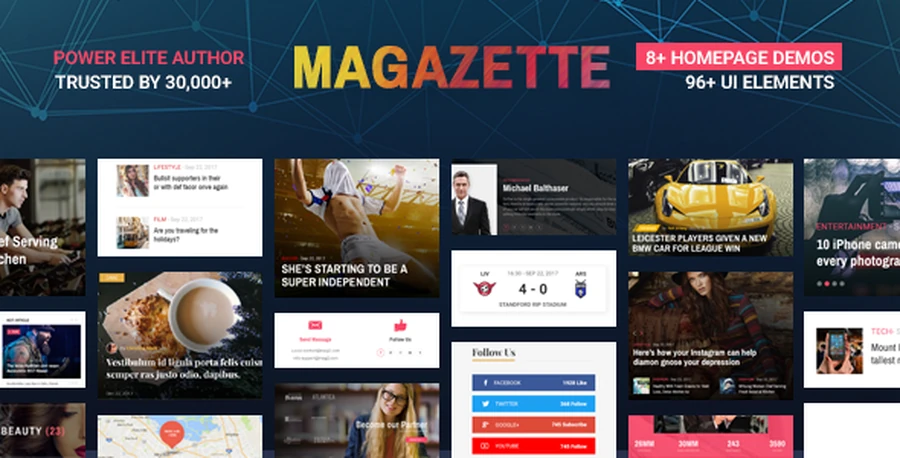
Magazette is a ThimPress theme aimed at news, magazine, and blog publishing. Its product materials describe prebuilt demos, article layouts, and a visual page-building approach.
Consider it when you want a publishing-focused starting point within the ThimPress range. Evaluate the homepage and individual story templates together, including how headline length, category labels, and featured images behave.
Before purchase, confirm the current editor dependencies and update arrangements. Test whether an editor can publish a normal story without having to reconstruct a page manually.
Use the demo to assess structure rather than treating every included section as a requirement. A smaller set of well-maintained news modules is easier to manage than a homepage filled with sections your team cannot update.
2. Magie: Another ThimPress Publishing Theme to Evaluate
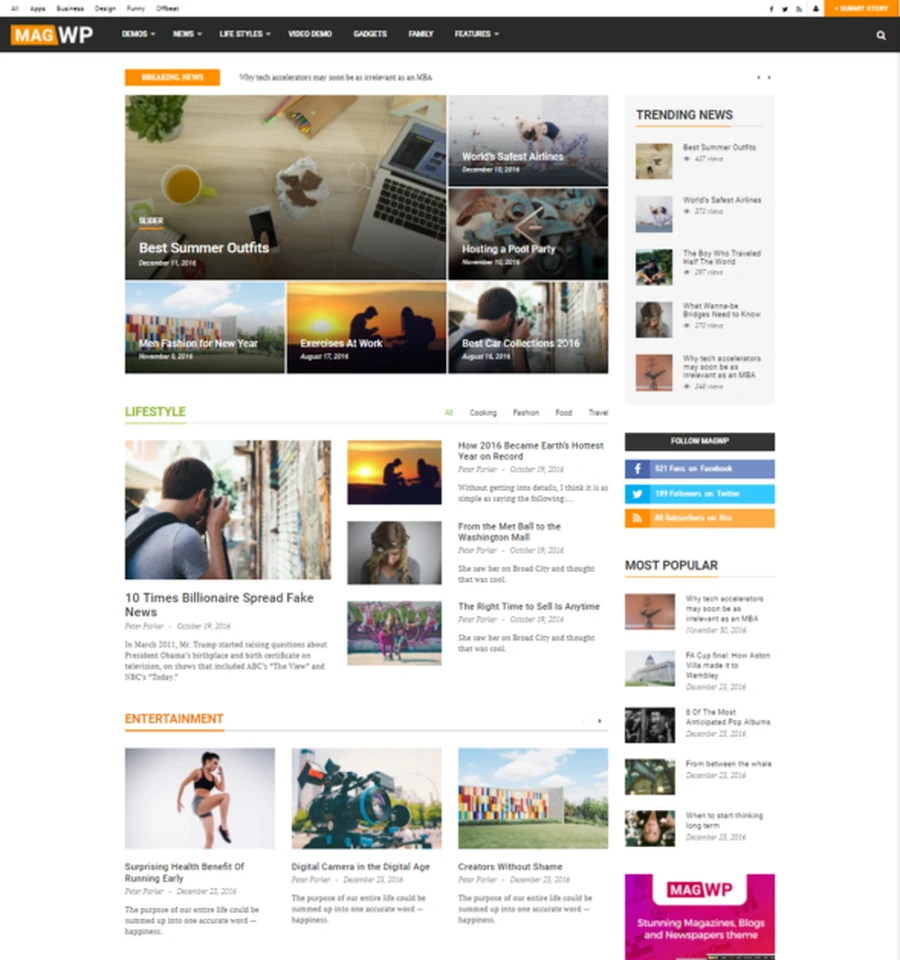
Magie is presented by ThimPress for magazines, newspapers, personal blogs, and other content-led sites. Its product page also uses the MagWP name, so check the current documentation when comparing packages.
It is worth considering if your publication blends editorial articles, images, and video. Review the reading experience and related-story presentation, then decide which elements actually help your audience.
Ask about current WordPress and PHP compatibility, required plugins, and the update history relevant to your project. Do not assume that every historical feature description reflects the exact configuration you will install today.
If you already use ThimPress products, compare this option with Magazette using the same sample stories. That makes the decision more useful than comparing two demos filled with different photographs and headline lengths.
3. Newspaper by tagDiv: A Dedicated Publishing Ecosystem
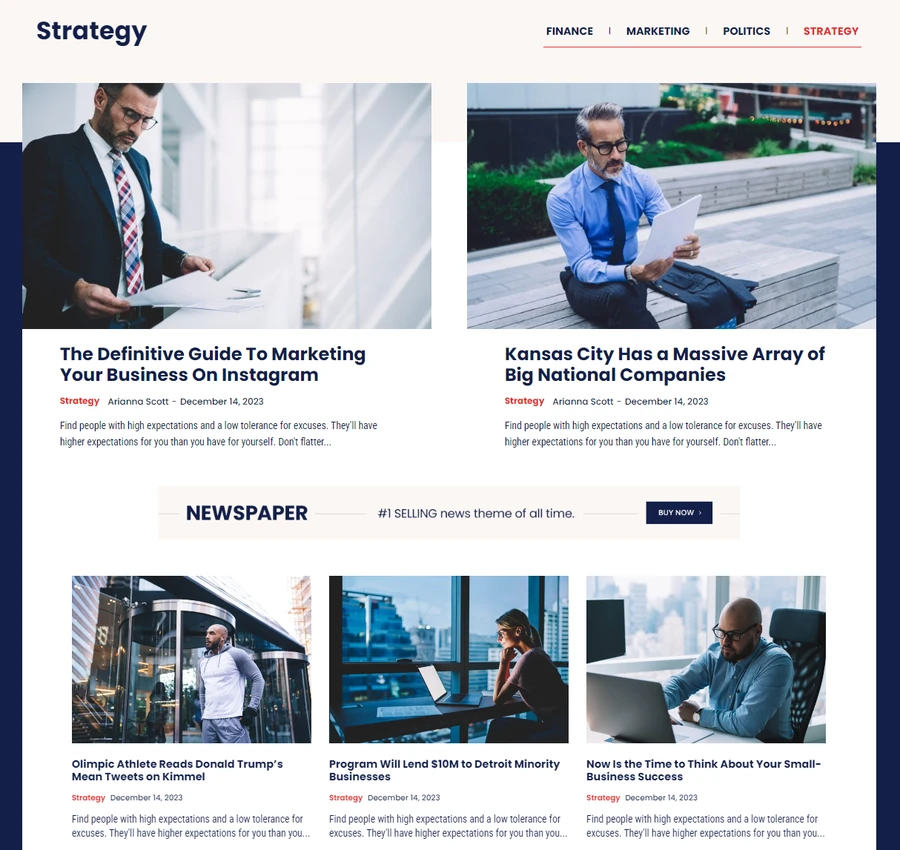
Newspaper is tagDiv’s publishing theme, with an associated visual builder and template library described in its official materials. Distinguish this specific product name from the general term newspaper template.
Consider it when your team wants a dedicated news-design ecosystem and is willing to learn the supplied editing tools. Evaluate how homepage modules, article templates, and advertising placements fit together.
Identify which functions belong to the theme and which require additional plugins or separate services. Subscription billing, email marketing, and advertising operations need their own evaluation even when the visual integration looks convenient.
Also test what routine editing requires. A publisher needs a repeatable process for assigning categories, selecting images, updating a story, and changing the homepage without involving a developer every time.
4. Newsmag by tagDiv: A Separate News Theme
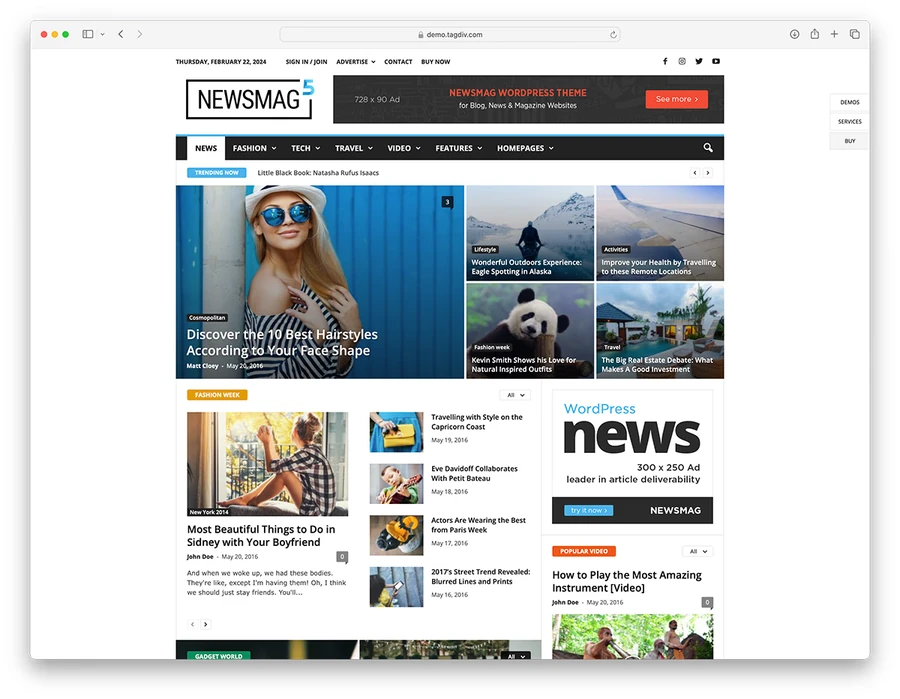
Newsmag is another tagDiv theme listed for news, magazine, and newspaper websites. It is a separate product from Newspaper, so compare its own documentation, demos, and package details.
Use it as an additional shortlist option when its available layouts match your publication. Do not assume that features advertised for Newspaper are automatically included in Newsmag.
Build a test issue containing several categories, different headline lengths, and an article with supporting media. Check whether the page-building approach suits your editors and whether the final layout remains clear on mobile.
Review current support, update access, and any required bundled plugins before deciding. The practical question is whether the complete setup supports your publication reliably, not whether the demo looks similar to a larger news brand.
5. Twenty Twenty-Five: A Free Block-Theme Foundation
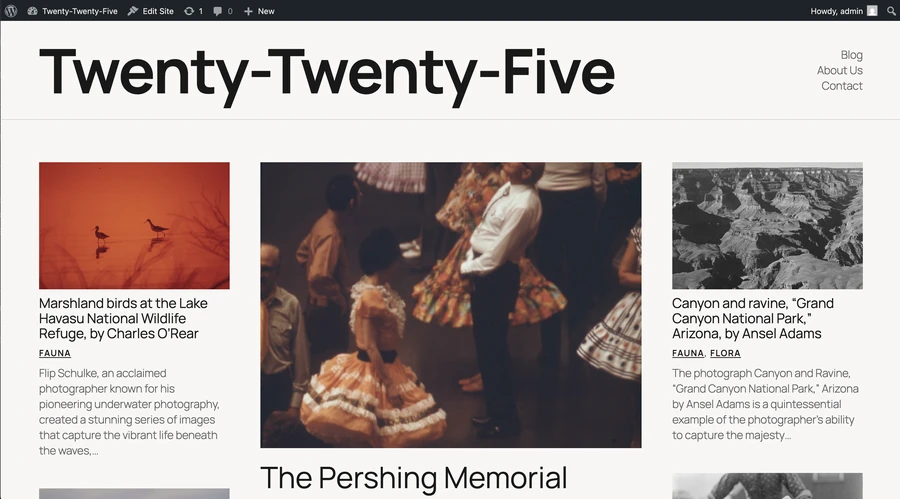
Twenty Twenty-Five is a free WordPress community theme with block-based layouts and patterns. Its official description includes text-focused and image-led publishing uses.
Consider it when you prefer building within WordPress’s block-editing system rather than adopting a dedicated publishing builder. You can develop a restrained newsroom or magazine structure, but you will need to plan the sections and templates.
It is not a complete newsroom business platform by itself. Advertising operations, memberships, newsletters, and specialized editorial workflows may need separate tools.
Free theme access also does not eliminate hosting, configuration, or maintenance costs. Test the complete stack and compare the time needed to create your required layouts with the cost of a more specialized theme.
Compare the Options by Workflow
| Starting point | Why consider it? | What to verify |
|---|---|---|
| Magazette | ThimPress news and magazine layouts | Current dependencies and editorial workflow |
| Magie | ThimPress content-led publishing option | Current features, documentation, and updates |
| Newspaper | Dedicated tagDiv publishing ecosystem | Builder fit and complete plugin requirements |
| Newsmag | Alternative tagDiv news theme | Its own package, features, and compatibility |
| Twenty Twenty-Five | Free block-theme foundation | Work needed for news-specific functionality |
For more publishing choices, explore ThimPress’s WordPress blog theme comparison. Keep the same evaluation criteria when adding another product to your shortlist.
The Page Layouts Your Newspaper Template Needs
A homepage with a deliberate news hierarchy
Give the lead story a clear position, then distinguish other important coverage from routine updates. Use consistent cards so readers can recognize a headline, image, category, and publication time without learning a new pattern in every section.
A latest-news list and an editor’s selection serve different purposes. Label them accurately and avoid repeating the same story in every module. ThimPress’s guide to design elements provides useful background for visual hierarchy and alignment.
Category pages that make the archive useful
Build topic pages that help readers continue exploring a subject. Include a clear heading, an appropriate introduction, and a useful article listing. Test pagination or any load-more control so older reporting remains accessible.
Keep category names meaningful and manageable. Creating several nearly identical labels can fragment coverage and make editorial decisions harder. Decide how a story’s primary topic is selected before the archive becomes crowded.
Article pages built for reading and trust
A story page should present the headline, byline, relevant dates, body text, and image captions clearly. Give readers a route to author information and use an understandable policy for corrections or significant updates.
Place related stories where they help readers continue, without interrupting the main article repeatedly. A narrow sidebar may work on desktop but require a different position on mobile. Review the full reading sequence rather than only the first screen.
Search, author, and publication information pages
Search results should show enough information to distinguish similar stories. Author pages should connect a byline with the person’s coverage and relevant background. The About page should explain who runs the publication and how readers can contact it.
Also plan contact, advertising, subscription, and editorial-policy pages as needed. These are part of the publication experience, not miscellaneous links to add only after the homepage is finished.
Choose Typography and Branding for Long Reading Sessions
Use readable body text, a clear heading hierarchy, and enough space between content elements. A newspaper-inspired typeface can establish personality, but readability should hold up in long articles and on small screens.
ThimPress’s guides to brand identity design and website color schemes can help you define a consistent masthead, palette, and visual language.
Test real headlines rather than only short demo titles. Include a long name, a number-heavy business headline, and a story without a featured image. The template should remain usable when the content is less visually convenient.
Keep navigation, link styling, and interactive controls consistent. ThimPress’s introduction to user experience design provides useful context for evaluating the reader’s journey across those elements.
Plan Advertising and Subscriptions Before Choosing a Theme
Identify how the publication will generate revenue. Display advertising needs suitable placements, labeling, and operational support. Memberships require account access, subscription rules, payment handling, and a way to help readers when something fails.
Reserve appropriate space for ads so their appearance does not unexpectedly move the article. Test the reading experience with actual advertising scripts, not just empty demo rectangles. An attractive template can behave differently after third-party services are added.
For paid access, test registration, sign-in, payment, cancellation, and the access rules for existing subscribers. A theme’s paywall-related feature does not by itself establish that every part of your business model is covered.
Review privacy controls when adding analytics, advertising, or embedded services. ThimPress compares cookie consent plugins and explains preparing a privacy policy. Configure those controls around your actual audience and data practices.
Test Performance With a Realistic News Site
Populate the test website with representative articles, images, categories, and plugins. A nearly empty installation is not a useful comparison with a live publication that has advertising, analytics, media embeds, and several years of archives.
Review homepage loading, article responsiveness, image behavior, and page stability on mobile. Check whether a visitor can open the menu, use search, and read a story while third-party content loads.
ThimPress’s WordPress performance guide offers a starting point for optimization. Investigate the actual bottleneck rather than assuming the solution is another cache plugin.
Also test keyboard navigation, visible focus, image alternatives, and the readability of captions and controls. Automated checks can help identify issues, but an actual reading session often reveals problems that a demo screenshot cannot show.
SEO Features to Check in an Online News Website Template
Check that important stories have stable URLs, readable headings, sensible internal links, and accessible archive routes. Avoid changing article addresses casually during a redesign, and plan redirects when a necessary change affects existing content.
Use accurate titles, relevant images, and dates that reflect publication and meaningful updates. Google’s Article structured data guidance explains how markup can communicate article details. Markup does not guarantee placement in Top Stories or other enhanced results.
Coordinate structured data across the theme and plugins so the page’s information remains consistent. ThimPress’s SEO plugin comparison and guide to appearing in Google Search provide broader implementation context.
Keep the editorial work central. A theme can support publishing and discovery, but it does not replace original reporting, useful coverage, or clear information about the people behind the publication.
How to Set Up Your Newspaper Template on WordPress
Step 1: Build an editorial and technical brief
Define your audience, main sections, publishing frequency, revenue model, and editing responsibilities. List the essential page types and integrations. Separate launch requirements from features you may add later.
Step 2: Install and configure on staging
Use a protected test environment before changing a live publication. ThimPress explains setting up a staging site. Keep test payment activity and outbound subscriber messages separate from production.
Step 3: Add representative stories and categories
Import or create enough sample content to test the structure. Include breaking news, a feature, a short update, and an image-heavy article. Remove demo copy and confirm that homepage modules query the intended categories.
Step 4: Test the editorial workflow
Ask an editor to draft a story, add images and credits, preview it, schedule it, and update it afterward. Test permissions with an appropriate account. The workflow should be clear without granting every contributor administrator access.
Step 5: Verify launch and maintenance tasks
Check redirects, forms, search, subscription actions, mobile pages, and indexing settings. Confirm that backups are available and that someone owns future updates. Follow ThimPress’s safe WordPress update guide and website maintenance tips when planning ongoing work.
Match the Layout to Your Newsroom’s Size
A small local publication
A team publishing a handful of stories each day may need one lead story, a recent-news list, several core sections, and a newsletter signup. Give important local topics a stable place, but avoid creating an archive for every subject mentioned once.
Make community contact routes clear. Readers should know how to submit a tip, request a correction, or ask about advertising. Keep those actions separate so an urgent editorial message does not disappear into a general sales inbox.
A specialist business publication
A trade publication may organize coverage by industry segment, company, technology, or regulation. Choose a primary navigation structure that readers understand, then use supporting tags selectively. An uncontrolled tagging system can create many thin, confusing archives.
Give analysis and practical resources enough context to distinguish them from short news updates. A returning reader should be able to find the latest coverage while a first-time visitor can locate useful background material.
A visual magazine with occasional news
A design, travel, or culture magazine may prioritize curated features and photography. Use a more visual homepage, but keep headlines legible and give article pages a predictable reading structure. A full-screen image is useful only when it supports the story.
For this model, an online magazine website template may fit better than a dense breaking-news grid. Test both with your own publishing schedule rather than choosing the style that contains the most sample stories.
A Shortlist Test You Can Run Before Purchase
Prepare the same five sample stories for every candidate: a lead feature, a long headline, a short update without an image, an article with a table, and a story containing an embedded video. This exposes differences that are hidden when each demo uses carefully selected content.
Give each template a simple assessment for readability, mobile navigation, editorial editing, required integrations, and maintenance. Record a short explanation alongside each result. A numeric score without a reason can hide a serious limitation behind several attractive design features.
Identify any non-negotiable failure. If your team cannot publish an ordinary article comfortably, or the membership workflow cannot support your access rules, the product should not remain the preferred choice simply because its homepage looks better.
When trial access is unavailable, inspect the public demo and ask the vendor focused questions. Request clarification about the specific template or integration you need rather than asking whether the theme is generally suitable for a newspaper.
Keep the Publication Easy to Move and Maintain
Ask where important content is stored and how much presentation depends on a particular builder. Articles should remain manageable as the website evolves. Before adopting custom blocks, shortcodes, or specialized fields, understand what happens if the supporting tool is removed.
Document the homepage module rules, image dimensions, ad placements, and required plugins. Keep a short publishing guide for editors so routine changes follow the same process. This becomes especially valuable when freelance contributors or new staff join the team.
Include a recovery plan for failed updates and access problems. A publication with daily deadlines needs someone responsible for responding, restoring service, and checking that scheduled stories and subscriber functions still work afterward.
Also test scheduled publication and homepage selection rules. A story going live should appear in the intended section without duplicating unrelated modules. Agree on who can pin or replace the lead story, and document how the team handles an urgent correction outside normal publishing hours.
FAQs About Newspaper Template
Can I use a free newspaper template on WordPress?
Yes. A free block theme can provide the foundation for a news publication. You still need hosting, configuration, content, and any specialized tools required by your revenue model or editorial process.
Is a news paper website template different from a magazine theme?
The terminology overlaps. News-focused layouts often emphasize updates and topic navigation, while magazine layouts may emphasize curated features and imagery. Evaluate the actual templates and workflow rather than relying on the product label.
Does a newspaper theme include a paywall?
Some products advertise subscription-related integrations or features, but the complete setup varies. Verify the required plugins, costs, payment workflow, and access rules before assuming paid memberships are ready to launch.
Will changing the template improve rankings?
A better template can address usability or technical problems, but rankings depend on many factors. Protect existing content and URLs, test the new implementation, and evaluate results rather than expecting a design change to produce automatic growth.
Conclusion
The right newspaper template supports both discovery and reading. Compare the homepage, archives, article pages, and editing workflow before deciding, then test the complete website with realistic content and integrations.
Start with the publication you can maintain consistently. A clear structure, reliable technical setup, and useful reporting will serve readers better than a large demo layout filled with sections your team cannot sustain.
Read More: Manufacturing Company Website Layout: A Practical Guide
Contact US | ThimPress:
Website: https://thimpress.com/
Fanpage: https://www.facebook.com/ThimPress
YouTube: https://www.youtube.com/c/ThimPressDesign
Twitter (X): https://x.com/thimpress_com