Picking a nonprofit website builder is one of those decisions that feels small until you are three weeks into a fundraising campaign with a site that cannot accept recurring donations. Most charities do not need a custom-coded platform. They need something that lets a program manager update an events page without calling a developer, and lets a donor complete a gift in under a minute on a phone.
This guide walks through how to evaluate a website builder for a nonprofit, what to look for in nonprofit website templates, and how to avoid the mistakes that send donors away before they finish checkout.
Eduma – Education WordPress Theme
We provide an amazing WordPress theme with fast and responsive designs. Let’s find out!
What a nonprofit website builder actually does
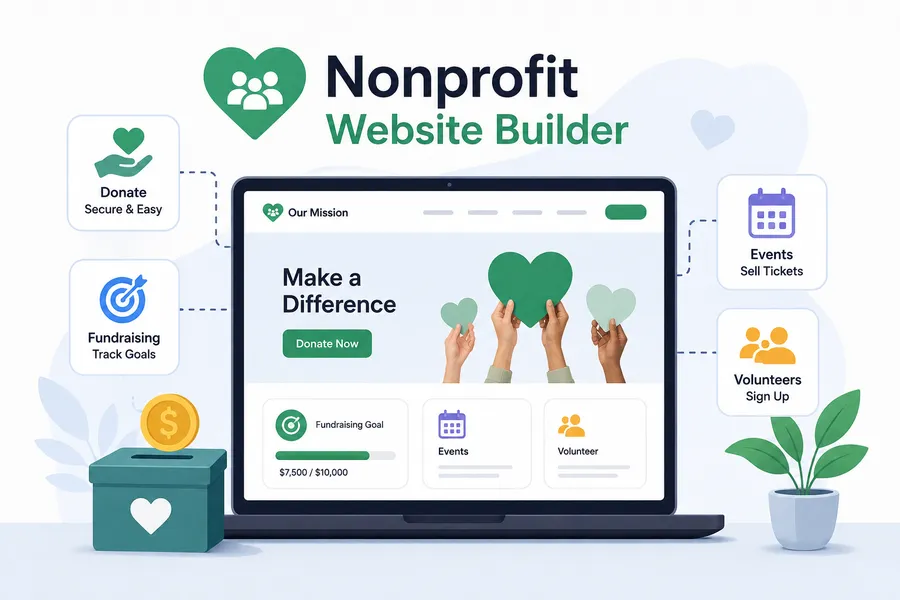
A nonprofit website builder is software, or a WordPress theme paired with plugins, that lets a charity create and manage a public-facing website without writing code. Instead of hiring a developer for every page update, staff use a visual editor to add causes, publish events, and connect a payment processor for donations.
The best tools in this category are not just page builders with a “donate” button bolted on. A genuine website for non profit organizations bundles the specific features charities need on day one: a donation form connected to Stripe or PayPal, a way to track fundraising goals, an events calendar with ticket sales, and a volunteer sign-up form. A generic small-business site builder can technically host a charity’s content, but staff usually end up stitching together three or four separate plugins or apps to replicate what a purpose-built charity theme already includes.
Why website design for a non profit organization is different from a business site
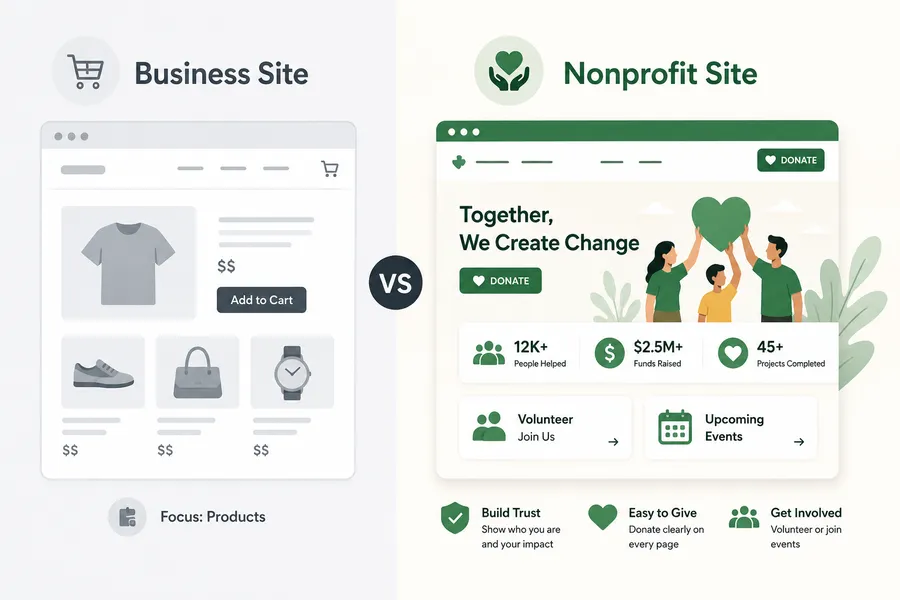
A retail site is built around a product catalog and a checkout page. A charity site is built around trust. Visitors are being asked to hand over money or personal contact information with no product arriving in the mail, so website design for non profit organization pages has to work harder to answer three questions fast: who runs this organization, where does the money go, and how do I get involved right now.
That shapes a few practical decisions:
- The donation button needs to be visible on every page, not buried in a menu.
- Impact numbers (people served, funds raised, projects completed) belong near the top of the homepage, not on an “about” page nobody clicks.
- Volunteer and event sign-ups need their own clear path, separate from donations, because not every visitor is ready to give money.
If a template or builder cannot make these three things easy to configure, it is going to slow the team down no matter how polished the design looks in a preview.
How to build a nonprofit website step by step
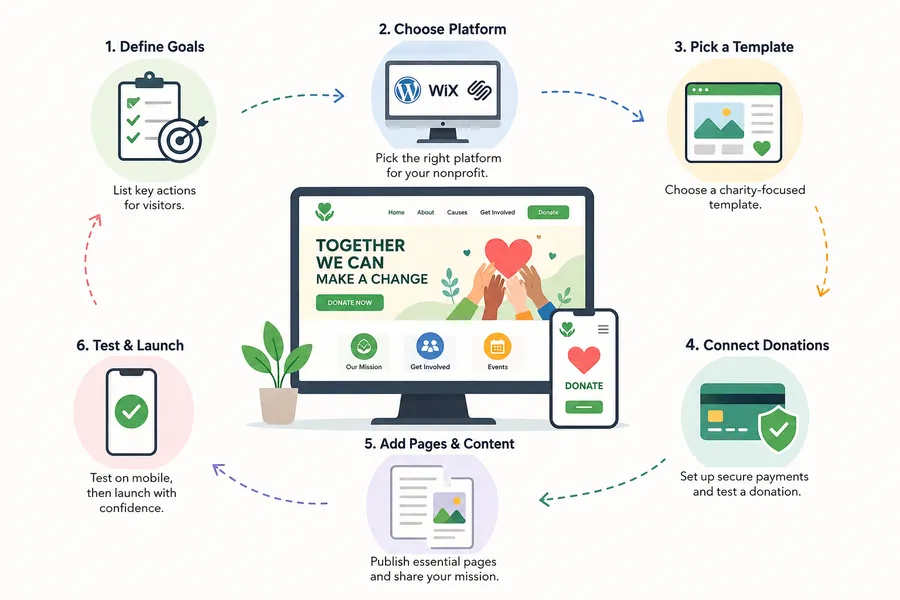
Here is the process most charities follow, whether they are launching a first site or replacing one that has not been updated in years.
Step 1: Define what the site needs to do
Before touching a builder, list the actions a visitor should be able to complete: one-time donation, recurring donation, event registration, volunteer application, newsletter sign-up. This list determines which plugins or apps get installed later, so it is worth doing on paper first.
Step 2: Choose the platform
Most charities land on one of three options: a hosted website builder like Wix or Squarespace, an all-in-one nonprofit CMS, or self-hosted WordPress with a charity-specific theme. WordPress currently powers a large share of active websites worldwide, according to W3Techs, which means charity staff switching organizations are more likely to have used it before, and the plugin ecosystem covers almost every fundraising scenario without custom development.
Step 3: Pick a template built for charities
This is where nonprofit website templates save the most time. A template designed around donation campaigns, causes, and events ships with the layout logic already built in, rather than a generic homepage that needs to be reworked page by page.
Step 4: Connect a donation and payment system
Whatever platform is chosen, confirm the payment processor supports both one-time and recurring gifts, shows fees transparently, and issues receipts automatically. Test a $1 donation before launch to confirm the full flow works end to end, including the confirmation email.
Step 5: Add core pages and content
At minimum, publish a homepage, an about or mission page, a donate page, a causes or campaigns page, a contact page, and a privacy policy. If the organization runs events, add an events calendar with registration.
Step 6: Test on mobile and launch
More than half of nonprofit web traffic typically arrives on a phone. Check that the donation form, navigation menu, and event registration all work cleanly on a small screen before announcing the site publicly.
Nonprofit website templates vs. building from scratch
Building a charity website template into a full site is almost always faster and cheaper than starting from a blank page, especially for organizations without an in-house developer. A template gives you pre-built layouts for a homepage, campaign pages, an events section, and a blog, along with color and typography choices that already work together.
That said, not every template labeled “charity” or “nonprofit” is actually built for fundraising. Some are simply corporate templates with a different color palette and a stock photo of volunteers. Before selecting one, check whether it includes a real donation module (not just a PayPal button widget), a campaign or cause post type separate from regular blog posts, and an events system with RSVP or ticketing.
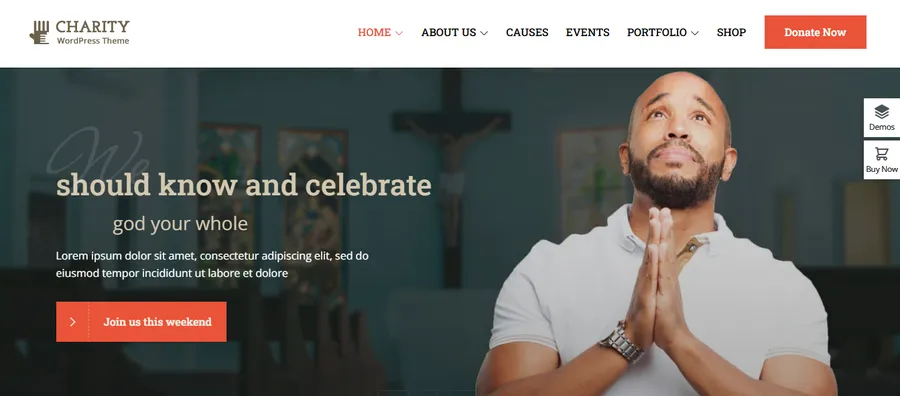
One theme built specifically around this checklist is Charitix, a WordPress theme from ThimPress. It ships with six-plus ready-made charity demos, a donation system built around the TP Donate plugin with Stripe, PayPal, and Authorize.Net support, a lightweight drag-and-drop page builder, and an events module with ticket sales, so a small team can launch a fundraising-ready site without hand-coding a donation flow. It’s worth a look if the goal is a working charity site in days rather than weeks.
WordPress vs. drag-and-drop builders for charities
The table below compares the three most common paths nonprofits take when choosing where to build their site.
| Factor | WordPress + charity theme | Hosted builder (Wix/Squarespace) | All-in-one nonprofit CMS |
|---|---|---|---|
| Upfront cost | Low (theme + hosting) | Low to moderate (monthly plan) | Often higher (platform fee) |
| Donation flexibility | High, choose your own processor | Limited to built-in apps | High, but locked to one vendor |
| Ownership of content and data | Full ownership, exportable | Partial, harder to migrate | Varies by contract |
| Learning curve for staff | Moderate | Low | Low to moderate |
| Long-term flexibility | High, thousands of plugins | Low | Moderate |
| Best for | Orgs planning to grow features over time | Very small orgs needing a fast, simple site | Orgs wanting fundraising and CRM in one place |
There is no universally correct answer here. A volunteer-run food pantry with one fundraiser a year may be perfectly served by a hosted builder. A regional nonprofit running multiple campaigns, events, and a donor database usually outgrows hosted builders within a year or two and migrates to WordPress, which is why so many mid-size charities settle there from the start.
Features to check before you commit to a template
Whether comparing non profit website templates, a theme marketplace listing, or a builder’s charity category, run through this checklist before paying for anything:
- Donation form flexibility: Can donors choose an amount, set a recurring gift, and donate in honor of someone? Does it support Stripe and PayPal at minimum?
- Campaign or cause pages: Is there a dedicated content type for fundraising campaigns with a progress bar toward a goal, separate from blog posts?
- Events with ticketing: Can the site sell paid or free tickets and track RSVPs without a third-party plugin bolted on?
- Mobile performance: Load the demo on an actual phone, not just a browser resized smaller. Slow-loading donation pages lose donors.
- SEO structure: Does the theme generate clean headings and schema markup, or will an SEO plugin need to fight the theme’s default markup?
- Update history: Check the changelog. A theme or builder that has not shipped an update in over a year is a risk for security and plugin compatibility.
- Support and documentation: Nonprofit staff are rarely full-time developers, so documentation quality matters as much as the feature list.
Common mistakes nonprofits make with their websites
A few patterns show up repeatedly across charity site rebuilds:
- Hiding the donate button behind a dropdown menu. If a visitor has to hunt for how to give, most will not bother. Keep it as a standalone button in the header on every page.
- Skipping receipt automation. Manually emailing tax receipts does not scale past a handful of donors and creates delays that damage trust.
- Using a template that was never actually built for fundraising. A pretty homepage with no real campaign structure behind it means staff end up recreating donation logic by hand, which is exactly the work a proper charity website template is supposed to remove.
- Ignoring page speed. A donation page that takes six seconds to load on mobile data loses a meaningful share of donors before the form even renders. Test with a tool like PageSpeed Insights before launch, not after.
- Launching without a privacy and refund policy. Payment processors increasingly require these pages to be present and linked from the checkout flow, so add them before going live rather than after a processor flags the account.
How to choose the right nonprofit website builder for your needs
There is not one best nonprofit website builder for every organization, but there is a best fit for a given team’s size, budget, and technical comfort. A useful way to decide: list the three actions donors and volunteers need to complete on the site, then test each shortlisted builder or theme by actually setting up those three flows in a demo or trial. The option that lets a non-technical staff member finish all three without external help is usually the right one, regardless of how the marketing page for that builder is worded.
How long does it take to launch a nonprofit website
Timelines depend heavily on which path an organization takes. A team using a hosted builder with a pre-built charity template can often go from signup to a live site in a few days, since the layout, navigation, and basic donation widget are already assembled. Building on WordPress with a dedicated charity theme and a one-click demo importer usually takes about a week for a small team, once content like mission copy, campaign descriptions, and staff bios is ready to drop in. The content, not the software, is almost always the bottleneck. Organizations that gather their photos, impact numbers, and campaign details before starting the build finish noticeably faster than those trying to write copy while also learning a new editor.
A fully custom-coded site, by contrast, typically takes six to twelve weeks and requires a developer for both the initial build and every meaningful change afterward. For most small and mid-size charities, that timeline and cost are hard to justify when a purpose-built theme covers ninety percent of what the organization needs on day one.
Budgeting for a nonprofit website beyond the builder
The builder or theme is only one line item in the real cost of running a nonprofit site. A realistic budget should also account for:
- Hosting: Self-hosted WordPress needs a hosting plan, typically $5 to $30 a month for a small to mid-size charity site, depending on traffic and whether managed WordPress hosting is chosen.
- Domain name: Usually $10 to $20 a year, though some registrars offer discounted or free domains to registered nonprofits.
- Payment processing fees: Stripe and PayPal both charge a percentage per transaction, commonly around 2.2% to 2.9% plus a small fixed fee, though many processors offer reduced nonprofit rates if the organization applies for them.
- Premium plugins: Event ticketing, advanced form builders, or SEO tools sometimes carry their own annual license, separate from the theme itself.
- Ongoing maintenance: Even a low-maintenance WordPress site benefits from someone checking plugin updates and backups on a schedule, whether that is in-house staff or a maintenance retainer.
Framing the decision around total first-year cost, not just the sticker price of the builder or template, usually points organizations toward the option with the best long-term value rather than the cheapest upfront number.
Accessibility and compliance considerations
Nonprofit sites often serve a wider range of visitors than a typical small business site, including older donors, people using screen readers, and visitors on slow mobile connections in areas with limited coverage. A few accessibility basics are worth confirming in any builder or theme before launch:
- Sufficient color contrast between text and background, especially on donation buttons and campaign progress bars.
- Alt text fields available for every image, including campaign photos and event banners, so screen readers can describe them.
- Keyboard navigation that works through the donation form without a mouse.
- Readable font sizes by default, since many nonprofit donors skew older than the average web user.
Many WordPress charity themes handle the underlying markup correctly out of the box, but it still falls on whoever manages content to actually fill in alt text and avoid low-contrast color combinations when customizing the design.
FAQs
Is WordPress good for nonprofit websites?
Yes. WordPress works well for nonprofits because it is self-hosted, so the organization owns its content and donor data outright, and there are charity-specific themes and donation plugins built specifically for fundraising, events, and volunteer management. The tradeoff is a slightly steeper setup than a fully hosted builder, though a good charity theme with a demo importer closes most of that gap.
How much does a nonprofit website builder cost?
Costs vary widely, from free hosted plans with limited features to a one-time theme purchase in the $30 to $60 range plus hosting, to monthly all-in-one platforms that can run $50 to $300 a month depending on donor management features included. Self-hosted WordPress with a paid charity theme is usually the lowest ongoing cost for organizations that already budget for hosting.
Do nonprofit website templates include donation forms?
Not always, and this is worth checking before purchase. Some templates only include a static “donate” button linking out to a third-party payment page, while others, like dedicated charity themes, ship with a full donation plugin that handles recurring gifts, campaign goals, and receipts inside the site itself.
Can I switch nonprofit website builders later without losing content?
It depends on the platform. Self-hosted options like WordPress make content exporting and migration straightforward because the organization controls the database directly. Fully hosted builders can make migration harder, since content and donor records are sometimes locked into that vendor’s format, so it is worth checking export options before committing to one long-term.
Conclusion
Choosing a nonprofit website builder comes down to matching the platform to what the team can realistically maintain and what donors need to complete a gift without friction. WordPress paired with a charity-focused theme gives most organizations the strongest mix of donation flexibility, content ownership, and room to grow, while hosted builders can work fine for very small, low-traffic sites. Whatever platform gets chosen, test the actual donation and event flows before launch, not just the homepage design, since that is where most donors either follow through or quietly leave.
Read more: 10+ Best Non Profit Website Templates
Contact US | ThimPress:
Website: https://thimpress.com/
Fanpage: https://www.facebook.com/ThimPress
YouTube: https://www.youtube.com/c/ThimPressDesign
Twitter (X): https://x.com/thimpress_com