Popups remain one of the simplest ways to turn anonymous website visitors into email subscribers, leads, and customers. But choosing the right WordPress popup plugin matters just as much as the offer you put inside it.
A basic popup creator may be enough if you only need to display an announcement or newsletter form. Growing websites, however, often need more advanced features such as exit-intent targeting, page-level rules, A/B testing, analytics, WooCommerce targeting, and email marketing integrations. If you are building out a broader WordPress stack, our guide to the most used WordPress plugins can help you evaluate other essential tools alongside your popup solution.
The good news is that there are plenty of WordPress popup plugins available in 2026, ranging from lightweight free tools to full conversion optimization platforms. In this guide, we compare seven of the best WordPress popup plugins based on ease of use, popup design options, targeting, integrations, pricing, and the types of websites they work best for.
Best WordPress Popup Plugins: Quick Comparison
| WordPress Popup Plugin | Best For | Free Option | Key Strength |
|---|---|---|---|
| OptinMonster | Overall conversion optimization | Limited plugin/connectivity | Advanced targeting and lead generation |
| Popup Maker | Most WordPress websites | Yes | Flexible WordPress-native popup management |
| Elementor Popup Builder | Elementor users | No for Popup Builder | Full visual design control |
| Hustle | Free lead generation | Yes | Popups, opt-ins, and email integrations |
| Icegram Engage | Budget-conscious websites | Yes | Multiple campaign formats and affordable plans |
| Popup Builder | Different popup types | Yes | Large range of specialized popups |
| Brave | Visual popup creation | Yes | Drag-and-drop editor and WooCommerce features |
There is no single best popup plugin for WordPress for every site. OptinMonster is a strong overall choice for businesses focused heavily on lead generation, while Popup Maker offers an excellent balance for users who prefer a WordPress-native solution. Elementor is particularly convenient if your site already uses Elementor Pro.
1. OptinMonster – Best WordPress Popup Plugin Overall
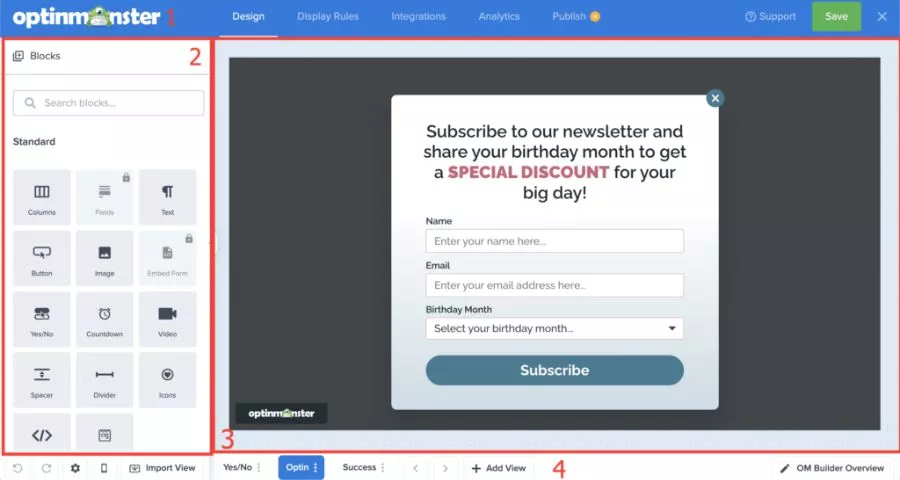
OptinMonster is much more than a simple WordPress popup maker. It is a complete conversion optimization platform designed to turn existing traffic into subscribers, leads, and sales.
The platform supports lightbox popups, floating bars, inline forms, scroll boxes, fullscreen campaigns, and a drag-and-drop campaign builder. Its biggest advantage is the depth of its targeting and campaign controls.
Instead of displaying the same popup to everyone, you can build campaigns around visitor behavior. Depending on your plan, targeting options can include page-level targeting, time on site, scroll behavior, device targeting, inactivity detection, referral sources, cookies, query parameters, and exit intent.
The exit-intent feature is especially useful for ecommerce and lead-generation websites because it can display an offer when desktop visitor behavior suggests that the user is about to leave.
OptinMonster also supports A/B testing on eligible plans. This allows marketers to compare variations of headlines, offers, layouts, and calls to action instead of guessing which popup performs best.
Key features
- Drag-and-drop popup creator
- Lightbox popups
- Floating bars
- Inline forms
- Fullscreen campaigns
- Scroll boxes
- Exit-intent targeting
- Page-level targeting
- Device and behavioral targeting
- A/B testing
- Campaign analytics
- Email marketing integrations
- WooCommerce support
- Large template library
One consideration is pricing. OptinMonster operates more like a SaaS conversion platform than a traditional one-time WordPress plugin, and advanced features are concentrated in higher-tier plans. For businesses that depend heavily on lead generation, however, the added targeting and testing controls can justify the higher cost.
Best for: Ecommerce stores, SaaS websites, publishers, marketers, and businesses that want sophisticated targeting rather than just simple popups.
2. Popup Maker – Best Free WordPress Popup Plugin for Flexibility
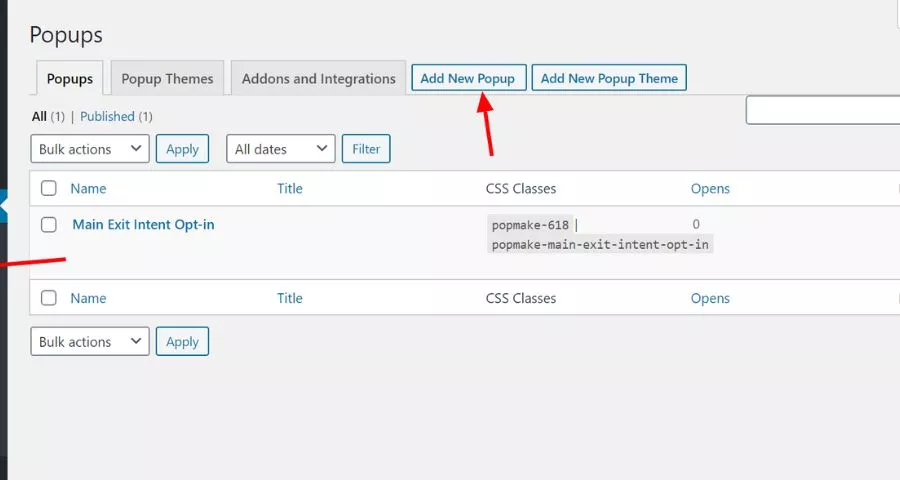
Popup Maker is one of the most established dedicated WordPress popup plugins. Unlike SaaS-focused tools, it works closely with the WordPress ecosystem, making it particularly useful if you want to put existing forms or WordPress content inside a popup.
You can create modal windows, email opt-ins, promotional campaigns, banners, slide-ins, and other conversion-focused experiences. The basic version is useful enough for many websites, while more sophisticated marketing features are available through paid plans and extensions.
Popup Maker also integrates well with other WordPress tools. That makes it a practical choice for websites already using dedicated form, ecommerce, membership, or learning-management plugins. If forms are a major part of your conversion strategy, compare the best contact form plugins for WordPress before deciding which form system to embed inside your popups.
Key features
- Unlimited popup creation
- Flexible popup layouts
- Multiple popup triggers
- Targeting and display conditions
- Email opt-in campaigns
- Slide-ins and banners
- Integration with WordPress forms
- Ecommerce features on higher plans
- Advanced conversion and attribution options on eligible plans
Popup Maker is particularly suitable if you want more control inside WordPress and do not need the broader SaaS infrastructure provided by OptinMonster.
Best for: Bloggers, small businesses, membership sites, WordPress-focused marketers, and users looking for a capable free pop up WordPress plugin.
3. Elementor Popup Builder – Best for Elementor Websites
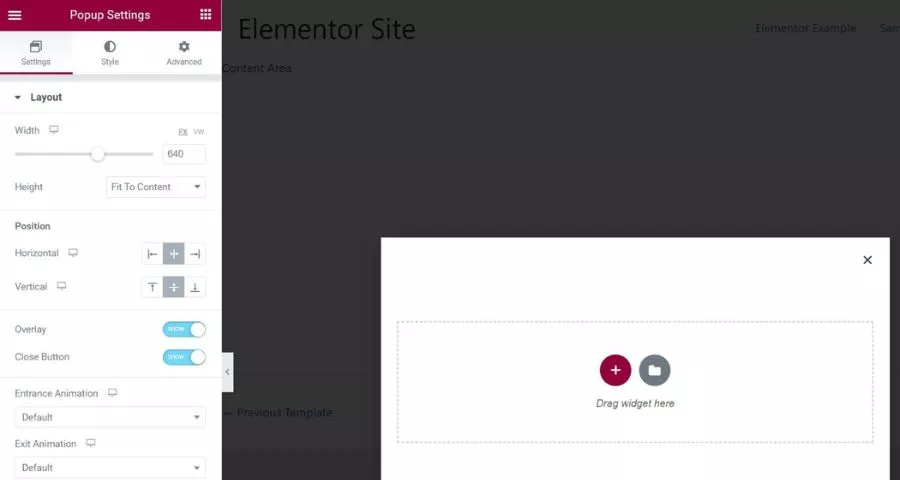
If your website already uses Elementor, you may not need another popup plugin at all. Elementor includes Popup Builder within eligible paid plans. Instead of learning a separate popup creator, you can build popups using the same visual editor you already use for WordPress pages.
This is Elementor’s biggest advantage. You can control popup dimensions, positioning, backgrounds, typography, buttons, forms, images, and other design elements through a familiar visual interface. If you are still choosing your site-building workflow, our Gutenberg vs. Elementor comparison explains how the two approaches differ in design flexibility, performance, and content management.
Elementor also provides detailed display controls. You can determine where a popup appears through Conditions, when it appears through Triggers, and additional eligibility through Advanced Rules.
Common triggers include:
- Page load
- Page scroll
- Scroll to an element
- Click
- User inactivity
- Page exit intent
Advanced rules can further control campaigns according to page views, sessions, referring URLs, traffic sources, login status, frequency, and visitor device.
Another advantage is design consistency. If your landing pages and website are already created with Elementor, you can reuse the same visual language within your popups instead of recreating designs in another application.
Best for: Businesses, designers, freelancers, and agencies already building websites with Elementor.
4. Hustle – Best Free Popup Plugin for Lead Generation
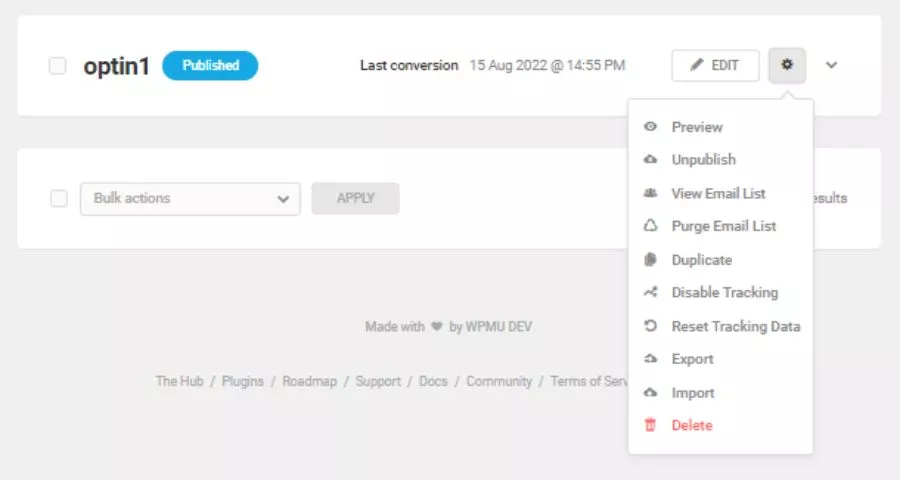
Hustle by WPMU DEV combines popups with broader email marketing and lead-generation tools. It supports popups, slide-ins, embeds, widgets, opt-in forms, and social sharing tools from one WordPress dashboard.
Hustle is particularly useful for websites that want to grow an email list without immediately paying for a dedicated conversion optimization service. You can build newsletter forms, promotional popups, announcements, lead magnets, and other campaigns using predefined layouts and design settings.
The plugin also includes display conditions so you can control who sees each campaign. Analytics can track views and conversions for individual modules, giving you basic information about which campaigns generate results rather than simply counting impressions.
If email list growth is your main goal, see our roundup of the best WordPress newsletter plugins. For more advanced automation after a visitor subscribes, you can also compare AI email marketing tools for segmentation, personalization, and campaign automation.
Best for: Bloggers, small businesses, content websites, and users looking for a free WordPress popup plugin focused on lead generation.
5. Icegram Engage – Best Affordable Popup and CTA Toolkit
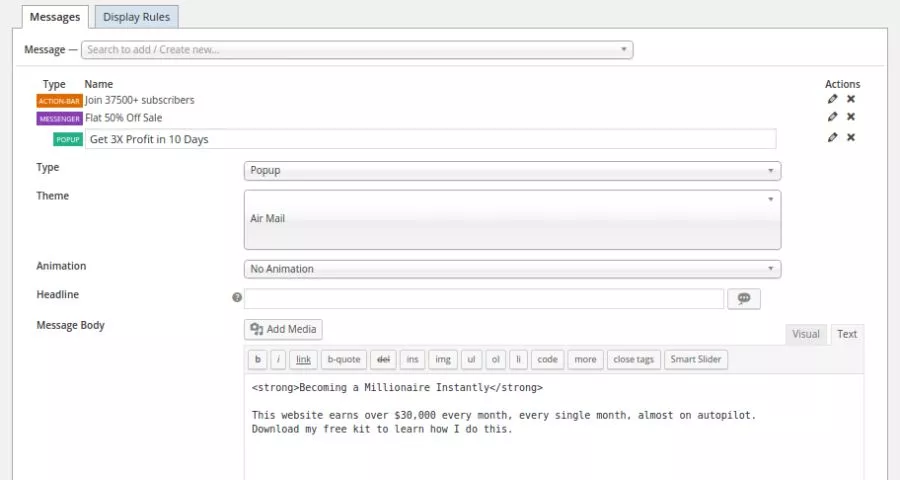
Icegram Engage takes a slightly different approach from a conventional popup maker. In addition to standard popups, it can create action bars, toast notifications, slide-ins, inline messages, overlays, and other calls to action.
That makes it useful for websites that want to communicate with visitors without constantly displaying traditional modal windows.
Icegram supports several common popup behaviors, including timed, scroll-triggered, click-triggered, fullscreen, ecommerce, and email opt-in campaigns. More advanced functionality, such as exit-intent targeting, behavioral rules, and testing, is available through paid tiers.
The free version covers core campaign formats and targeting, which makes Icegram attractive to budget-conscious site owners. Premium plans expand the toolkit with more campaign types, advanced targeting, reporting, animations, and testing functionality.
Best for: Small businesses, bloggers, publishers, and marketers who want several CTA formats without paying for a high-end SaaS conversion platform.
6. Popup Builder – Best for Specialized Popup Types
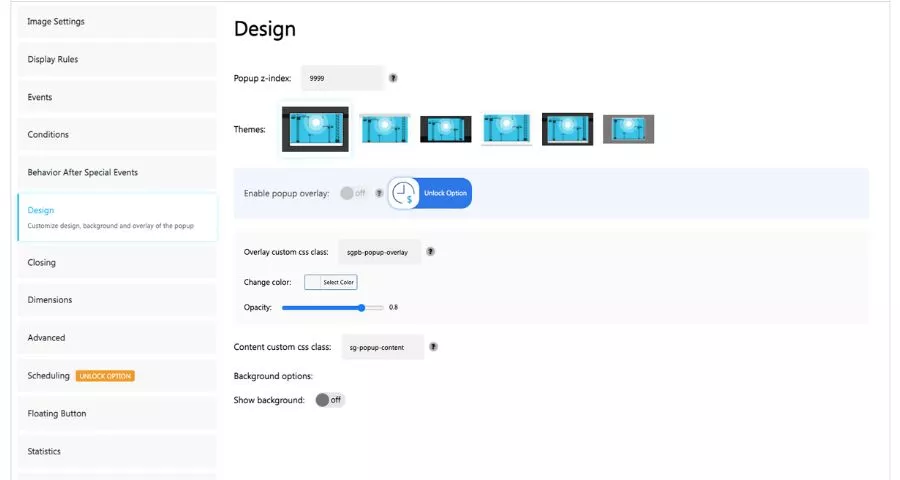
Popup Builder is another long-running WordPress option, and its biggest strength is variety.
The plugin supports standard promotional and subscription popups, while premium extensions expand the system with specialized formats and triggers. Depending on your setup, you can use it for images, HTML content, video, login experiences, forms, WooCommerce campaigns, email integrations, and other targeted interactions.
There is also considerable flexibility around triggers. For example, a popup can open automatically, after a delay, through a click, or when a user hovers over an element. Premium features can add more detailed targeting based on visitor and site conditions.
The plugin integrates with many popular WordPress tools, including ecommerce, forms, multilingual plugins, and page builders. This flexibility makes it useful when you need a specific popup workflow rather than a standalone marketing platform.
Best for: WordPress users who need multiple specialized popup types and detailed trigger options.
7. Brave – Best Visual WordPress Popup Maker
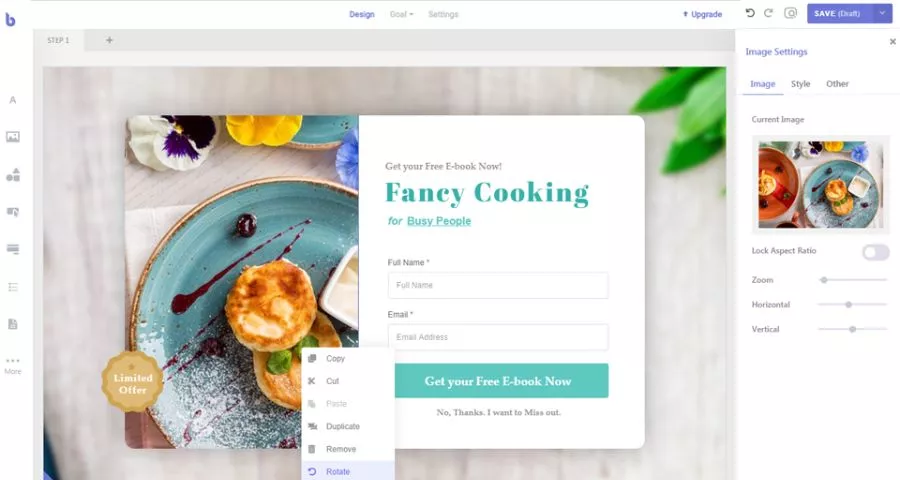
Brave is a visual popup creator aimed at users who prefer drag-and-drop campaign building. Its editor supports elements such as text, buttons, images, forms, lists, WordPress content, WooCommerce products, and custom code.
You can use it for more than conventional newsletter popups. Brave supports sticky bars, sidebars, modals, lightboxes, announcements, contact forms, promotional campaigns, and ecommerce-oriented campaigns.
Its free version includes useful targeting controls, display-frequency settings, forms, campaign goals, and analytics. Brave Pro expands the system with features such as multi-step popups, multi-step forms, exit intent, scroll triggers, device targeting, traffic-source targeting, advanced animations, countdown timers, and additional integrations.
WooCommerce users may find Brave particularly interesting because product content can be incorporated directly into popup campaigns. If you are still configuring your store, follow this step-by-step WooCommerce setup guide before adding conversion campaigns on top of your checkout funnel.
Best for: Designers, WooCommerce stores, and marketers who want a visual WordPress popup maker with a useful free tier.
How to Choose the Best Popup Plugin for WordPress
The best plugin is not necessarily the one with the longest feature list. Consider how you actually plan to use your popups, how much traffic your site receives, and which marketing tools are already part of your WordPress setup. For a broader checklist, see these must-have WordPress plugins and compare any new plugin against your existing stack before installing it.
1. Popup triggers
A basic popup that appears immediately after page load is easy to create, but it is not always the best experience.
Useful triggers include:
- Time delay
- Scroll percentage
- Button click
- Exit intent
- User inactivity
- Number of page views
- Number of sessions
Behavior-based triggers let you wait until a visitor has demonstrated some level of interest before showing an offer.
2. Targeting options
Targeting becomes increasingly important as your website grows. For example, you may want to display one lead magnet on blog posts, a coupon on product pages, and a different offer for returning customers.
More advanced WordPress popup plugins can target campaigns according to page, device, referral source, visitor behavior, geography, WooCommerce activity, or other conditions.
3. Email marketing integrations
If your goal is email list growth, verify that the plugin works with your email service before installing it. Popular integrations may include Mailchimp, ActiveCampaign, Kit, AWeber, GetResponse, Brevo, Constant Contact, and other email platforms.
Also check whether the integration is included in the free version or locked behind a paid plan. A popup creator can look inexpensive initially but become more costly if the integrations you need require an upgrade.
4. Analytics and A/B testing
Creating a popup is only the beginning. At minimum, you should know how many visitors see your campaign and how many complete the desired action.
For high-traffic websites, A/B testing becomes particularly useful because you can compare different headlines, incentives, forms, images, and calls to action using actual conversion data.
5. Mobile control
A desktop popup can become extremely intrusive when compressed onto a smartphone screen. Choose a plugin that provides responsive templates or device-specific targeting and always test your campaign on multiple screen sizes before publishing it.
6. Performance
Every additional WordPress plugin can potentially add JavaScript, CSS, API calls, database queries, or external resources. A feature-rich popup plugin is not automatically slow, but you should test important pages before and after installation using Google PageSpeed Insights.
You can also review our guide to the best WordPress speed optimization plugins if popup scripts or other marketing tools begin affecting load time.
Avoid running multiple popup plugins simultaneously unless there is a specific reason to do so. Duplicate campaign systems can increase front-end weight, complicate analytics, and make display rules harder to manage.
7. Security and maintenance
Popup plugins often interact with forms, email addresses, cookies, tracking scripts, and third-party services. That makes maintenance an important selection factor, not just an administrative task.
Choose plugins that receive regular updates and remain compatible with current WordPress versions. WordPress recommends keeping the core software, themes, and installed plugins up to date and choosing extensions that are actively maintained. Review the official WordPress security best practices for additional guidance.
For more tools focused specifically on protecting your site, see our roundup of WordPress security plugins.
Are WordPress Popups Bad for SEO?
Popups themselves are not automatically bad for SEO. How you implement them matters.
Google recommends avoiding intrusive interstitials and dialogs that prevent visitors from immediately accessing the primary content. According to Google Search Central’s guidance on intrusive interstitials, promotional overlays that obstruct content can create a poor user experience and make content harder for search engines to understand.
This is especially important on mobile devices.
Instead of covering the entire screen as soon as someone reaches a page from Google, consider:
- Waiting until the user has scrolled
- Adding a time delay
- Triggering the popup after engagement
- Using exit intent where appropriate
- Using a small banner instead of a fullscreen popup
- Limiting how frequently the same visitor sees a campaign
- Making the close button easy to find
- Creating separate mobile designs
For the rest of your site’s search optimization, compare the best WordPress SEO plugins for metadata, schema, sitemaps, on-page analysis, and other technical SEO tasks.
Popup implementation should balance conversion goals with usability. A campaign that earns a few extra email signups is not worth it if it consistently interrupts users before they can access the content they came to read.
Which WordPress Popup Plugin Should You Choose?
For most users, these are the simplest recommendations:
- Choose OptinMonster if conversion optimization is a major part of your marketing strategy and you need sophisticated targeting, A/B testing, and campaign management.
- Choose Popup Maker if you want a flexible WordPress-native popup plugin with a strong free version.
- Choose Elementor Popup Builder if you already use Elementor and want to design both your website and popups through the same visual editor.
- Choose Hustle if you want a free lead-generation tool with popups, opt-ins, and email integrations.
- Choose Icegram Engage if you need popups plus action bars, toast messages, and other calls to action at a relatively accessible price.
- Choose Popup Builder if you need unusual or specialized popup types and detailed conditions.
- Choose Brave if visual drag-and-drop design and WooCommerce functionality are your priorities.
For a simple website, starting with a free plugin is usually sufficient. High-traffic ecommerce and lead-generation sites are more likely to benefit from advanced targeting and testing features.
WordPress Popup Plugins: FAQs
What is the best WordPress popup plugin?
OptinMonster is one of the strongest overall choices for advanced lead generation because it combines a visual campaign builder with behavioral targeting, exit intent, analytics, integrations, and A/B testing.
Popup Maker is a strong alternative for users who prefer a WordPress-native solution with a capable free version.
What is the best free popup plugin for WordPress?
Popup Maker, Hustle, Icegram Engage, Popup Builder, and Brave all provide free versions or free core plugins.
Popup Maker is a good general-purpose choice, while Hustle is particularly useful for email opt-ins and lead generation.
Can I create a popup in WordPress without coding?
Yes. Modern WordPress popup plugins provide visual editors, templates, or configuration interfaces that allow you to create popups without writing HTML, CSS, JavaScript, or PHP.
Elementor and Brave are particularly suitable for users who prefer visual drag-and-drop design.
Can a WordPress popup plugin collect email addresses?
Yes. Most of the plugins in this guide can create email subscription forms or integrate with email marketing platforms.
Before choosing a plugin, check whether it supports your specific email provider and whether that integration is included in the free or paid plan.
Can I create an exit-intent popup in WordPress?
Yes. Several popup tools support exit-related triggers, although the feature may require a premium plan. Exit intent is commonly used to display a final offer, discount, newsletter invitation, or lead magnet before a visitor leaves a page.
Do popups hurt WordPress performance?
They can if a plugin loads excessive scripts, third-party assets, tracking code, or other resources. Performance varies between plugins and website configurations. Test your pages before and after enabling a popup plugin and remove unused campaigns or duplicate marketing tools whenever possible.
Are popups bad for Google rankings?
Not necessarily. Google’s concern is primarily with intrusive interstitials that make the main content difficult to access. Use responsive designs, sensible timing, clear close controls, and less intrusive formats when possible.
Final Thoughts
There are dozens of WordPress popup plugins, but they are built for very different types of users. OptinMonster provides one of the most comprehensive conversion toolsets, while Popup Maker offers a flexible WordPress-focused alternative. Elementor Popup Builder makes the most sense for existing Elementor users, and Hustle and Icegram Engage provide strong options for sites that want to start with a free plan.
Popup Builder is useful when you need specific popup formats, while Brave stands out for its visual editor and WooCommerce capabilities. Whichever popup creator you choose, avoid measuring success by how many popups you can display. A good popup plugin for WordPress should help you show a relevant message to the right visitor at an appropriate moment. Combine thoughtful targeting with a clear offer, responsive design, controlled frequency, and ongoing conversion tracking.
That approach can help you build your email list and generate more leads without sacrificing the user experience that brought visitors to your website in the first place.
Read More: Shopify Market Cap: How Much Is Shopify Worth?
Contact US | ThimPress:
Website: https://thimpress.com/
Fanpage: https://www.facebook.com/ThimPress
YouTube: https://www.youtube.com/c/ThimPressDesign
Twitter (X): https://x.com/thimpress_com