If you possess a valuable skill, it is time to monetize that knowledge by learning how to build online learning website WordPress platforms.
“An investment in knowledge pays the best interest.” This famous quote by Benjamin Franklin remains the core principle of the modern education industry. Global learners are constantly seeking experts to help them acquire new professional and personal skills through accessible digital channels.
According to Statista (2025), the global eLearning market is expected to grow significantly, reaching a valuation of over $400 billion by 2026. The transition toward digital education is driven by the global requirement for flexible and accessible learning. Traditional schools are no longer the only source of high-quality information. Today, students prefer the convenience of learning at their own pace. Fortunately, establishing a professional WordPress course website is a manageable process that does not require advanced programming skills.
So, let’s learn how to build an online education platform in just 7 simple steps!
Eduma – Education WordPress Theme
We provide an amazing WordPress theme with fast and responsive designs. Let’s find out!
Different Types of Online Education Platforms

Before starting the technical work, it is important to understand the different types of platforms. The business model chosen will determine the features required for the site.
1. Learning Management Systems (LMS)
This is the standard model for many teachers. It allows for the creation of structured courses where students follow a linear path. An LMS focuses on tracking student progress, grading assignments, and managing the overall learning experience.
2. Course Marketplaces
Similar to platforms like Udemy, these sites host many independent teachers. The platform owner provides the infrastructure, while various experts upload their content. This model usually involves a system where the owner earns a commission from each sale.
3. Live Tutoring Platforms
Some platforms focus on real-time interaction. They use video tools to allow for live lectures and workshops. This is ideal for language schools or professional certification programs that require direct feedback.
4. Subscription-Based Platforms
Instead of selling individual courses, these sites offer access to a full library of content for a recurring fee. This model is effective for building a consistent income stream and is popular in areas like fitness or software training.
5. Corporate Training Portals
Designed specifically for the B2B business sector, these portals help organizations train their staff. The focus is on compliance, performance tracking, and high-level administrative reporting to ensure all employees meet company standards.
Phase 1: Choosing Hosting and a Domain
The first step to build online learning website WordPress platforms is securing a strong technical foundation. Unlike a simple blog, an education site requires more power because it handles video streaming and many user logins at the same time.
Selecting Professional Hosting
It is highly recommended to use the best hosting for LMS websites. Site speed is a critical factor in keeping students engaged. Slow websites often lead to students leaving before they finish a lesson. Managed hosting provides a stable environment, better security, and automatic updates. This ensures that the platform remains fast and reliable, even when many students are logged in simultaneously.
Choosing a Domain Name
The domain name is the digital address of the academy. It should be short, easy to remember, and professional. Using .com or .net domains is still the most trusted option globally. Ensure the name reflects the brand’s educational focus to help students find the site easily through search engines.
Phase 2: Selecting a Professional Theme
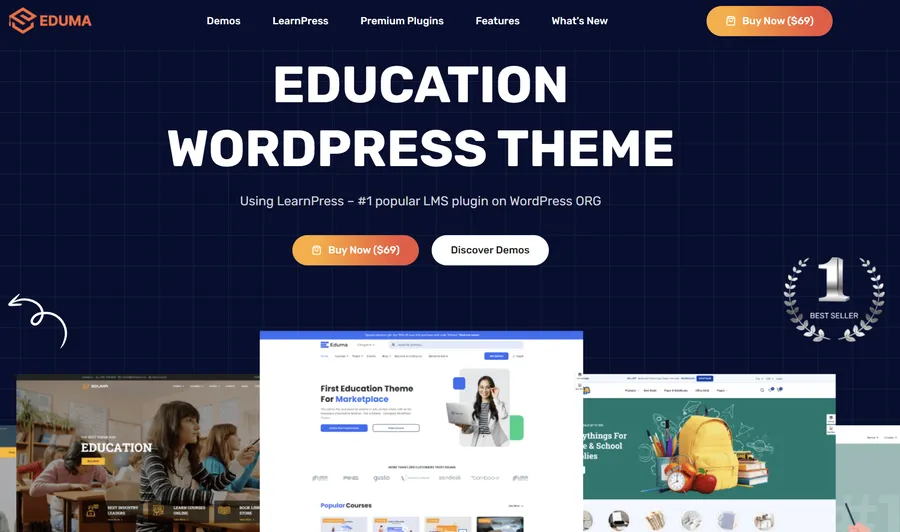
The visual design of a learning site must be clean and easy to navigate. For any project to build online learning website WordPress portals, Eduma is the top recommendation. Eduma provides everything you need for an online learning website. Key highlights include:
- Massive Demo Library: Access over 39+ premium Eduma demos tailored for various niches, including University, Yoga Coaching, Marketplace, and Languages School.
- Easy Customization: Utilize a Drag & Drop Builder with over 100+ sections and 25+ flexible sections everywhere. This allows for complete design freedom without writing code.
- Stunning Plugin Integration: Only the most suitable plugins are integrated to help users build powerful and fully functional education websites.
- Cost-Effective Add-ons: When you choose Eduma, you unlock 22 Premium Add-ons at no cost, saving you a total of $500 per year compared to purchasing them individually.
Phase 3: LMS Plugin for Online Courses
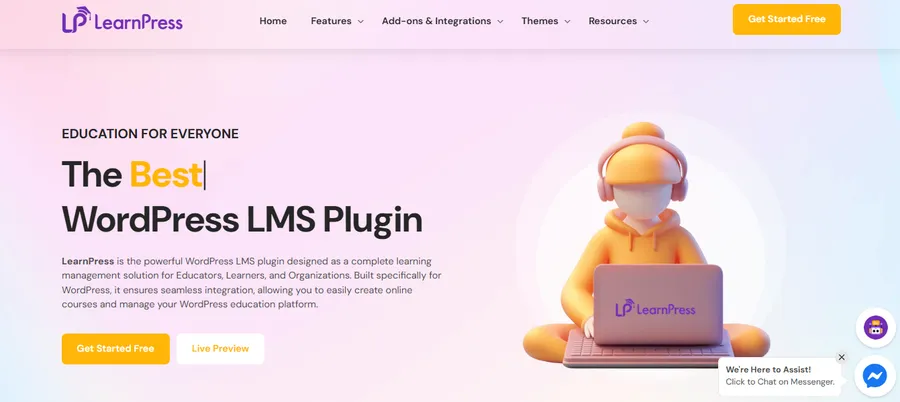
The functionality of the site depends on the LMS plugin used. Using LearnPress for online courses is an efficient and powerful choice. It is widely considered the #1 popular LMS plugin on the WordPress.org repository.
LearnPress is a comprehensive and independent WordPress LMS Plugin. It offers several benefits:
- Course Management: Easily create, update, and change course content independently from the theme.
- Selling Power: It provides a complete system to sell courses online, supporting various payment gateways.
- Scalability: While the core is lightweight, the integration with Eduma provides a powerful force in web design for any learning platform.
Phase 4: LMS WordPress Setup (Step-by-Step Tutorial)
A structured LMS WordPress setup ensures that the platform is ready for students. This LMS plugin tutorial (general) outlines the essential steps to get the first course live and functional.
Step 1: Initialize the Environment
After setting up the hosting and domain, install WordPress. Once the dashboard is active, configure the site settings to ensure all links are easy to read. This is the first part of a proper LMS WordPress setup.
Step 2: Install and Configure the LMS Plugin
Navigate to the “Plugins” menu, search for “LearnPress,” and install it.

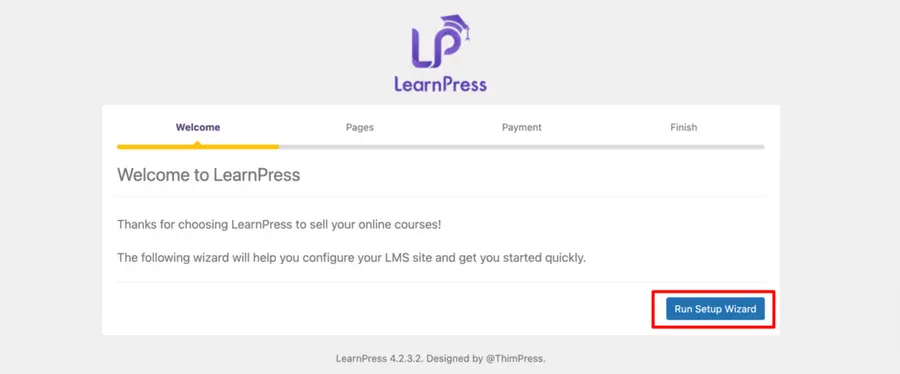
After activation, use the setup wizard. This wizard is vital for setting up the currency, essential pages like the student profile, and payment gateway settings so you can accept fees from learners.
Step 3: Start the Course Creation Process
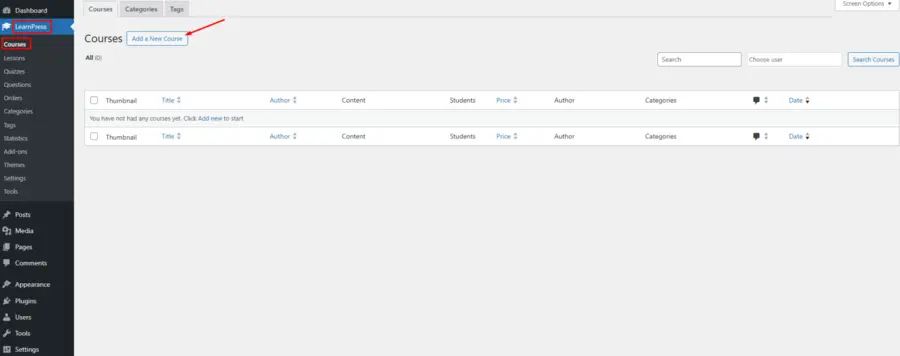
To begin, navigate to your Dashboard -> LearnPress -> Course -> Add New. This is the primary area where you will create your content. Every course consists of three main parts: the overview, the curriculum, and the settings.
Step 4: Detailed Course Configuration
Using the LearnPress interface, you must configure several key sections:
I. Course Overview
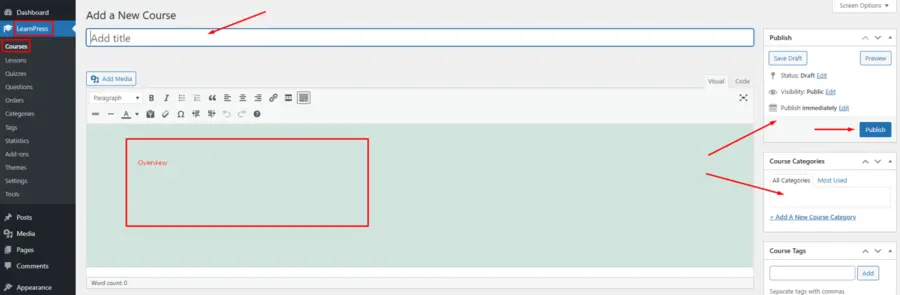
In the Course Description section, set the name and an introduction. This text appears in the “Overview” tab of the course page. You can assign the course to specific Course Categories and set a Featured Image, which displays on the main Courses page. You should add a featured image for all courses to maintain a professional look.
II. Course Settings
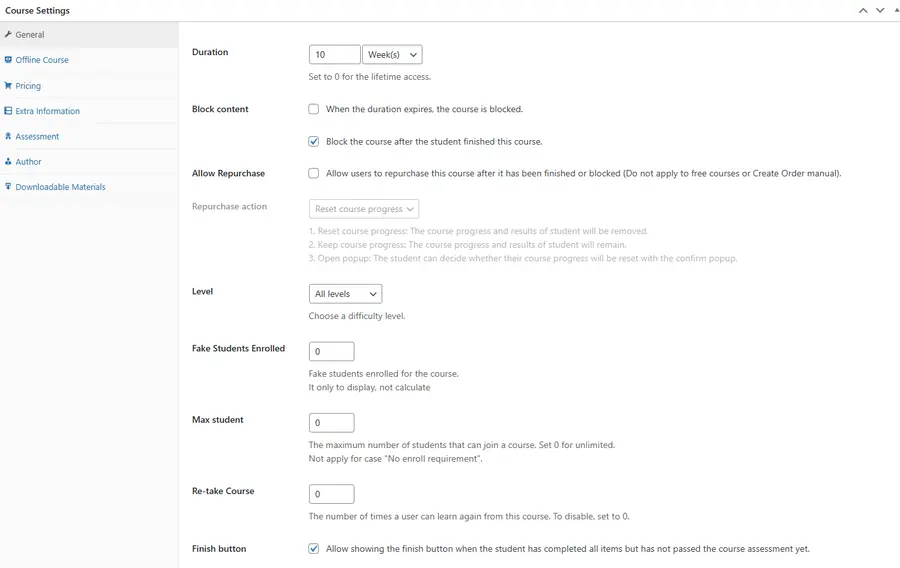
- General: Define the Duration and decide if you want to Block Content once the time expires. Other options include setting the Level (Beginner, Intermediate, etc.), adding Fake Students Enrolled for marketing purposes, and limiting Max Students.
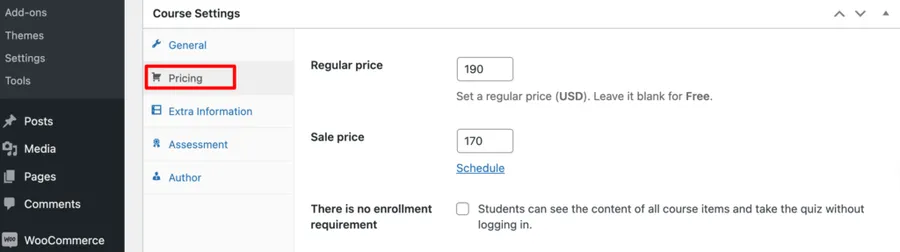
- Pricing: Set a Regular Price or leave it blank for a Free course. You can also schedule a Sale Price for specific dates.
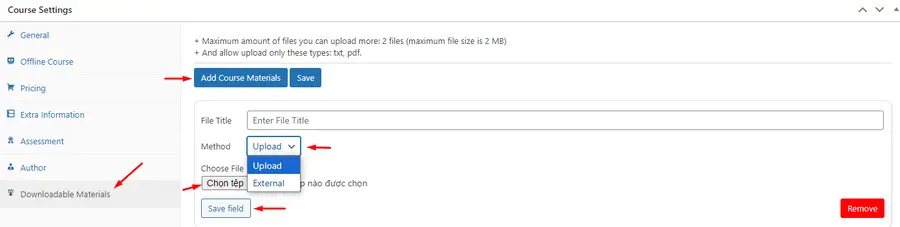
- Materials: Use the Add Course Materials button to upload Docx, Txt, or PDF files. Students must usually enroll to access these downloads.
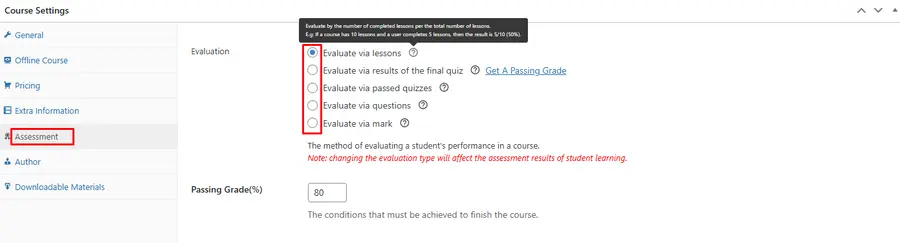
- Assessment: Choose from basic options to define the Passing Condition (e.g., based on quiz results or lesson completion).
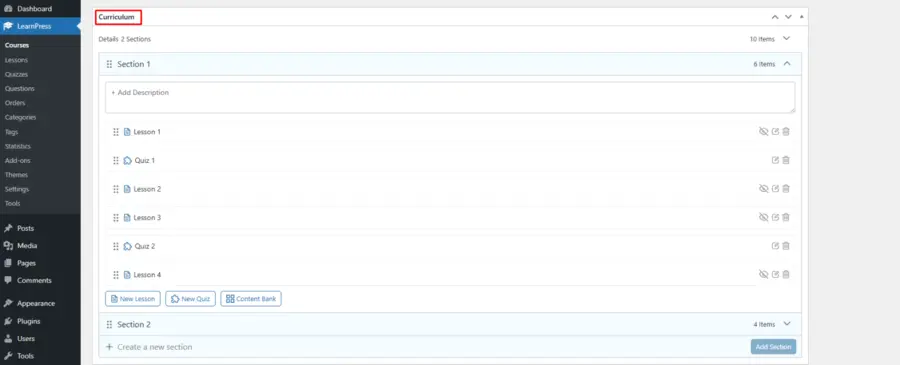
III. Course Curriculum
This is where you manage sections, lessons, and quizzes. You can create a lesson directly here or use the Content Bank to select items you have previously created.

For details on the LearnPress setup tutorial, see the LearnPress Admin Guide.
Monetization Strategies for Online Education
When you build online learning website WordPress sites, you have several ways to earn money. Successful models include:
- One-Time Sales: Students pay a single fee for permanent access to a course.
- Subscription Memberships: Students pay a monthly fee to access all content on the WordPress course website.
- Certification Fees: You can offer the learning material for free but charge a fee for a verified certificate.
- Corporate Licensing: Selling access to businesses so they can train their entire staff at once.
Benefits and Challenges of Online Education
There are many advantages to choosing to build online learning website WordPress platforms, but there are also challenges to keep in mind.
Advantages
- Global Reach: Students can join from any country at any time.
- Low Costs: Once a course is made, there are very few extra costs to teach more students.
- Data Insights: You can use the Gradebook add-on to see where students are struggling and improve your lessons based on their performance.
Challenges
- Technical Maintenance: You must update the site regularly to keep it secure.
- Student Motivation: It can be hard to keep students engaged without being in a physical classroom, so Content Drip is very important.
Estimated Budget for a Professional Site
Launching a professional platform requires an initial investment. Below is a general estimate of the typical costs involved.
| Item | Estimated Annual Cost | Purpose |
| Domain & Hosting | $150 – $500 | Speed, security, and stability. |
| Eduma Theme | $69 (Regular License) | Professional design and 22 premium add-ons. |
| LearnPress Add-ons | Included with Eduma | Advanced tools for students (Save $500/yr). |
| Video Hosting Platforms | $100 – $300 | Protecting videos from being copied. |
| Marketing Tools | $100 – $400 | Helping students find your site. |
| Total Estimated Budget | $419 – $1,269 | A complete professional setup. |
Conclusion
The decision to build online learning website WordPress platforms is a smart move for any expert. By following the 7-step LMS WordPress setup and using professional tools like LearnPress for online courses and the Eduma theme, you can establish a reliable and scalable educational business. Success requires a commitment to high-quality content and a smooth experience for your students.
Frequently Asked Questions (FAQs)
1. Is WordPress a good platform for a large online school?
Yes. WordPress is very flexible. When combined with a proper LMS WordPress setup, it can support thousands of students and many different courses at the same time.
2. Do I need to know how to code to use LearnPress and Eduma?
No. Both are designed to be used by anyone. Most tasks are finished by using simple menus or the Drag & Drop builder included with Eduma.
3. How do I protect my course videos from being stolen?
It is best to use a professional video hosting service. These services allow you to set rules so that your videos can only be watched on your own website.
4. Can I offer certificates to my students?
Yes. LearnPress has a feature that automatically creates a PDF certificate for students once they pass all their tests and finish the course.
5. How many courses can I host on one site?
There is no limit to the number of courses you can have. Your hosting plan will determine how much data and how many users your site can handle at once.
Read more: 10 Most Common WordPress Errors and How to Fix Them
Contact US | ThimPress:
Website: https://thimpress.com/
Fanpage: https://www.facebook.com/ThimPress
YouTube: https://www.youtube.com/c/ThimPressDesign
Twitter (X): https://x.com/thimpress_com