A good travel template saves you weeks of design work and gives visitors a clear path from browsing to booking. The hard part is picking one that fits a real tour business, not just one that looks nice in a demo.
This guide explains what to look for, compares three WordPress options, and shows you how to avoid the common mistakes.
Eduma – Education WordPress Theme
We provide an amazing WordPress theme with fast and responsive designs. Let’s find out!
What is a travel template?
A travel template is a ready-made website layout built for tour operators, travel agencies, hotels, and travel bloggers. It includes pre-designed pages such as a homepage, tour listings, destination pages, and a booking form. In WordPress, it usually comes as a theme or a starter pack that you can import with one click and then edit.
You do not need to code to use one. You replace the demo text and images with your own, connect a booking system, and publish. Most people in the tourism business choose this route because a custom build costs far more and takes much longer.
Template, theme, and plugin: what is the difference?
A theme controls how your site looks. A template is a layout or demo that sits on top of the theme. A plugin adds functions, such as booking, payments, or reviews. Good travel products often bundle all three, so the design and the booking engine work together from day one.
Who should use a travel template?
Small tour operators, independent guides, and booking agents get the most value. A solo operator can launch a full site in a few days. A growing agency can use the same base and add custom features later.
Why the right travel agency template matters
The right template affects how fast your pages load, how easy booking feels, and how well your site ranks. Travel buyers compare many options before they pay, so a slow or confusing site loses them quickly.
It shapes first impressions
Visitors decide in a few seconds whether to trust your brand. Large photos, clear prices, and a visible search box tell them you are active and professional. A cluttered layout does the opposite.
It affects speed and Core Web Vitals
Travel sites are image heavy, so speed is a real risk. Google recommends a Largest Contentful Paint (LCP) of 2.5 seconds or less, according to web.dev. Choose a template that supports lazy loading, uses compressed images, and does not load heavy scripts on every page.
It supports SEO from the start
Clean heading structure, mobile-friendly layouts, and schema-ready tour pages help search engines understand your content. Pair your template with an SEO plugin such as Rank Math or Yoast to control titles, meta descriptions, and FAQ schema.
Features every good template should have
Before you buy or download anything, check the feature list against your daily workflow. These are the features that matter most in practice.
Booking and payment tools
Look for a tour search form, date and guest selection, availability calendars, and support for WooCommerce or other payment gateways. If you sell hotel rooms or car rentals as well, confirm that those booking types are included.
Flexible tour pages
Each tour page should show the price, itinerary, inclusions, gallery, map, and reviews. A template that hides these details behind extra clicks will cost you bookings.
Page builder support
Elementor and WPBakery are the two builders most travel themes support. Pick the one your team already knows. Learning a new builder while launching a site slows everyone down.
Mobile responsiveness
Most travellers browse on phones, then book on a laptop. Test the demo on a real phone, not only in a desktop browser preview. Check that the search form, menu, and gallery are easy to use with one thumb.
Demo import and documentation
A one-click demo import lets you start from a finished design. Clear documentation and active support matter just as much. Check the theme changelog to see when it was last updated.
Free vs premium: tour and travel template free download
A tour and travel template free download is a good starting point for a test site or a very small budget. A premium template is usually the better choice once you accept real bookings. The difference comes down to support, updates, and booking features.
When a free template works
Free options are fine if you want to learn WordPress, build a simple brochure site, or test an idea. The WordPress.org theme directory is the safest place to find them, because every theme goes through a review process. A tourism template free download from a trusted source also helps you compare layouts before spending money.
Where free templates fall short
Free templates, including a typical travel agency template from a free source, often lack booking engines, advanced search, and priority support. You may need to add several plugins to reach the same result, which can slow your site. Updates can also be less frequent.
Why premium usually pays off
Premium templates include booking tools, regular updates, and a support team you can contact. For a business that takes payments, that support is worth the price. You also get more demos and layout options, which saves design time.
A warning about nulled themes
Never download “free” copies of paid themes from unofficial sites. These nulled files often hide malware, backdoors, or spam links that can damage your site and your search rankings. If you search for free options, stick to the official WordPress.org directory or the free versions offered by the developer.
Tour and travel website design tips that raise bookings
Strong tour and travel website design is about making the next step obvious. A beautiful page that does not guide the visitor to book will not earn much. These tips apply to any template.
Put search and prices above the fold
Place the tour search form near the top of the homepage. Show starting prices on tour cards, so visitors can filter quickly without opening every page.
Use real photos and short copy
Real photos of your own tours build more trust than stock images. Keep descriptions short and scannable, with the itinerary in a clear list. Compress images before uploading, and add descriptive alt text such as “Tourists walking through a market in Hoi An, Vietnam.”
Show reviews and trust signals
Add customer reviews, safety information, and cancellation terms near the booking button. These details remove doubt at the moment people decide.
Keep navigation simple
Limit the main menu to destinations, tours, about, blog, and contact. Extra links distract visitors from the booking path. A short menu also works better on small screens.
Add a blog for organic traffic
Travel guides, packing lists, and local tips bring in visitors who are not ready to book yet. A travel blog also builds authority in your niche and supports your tour pages with internal links.
Best travel templates for WordPress
The three themes below come from Physcode, the team behind ThimPress products, and cover tours, bookings, and travel blogging. We selected them because each one serves a different type of travel business. Check each live demo and changelog before you buy, since features change over time.
TravelWP: tour booking theme for agencies
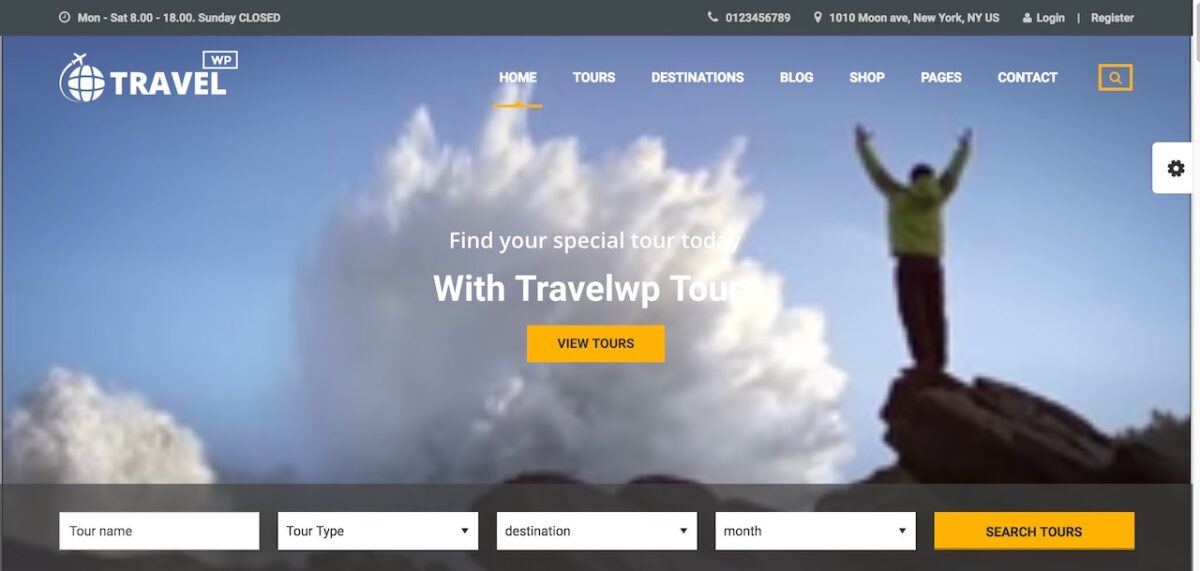
TravelWP is a tour booking WordPress theme made for travel agencies and tour operators. It is a strong travel agency template if you manage several tours, destinations, and booking types in one place. It suits agencies that want a full booking system, and it is one of the most complete picks for tour and travel website design that centers on bookings.
Why it stands out: it is designed around tour listings and online booking, and it works with popular page builders. Keep in mind that a feature-rich theme needs good hosting and image optimization to stay fast.
Tour WP: clean tour booking theme

Tour WP is a tour booking travel WordPress theme with a modern, image-focused look. It works well as a travel template for small and mid-size operators who want a polished design and a simple booking flow.
Why it stands out: the layout puts photos and tour details first, which helps visitors decide quickly. It is a good fit if you want a clean site without too many extra modules.
Travel Blog: theme for travel writers

Travel Blog is a WordPress theme built for bloggers, travel writers, and influencers who share stories and guides. It is the better pick if content matters more than bookings.
Why it stands out: it focuses on readable layouts, galleries, and story-driven pages. If you later want to sell tours, you can add a booking plugin, but a dedicated booking theme is easier for that goal.
Comparison table
The table below summarizes the three themes so you can match one to your business. Always confirm current features on the demo page, because developers update their products regularly.
| Feature | TravelWP | Abape | Travel Blog |
|---|---|---|---|
| Main purpose | Tour booking for agencies | Tour booking for small and mid-size operators | Travel blogging and storytelling |
| Best for | Travel agencies, multi-service operators | Independent tour companies | Bloggers, influencers, guides |
| Booking focus | High | Medium to high | Low (add a plugin if needed) |
| Design style | Feature-rich, flexible | Clean, image-led | Content-led, editorial |
| Page builder support | Check the demo page | Check the demo page | Check the demo page |
| Setup effort | Medium | Low to medium | Low |
| Good as a tourism template | Yes | Yes | For content sites |
How to choose the right template
Start with your business model, then check the budget and the technical skills on your team. The right travel template is the one that matches how you actually sell, not the one with the longest feature list.
Match the template to your goal
If you take online bookings, choose a booking theme such as TravelWP or Abape. If you mainly publish stories and guides, Travel Blog is the simpler option. Do not pay for features you will never use.
Check speed before you commit
Run the live demo through Google PageSpeed Insights on mobile. Look at LCP, Cumulative Layout Shift (CLS), and total page weight. A demo is always lighter than a real site with your photos, so treat the result as a best case.
Test support and updates
Read the changelog, check the last update date, and look at how the developer answers questions. A template that is not updated can break with a new WordPress release.
Plan your budget
Include hosting, a booking or payment plugin, an SEO plugin, and image optimization in your budget. The template price is only one part of the total cost.
How to set up your template step by step
Setting up a template takes a few hours if you prepare your content first. Follow these steps in order, and use a child theme if you plan to edit theme files.
- Back up and prepare hosting. Use a host with PHP 8.x, enough memory, and SSL enabled.
- Install WordPress. Set up a clean installation and choose your permalink structure under Settings > Permalinks.
- Upload and activate the theme. Go to Appearance > Themes > Add New, upload the zip file, and activate it.
- Create a child theme. This protects your edits when the parent theme updates.
- Install required plugins. Accept the plugin prompts, such as the booking and page builder plugins.
- Import the demo. Pick the demo closest to your business and run the one-click import.
- Replace demo content. Update tours, prices, photos, logo, and contact details.
- Set up payments and emails. Test a full booking, including the confirmation email, before you go live.
- Optimize and launch. Compress images, enable caching, add SEO titles and descriptions, and test on mobile.
FAQs
What is the best format for a tour page?
The best tour page shows the price, duration, itinerary, inclusions, photos, and a booking button on one screen. Add reviews and cancellation terms nearby. Keep paragraphs short so mobile visitors can scan quickly.
Can I build a travel website without coding?
Yes. WordPress themes with a page builder and one-click demo import let you build a full site without writing code. You only need to edit text, images, and settings. Basic knowledge of the WordPress dashboard is enough.
How much does a travel website cost?
A basic site can cost very little if you use a free theme and budget hosting. A booking-ready site usually needs a premium theme, hosting, and a few plugins. Costs vary by provider, so compare current prices before you decide.
How do I get more bookings from my travel website?
Make the booking path short, show clear prices, and display reviews near the booking button. Publish helpful travel content to attract search traffic. Track results in Google Analytics and fix the pages where visitors leave.
Conclusion
The right travel template gives you a faster launch, a better user experience, and a stronger base for SEO. Start by deciding whether you need online bookings or a content site. Then compare features, speed, and support before you commit.
A tourism template free download works well for testing ideas, while premium options such as TravelWP, Abape, and Travel Blog are better for serious businesses. Combine your template with clear design, real photos, and honest reviews. That is what turns visitors into customers.
Read more: Cookie Compliance: A Practical Guide for Websites
Contact US | ThimPress:
Website: https://thimpress.com/
Fanpage: https://www.facebook.com/ThimPress
YouTube: https://www.youtube.com/c/ThimPressDesign
Twitter (X): https://x.com/thimpress_com