Cookie compliance means aligning your website’s tracking behavior, disclosures, and privacy controls with the rules that apply to your business. Installing a cookie popup is only one part of that work. The important question is whether the website actually follows the choices visitors make.
For a US business with an international audience, the implementation can involve different regional requirements. EU consent rules and US opt-out obligations are not interchangeable. A practical approach begins with a tracking inventory, a documented legal assessment, and a consent system you can test.
This guide explains how those pieces fit together on WordPress. It covers the EU framework, California considerations, popup design, consent tools, and a repeatable testing process. If you need the technical basics first, read ThimPress’s explanation of cookies in WordPress.
Eduma – Education WordPress Theme
We provide an amazing WordPress theme with fast and responsive designs. Let’s find out!
What Does Cookie Compliance Include?
Cookie compliance covers more than the small files stored in a browser. Depending on the technology and applicable rules, your review may also need to consider local storage, tracking pixels, device identifiers, embedded services, and other methods of collecting or accessing information.
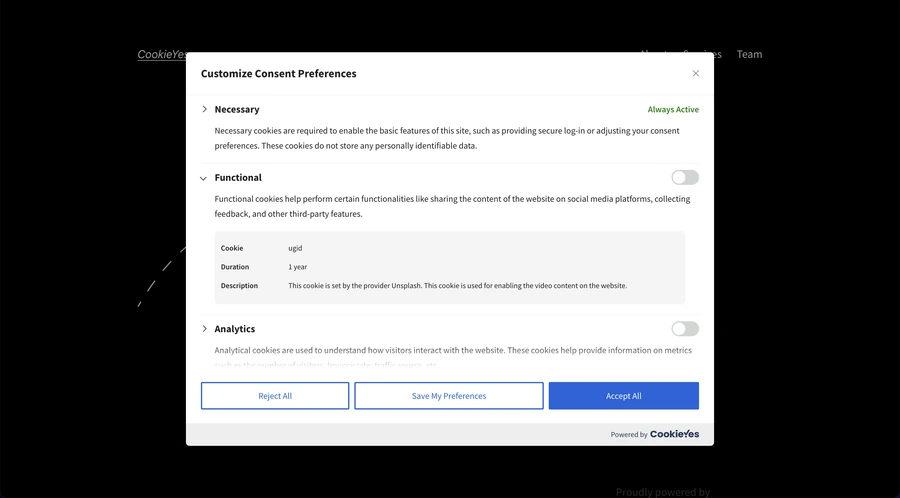
A complete implementation connects four things: what the website does, what you tell visitors, which choices you offer, and how you enforce those choices. If a policy says advertising requires permission while an advertising tag runs on arrival, the implementation is inconsistent.
Start with your actual data flows rather than a generic banner template. Identify the vendors involved, the information they receive, the purposes of collection, and the settings that control transmission. These details determine what your privacy interface needs to communicate.
ThimPress’s overview of data privacy regulations can provide background. Use current regulator guidance and advice for your circumstances when deciding which legal obligations apply.
How the EU Cookie Law and GDPR Fit Together
The phrase EU cookie law commonly refers to the ePrivacy rules on storing information on, or accessing information from, a user’s device. Article 5(3) of the ePrivacy Directive, implemented through national laws, generally requires consent unless a specified exemption applies.
Those exemptions include storage or access strictly necessary to provide an information society service the user explicitly requests, as well as the transmission-related exception. “Useful to our marketing team” is not the same as strictly necessary to deliver the requested service.
The GDPR supplies the standard for consent and governs personal-data processing within its scope. Consent must be freely given, specific, informed, and unambiguous. Where processing relies on consent, withdrawing it must be as easy as giving it.
Assess territorial scope carefully. A US company may have GDPR obligations when offering goods or services to people in the EU or monitoring their behavior there. Simply being accessible from Europe does not automatically settle the question.
EU cookie compliance therefore needs both technical analysis and a review of the applicable national rules. Do not assume that every member state’s implementation guidance is identical, especially when considering analytics exemptions or unusual access models.
What US Website Owners Should Consider
The United States does not have one universal rule requiring every website to display an EU-style opt-in banner for every visitor. State laws, sector-specific rules, business coverage, user characteristics, and the way information is used can change the analysis.
For example, the California Consumer Privacy Act gives covered consumers rights that include opting out of the sale or sharing of personal information. Businesses subject to the law must provide relevant notices and mechanisms. Advertising arrangements can require analysis even when you do not sell customer records for cash.
California’s attorney general explains that covered businesses must honor qualifying Global Privacy Control signals as requests to opt out of sale or sharing. GPC is not the same as an EU consent button, and one generic banner does not demonstrate that either mechanism works.
Build a jurisdiction matrix with the help of your privacy adviser. Record which rules apply, which choices you must offer, and how the website should behave for each situation. Revisit that assessment when you enter a new market or change advertising practices.
Audit Your Cookies, Scripts, and Embedded Services
Start on a staging copy of your website. Follow this guide to creating a WordPress staging site so you can inspect and adjust integrations before changing the live experience.
Review theme settings, plugins, tag manager containers, custom HTML, header scripts, embedded videos, maps, chat widgets, booking services, and payment integrations. Tracking can enter through several paths, including a marketing campaign added outside your normal release process.
Use an automated scan as a starting point, then inspect representative journeys manually. A scanner that visits only public pages may miss a checkout step, logged-in area, language variant, or interaction that loads another service.
For each item, record its name, provider, purpose, trigger, duration where applicable, and the person responsible for it. Distinguish browser storage from network requests. A request can transmit information even when you do not see a new cookie appear.
Resolve duplicate integrations early. If the same analytics service is loaded by both a plugin and a tag manager, blocking only one route can leave the other active. Your inventory should describe how each service is actually installed.
Classify Tracking by Purpose
Categories should help visitors understand the consequences of their choices. Common labels include necessary, preferences, analytics, and advertising. The label alone does not establish an exemption or legal basis.
A shopping cart session can serve the shopping service a visitor requested. An advertising identifier serves a different purpose. Evaluate each technology in context, including whether it performs multiple functions and whether you can disable the optional function separately.
Be careful with “functional” categories. The term can obscure a mixture of required services and optional enhancements. Explain what each category does, and keep optional purposes separate from genuinely necessary operations.
Do not move analytics into the necessary category simply because your team wants complete reporting. Some configurations may qualify for a narrow exemption under particular national guidance, but that requires a specific assessment of the technology and its settings.
Design a Cookie Popup That Supports a Real Choice
A good cookie popup explains the relevant purposes in plain language and makes available actions understandable. For a consent-based setup, distinguish accepting optional tracking, rejecting it, and choosing individual categories.
The French regulator CNIL states that rejecting cookies should be as easy as accepting them. A practical design is to place clearly visible accept, reject, and settings controls on the first layer. Review applicable local guidance before finalizing the interface.
Use readable text, clear labels, and sufficient contrast. Avoid hiding refusal inside a long paragraph or giving it a much smaller visual presence. ThimPress’s website design tips and explanation of design elements can help you organize the interface.
Your brand palette should support readability. Review your website color scheme, then test focus indicators, keyboard navigation, mobile scrolling, and screen reader labels. A visitor should be able to exercise a choice without relying on a mouse.
What a GDPR Cookie Popup Should Say
A GDPR cookie popup should describe what optional tracking does and point to information that supports an informed decision. Avoid vague statements such as “We use cookies to improve your experience” when the site also uses advertising or audience measurement services.
For a hypothetical site using optional analytics and advertising, the first layer might say: “We use necessary cookies to operate this website. With your permission, we also use analytics to understand visits and advertising technologies to measure campaigns. You can accept, reject, or customize optional tracking.”
That wording is only a starting example. Adapt it to your actual purposes and vendors. More detailed information should explain the relevant technologies, retention or duration details, recipients where required, and how visitors can change their choices.
Use this guide to writing a basic privacy policy as a drafting aid. Reconcile the finished policy with the inventory instead of publishing a generated document without checking its claims.
Make the Website Enforce the Choice
In a consent-based configuration, set the required defaults before optional technologies run. Waiting for the popup to appear and then changing tag settings can leave an initial period during which information has already been transmitted.
Map each category to the integrations it controls. When someone rejects advertising, the advertising implementation should respond consistently across scripts, embeds, and relevant downstream systems. A preference saved in the browser is useful only if the affected services receive and follow it.
Use placeholders where an optional embedded service cannot load yet. A video placeholder can explain that loading the video activates a third-party service and offer an appropriate choice. Keep essential page content available wherever possible.
Inspect caching and optimization carefully. Script delay, combination, or reordering can change initialization order. Test these interactions while working on WordPress performance improvements so optimization does not accidentally bypass privacy controls.
Understand What Google Consent Mode Does
Google Consent Mode adjusts how supported Google tags behave according to consent signals. It does not obtain consent for you. Your interface and consent management setup still need to collect and communicate the relevant choice.
Google distinguishes basic and advanced implementations. Basic mode blocks Google tags until consent. Advanced mode loads tags with default consent settings and can send cookieless pings when consent is denied.
“Cookieless” does not mean that no information leaves the browser or that every legal obligation disappears. Assess the actual data flow and your applicable requirements before choosing a mode. A successful integration check is not a legal determination.
Also inspect tags outside Google’s ecosystem. Configuring Google consent signals does not automatically control an unrelated chat widget, advertising pixel, or custom script. Every integration needs an appropriate enforcement path.
Choose a Cookie Consent Solution You Can Operate
A cookie consent solution should fit your website’s complexity and your team’s ability to maintain it. Evaluate script control, scanning coverage, preference management, records, regional configuration, accessibility, and compatibility with your integrations.
Check the specific plan you intend to use. Page limits, scanning frequency, consent history, supported domains, and regional features can vary. Avoid comparing tools only by their banner appearance or assuming a free plugin includes every hosted service feature.
For additional options, see ThimPress’s comparison of WordPress cookie consent plugins and its WPLP Compliance Platform review. The following tools are candidates to evaluate, rather than guarantees of compliance.
CookieYes
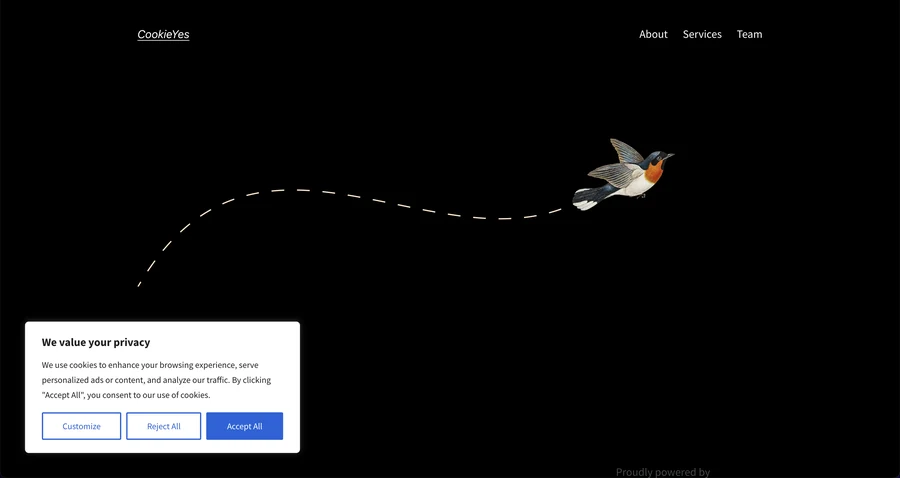
CookieYes offers a WordPress plugin with banner and cookie-blocking functionality, alongside a connected web application. Evaluate how its scanning and preference controls work with your specific installation. Confirm which features and service limits apply to your selected plan, then test custom scripts that may need additional configuration.
Complianz
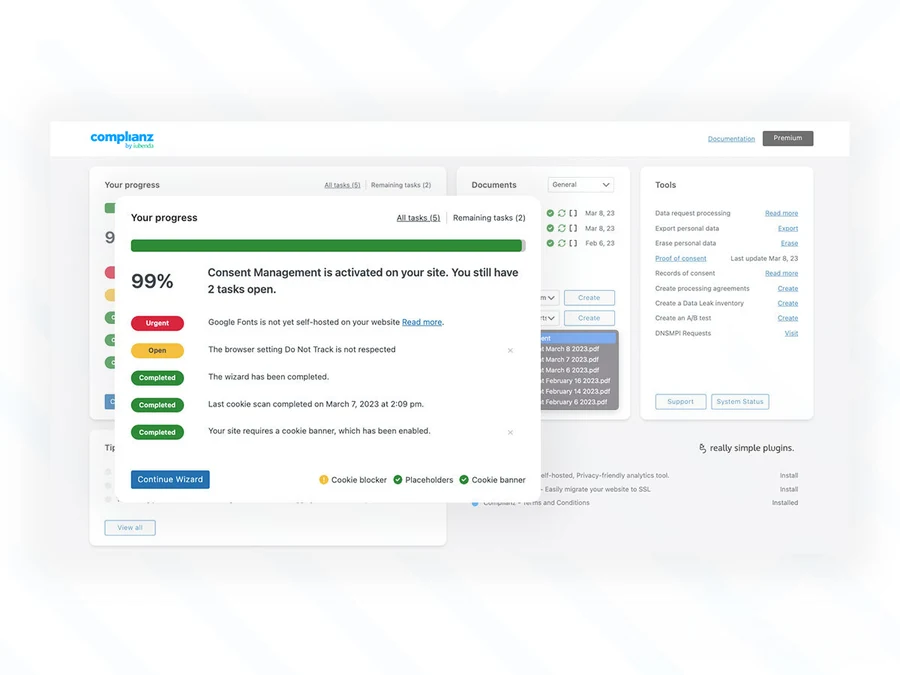
Complianz provides a setup wizard, scanning, and consent-management features for WordPress. It is a candidate for teams that want a guided configuration process. Review the available regions, documents, integrations, and licensing details for your chosen edition. Wizard answers still need to reflect your real business practices.
Cookiebot by Usercentrics
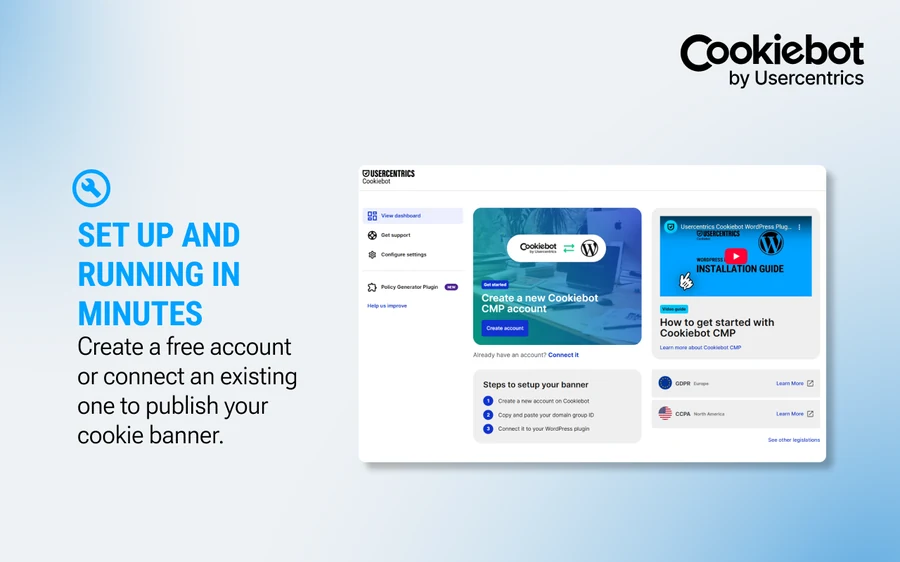
Cookiebot connects WordPress with a consent management platform that includes scanning and cookie controls. Evaluate its behavior across your domains, page types, and embedded services. Check the account requirements and current service limits before rollout, and verify that blocking works for your particular script installation methods.
Coordinate Theme Features and Consent Plugins
If you use a ThimPress theme, review the cookie consent feature in ThimCore before adding another interface. Understand which component will collect choices and which integrations it will control.
Running multiple consent banners can create conflicting preferences and confusing user journeys. Assign one clear source of consent state and document how other services receive it. A banner included with a theme should be tested against the same requirements as any separate plugin.
If you discover overlapping plugins, use this guide to disabling WordPress plugins during controlled troubleshooting. Confirm the replacement works before removing a component that currently handles consent or stores required records.
Test Every Important Consent State
Use a clean browser profile for each scenario and record the region, browser, page, and configuration version. Open developer tools before loading the page so you can inspect initial requests as well as later interactions.
| Scenario | What to inspect |
|---|---|
| First visit without a choice | Defaults, initial network requests, storage, and banner controls |
| Reject optional tracking | Category state, blocked integrations, and ordinary site functionality |
| Analytics accepted only | Analytics behavior and continued restriction of advertising |
| All optional purposes accepted | Expected integrations and accurate saved preferences |
| Consent withdrawn | Updated signals, future requests, and storage cleanup where applicable |
| Return visit | Remembered choice and consistency across page types |
| Applicable GPC opt-out | Signal recognition and sale or sharing restrictions |
Also test forms, search, account access, and checkout after rejection. Review the integrations described in these contact form plugin comparisons if a form loads external services such as CAPTCHA, maps, or scheduling tools.
Inspect redirects and subdomains when they form part of the customer journey. A visitor’s preference on the main site may not automatically control a separately hosted checkout or help center. Document any boundaries and the behavior expected at each one.
A Practical Example: Fixing a Misleading Banner
Imagine a fictional WordPress store called Northline Supply. Its popup offers accept and reject buttons, and its policy says advertising runs only with permission. During testing, the developer notices an advertising request on the first page load, before either button is pressed.
The team traces the request to a header script added for an old campaign. The consent plugin controls the tag manager installation, but the header script loads independently. Changing the banner wording would leave the underlying problem unresolved.
The developer removes the duplicate installation and connects the remaining integration to the approved consent category. The team then repeats the first-visit and rejection tests in a clean browser profile. It also checks that accepting analytics alone does not activate advertising.
Next, the team finds that a product-page video loads an external player immediately. It replaces that embed with a descriptive placeholder and configures an appropriate loading choice. Product information remains readable while the optional service waits.
Finally, marketing updates the inventory and privacy information to match the revised setup. The developer saves the tested configuration version, and the release owner adds the relevant product pages to future regression checks. The result is a documented correction covering the interface, scripts, content, and operating process.
This example shows why a green status indicator in a plugin is insufficient evidence. Useful acceptance criteria describe observable behavior: which request should be absent before a choice, which integration should activate afterward, and which essential tasks should remain available when optional tracking is rejected.
Make Withdrawal and Preference Changes Easy
Provide a persistent privacy or cookie settings link in a location visitors can find, such as the footer. It should reopen usable controls rather than send people to a policy that explains choices without letting them change anything.
Test withdrawal separately from rejection on a first visit. A previously activated integration may keep its own state, storage, or event queue. Your implementation needs to address what happens after the user changes their mind.
Do not promise that a consent tool can instantly erase every third-party cookie or retrieve data already transmitted. Stop future consent-dependent activity appropriately, clear relevant storage where technically possible and required, and explain separate privacy-rights request mechanisms when needed.
Keep retention decisions specific to your purposes and applicable guidance. There is no single worldwide rule that every site must remember consent for exactly the same number of months. Document when choices expire and when a material purpose change requires a new decision.
Keep Evidence Without Collecting Unnecessary Data
Where you rely on consent, you need to be able to demonstrate it. Plan records that connect the choice with the information and configuration presented at the time. Consider purpose selections, timestamps, notice versions, and relevant configuration identifiers.
Minimize additional personal information in those records. Restrict access and define retention based on your actual requirements. A consent database should not become an unrelated tracking system simply because the platform can store more fields.
Keep configuration snapshots and test evidence alongside your inventory. Record who approved a change and which scenarios passed. Protect administrative access with appropriate security controls; this guide to installing a WordPress security plugin can support the broader site protection process.
Maintain Compliance After Launch
Add tracking review to your normal release process. A new plugin, embedded campaign form, advertising partner, or theme update can introduce a data flow that the existing configuration does not cover.
Follow a safe WordPress update process and maintain recoverable backups. These WordPress backup plugins can help protect site configuration, although restoring a backup does not undo information already sent to a vendor.
Assign ownership across marketing, development, and privacy teams. Include scans and manual consent checks in your WordPress maintenance routine. Investigate differences between your inventory and the current website rather than simply replacing the cookie list.
FAQs About Cookie Compliance
Does every US website need a cookie popup?
No single answer covers every website. Assess the laws that apply to your business, users, and data practices. Some situations call for consent, others involve notices or opt-out mechanisms, and a generic EU banner may not address the relevant requirement.
Does a cookie consent plugin guarantee compliance?
No. A plugin helps implement controls, but results depend on configuration, actual data flows, legal scope, disclosures, and ongoing testing. Verify what happens in the browser rather than relying only on a dashboard status.
Can visitors consent by continuing to browse?
Continuing to browse is not a substitute for the affirmative action required for valid GDPR-standard consent. Avoid preselected optional categories, and make sure your consent-based configuration waits for an appropriate choice.
Can I remove cookies and stop worrying about privacy?
No. Pixels, server-side events, identifiers, and other processing can still raise privacy obligations. Review what information is collected and shared, how it is used, and which controls apply rather than focusing only on cookie files.
Conclusion
Effective cookie compliance connects accurate disclosures, meaningful controls, and verified technical behavior. Start with your inventory, identify applicable rules, and choose a consent solution that your team can maintain.
Then test what happens before a choice, after rejection, after acceptance, and after withdrawal. Keeping those behaviors aligned with your policies is an ongoing website responsibility, especially when your marketing stack or audience changes.
Read More: SaaS Pricing Strategy Workshop Management Software
Contact US | ThimPress:
Website: https://thimpress.com/
Fanpage: https://www.facebook.com/ThimPress
YouTube: https://www.youtube.com/c/ThimPressDesign
Twitter (X): https://x.com/thimpress_com