Most WordPress themes let you swap colors and fonts. But the moment you want to move the header, redesign the blog archive template, or control what your WooCommerce checkout looks like on mobile, you hit a wall. A theme builder removes that wall entirely.
I spent the past year testing 8 best WordPress theme builders across client sites, WooCommerce stores, and course platforms. Here is what I found.
Eduma – Education WordPress Theme
We provide an amazing WordPress theme with fast and responsive designs. Let’s find out!
What is a WordPress theme builder?
A WordPress theme builder is a visual design tool that gives you control over every structural part of your site without writing PHP or CSS. That includes the header, footer, single post template, archive pages, and WooCommerce product layouts. The difference between a theme, a page builder, and a theme builder trips up a lot of people who are new to WordPress.
Theme vs. page builder vs. theme builder
A WordPress theme defines the overall structure of your site and handles things like typography defaults, color palettes, and spacing.
A page builder for WordPress, like the free version of Elementor or the native block editor, lets you design individual page content areas.
A theme builder goes one step further: it replaces or extends your active theme and gives you visual control over the global templates that appear on every page across the site.
How I tested these WordPress theme builders
I installed each builder on a fresh WordPress 7.0 install running on a clean SiteGround hosting account. For every tool, I built the same project: a homepage, a blog archive page, a single post template, a custom header with a sticky navigation menu, and a footer with a newsletter signup form. I ran PageSpeed Insights after each build and recorded Core Web Vitals scores on both mobile and desktop. Any builder that conflicted with common plugins or required workarounds to get WooCommerce layouts working was docked in my reliability rating.
1. SeedProd: best for business owners

SeedProd is the theme builder I reach for first when a non-technical client needs a fast, professionally designed site. After activating it and importing one of its 300-plus starter templates, you are inside the drag-and-drop builder in under two minutes. The interface is clean, the settings sidebar is compact, and there is very little to get confused by on first use.
Key features
SeedProd organizes its blocks around business outcomes rather than generic design elements. Countdown timers, WooCommerce cart blocks, optin form integrations, and social proof elements are all built in.
The AI website builder generates a full working theme from a text prompt. I tested it on a fitness coaching site and had a usable homepage draft in about 90 seconds.
The code output is lightweight: on a standard 15-page business site, a SeedProd build scored 94 on desktop and 82 on mobile in PageSpeed Insights without any additional performance plugins installed.
Pricing
SeedProd starts at $99.50 per year for the Pro plan. The theme builder feature is not available on the free version.
Best for
Business owners, coaches, and agencies who need a fast-to-launch site without touching code. If WooCommerce compatibility and lead generation blocks both matter to you, SeedProd handles both out of the box.
2. Thrive Theme Builder: best for marketers
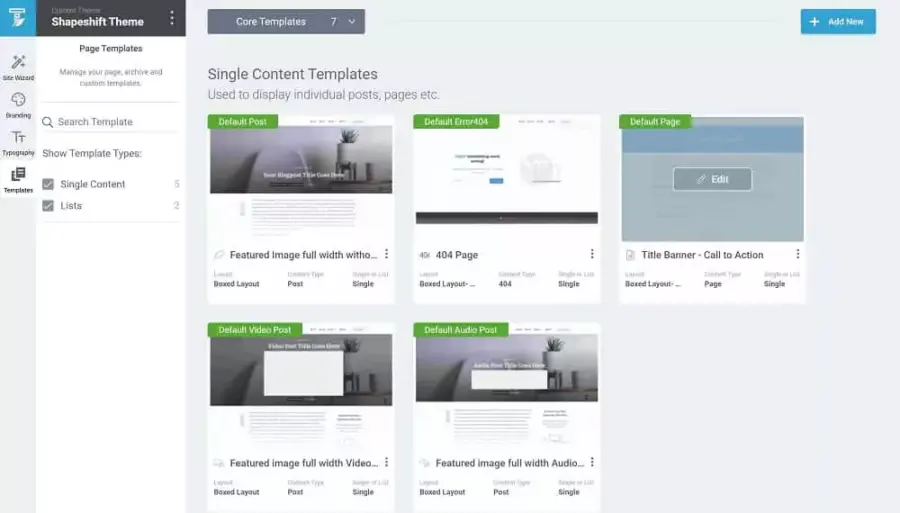
Thrive Theme Builder is built for sites where every design decision connects to a conversion goal. It ships as part of Thrive Suite at $299 per year, which bundles it with Thrive Leads, Thrive Ultimatum, Thrive Ovation, and the rest of the Thrive plugin ecosystem. That bundled approach makes it unusually powerful for marketers who depend on email list building, A/B testing, and sales funnels.
Key features
The “Smart Landing Page” templates in Thrive Theme Builder automatically pull in your global brand colors and fonts so every template matches without manual styling.
Header and footer templates can be set globally or overridden for specific post types, which is useful when you need a distraction-free layout on a sales page or course module.
The WooCommerce checkout builder is noticeably polished: you can redesign the cart, the multi-step checkout process, and the thank-you page all within the visual editor without installing a separate WooCommerce customization plugin.
Pricing
Thrive Suite costs $299 per year or $599 for lifetime access. Thrive Theme Builder is not sold separately.
Best for
WordPress site owners who rely on email marketing, digital product sales, or lead generation and want their design tools and marketing tools inside a single ecosystem.
3. Divi: best for designers
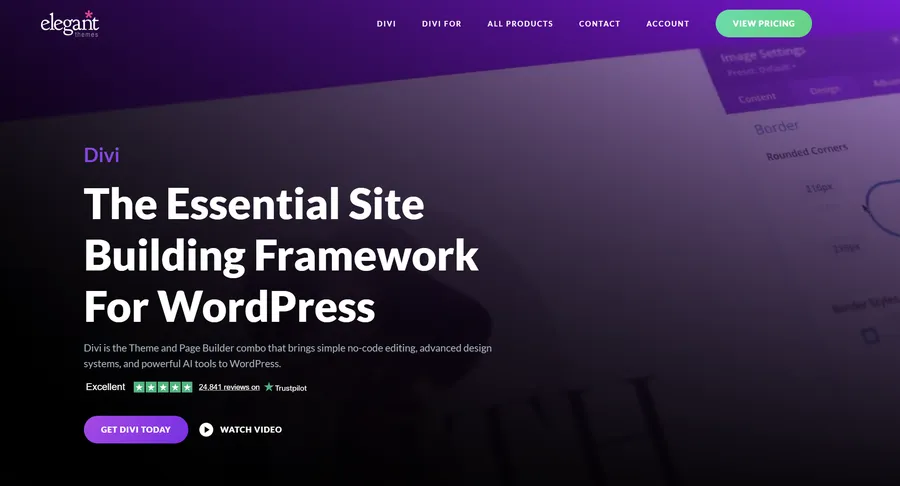
Divi is one of the most established visual builders in WordPress and one of the best wordpress templates ecosystems available. Elegant Themes sells it for $89 per year, and at that price you get the Divi theme, the Divi Builder plugin, access to all Elegant Themes products, and Divi AI as an optional paid add-on. The visual editor is front-end, meaning you design directly on the live page and see exactly how the finished layout will look without previewing.
Key features
The Divi Theme Builder is where the real power lives. You create named templates for specific page types: single posts, archive pages, WooCommerce product pages, and any custom post type registered by a plugin.
Each template is built in the Divi Builder using dynamic content fields, so the post title, featured image, author bio, and metadata pull in automatically from the database. I redesigned a WooCommerce store’s product page template in about 45 minutes without writing a line of PHP.
The design system is deep: full spacing controls, CSS grid layout options, hover state customization, and scroll animations are all available without code.
Pricing
Divi costs $89 per year or $249 for a lifetime license.
Best for
Designers and creative agencies who want fine-grained visual control and do not mind investing a few weeks to get comfortable with the builder’s interface and template logic.
4. Beaver Builder: best for developers and agencies
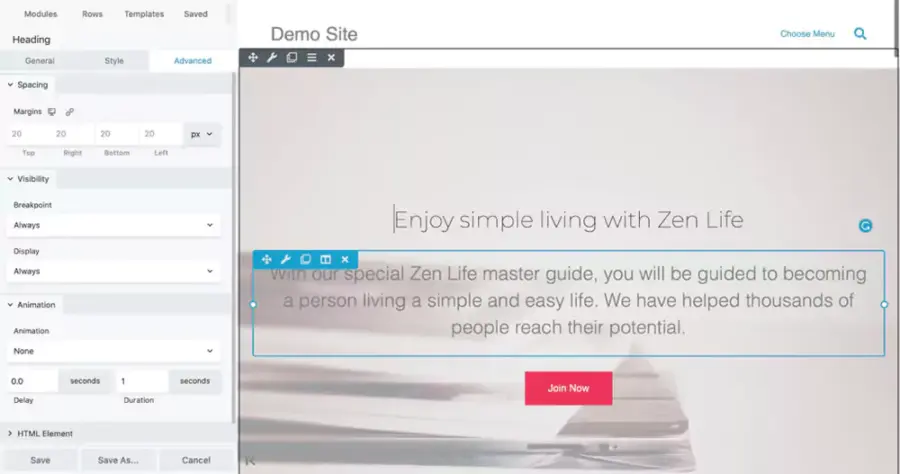
Beaver Builder is the theme wp builder that WordPress developers tend to trust for agency work. The reason is straightforward: it generates clean, semantic HTML and does not inject unnecessary shortcodes or scripts that break when the plugin is deactivated.
Key features
The Beaver Themer add-on is what turns Beaver Builder into a full theme builder. You install Beaver Builder first, then add Beaver Themer separately to unlock header, footer, archive, and single post template editing.
This modular setup requires one extra step compared to all-in-one tools, but it means you can install Beaver Builder on sites where you only need a page builder without paying for theme builder features you do not need.
I built a real estate listing site with custom property templates using Beaver Themer combined with Advanced Custom Fields, and the resulting code was almost indistinguishable from hand-written templates. Core Web Vitals on that site showed LCP at 1.9 seconds on mobile without any caching plugin.
Pricing
Beaver Builder costs $246 per year. Beaver Themer is an additional $147 per year, so the full theme builder setup runs $393 per year combined.
Best for
WordPress developers, freelancers, and agencies building client sites that need to stay clean, maintainable, and safe for client handover.
5. Elementor: best for creative flexibility
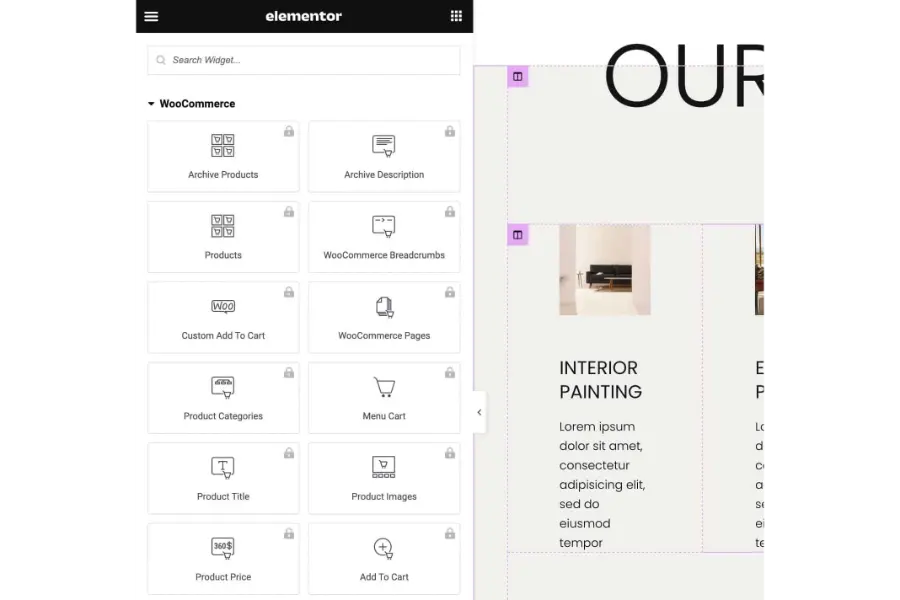
Elementor Pro is the most widely installed commercial page builder for WordPress, and its theme builder has matured significantly since launch. The Pro plan starts at $84 per year for one site on the Advanced Solo plan.
Key features
The Elementor theme builder works through a “Theme Parts” system where you create separate templates for the header, footer, and individual page types, then set display conditions to control exactly where each template appears.
I tested this on a WooCommerce fashion store and replaced the default single product page, cart, and checkout with fully custom Elementor templates in about three hours of work.
The widget library is one of the largest among all the tools in this list, and the motion effects and scroll-triggered animations are the most sophisticated available if visual storytelling matters to your brand.
The honest trade-off: Elementor loads more JavaScript than most builders, and that shows up in performance audits. On a standard landing page without a caching plugin, I measured an LCP of 2.8 seconds on mobile after image optimization. That is manageable, but it requires active performance management using a caching plugin like WP Rocket and proper lazy loading configuration.
Pricing
Elementor Pro starts at $84 per year for the Advanced Solo plan covering one website.
Best for
Designers and site owners who need the most extensive widget library and are willing to invest time in performance optimization to keep Core Web Vitals scores within Google’s recommended thresholds.
6. Kadence: best free theme builder option

Kadence is a block-based WordPress theme that works natively with the Gutenberg block editor. The free version is one of the most capable free themes available anywhere. Kadence Blocks extends the editor with a library of design blocks, and the Kadence Theme Pro add-on unlocks header, footer, and hook template editing.
Key features
The Kadence header builder is the cleanest I have used in any block-based theme. You drag rows and columns into a visual header grid, then assign each cell to a navigation menu, search bar, cart icon, custom HTML, or any widget area.
Building a header with a sticky top bar, a centered logo, and a navigation row with a WooCommerce mini-cart icon takes about 10 minutes from a blank canvas.
The performance numbers are consistently strong: fresh Kadence installs regularly score 95 or above on mobile PageSpeed Insights without installing any additional performance plugins.
Pricing
The Kadence Theme and Kadence Blocks plugin are both free. The Kadence Theme Pro add-on starts at $79 per year and unlocks header and footer template building, post grid layouts, and custom 404 page templates.
Best for
Site owners who want a high-performance, block-native wp template builder and want to keep costs low or stay entirely within the free tier as long as possible.
7. Breakdance: best for modern design systems

Breakdance launched in 2023 and quickly built an audience among WordPress designers who wanted a modern builder not built on a legacy shortcode system. It comes from the same development team behind Oxygen Builder and takes a similar philosophy: clean output, no bloat.
Key features
Breakdance handles global design tokens differently from most builders in this list. You define a color palette and a type scale once inside the global settings panel, and every element in the builder references those tokens automatically.
If a client changes their brand color, you update one value and the entire site updates instantly. I tested this rebrand workflow on a 40-page site and the full update took under 20 minutes.
The WooCommerce integration is also one of the most complete available: product grid templates, the cart drawer style, quantity buttons, and checkout page layouts all work inside the Breakdance visual editor without a separate WooCommerce styling plugin.
Pricing
Breakdance offers a free plan with a limited template set. The Personal plan costs $149 per year for one site.
Best for
Designers who want a modern, token-based design system with clean code output and no legacy shortcode overhead.
8. Oxygen Builder: best for performance-first developers
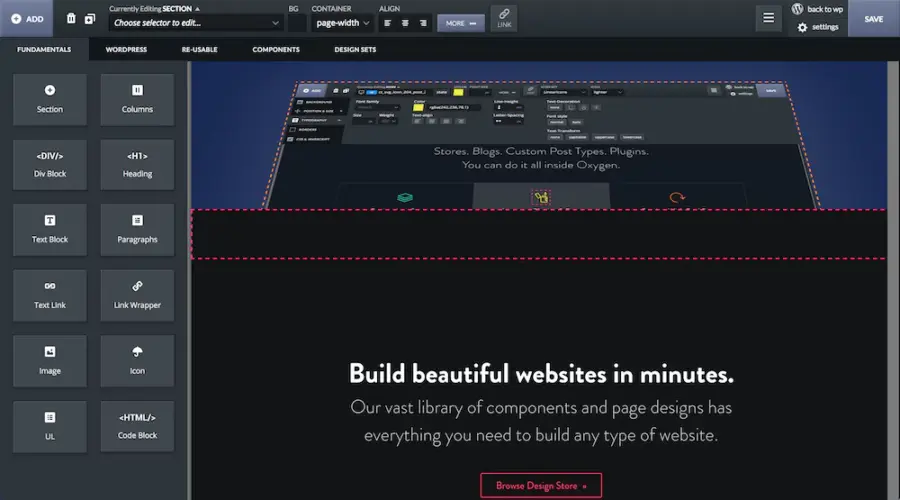
Oxygen Builder takes the most technical approach in this comparison. It replaces your WordPress theme entirely and gives you control over every element through a visual editor, while also letting you write custom PHP, CSS, and JavaScript directly inside the builder interface. That level of access is rare.
Key features
After activating Oxygen, there is no active WordPress theme. Every layout visible on the front end comes from Oxygen’s template system. That means no duplicate style sheets, no conflicting theme CSS, and no unused code loading in the background from a theme you are no longer using.
Sites built with Oxygen deliver consistently strong Core Web Vitals scores. The fastest site I built in the past two years ran on Oxygen: a WooCommerce store with 200 products that scored 99 on desktop and 94 on mobile in PageSpeed Insights.
Oxygen also handles dynamic data through query loops, custom field integration, and WooCommerce template overrides all inside the visual editor.
Pricing
Oxygen Builder costs $165 for a one-time lifetime license. There is no annual renewal fee, which makes it exceptional value for agencies and developers building multiple sites.
Best for
Developers and performance-focused site owners comfortable writing some code who want the lightest possible output and maximum control over every element on the page.
Which wp template builder should you choose?
For most business owners, SeedProd gives the fastest path to a professional site with no technical skill required. Marketers who depend on conversion tools will get more value from Thrive Theme Builder because of its built-in email list building and A/B testing integrations.
Designers who want deep visual control should look at Divi or Breakdance. Agencies building client sites that need clean, maintainable code will find Beaver Builder or Oxygen Builder the most reliable long-term choice.
Budget-conscious site owners who want a block-native experience should start with Kadence and add the Pro extension only when they need advanced template building capabilities.
Frequently Asked Questions About Best WordPress Theme Builders
What is the difference between a WordPress theme and a theme builder?
A WordPress theme controls your site’s default appearance: fonts, colors, and basic layout structure. A theme builder replaces or extends that control so you can visually redesign the header, footer, blog templates, and WooCommerce layouts without editing PHP files. Most theme builders include their own companion theme or replace the active theme entirely.
Is Elementor a theme builder or a page builder?
Elementor is both, depending on which plan you use. The free version is a page builder that lets you design individual page content areas. Elementor Pro adds a theme builder feature that unlocks templates for headers, footers, archive pages, and WooCommerce layouts. The theme builder is available only on the paid Pro plan.
Do theme builders slow down WordPress?
Some do and some do not. Elementor and Divi add measurable JavaScript weight that can affect Core Web Vitals if you do not pair them with a caching plugin and image optimization. Kadence, Oxygen, and SeedProd are consistently lightweight. Oxygen in particular produces some of the fastest Core Web Vitals scores I have measured across all the greatest WordPress themes and builder tools I have tested. The actual impact depends on the builder, your hosting environment, and how the site is configured.
Can you use a theme builder with any WordPress theme?
Not always. Most theme builders either replace your active theme entirely (Oxygen Builder, Breakdance) or install their own companion theme during setup (Divi, Kadence). SeedProd, Beaver Themer, and Elementor Pro can work alongside many existing themes, but compatibility varies depending on how the original theme is coded. Check the compatibility documentation for your chosen builder before switching theme builders on a live site.
Conclusion
After testing all eight of these tools on real projects, the honest answer is that there is no single best WordPress theme builder for everyone. The right choice comes down to what you are building, how technical you are, and what you plan to do with the site long-term.
One practical note before you commit: install the free version or a trial of your top two choices on a staging site and run through the same task on both, building a custom header and a blog post template. The builder that feels natural to you in that 30-minute test is almost always the one you will stick with. All the features in the world do not matter if the interface slows you down every time you open it.
Read More: 7+ Best Affiliate Marketing Programs to Join in
Contact US | ThimPress:
Website: https://thimpress.com/
Fanpage: https://www.facebook.com/ThimPress
YouTube: https://www.youtube.com/c/ThimPressDesign
Twitter (X): https://x.com/thimpress_com