Making a website for a small business is no longer optional if you want customers to find you, trust you, and buy from you.
Most shoppers look a company up online before they ever call or walk through the door, and a business with no site or an outdated one loses that first impression before the conversation even starts.
This guide walks through every stage of building a site, from picking a domain to choosing a theme, so you end up with something that actually brings in customers instead of sitting there unfinished.
Let’s get started!
Eduma – Education WordPress Theme
We provide an amazing WordPress theme with fast and responsive designs. Let’s find out!
Why Small Businesses Need a Website in 2026
A website is the one piece of marketing you fully own. Social media accounts can get restricted, algorithms can bury your posts, and a platform can change its rules overnight, but your website stays exactly as useful as you make it.
What a website does that social media can’t
A Facebook page cannot show up when someone searches “plumber near me” on Google the way a properly built website can. According to Network Solutions, 81% of shoppers research a business online before making a purchase, which means a page with no site simply doesn’t get considered. A website also lets you control the story: your services, your pricing, your reviews, and your booking process, all in one place you don’t have to rent from a third party.
The cost of staying invisible online
Skipping a website has a real cost, not just a missed opportunity. Recent industry data from Network Solutions puts small business website adoption at 83%, up sharply from 64% in 2018, which means businesses without one are now the exception rather than the norm. Customers who can’t find basic information, like your hours, address, or what you actually sell, tend to move on to the next search result instead of calling to ask.
How to Create a Small Business Website Step-by-step
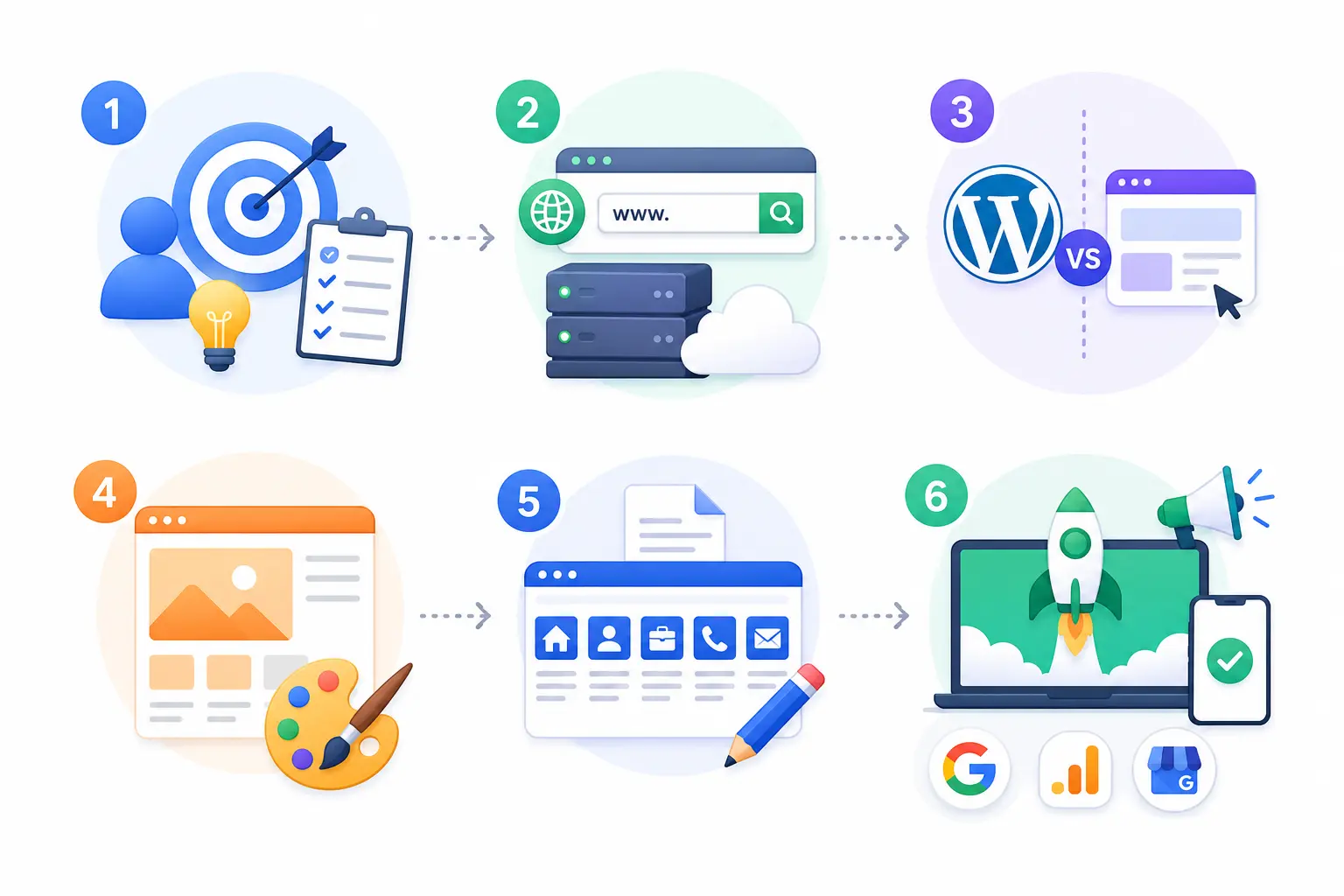
Knowing how to create a small business website comes down to six manageable stages. Skipping ahead, especially past planning, is the most common reason projects stall halfway through.
Step 1: Define your goal and audience
Decide what the site needs to do before you touch any design tool. A local bakery needs an online menu and a map. A consultant needs a portfolio and a contact form. A service business might need online booking. Write this down in one sentence: “This site exists so that [audience] can [action].” Everything else gets built around that sentence.
Step 2: Choose a domain name and hosting
Pick a domain name that matches your business name as closely as possible, keep it short, and avoid hyphens or numbers that people might mistype. Hosting is where your site’s files actually live; shared hosting works fine for most small businesses starting out, while managed WordPress hosting is worth the extra cost once your site gets real traffic or you’re running WooCommerce.
Step 3: Pick a platform, WordPress or a website builder
This is the decision that shapes everything after it. WordPress gives you full ownership of your content and thousands of themes and plugins, which matters if you plan to grow, add a blog, or sell products later. Drag-and-drop builders like Wix or Squarespace get a basic site online faster but can box you in once you need something custom. If you expect your business to change or expand, WordPress is usually the safer long-term choice, since you’re not locked into one company’s platform.
Step 4: Choose a theme and design your pages
Once you’re on WordPress, a theme controls how the entire site looks and, to a large degree, how fast it loads. Pick one built for your industry rather than a generic template, since industry-specific themes usually come with the layouts and demo content you actually need already built in. Import a demo close to what you want, then swap in your own text, images, and colors rather than starting from a blank page.
Step 5: Add essential pages and content
Every small business site needs, at minimum: a homepage that states clearly what you do, an about page, a services or products page, a contact page with a real phone number and address, and a way to capture leads (a form, a booking widget, or a phone number that’s clickable on mobile). Skip filler pages nobody will read and put your effort into these core five instead.
Step 6: Test, launch, and promote
Before you launch, click every link, submit every form yourself, and load the site on your own phone to check that nothing overlaps or cuts off. After launch, submit your site to Google Search Console, connect Google Analytics, and set up a free Google Business Profile so local searches can find you. None of that takes more than an afternoon, and skipping it is why so many new sites get zero visitors in their first month.
Small Business Website Design Principles That Convert
Good small business website design isn’t about looking fancy. It’s about making it easy for a stranger to find what they need in under ten seconds and take the next step.
Mobile-first layout
More than half of global website traffic now comes from phones, so design for a small screen first and check the desktop version second. Buttons need to be large enough to tap with a thumb, text needs to be readable without pinching to zoom, and menus should collapse into a simple icon rather than a long row of links.
Clear calls to action
Every page should have one obvious next step, whether that’s “Call now,” “Book a consultation,” or “Get a quote.” Burying your phone number in the footer or hiding your contact form behind three clicks costs you leads you’ll never know you lost.
Fast load times
A site that takes more than three seconds to load will lose a large share of mobile visitors before the page even finishes rendering. Compress images before uploading them, avoid stacking multiple heavy sliders and animations on the homepage, and pick a theme that’s been built with performance in mind rather than one that ships with unnecessary scripts running on every page.
Small Business Website Development Options And Costs
Small business website development can cost anywhere from nothing but your time to several thousand dollars, depending on how much of the work you do yourself versus hand off to a professional.
DIY builders vs custom development
Building it yourself with a theme and page builder like Elementor keeps costs low and gives you full control, but it takes time to learn. Hiring a freelancer or agency costs more upfront, typically a few thousand dollars for a small business site, but saves you the learning curve and usually delivers a more polished result faster.
Typical cost ranges
Costs vary widely depending on the route you take. A DIY WordPress site with a premium theme might run $50 to $200 a year in hosting, domain, and theme fees. A freelancer-built site commonly falls between $1,000 and $5,000. A full custom build from an agency can run well past $10,000 for larger, more complex sites.
| Platform | Best for | Typical cost | Ease of use |
| WordPress + theme | Businesses planning to grow, blog, or sell online | $50–$300/year (hosting, domain, theme) | Moderate learning curve |
| Wix or Squarespace | Very simple sites launched quickly | $16–$40/month | Easiest to start |
| Shopify | Product-based businesses selling online | $39+/month | Moderate |
| Freelancer or agency build | Businesses that want a done-for-you result | $1,000–$10,000+ one time | No effort required from you |
Common Mistakes Small Business Websites Make
Even well-meaning owners repeat the same errors, and most of them are easy to fix once you know to look for them.
- No clear contact information. Hiding your phone number or address forces visitors to hunt for a way to reach you, and most won’t bother.
- Outdated content. A site that still lists last year’s hours or a discontinued service tells visitors nobody is minding the store.
- Slow, image-heavy homepages. Oversized photos and autoplay video sliders are the single biggest cause of slow load times on small business sites.
- No mobile testing. A site that looks fine on a laptop but breaks on a phone screen is turning away the majority of its visitors.
- Ignoring basic SEO. Skipping page titles, meta descriptions, and image alt text means search engines have almost nothing to work with when deciding whether to show your page.
Choosing The Right Theme for Small Company Websites
The theme you pick for small company websites decides your starting point for both design and functionality, so match it to your actual industry rather than picking whatever looks nicest in a demo screenshot. A restaurant needs a menu layout and online ordering support. A local service business needs a booking calendar and a testimonials section. A consultant or coach needs a clean portfolio layout with a strong lead capture form.
If your small business happens to be in tutoring, coaching, or online course creation, it’s worth a look at Eduma from ThimPress. It’s built specifically for education and course-selling sites, with course management, student dashboards, and payment integrations already set up, so you’re not stitching together separate plugins to get a working LMS.
Maintaining And Growing Your Website After Launch
Launching is the start of the work, not the end of it. Before promoting your new site, test your website on different browsers to make sure customers on Safari or older devices see the same experience as you do. Update your plugins and theme regularly, back up the site before every major change, and check your contact form every few months to confirm it still delivers messages to your inbox. Add a blog post or update a service page at least once a month; search engines favor sites that show ongoing activity over ones that go stale. Review your analytics quarterly to see which pages actually bring in visitors and which ones nobody clicks, then put your time into improving the pages that matter.
FAQs About Making a Website for a Small Business
How much does it cost to make a website for a small business?
Costs range from under $100 a year for a DIY WordPress site with a premium theme to several thousand dollars for a professionally built custom site. Most small businesses land comfortably in the $200 to $2,000 range once hosting, a domain, and a theme or template are factored in.
How long does it take to build a small business website?
A simple site built on a theme with a demo import can go live in a few days to two weeks if you’re doing it yourself part time. A custom build from a freelancer or agency usually takes four to eight weeks depending on how many pages and features are involved.
Do I need a developer to make a small business website?
No, a developer isn’t required if you’re using WordPress with a well-built theme and a page builder like Elementor, since most design changes can be made without touching code. A developer becomes worthwhile once you need custom functionality that off-the-shelf plugins can’t handle, such as a complex booking system or a custom integration with internal software.
Is WordPress or a website builder better for a small business?
WordPress is generally the better long-term choice if you expect your business or site to grow, since it gives you full ownership of your content and access to thousands of themes and plugins. A website builder like Wix or Squarespace can be faster to launch for a very simple one-page site, but it can limit you once you need more advanced features later.
Conclusion
Making a website for a small business comes down to a handful of decisions made in the right order: define what the site needs to do, pick a platform that fits how you plan to grow, choose a theme built for your industry, and keep the design simple enough that a visitor can find what they need in seconds. Get those basics right and the site pays for itself many times over in the customers it brings through the door.
Read more:
How to Build a Social Media Website
How to Rank on Google: 10 Proven Steps to the Top
8+ Best Backlink Monitoring Tools Worth Using
Contact US | ThimPress:
Website: https://thimpress.com/
Fanpage: https://www.facebook.com/ThimPress
YouTube: https://www.youtube.com/c/ThimPressDesign
Twitter (X): https://x.com/thimpress_com