If you are an educator, a subject matter expert, or a business owner looking to share your knowledge with the world, establishing your own online academy is one of the most rewarding steps you can take. While third-party platforms exist, they often limit your branding and take a significant cut of your revenue. This is why many professionals choose to create a WordPress LMS website to maintain full control over their content, student data, and profit margins.
The digital learning market is expanding rapidly as more people turn to the internet to gain new skills. This shift proves that digital education is no longer just an alternative; it is the standard for modern professional development. Whether you want to sell professional certifications or hobbyist tutorials, learning how to build an LMS website is the key to tapping into this growing industry.
In this comprehensive guide, we will walk you through the entire process using the most powerful tools available today: LearnPress and the Eduma theme.
Eduma – Education WordPress Theme
We provide an amazing WordPress theme with fast and responsive designs. Let’s find out!

Why WordPress is the Superior Solution for Online Learning
WordPress has evolved far beyond its blogging roots. Today, it powers a significant portion of the internet’s educational platforms. When you choose to create a WordPress LMS website, you benefit from an ecosystem that is flexible, scalable, and highly customizable.
- Diverse Content Hosting: You aren’t limited to just text. WordPress allows you to host high-quality videos, interactive quizzes, downloadable documents, and even live webinars.
- Extensive Customization: With thousands of themes and plugins, you can design a site that looks exactly like your brand.
- SEO Mastery: WordPress is inherently search-engine friendly. When you build an LMS website WordPress users can find easily, your organic traffic will grow much faster than on closed platforms.
- Cost Efficiency: Unlike SaaS platforms that charge high monthly fees, a WordPress setup allows you to pay for what you need.
What You Need to Get Started
Before you dive into the technical setup, you need a solid foundation. To create a WordPress LMS website that performs well, you must gather three essential components:
1. High-Performance Hosting
An eLearning site is more resource-intensive than a standard blog. Students will be streaming videos and taking quizzes simultaneously, which requires a stable server. It is vital to choose the best hosting for LMS website needs to ensure zero downtime. Reliability and speed are non-negotiable.
2. A Powerful WordPress LMS Plugin
The “brain” of your website will be your WordPress LMS plugin. This software handles course creation, student enrollment, and progress tracking. While there are many options, LearnPress is widely regarded as the best LMS plugin for WordPress due to its ease of use and professional-grade features. It allows you to build a structured curriculum without writing a single line of code.
3. A Professional Education Theme
Your theme determines how your courses look and feel. For the best results, we recommend Eduma. Developed by ThimPress, Eduma is specifically engineered to work seamlessly with LearnPress. It provides the professional user interface that turns a simple website into a world-class online university.
LearnPress: The Best LMS Plugin for WordPress
Choosing the right tools is half the battle. LearnPress has earned its reputation as a top-tier WordPress LMS plugin because it balances power with simplicity. It is designed to be intuitive for beginners while offering advanced capabilities for experienced developers.
With LearnPress, you can manage your entire curriculum from a single dashboard. You can create sections, add lessons, and insert quizzes effortlessly. One of its standout features is the “drag-and-drop” builder, which makes organizing your content very simple. Because it is lightweight and SEO-optimized, it ensures that your LMS website WordPress setup remains fast and responsive.

Eduma: The Ultimate Theme for Education
While LearnPress is the brain, Eduma is the beautiful face of your academy. Eduma is consistently rated among the best education themes for WordPress because it was built specifically to enhance the LearnPress experience.

Installing Eduma Theme on WordPress
Following these steps for installing Eduma theme on WordPress will ensure a professional result:
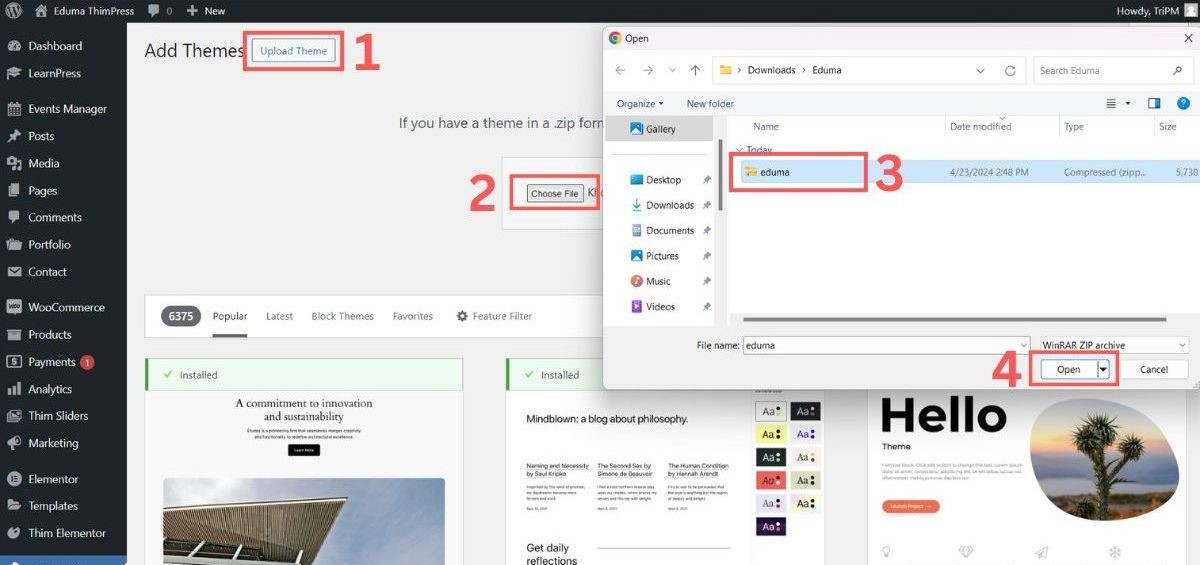
- Upload: Go to Appearance > Themes > Add New > Upload Theme. Select your eduma.zip file and install it.
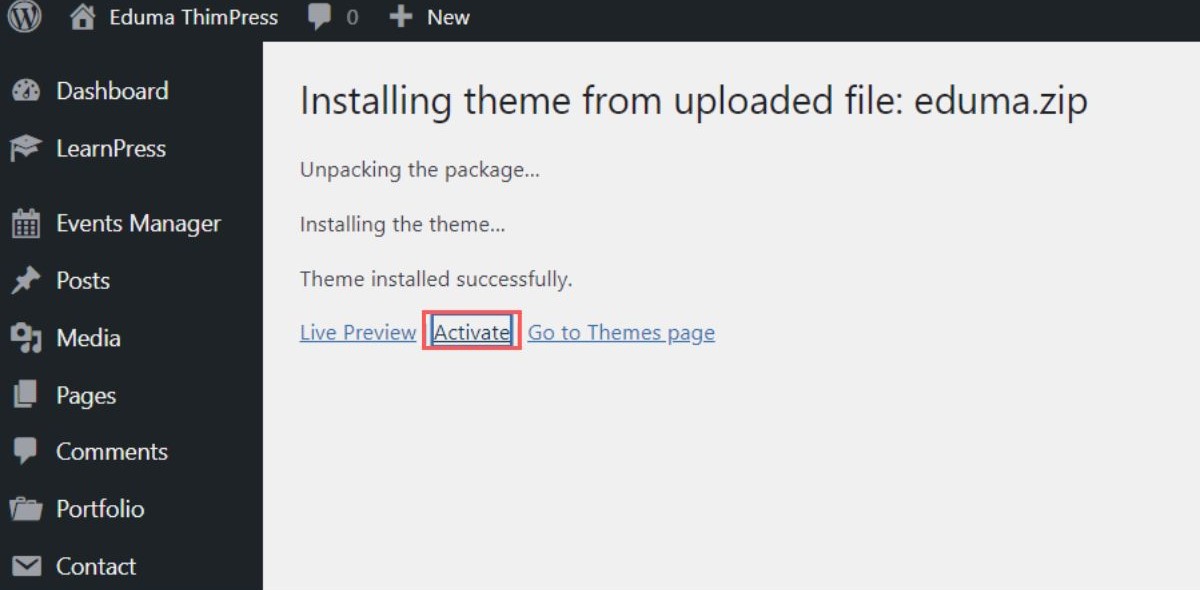
- Activate: Use the Purchase Code from ThemeForest to verify your license.
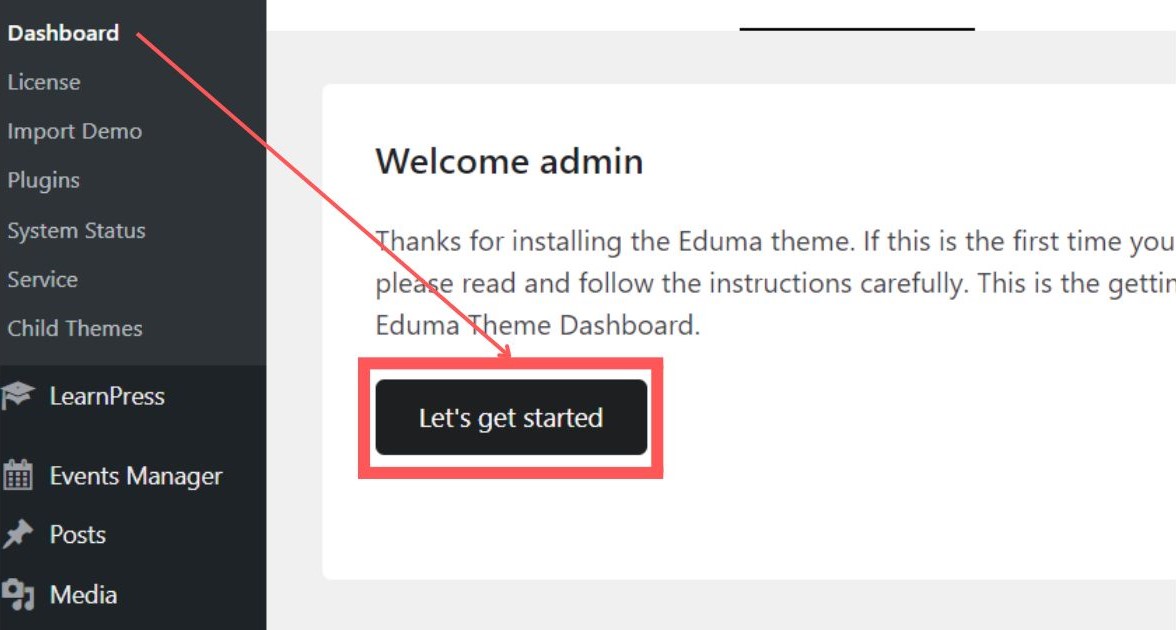
- Enable Thim Core: This is a vital step. Do not skip the “Thim Core” activation, as it powers the theme’s most advanced features.
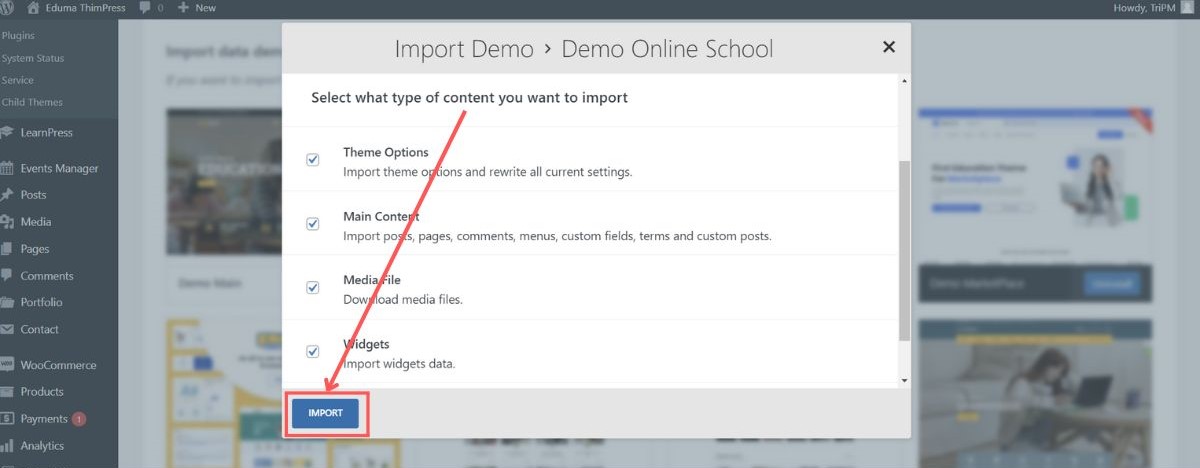
- Import Demo: Eduma offers over 35 pre-built demos. Choose the one that fits your niche (University, Coaching, etc.) and select “All Pages” to import a ready-to-use framework. This ensures a world-class UI/UX for your students.
- Required Plugins: The wizard will prompt you to install necessary tools. This is where you ensure LearnPress and its add-ons are fully integrated.
Step-by-Step: How to Build an LMS Website
Now, let’s get into the practical steps to create a WordPress LMS website from scratch using our recommended stack.
Step 1: Install and Configure
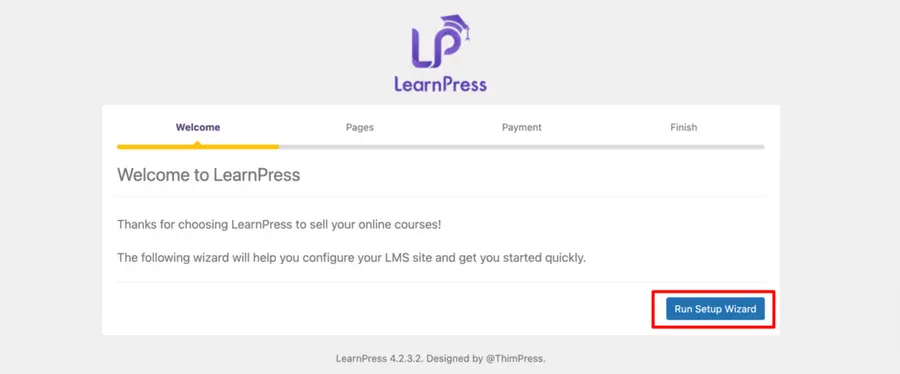
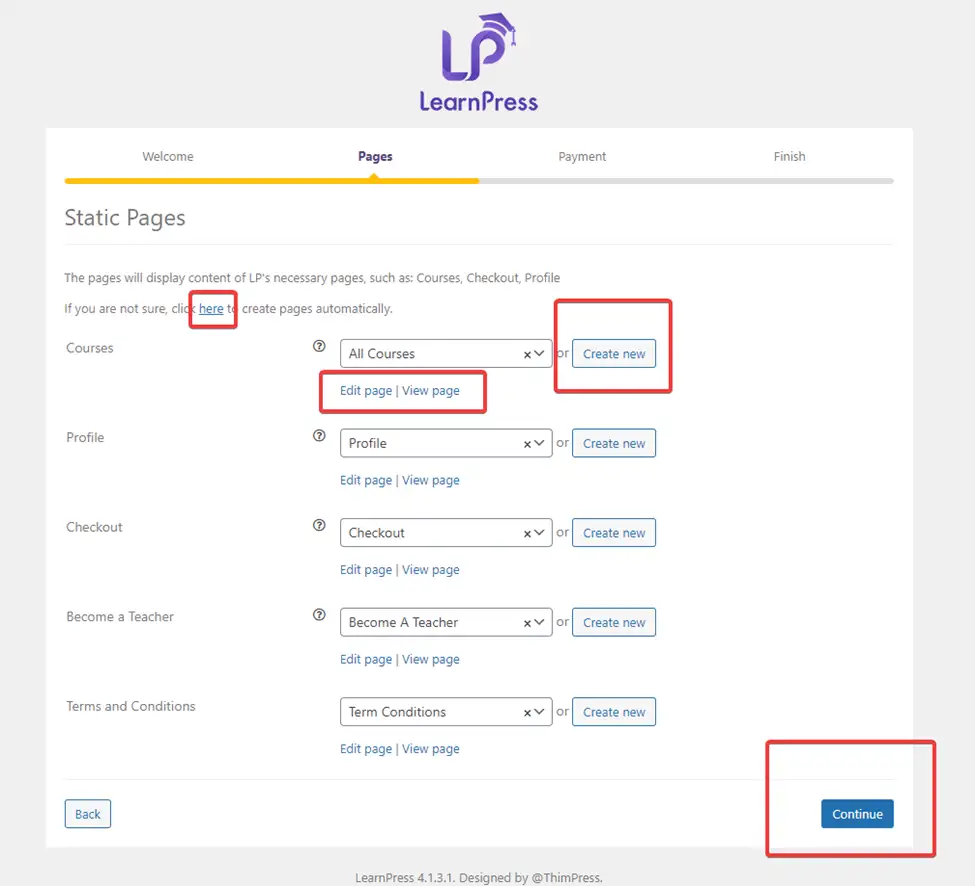
After purchasing Eduma from ThemeForest, go to your WordPress Dashboard. Once you have finished installing Eduma theme on WordPress, click Activate. Then, navigate to the LearnPress settings. Knowing how to configure LearnPress theme properly is essential to ensure your site is ready to handle real users.

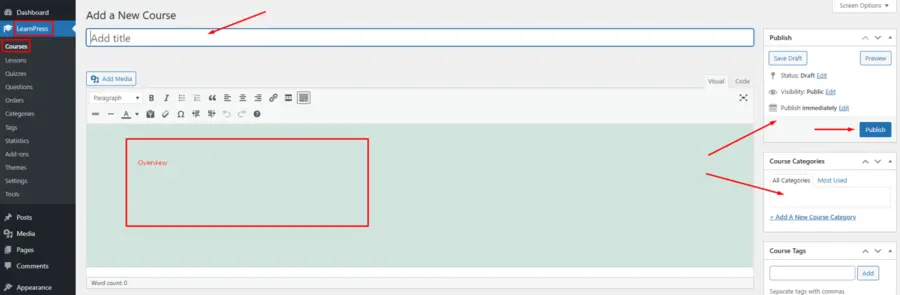
Step 2: Create Your First Course
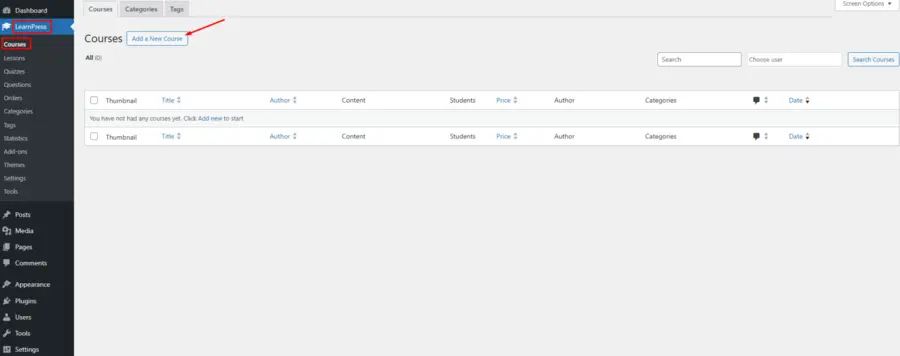
Navigate to LearnPress > Courses > Add New. Give your course a compelling title and description. This is the core of how to create an online course in WordPress. Scroll down to the Curriculum section to add sections, lessons, and quizzes.
Step 3: Add Quizzes and Assignments
Engagement is vital for learning. Use the LearnPress quiz builder to add multiple-choice or true/false questions. If you want to offer deeper learning, you can integrate the Assignments add-on for LearnPress, allowing students to submit their work for manual grading.
Step 4: Setting Up Payments
To monetize your expertise, you need to connect a payment gateway. To create a WordPress LMS website that generates revenue, you can use the Stripe add-on for LearnPress. If you want to sell your courses as products, the WooCommerce add-on for LearnPress is highly recommended.
Create Lesson, Quiz, and Question with LearnPress – Create an LMS Website with LearnPress video:
Taking it Further with LearnPress Pro Bundle
If you are serious about growing your online school, the free version of the plugin is just the beginning. The LearnPress Pro version unlocks a suite of premium features. For a detailed breakdown of its value, you can read our LearnPress Pro Bundle review.
The bundle includes advanced tools like:
- Content Drip: Release lessons over time to keep students engaged.
- Certificates: Automatically generate custom certificates for students.
- Co-Instructors: Allow multiple teachers to manage a single course.
- Gradebook: View detailed progress reports for every student.
Optimization and Marketing Tips
Once you have learned how to build an LMS website, your next focus should be on visibility. To ensure your courses reach the right audience, consider these strategies:
- Keyword Optimization: Use tools to find what your students are searching for.
- Social Proof: Encourage students to leave reviews to build trust.
- Community Building: Use the best WordPress community plugin integrations to create forums for student retention.
- Enrollment Management: Learn how to manually enroll student to a course in LearnPress to assist students who encounter payment issues.
Conclusion
The decision to create a WordPress LMS website is an investment in your future and your brand. By using LearnPress, the best LMS plugin for WordPress, and the highly-acclaimed Eduma theme, you are giving yourself the best possible start. These professional tools provide the reliability and speed required to succeed in the competitive world of digital education. For more insights and advanced features, visit ThimPress to explore our complete ecosystem of premium education WordPress themes. Start building your platform today and share your expertise with learners across the globe.
FAQs about How to create a WordPress LMS website
1. Is LearnPress really the best LMS plugin for WordPress?
Yes, LearnPress is considered the best LMS plugin for WordPress because it is free to start, flexible, and offers a wide range of premium add-ons to help you scale.
2. Can I sell courses on my LMS website WordPress platform?
Absolutely. You can integrate payment gateways like PayPal, Stripe, or WooCommerce to handle transactions easily.
3. Do I need to know how to code to create a WordPress LMS website?
No coding knowledge is required. By using the Eduma theme and the LearnPress visual builder, you can design and manage your site through a simple interface.
4. How long does it take to learn how to build an LMS website?
With a professional theme like Eduma, you can have the basic structure of your site ready in a few hours.
5. Can I migrate my courses if I decide to change my theme later?
Yes. One of the biggest advantages is that your course data is stored within the WordPress LMS plugin database, so your content remains safe even if you switch themes.
Read more: How to Create an eLearning Website?
Contact US | ThimPress:
Website: https://thimpress.com/
Fanpage: https://www.facebook.com/ThimPress
YouTube: https://www.youtube.com/c/ThimPressDesign
Twitter (X): https://x.com/thimpress_com