Announcement Add-on for LearnPress

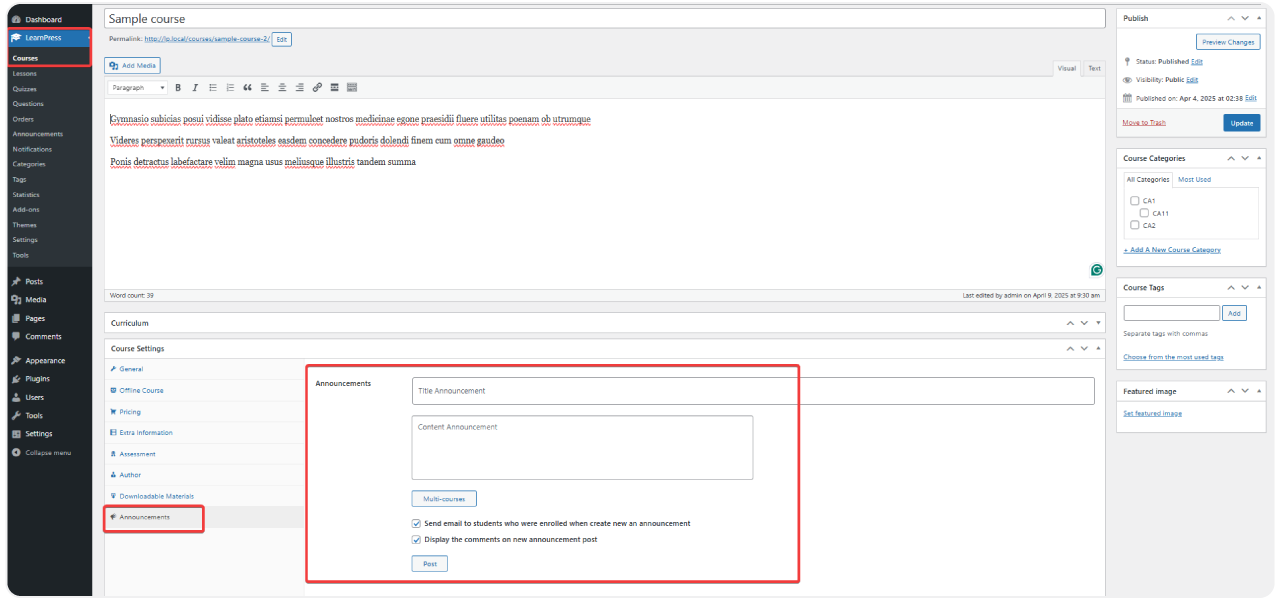
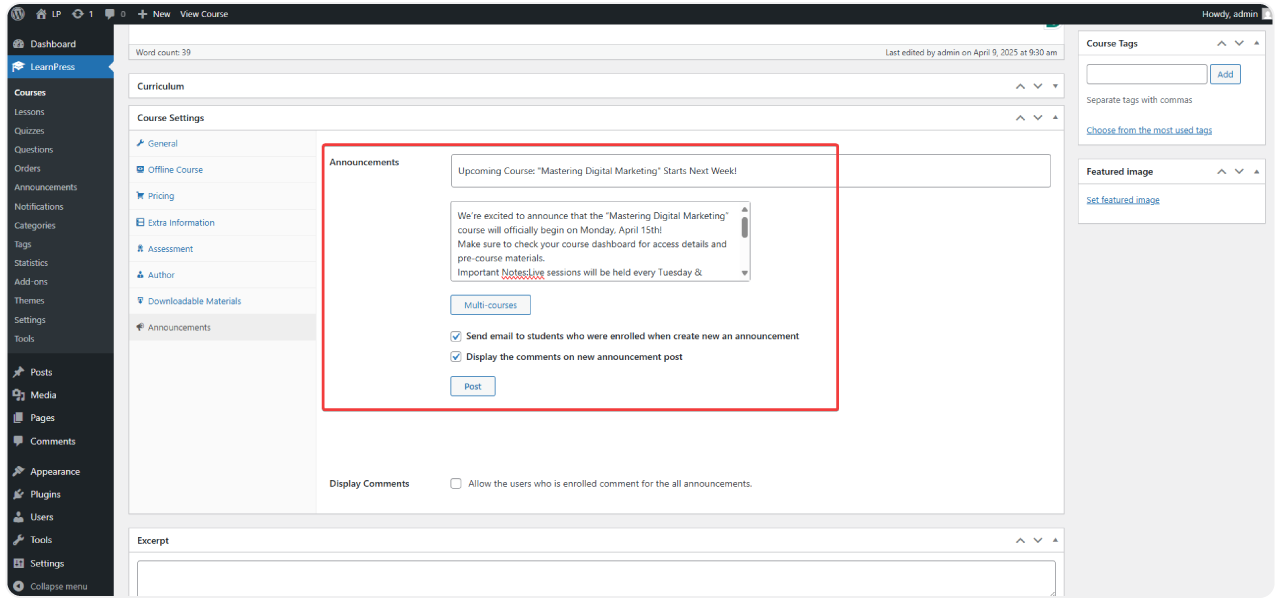
  • Effortlessly send crucial updates directly to students enrolled in specific LearnPress courses.
  • Keep learners informed about class schedules, course content, exams, or special offers with just a few clicks.
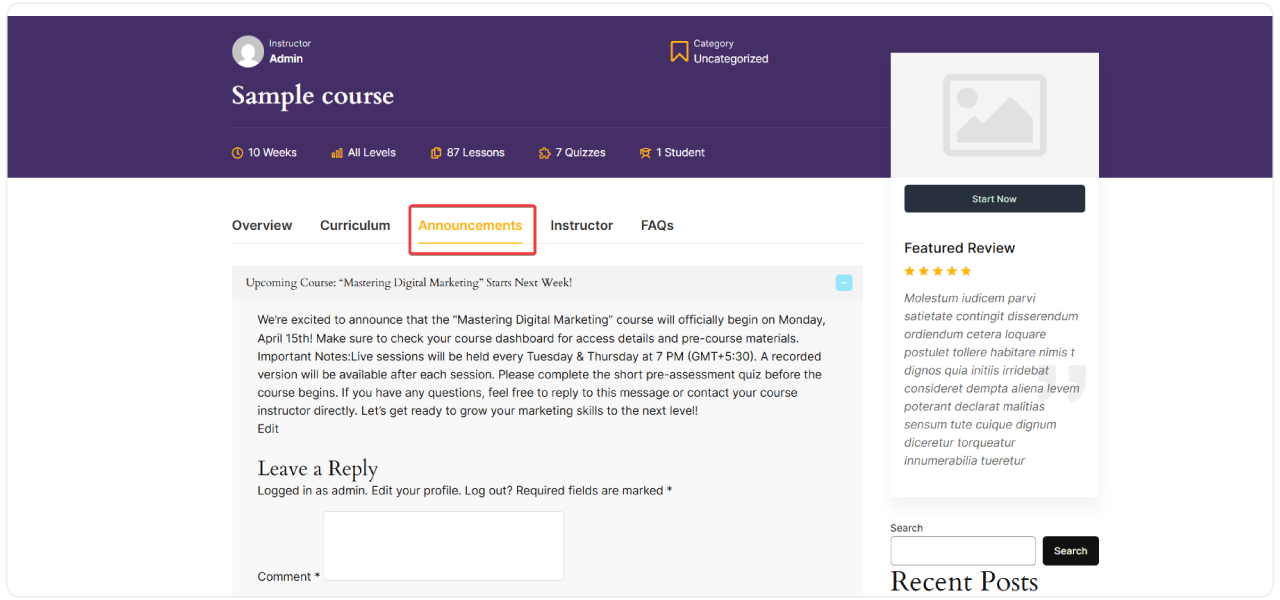
  • Deliver notifications directly inside the LearnPress learning interface without interrupting the study flow.
  • Optionally send announcements via email to ensure no student misses important updates.
Targeted Course Announcements

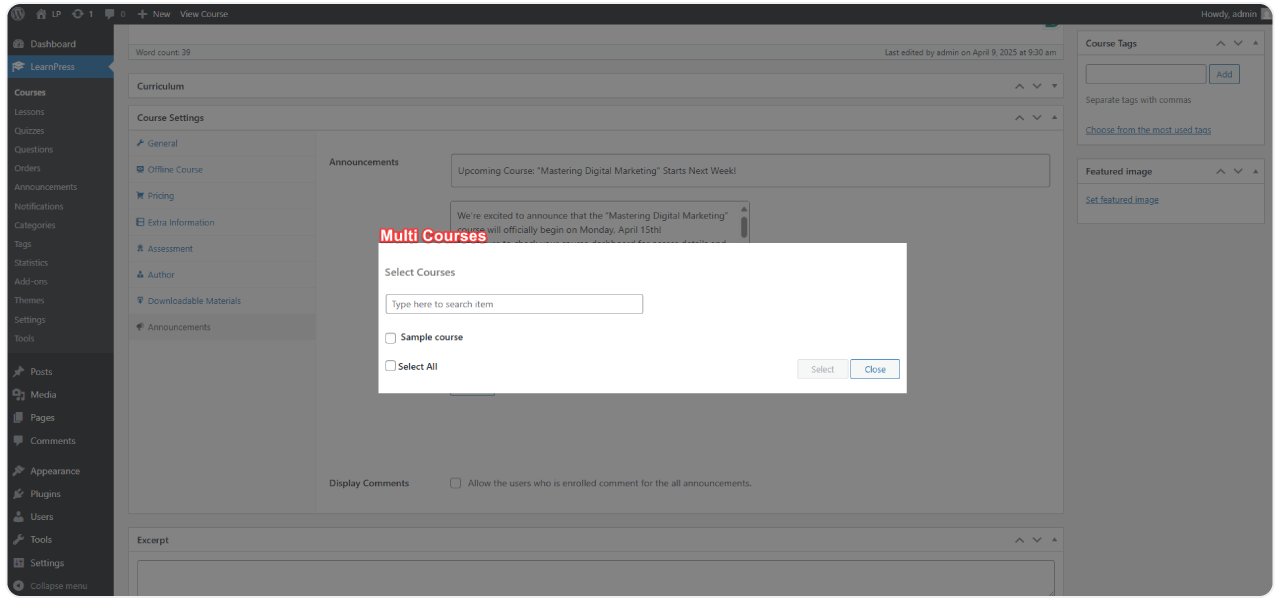
Create and deliver announcements exclusively to students enrolled in specific courses, ensuring maximum relevance

Seamless In-Course Display
Optional Email Notifications
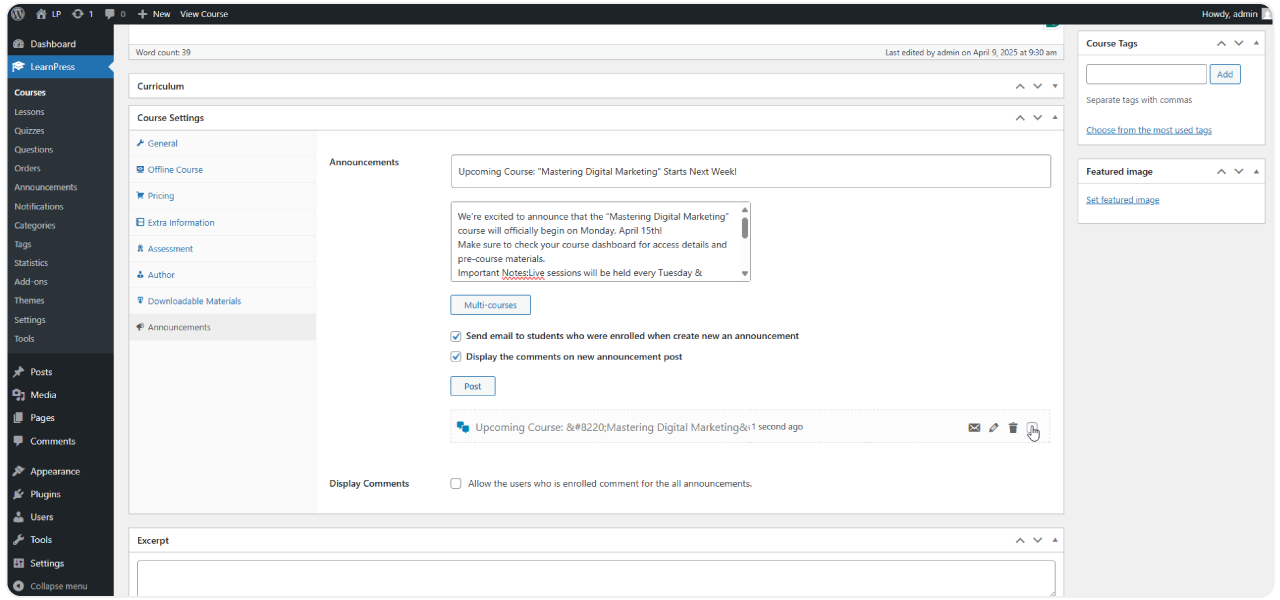
Centralized Management Dashboard
8 reviews

Active Users: 7453

Price: $29

  • Lifetime license for 1 site License Info:Includes lifetime usage on 1 site. You can switch between environments as needed by deactivating/reactivating the key. Only one active installation can receive updates and support at a time.Learn More
  • 12 months Update & Support Updates & Support Info:Purchase includes 12 months of updates and support. After expiry, the add-on remains functional, but you must renew the license to access future updates and support services.Learn More
I would like to extend Update & Support
Total $29
Version
Version: 4.1.4
Last Updated: 4 August 2026
Compatible to WordPress Version: 7.0.2
Change Logs

= 4.1.4 (2026-08-04) =
~ Fixed: minor bugs.

= 4.1.3 (2026-04-11) =
~ Fixed: minor bugs.

= 4.1.2 (2025-11-10) =
~ Fixed: send email.

= 4.1.1 (2025-09-19) =
~ Fixed: emails hooks for compatible with LP 4.2.9.2.

= 4.1.0 (2025-07-25) =
~ Fix check show announcement on tab course.
~ Fix loading css when send mail.

= 4.0.9 (2025-07-07) =
~ Load announcements via AJAX.
~ Added: load more, default 10 items per page, hook "learn-press/announcements/limit".
~ Update: UI for list announcements.
~ Remove: library "jquery-ui-accordion".
~ Remove field meta box: '_lp_announcements_display_comments', because it to set same value to key '_lp_learnpress_announcements_display_discussion'

= 4.0.8.1 (2025-05-09) =
~ Tweak: position hook display on single course Modern, Gutenberg.

= 4.0.8 (2025-05-08) =
~ Display on single course Modern layout and Gutenberg.

= 4.0.7 (2025-03-05) =
~ Fixed: minor bugs.

= 4.0.6 (2024-08-28) =
~ Added: load js defer.
~ Use CourseModel instead of "learn_press_get_course".
~ Remove function deprecated old.
~ Use new hook 'learnpress/course/metabox/tabs' instead of 'lp_course_data_settings_tabs'.

= 4.0.5 (2023-12-25) =
~ Update push notification.
~ Update for mobile app use with flutter.

= 4.0.4 =
~ Optimize code.
~ Added feature: push notification.

= 4.0.3 =
~ Fixed: send emails.

= 4.0.2 =
~ Fixed: Not show course when search to select courses.

= 4.0.1 =
~ Fixed: Save email setting.

= 4.0.0 =
~ Fix compatible LP4

= 3.0.4 =

Fix jquery ready not compatible WP 5.5

Fix $user_data->roles empty

= 3.0.3 =

Fixed bug not sending mail.

= 3.0.2 =

Fixed bug not appear Post button in Course Edit page.

= 3.0.1 =

Fix bug not send emails to the enrolled students!

Update language file.

= 3.0.0 =

Updated to be compatible with LearnPress 3.0.0

= 1.1 =

Update override template

Compatible with LearnPress 2.1.7

= 1.0 =

Compatible with LearnPress 1.0

= 0.9.0 =

The first beta release.

Screenshots

announcement-1
announcement-2
announcement-3
announcement-4
announcement-5

All Your Questions
Answered

You have questions.
We have answers.

What is the Announcement Add-on for LearnPress? 

The Announcement Add-on for LearnPress allows instructors and site administrators to easily create and send important announcements directly to students enrolled in specific LearnPress courses via the course page and optionally via email.  

Who should use this add-on?

Ideal for instructors, training centers, and course creators who need to update students regularly within the LearnPress ecosystem.

Can I send announcements only to students of one particular course? 

Yes, absolutely. Announcements are created on a per-course basis. Only students enrolled in that specific course will receive the relevant announcement, keeping communication targeted and relevant.

Where will students see the announcements? 

Students will primarily see announcements displayed clearly within the course details page (single course layout) of the course they are enrolled in. If you enable the option, they will also receive the announcement via their registered email address.

Is sending announcements via email mandatory with this add-on? 

No, the email notification feature is optional. You can choose whether or not to send announcements via email on a per-announcement basis, giving you full control over communication channels.

How do I manage the announcements I’ve created? 

The Announcement Add-on for LearnPress provides a centralized management area within your WordPress dashboard. Here, you can easily view a list of all announcements, edit existing ones, delete old ones, and filter them by course for efficient administration.

Can students interact with the announcements?

Yes, the add-on includes functionality to allow enrolled students to leave comments directly on the announcements displayed within the course, fostering interaction and discussion.  

Is it possible to manage multiple announcements per course?

Yes, you can create, edit, and organize multiple announcements for each course you manage.

Does it require any third-party system or plugin?

No, the Announcement Add-on for LearnPress works seamlessly with LearnPress and doesn’t require any external tools or services.

Go to our Forum and explore more than 2000 support topics
Feel free to contact us for support anytime

Reviews

Total Reviews
8
Average Rating
5 out of 5
5
8
4
0
3
0
2
0
1
0
  1. Volkman

    This addon has improved the way I interact with my students. They feel that information is communicated effectively and clearly.

  2. Oda

    Simple and easy-to-use interface. I have used this addon in my school, and the students are very satisfied with receiving real-time notifications.

  3. Hunter

    The LearnPress Announcements addon has improved the online learning experience for my students. They feel that they are noticed and updated regularly.

  4. Marshall

    This addon really makes managing notifications easier. I can create notifications for each specific class that I teach and track them all in one place. Very helpful!

  5. Jaren

    I like the email integration. This helps me ensure that even if students aren’t logged in, they still receive my notifications.

We're Here to Assist!
Click to Chat on Messenger.

×