





















Authorize.Net Add-on for LearnPress

  • Seamlessly integrate Authorize.Net, a leading US payment gateway, with your LearnPress site using the Authorize.Net Add-on for LearnPress.
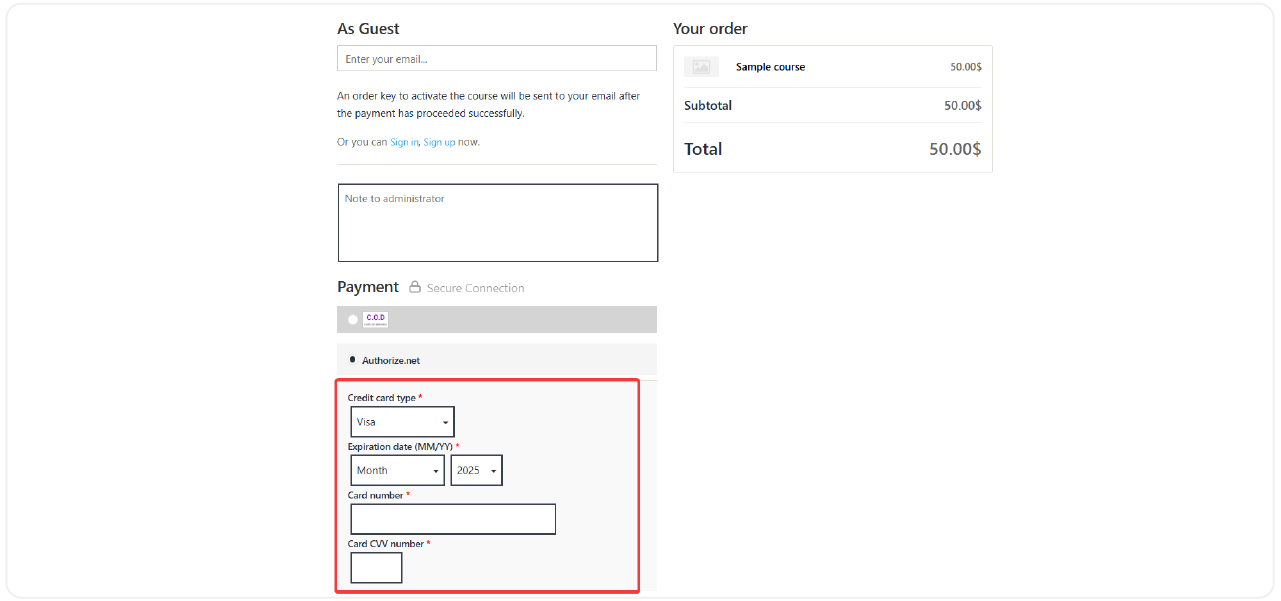
  • Accept credit/debit card payments directly on your WordPress site without redirection, minimizing friction and boosting conversion rates.
  • Secure and professional payment gateway for your LearnPress-powered online courses with direct integration of Authorize.Net—a top-tier US-based solution.
  • Ideal for users in the United States, Canada, UK, Europe, and Australia, supporting major currencies and cards like Visa, MasterCard, and American Express.
On-site Checkout Experience

Learners can pay for their courses right on your WordPress site—no redirects or page reloads—ensuring a smooth and uninterrupted transaction process.

High Security & PCI Compliance
Automated Enrollment & Order Updates
Seamless Compatibility
8 reviews

Active Users: 8632

Price: $29

  • Lifetime license for 1 site License Info:Includes lifetime usage on 1 site. You can switch between environments as needed by deactivating/reactivating the key. Only one active installation can receive updates and support at a time.Learn More
  • 12 months Update & Support Updates & Support Info:Purchase includes 12 months of updates and support. After expiry, the add-on remains functional, but you must renew the license to access future updates and support services.Learn More
I would like to extend Update & Support
Total $29
25% OFF SALE
Discount 25%
Get
LPAUG2026
Version
Version: 4.0.0
Last Updated: A week ago
Compatible to WordPress Version: 5.8 or higher

Screenshots

authorize-net-4
authorize-net-5

All Your Questions
Answered

You have questions.
We have answers.

What is the Authorize.Net Add-on for LearnPress?

It’s a LearnPress extension that allows you to integrate the Authorize.Net payment gateway into your WordPress LMS site for secure and seamless transactions.

What is required to use the Authorize.Net Add-on for LearnPress?

You need the LearnPress plugin installed and activated on your WordPress site, along with an active Authorize.Net merchant account, to obtain your necessary API Login ID and Transaction Key.

Which countries and currencies are supported?

This add-on is primarily designed for the United States, Canada, the United Kingdom, Europe, and Australia. It supports USD and other major currencies depending on your Authorize.Net settings.

Is the payment process secure?

Absolutely. Authorize.Net provides advanced security features, including fraud detection and encrypted transactions, to protect both merchants and customers.

Does it support recurring payments or subscriptions?

Currently, this add-on supports one-time payments. For recurring billing, additional customization or plugins may be needed.

Can I customize the payment form design?

Yes, the form inherits your site’s theme styling and can be further customized via CSS for better branding consistency.

How easy is it to configure the Authorize.Net Add-on for LearnPress?

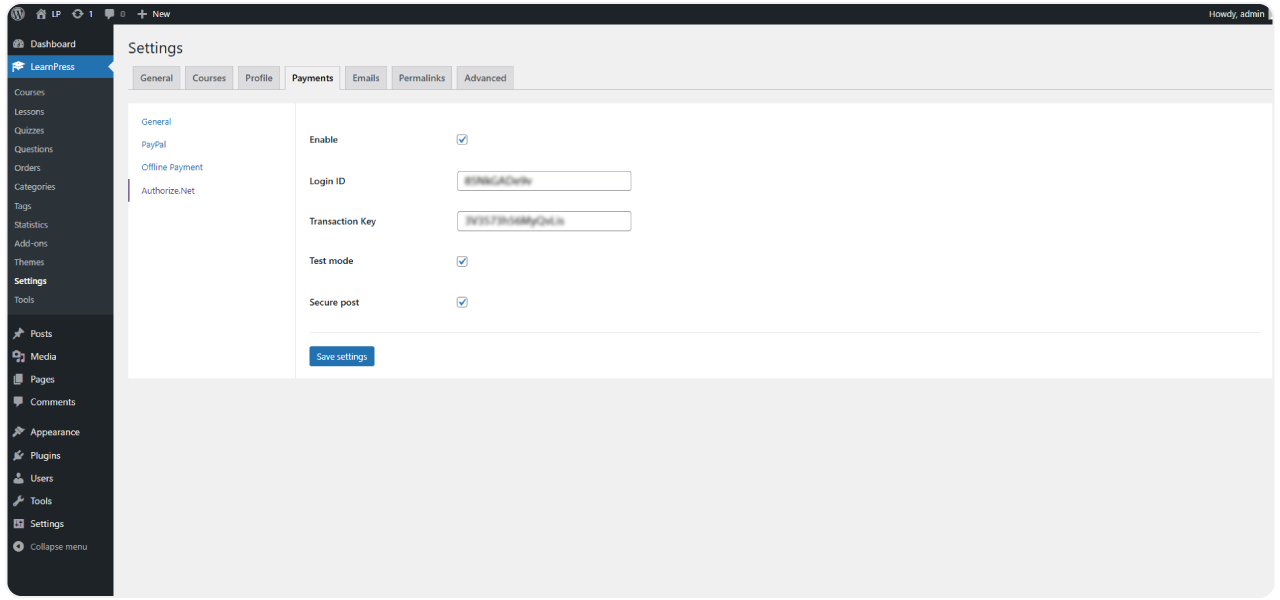
Configuration is simple. Once installed and activated, navigate to LearnPress settings, select the Payments tab, enable Authorize.Net, and enter your API Login ID and Transaction Key provided by Authorize.Net.

Go to our Forum and explore more than 2000 support topics
Feel free to contact us for support anytime

Reviews

Total Reviews
8
Average Rating
5 out of 5
5
8
4
0
3
0
2
0
1
0
  1. Citlalli

    I am very satisfied with the LearnPress Authorize.Net integration. This helps create a smooth online payment experience for my students.

  2. Danial

    This addon helps me create different prices for my courses and manage income flexibly.

  3. Eleonore

    The LearnPress – Authorize.Net Payment addon has increased my sales volume. Students feel comfortable when making payments and have immediate access to the learning content.

  4. Susie

    This addon provides security for payment data and creates trust for students when they register for my courses.

  5. Haylie

    The technical support from the LearnPress developers was very helpful when I had problems installing and using this addon.

We're Here to Assist!
Click to Chat on Messenger.

×